The Ultimate Guide to Data Loss Prevention for Drive
Data loss prevention for Drive finds sensitive files in Google Drive and OneDrive, redacts them in place, and revokes risky links before a share or an AI assistant exposes them.
Data loss prevention for Drive protects the files your company keeps in Google Drive and OneDrive: customer exports, contracts, payroll sheets, screenshots, and source code.
Native controls in Google Workspace and Microsoft 365 decide who can open a file. They do not reliably tell you what is inside it, and they rarely clean up the links people already created.
The risk changed in 2025 and 2026. Gemini, Copilot, and AI agents connected over MCP now read whatever a user can read, so an old "Anyone with the link" share is no longer a quiet mistake. It is something an assistant can surface on request.
Strac scans every file, historical and new, redacts sensitive fields in place, revokes public and external access in bulk, and applies the same policy on the endpoint, in the browser, across SaaS apps, and on every AI agent action.
What Is Data Loss Prevention for Drive?
Cloud drives are where most company documents live now. A finance team keeps its revenue models in Google Sheets. A clinic stores intake forms as PDFs in OneDrive. Engineering drops architecture diagrams and environment files into a shared folder so a contractor can get started. All of it is useful because it is easy to share, and all of it is exposed for the same reason.
Data loss prevention for Drive answers three questions for every file:
What is in it? A spreadsheet with Social Security numbers, a scanned driver's license, a document with a live API key, or a lunch menu.
Who can reach it? Only the owner, the whole company, a named external partner, anyone with the link, or an AI assistant acting for any of those people.
What should happen next? Leave it alone, redact the sensitive fields, restrict the link, remove an external collaborator, or block the download.
Drive leaks are rarely dramatic. Nobody breaks in. A file simply ends up reachable by people who were never meant to see it, and usually it happens in one of these ways.
Link sharing that outlives its purpose. Someone sets a folder to "Anyone with the link" for a one-week vendor project. The project ends. The link does not. Two years later that folder holds forty new files nobody meant to publish.
External collaborators nobody removes. Agencies, auditors, contractors, and former partners keep edit access long after the work is done. In OneDrive, permissions inherited through nested folders make this even harder to see.
Sensitive data hiding in ordinary files. A sales deck has a customer export pasted into slide 14. A support folder of screenshots contains one image with a full card number. A zip file holds a database dump. Permission settings treat all of these exactly like a meeting agenda.
Downloads and re-uploads. A file restricted in the corporate Drive is downloaded to a laptop and uploaded to a personal Gmail, a personal Dropbox, or a ChatGPT session. The original share settings no longer apply. This is the shadow AI problem showing up through Drive.
AI assistants that read everything a user can read. Gemini in Google Workspace and Copilot in Microsoft 365 honor permissions, which sounds safe until you remember how loose those permissions already are. Ask a simple question, and the assistant pulls an answer from a folder nobody reclassified. The guide on stopping Gemini from surfacing the wrong files walks through this in detail.
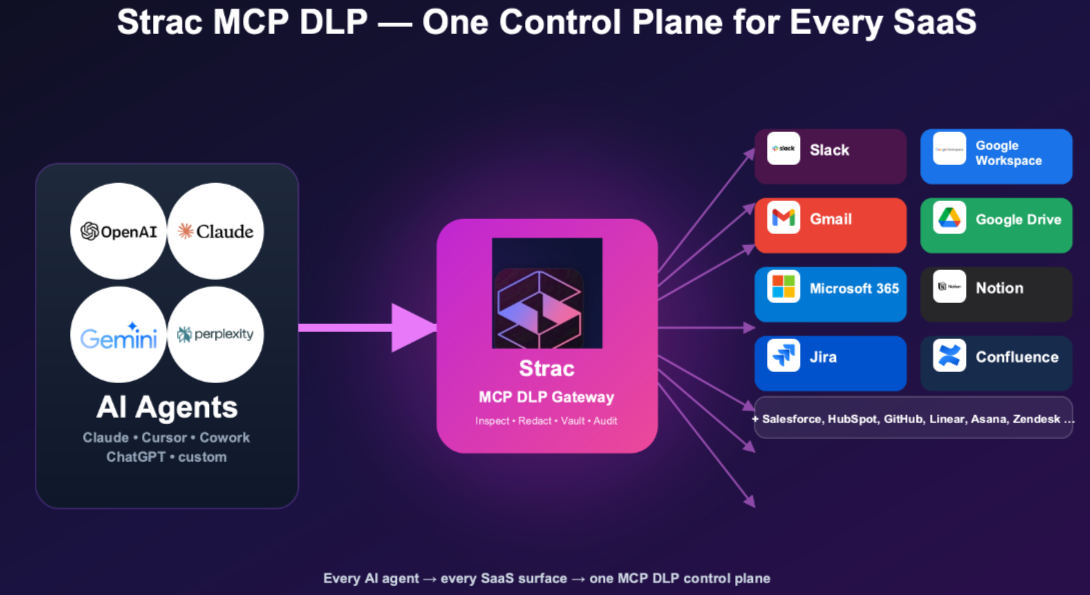
AI agents connected over MCP. Teams now connect Claude, ChatGPT, and internal agents to Google Drive, OneDrive, and Dropbox through Model Context Protocol servers. Each tool call returns raw file content straight into a model's context, outside the path of the DLP most companies already run. That is the gap MCP DLP closes.
The Compliance Side
Most companies care about Drive DLP because an auditor or a customer asked a pointed question. If your drives hold regulated data, the obligations follow the data wherever the share setting sends it.
Health records in a shared folder fall under HIPAA. Card numbers in a spreadsheet fall under PCI DSS, and both Google Drive and OneDrive need extra controls before they belong anywhere near cardholder data. Customer PII brings in GDPR and CCPA. Security frameworks like SOC 2, ISO 27001, and NIST all expect you to know where sensitive data sits and to show that access to it is controlled.
The practical test is simple. If an auditor asks you to list every file containing Social Security numbers that is shared outside the company, can you produce that list today? If the answer involves exporting sharing reports and opening files by hand, you do not have Drive DLP yet. You have Drive settings.
What Native Google and Microsoft Controls Cover
Both platforms ship real controls, and they are worth configuring well before adding anything else.
In Google Workspace, admins can restrict external sharing by organizational unit, allowlist trusted domains, warn users before sharing outside the company, set link expiry, and write DLP rules for Drive and Gmail with predefined detectors. The step-by-step version lives in the guides on Google Drive block sharing, Google Drive sharing permissions, and preventing downloads in Google Drive.
In Microsoft 365, Microsoft Purview DLP covers OneDrive, SharePoint, Exchange, and Teams, with sensitivity labels and sharing restrictions. The deeper capabilities depend heavily on license tier.
Where both fall short is consistent:
Policies follow org structure, not data. A rule applies to a department or a site, so a customer export and a holiday schedule get the same treatment.
Detection is shallow on real files. Text inside images and screenshots, files buried in zip archives, and messy scanned PDFs are where sensitive data actually hides.
The back catalog is left alone. A new policy governs what happens next. It does not clean up the thousands of public links and stale external users created before the policy existed.
Remediation is mostly block or alert. Blocking everything pushes people to personal tools. Alerting on everything buries the security team. Neither removes the sensitive value from the file.
Each platform stops at its own border. Google DLP does not see OneDrive. Purview's coverage of Google Drive, Box, and Dropbox is limited. Neither follows the file to a laptop, a browser tab, or an AI agent.
✨ What Good Data Loss Prevention for Drive Looks Like in 2026
When you evaluate tools, these are the capabilities that separate a real program from a reporting exercise.
Full discovery of what already exists. The first scan should cover every file in every drive, not only new uploads. It should report which files contain sensitive data, what type, and exactly who can reach each one. This is the posture side, usually called DSPM.
Accurate detection across real file types. Look for detectors for PII, PHI, PCI, credentials, and source code, plus custom detectors for your own data. It should read Docs, Sheets, Slides, PDF, DOCX, XLSX, CSV, ZIP, and images with OCR. Check the full catalog of sensitive data elements Strac supports. Accuracy matters as much as coverage, because a tool that fires on every nine-digit number gets switched off within a month. See reducing DLP false positives for how to keep alerts useful.
Remediation that fixes the data, not just the setting. The best fix for a spreadsheet with one column of SSNs is to redact that column and let the rest of the file keep working. Bulk actions should include restricting public links, removing external collaborators, and applying labels.
Real-time policy on new activity. When someone shares a sensitive file externally, the tool should act within seconds: warn the user, restrict the link, or redact the value, depending on policy.
Coverage beyond one drive. Most companies run both Google and Microsoft somewhere, plus Box or Dropbox. One policy engine across all of them saves you from maintaining two or three definitions of "sensitive" that drift apart.
Control over AI access. If Gemini, Copilot, or an MCP agent can read a file, your Drive DLP needs to account for that reader too.
Fast, agentless setup. API-based connections to Google and Microsoft should take minutes, not a quarter-long rollout.
🎥 How Strac Protects Google Drive and OneDrive
Strac connects to Google Drive and OneDrive over their APIs. There is no proxy, no agent on the file server, and no change to how people work. Once connected, it scans every existing file and every new one, then shows sensitive files by data type, owner, and exposure level.
When a file matches a policy, Strac can:
Redact or mask the sensitive values inside the document, spreadsheet, PDF, or image, leaving everything else readable.
Restrict public links by converting "Anyone with the link" files to restricted access, one file at a time or in bulk.
Remove external collaborators who no longer need access, across nested folders.
Label files as Internal, Confidential, or a custom label so Google and Microsoft controls downstream can use that signal.
Warn and coach users at the moment of sharing, with a short note on which data type triggered the policy.
Alert on unusual behavior such as bulk downloads, printing, or moving files out of shared drives.
✨ Strac: One Policy From the Drive to the Agent
A Drive-only control leaves gaps the moment a file moves. Strac applies the same detectors and the same policy everywhere that file can travel.
Google Drive DLP and OneDrive DLP: the file at rest. Historical and real-time scanning, in-place redaction, and bulk revocation of public links and stale external users. SharePoint, Box, and Dropbox are covered by the same engine.
SaaS DLP: the file forwarded. The same rules apply in Gmail, Slack, Microsoft 365, Salesforce, Zendesk, and dozens of other apps, so a file blocked in Drive is not simply attached somewhere else.
DSPM: the exposure you inherited. A live map of where sensitive data sits across every drive and connected app, ranked by how exposed it is.
Endpoint DLP: the file downloaded. One agent for Windows, macOS, and Linux governs clipboard, uploads to personal accounts, screenshots, printing, and USB, which closes the download and re-upload path.
Data lineage: the file renamed. Files synced from Google Drive, OneDrive, SharePoint, Box, and Dropbox carry a lasting fingerprint, so a renamed or lightly edited copy is still recognized on its way out.
AI DLP: the file pasted into a prompt. Browser and desktop coverage redacts sensitive fields before a Drive export reaches ChatGPT, Claude, Gemini, or Copilot.
MCP DLP: the file read by an agent. Strac wraps official MCP integrations for Google Drive, OneDrive, Dropbox, and more, redacting each tool response so an agent gets masked fields instead of raw customer records.
Sharing settings, admin policies, and access reviews all slip eventually. A link outlives its project, an exception becomes permanent, an assistant reads a folder nobody reviewed. Data loss prevention for Drive is the backstop: find the sensitive files, remove the values that should not be there, close the links that should not exist, and follow the file wherever it goes next.
Book a demo to see Strac protect your Google Drive and OneDrive.
🌶️ Spicy FAQs on Data Loss Prevention for Drive
What is data loss prevention for Drive?
It is the practice of finding sensitive data inside files stored in cloud drives like Google Drive and OneDrive, controlling who can reach those files, and acting on the data itself through redaction, link restriction, or collaborator removal when the risk is too high.
Is Google Workspace or Microsoft Purview DLP enough on its own?
For basic rules on new activity, they help. Most teams still struggle with the files already shared before the policy existed, text inside images, nested folder permissions, and coverage across both platforms. Strac works alongside both and does not require a higher Microsoft license tier.
Can DLP stop Gemini or Copilot from showing the wrong file?
Yes, indirectly. Both assistants respect permissions, so the fix is to make sure no sensitive file is shared more broadly than it should be, and to redact sensitive values that do not need to be there. If a file is restricted or the SSNs are gone, the assistant has nothing to surface.
How does Drive DLP handle AI agents connected over MCP?
An MCP server returns file content directly into the agent's context, bypassing traditional DLP. Strac sits on that tool call boundary and redacts PII, PHI, PCI, secrets, and text inside images before the response reaches the model.
How long does it take to deploy Strac for Google Drive and OneDrive?
The integrations are API-based and usually connect in minutes. A first full scan of existing files typically shows results the same day, depending on drive size.
Customer story
“Don’t just alert on problems, fix them.”
Scott Roberts, Chief Information Security Officer, UiPath
Discover & Protect Data on SaaS, AI, MCP, Endpoints & Cloud
Strac provides end-to-end data loss prevention for all SaaS and Cloud apps. Integrate in under 10 minutes and experience the benefits of live DLP scanning, live redaction, and a fortified SaaS environment.