What is Shadow AI? Definition, Risks & How to Detect It (2026 Guide)
Shadow AI explained: what it is, why the data loss is irreversible, the 5 detection methods and what each one misses, and how to stop it without banning AI.
Shadow AI is the use of any AI tool, model, or agent inside an organization without formal review or approval from IT, security, or legal — ChatGPT on a personal account, Claude in the browser, Copilot in a free GitHub repo, Notion AI silently indexing the workspace, an MCP server running on a developer laptop.
The average mid-market and enterprise company has 25–30 AI tools active in the shadows; most security teams are aware of fewer than five.
Top risks: customer PII and source code leaking into prompts, over-broad OAuth grants giving AI apps full Drive and Gmail access, compliance gaps under SOC 2, GDPR, HIPAA, ISO 42001, and the EU AI Act, and a new wave of MCP servers exposing local secrets to remote LLMs.
Detection requires three signals fused together: browser-level prompt visibility, OAuth grant scanning across SaaS, and audit-log domain filtering. Network DNS and firewall logs alone miss most of it because AI usage is browser-based and SaaS-embedded.
Blocking everything fails. The pattern that works: discover every AI tool, classify each one, redact sensitive data at the prompt level, and route users toward approved enterprise AI alternatives.
Last updated: July 2026
Shadow AI, in Short
Shadow AI is any AI tool employees use for work that IT and security never approved — a personal ChatGPT account, a browser extension that summarizes tickets, an AI notetaker silently joining calls, a coding assistant reading the repo. It is shadow IT with a much shorter fuse, because the thing being handed over is not a login. It is your data.
The three questions people actually need answered:
Why it matters: the data does not come back. A patient record pasted into a consumer chatbot may be retained, used to improve a model, and in some tiers reviewed by a human. There is no recall.
How to detect it: browser telemetry, egress and DNS logs, OAuth grants in your identity provider, endpoint visibility, and expense reports. Each catches a different slice, and none catches all of it — see the detection table below.
What to actually do: banning it fails, because the tools are genuinely useful and one tab away. What works is letting people use AI while the sensitive data is stripped out of the prompt before it is submitted.
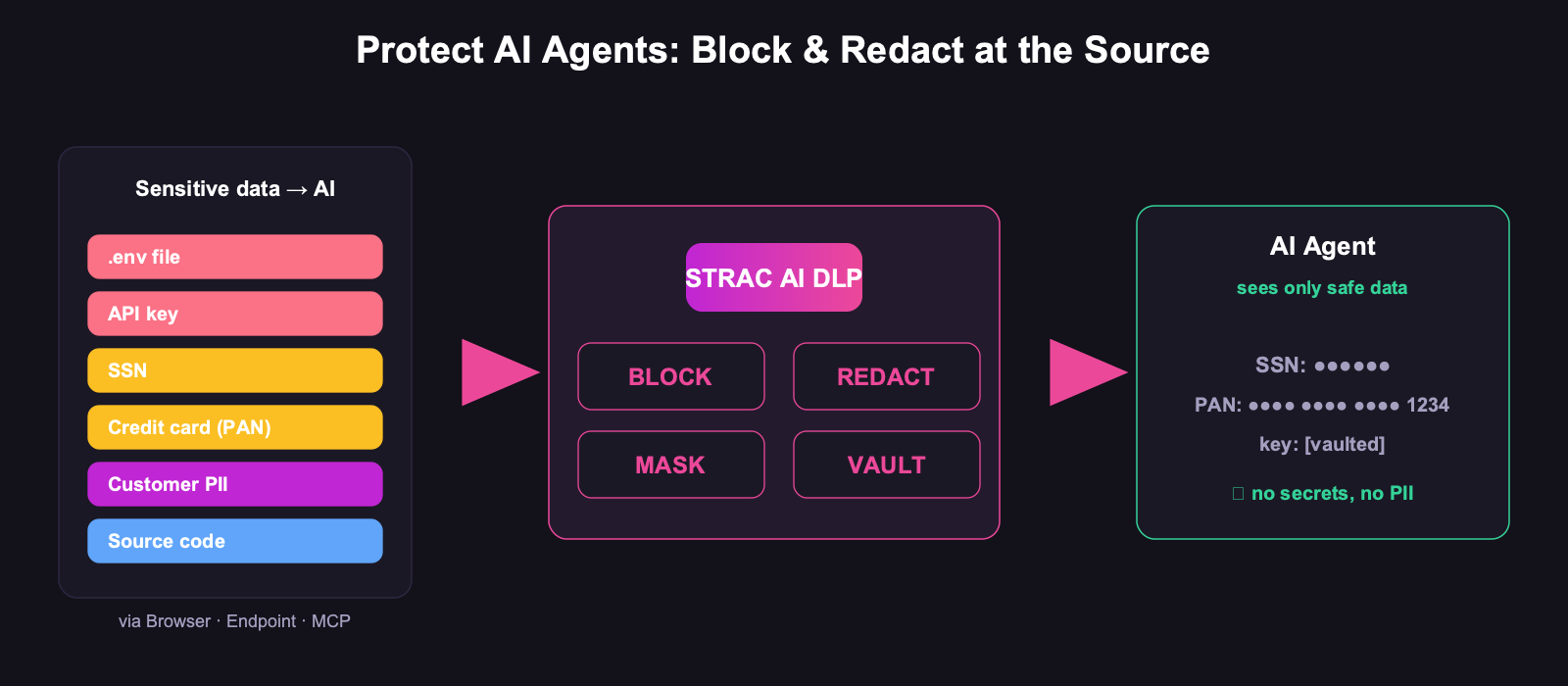
That last point is the whole game. Shadow AI is not a discovery problem you solve once; it is an enforcement problem you solve continuously. A list of unsanctioned tools is obsolete the week a new one launches. A control that redacts PII, PHI, card data, and secrets out of any prompt, in any AI tool, on any account, does not go stale.
Last updated: July 2026
What is Shadow AI?
Shadow AI is the use of any AI tool, model, agent, or AI-powered feature inside an organization without explicit approval, review, or oversight from IT, security, legal, or data governance.
It includes the obvious cases:
ChatGPT, Claude, Gemini, and Perplexity used through personal accounts in the browser
GitHub Copilot, Cursor, and Replit AI installed on developer laptops without licenses tracked
Midjourney, DALL-E, and Runway used by marketing without procurement
AI Chrome extensions added by individual employees
And the less obvious — and often more dangerous — cases:
AI features auto-enabled inside already-approved SaaS: Notion AI, Slack AI, Atlassian Intelligence, Salesforce Einstein, Zoom AI Companion
AI Chrome extensions and agentic browsers (Comet, Dia) that read every page the user visits
OAuth grants where a single employee gave an AI app full read access to corporate Google Drive, Gmail, or Slack
Custom GPTs, Copilot Studio agents, and Glean assistants built by individual teams
Locally-run MCP (Model Context Protocol) servers connecting LLMs to filesystems, databases, and SaaS APIs
The term is a direct extension of Shadow IT — the 2010s-era category for unsanctioned SaaS apps — applied to the AI wave that started with ChatGPT in late 2022. Shadow AI inherits every problem Shadow IT had, and adds three new ones: prompt-level data leakage, prompt injection, and the fact that the model itself is a third-party data processor whose retention and training behavior is often unclear.
Shadow AI meaning vs. Shadow AI definition
The two phrases get used interchangeably. The cleanest working definition for security and compliance teams:
Shadow AI is any AI capability used by employees, contractors, or systems inside the company that has not been inventoried, risk-assessed, or governed under the organization's AI policy.
If you cannot answer "who used what AI tool, with what data, when, and under whose authorization" — it is Shadow AI.
Why Shadow AI is exploding in 2026
Shadow AI grew faster than any prior Shadow IT wave. Four structural reasons:
1. Adoption is bottom-up, not top-down. Employees discover and adopt AI tools faster than security can review them. A tool goes from "I saw it on Twitter" to "embedded in our daily workflow" in under a week.
2. Free tiers eliminate the procurement gate. ChatGPT, Claude, Gemini, Perplexity, Midjourney, Cursor — every consumer-grade AI has a free or low-cost individual tier with no SSO, no admin console, and no audit logs from the customer's side.
3. The browser is the new perimeter, and most security teams don't own it. AI tools are accessed through chat.openai.com, claude.ai, gemini.google.com. Network firewalls see TLS-encrypted HTTPS to a known SaaS domain — not the prompts, not the file uploads, not the OAuth scopes granted.
4. AI is being shipped into every SaaS the company already pays for. Microsoft, Google, Slack, Notion, Atlassian, Salesforce, Zoom, GitHub — every major SaaS now has AI features that are "free" with the existing license. You don't have to install anything to be using AI. Often you have to opt out, and the opt-out is buried in admin settings.
The result: by Q1 2026, large enterprises that have done full Shadow AI discovery audits are typically finding 8–12× more AI tools in active use than their security team had on file. The number for mid-market is similar in proportion, just smaller in absolute terms.
✨ Real examples of Shadow AI in the wild
Every example below is a real pattern observed in customer Shadow AI discovery scans (anonymized):
A backend engineer pastes a production database connection string into ChatGPT to debug a slow query. The conversation is now in OpenAI's training-eligible logs.
A sales rep uploads a CSV of 14,000 customer contacts into Claude to draft personalized follow-ups. Customer PII leaves the company perimeter.
A finance analyst summarizes pre-release quarterly numbers in ChatGPT to draft an internal memo. Material non-public information is now in a third-party log.
A marketing manager uses Jasper to draft a launch announcement two weeks before launch. The unreleased product name and pricing sit in a third-party AI vendor's database.
An employee installs an "AI meeting notetaker" Chrome extension that records every Zoom and Google Meet call — including the executive offsite where M&A is discussed.
Notion AI is left enabled organization-wide. It indexes the entire workspace, including private HR pages, and serves answers to anyone with a Notion account.
A developer authorizes GitHub Copilot in their personal account to access all corporate repos, including the one with hard-coded AWS keys.
A new "agentic browser" is installed by 30 engineers. Every page they visit, including the corporate admin consoles, is streamed to the browser vendor's LLM for context.
An MCP server on a developer laptop is given filesystem and shell access. It reads ~/.ssh/id_rsa, .env files, and browser cookie databases as context for routine code generation prompts.
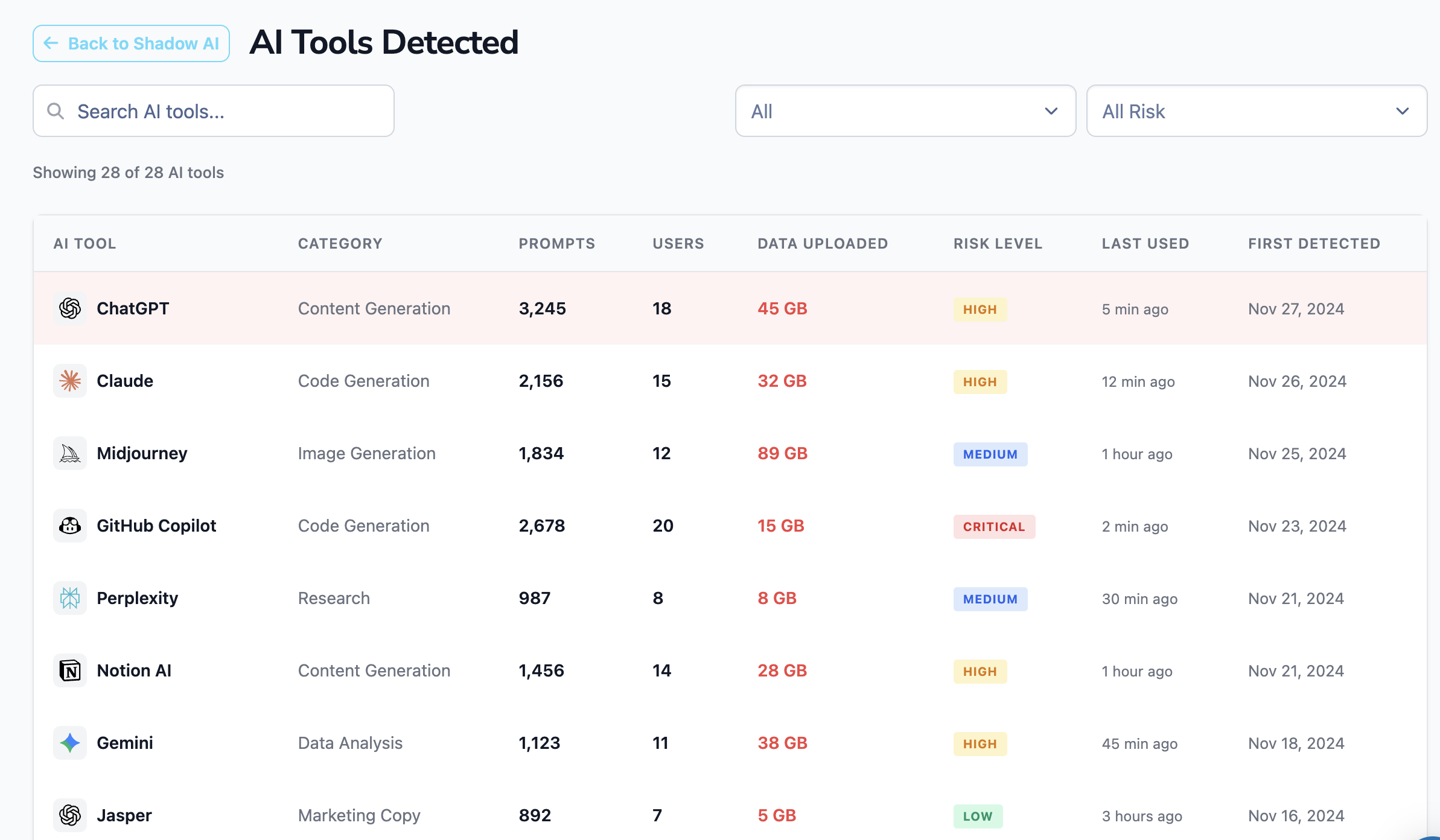
When a Shadow AI discovery scan is run against a typical mid-market company, the inventory looks something like this:
The tools at the top of the list are the famous ones. The ones that consistently surprise security teams are the long-tail entries below row 10 — niche AI products picked up by individual departments that nobody at the executive level had heard of.
✨ The 7 categories of Shadow AI risk
Shadow AI is not one risk. It is seven distinct risk categories, and a complete program needs to address all of them.
1. Sensitive data exposure. PII, PHI, PCI, source code, customer lists, credentials, and trade secrets pasted into prompts. Free-tier consumer AI tools generally retain prompts and may use them for model improvement. Even paid enterprise tiers retain prompts for 30 days for abuse detection. The Samsung incident in 2023 — where engineers leaked semiconductor design code into ChatGPT — is the canonical example, but variations happen weekly inside most companies.
2. Compliance and regulatory violations. Shadow AI breaks every major framework:
SOC 2 — CC1.4 (vendor risk management), CC6.1 (logical access), and CC9.2 (third-party risk) all assume an inventory of services processing customer data. Unauthorized AI tools are unmanaged third-party data processors.
GDPR — Article 28 requires a data processing agreement (DPA) with every processor. A consumer ChatGPT account does not have one.
HIPAA — sending PHI to an AI vendor without a Business Associate Agreement is a per-record violation.
PCI DSS 4.0 — Requirement 4 covers transmission of cardholder data; pasting card data into an AI prompt is an undocumented external transmission.
EU AI Act — Article 26 places obligations on deployers of AI systems, including high-risk use cases. "We didn't know our employees were using it" is not a defense.
ISO 42001 and NIST AI RMF — both require an inventory of AI systems and risk management lifecycle. Shadow AI is, by definition, outside the inventory.
3. Intellectual property leakage. Anything submitted to a free-tier AI may be retained, indexed, or used to train future models. For pre-release products, undisclosed financials, or proprietary code, this is a one-way leak that cannot be retracted.
4. Data residency and sovereignty violations. Most consumer AI tools route prompts through US-based infrastructure regardless of the user's location. EU and APAC employees pasting EU resident data into ChatGPT may trigger cross-border transfer obligations under GDPR, the UK Data Protection Act, and emerging APAC privacy laws.
5. OAuth and over-permissioned grants. Often the most under-appreciated risk. An employee installs an AI app from the Google Workspace Marketplace and clicks "Allow." That single click can grant the AI vendor read access to every email, every Drive document, and every calendar entry. The grant persists indefinitely until manually revoked — even after the employee leaves.
6. Prompt injection and indirect attack surface. AI tools that read external content (web pages, emails, Slack messages, customer support tickets) are exposed to prompt injection — adversarial instructions hidden in content that hijack the AI to leak data, misclassify, or exfiltrate. Every Shadow AI tool with broad data access is a new injection target.
7. Audit trail gaps. When the IT team does not know a tool is in use, there are no logs. When something goes wrong — a leaked prompt, a customer complaint, a regulator's question — the company cannot reconstruct what happened. This is the deepest compliance failure, because the absence of logs alone is a finding under SOC 2, ISO 27001, and HITRUST.
A modern Shadow AI program needs to surface, in one view, which AI tools are creating risk in which category — at the tool level and at the user level:
Risk scoring should weight not just what AI tool is in use but what data has flowed into it, who the user is, and what permissions the AI tool has been granted in the rest of the SaaS estate.
Shadow AI vs. Shadow IT vs. AI Governance
These three terms collide constantly. The differences:
Shadow IT
Shadow AI
AI Governance
Scope
Unsanctioned SaaS, hardware, scripts
Unsanctioned AI tools, models, agents, AI features inside SaaS
All AI in use — sanctioned and unsanctioned — across the lifecycle
Primary risks
Data sprawl, license sprawl, vendor risk
Prompt-level data leakage, OAuth grants, prompt injection, model training on company data
Model registry, deployment pipelines, incident reporting
Response
Sanction, replace, or block
Discover → redact at prompt → approve enterprise alternative
Policy framework + lifecycle controls + tooling
Frameworks
SOC 2 CC1.4, ISO 27001 A.5.19
NIST AI RMF, ISO 42001, EU AI Act, OWASP Top 10 for LLMs
NIST AI RMF, ISO 42001, EU AI Act
Shadow AI is the discovery and remediation layer. AI governance is the policy and lifecycle layer above it. You cannot govern what you have not discovered, which is why Shadow AI detection is the prerequisite for any serious AI governance program.
The row that should worry you is Reversible. Shadow IT is a governance problem you can unwind. Shadow AI is a disclosure you cannot take back.
How to Detect Shadow AI: What Each Method Actually Catches
Method
Catches
Misses
Network / DNS / egress logs
Traffic to known AI domains on the corporate network
Personal devices, home networks, anything not on a domain blocklist yet
CASB / SSE
Sanctioned-app usage and some inline AI traffic
Personal accounts; new tools it has no signature for
OAuth grants in your IdP
AI apps granted access to Google Workspace or M365 — notetakers, summarizers
Tools that never request OAuth, i.e. anything you just paste into
Endpoint agents
Installed AI apps and coding assistants
Browser-based AI, which is most of it
Expense reports
Paid subscriptions
Free tiers — where the majority of shadow AI lives
Browser-level DLP
The prompt itself, in any AI tool, on any account — and can redact or block it
Activity entirely off managed browsers
Read the Misses column carefully, because it explains why shadow-AI inventories are always out of date: every discovery method except the browser is blind to the free personal account, which is exactly where the problem is. Detection tells you what happened. Only the browser layer can intervene before it does.
✨ How to detect Shadow AI: the 5 methods that actually work
Most security teams start with network logs and find very little. The reason: AI usage is browser-based, SaaS-embedded, and OAuth-driven, so the signal is not on the network. Real Shadow AI detection requires fusing five sources, ranked here from highest signal to lowest:
1. Browser-level discovery. A lightweight browser extension (or already-installed endpoint agent) that observes domain visits, session duration, prompts typed, files uploaded, and clipboard pastes into AI tools. This is the only signal that captures what data is being submitted, not just which tools are in use. It is the single most valuable source.
2. OAuth grant inventory. Pull the full list of OAuth-authorized applications across Google Workspace (users.tokens.list), Microsoft Entra ID (Enterprise Applications + delegated permissions), Slack (apps inventory), and GitHub (OAuth Apps). Cross-reference each authorized app against a maintained catalog of known AI products. This catches the long tail — Otter, Fathom, Gong, Glean, Notion AI, AI meeting notetakers — that pure browser monitoring would miss because users authorized them once and forgot.
3. SaaS audit log filtering. Google Workspace login activity logs, Microsoft 365 sign-in logs, Okta / Entra ID system logs, and Slack admin logs all contain references to AI tools used as authentication targets. Filtered against an AI domain catalog, these logs surface every AI tool a user has logged into via SSO.
4. Egress / SWG logs. If the organization already runs Cloudflare Gateway, Zscaler, Netskope, or another secure web gateway, its logs are gold for Shadow AI discovery. The catch: most mid-market companies do not have one, which is why this method is fourth and not first.
5. Expense and procurement signals. Ramp, Brex, Concur, and corporate-card data show personal-card and team-card subscriptions to AI tools that never went through procurement. Less timely than browser or OAuth signals, but useful for catching paid Shadow AI that lives entirely outside the SSO and SaaS log layer.
A complete Shadow AI dashboard fuses all five and presents a single inventory with prompt volume, data volume, top users, and per-tool risk:
Counts alone are not enough. The dashboard has to answer: which user, what data, which AI tool, what OAuth scopes — because that is the level at which remediation actually happens.
✨ Beyond chatbots: MCP servers and the next wave of Shadow AI
The 2026 expansion of Shadow AI is not another chatbot. It is agentic AI — language models that take actions on behalf of users via tool calls — and the most common transport for tool calls is the Model Context Protocol (MCP).
Engineers stand up local MCP servers on their laptops to connect Claude, Cursor, or other LLM clients to:
Their local filesystem
Postgres and other databases
Slack workspaces
GitHub repositories
AWS accounts
Google Drive
Browser sessions
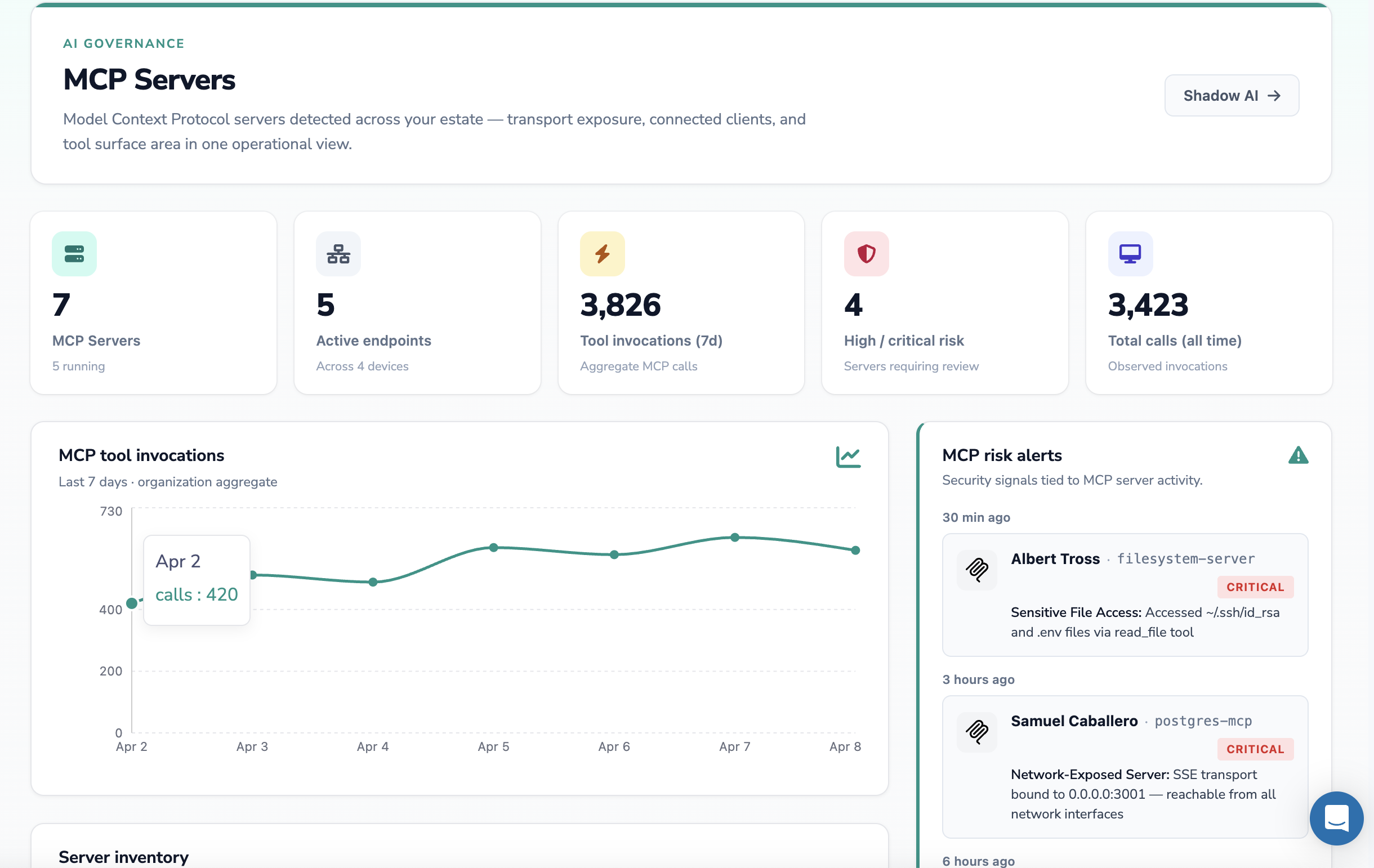
Most are running with no authentication, on localhost SSE transports, accessible to any process on the machine. A developer laptop with five running MCP servers is, in effect, an undocumented broker that can read ~/.ssh/id_rsa, .env files, browser cookie stores, and corporate Slack DMs — and stream that context into a remote LLM on every prompt.
This is invisible to traditional Shadow IT discovery. The agent is local, the LLM is in the cloud, and there is no SaaS audit log that records the tool invocations. Detection requires endpoint-level visibility into running MCP processes, their transport configuration, the tools they expose, and the data they have accessed.
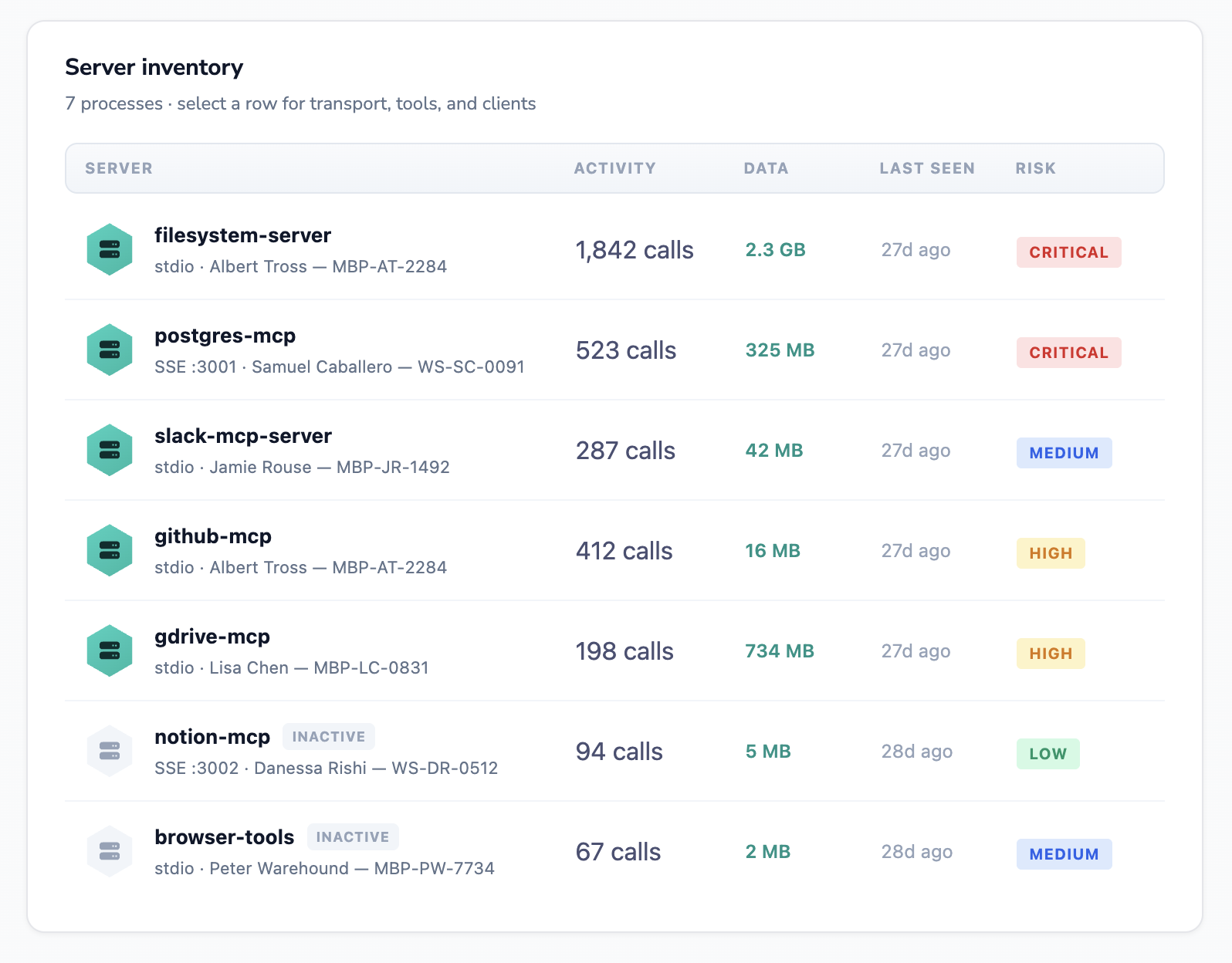
A real MCP server inventory will look like this — a mix of stdio and SSE transports, several inactive servers (still installed, still capable of being re-activated), and a handful of high-risk servers exposing filesystem or database access:
Two MCP-specific risks deserve called out:
Network-exposed servers. An MCP server bound to 0.0.0.0:3001 is reachable from any network the laptop joins — the coffee shop Wi-Fi, the hotel network, a colleague's machine. Anyone on that network can invoke its tools.
Over-broad filesystem access. The default filesystem MCP server has access to the entire home directory unless explicitly scoped. Every prompt that references "find me the relevant config" is a free pass to read SSH keys and environment files.
Treating MCP as a Shadow AI discovery problem — inventory, risk score, alert, remediate — is the right framing for the next 12 months.
How to build a Shadow AI policy that actually holds
Block-everything policies fail. Within two weeks, employees route around them by tethering to a phone hotspot, using a personal laptop, or finding an AI feature embedded in an already-approved SaaS. The pattern that actually works:
Tier the tools, not the people.
Approved — Enterprise-grade AI with SSO, admin controls, no training on customer data, signed DPA / BAA: ChatGPT Enterprise, Claude for Enterprise, Microsoft Copilot for M365, Google Gemini for Workspace, an internal LLM gateway.
Conditional — Allowed only behind a sensitive data redaction layer that strips PII / PHI / secrets before the prompt leaves the browser. Used for tools the organization does not want to fully sanction but cannot reasonably block (Perplexity, Midjourney, niche industry AI tools).
Prohibited — Free-tier consumer accounts of any AI that trains on user data. Personal-account ChatGPT, free Claude, free Gemini.
Always provide an approved alternative for every prohibited tool. Otherwise users go underground, and you lose the visibility you fought to gain.
Map controls to whichever frameworks you carry. A complete Shadow AI policy ties every control back to:
SOC 2 — CC1.4, CC6.1, CC9.2
ISO 27001 — A.5.19, A.5.23, A.8.16
ISO 42001 — Clauses 8.2, 8.3, 8.4 (operation, AI risk assessment, AI impact assessment)
NIST AI RMF — Govern, Map, Measure, Manage functions
EU AI Act — Articles 16, 26, 50 (deployer obligations and transparency)
The policy should be framework-agnostic in implementation and framework-specific in evidence. The same control — "every AI tool processing customer data is inventoried, risk-assessed, and tied to a DPA" — produces evidence under SOC 2, ISO 42001, and GDPR simultaneously.
Strac's approach to Shadow AI is built around a single observation: discovery without prompt-level visibility is a dashboard, not a control. Knowing 28 AI tools are in use does not stop the customer record that gets pasted into ChatGPT five minutes later.
Strac fuses three discovery sources and adds a real-time prompt-level redaction layer on top.
Discovery — three sources, agentless where possible:
Browser-level visibility through the Strac browser extension — sees AI domain visits, prompt content, file uploads, and clipboard pastes into ChatGPT, Claude, Gemini, Copilot, Perplexity, and 100+ other AI tools. This is the layer that competitors building on network or proxy approaches cannot match.
OAuth grant scanning across Google Workspace, Microsoft 365, Slack, GitHub, and other connected SaaS — surfaces every AI app any employee has authorized, with the scopes granted.
SaaS audit log enrichment — pulls login and admin activity logs across the existing integration estate, filters them against a maintained AI tool catalog, and flags new AI tools the moment a user signs in.
Real-time prompt redaction. When an employee types a prompt into ChatGPT, Claude, Gemini, or Copilot, Strac inspects the prompt in the browser before it is sent. PII, PHI, PCI, secrets, source code, and customer records are redacted inline. The user gets the productivity benefit of the AI tool; the sensitive data never leaves the browser.
MCP server discovery. Strac extends the same approach to MCP. Endpoint signal surfaces every running MCP server, its transport configuration, the tools it exposes, and any high-risk file accesses (SSH keys, .env files, credential stores) — closing the agentic Shadow AI gap before it becomes the next Samsung incident.
Framework-agnostic evidence. Every Shadow AI finding maps to SOC 2 CC6.1, ISO 42001 8.x, NIST AI RMF Manage 4.1, EU AI Act Article 26, GDPR Article 28, and HIPAA Security Rule. The same Shadow AI inventory becomes audit evidence for whichever framework the company carries.
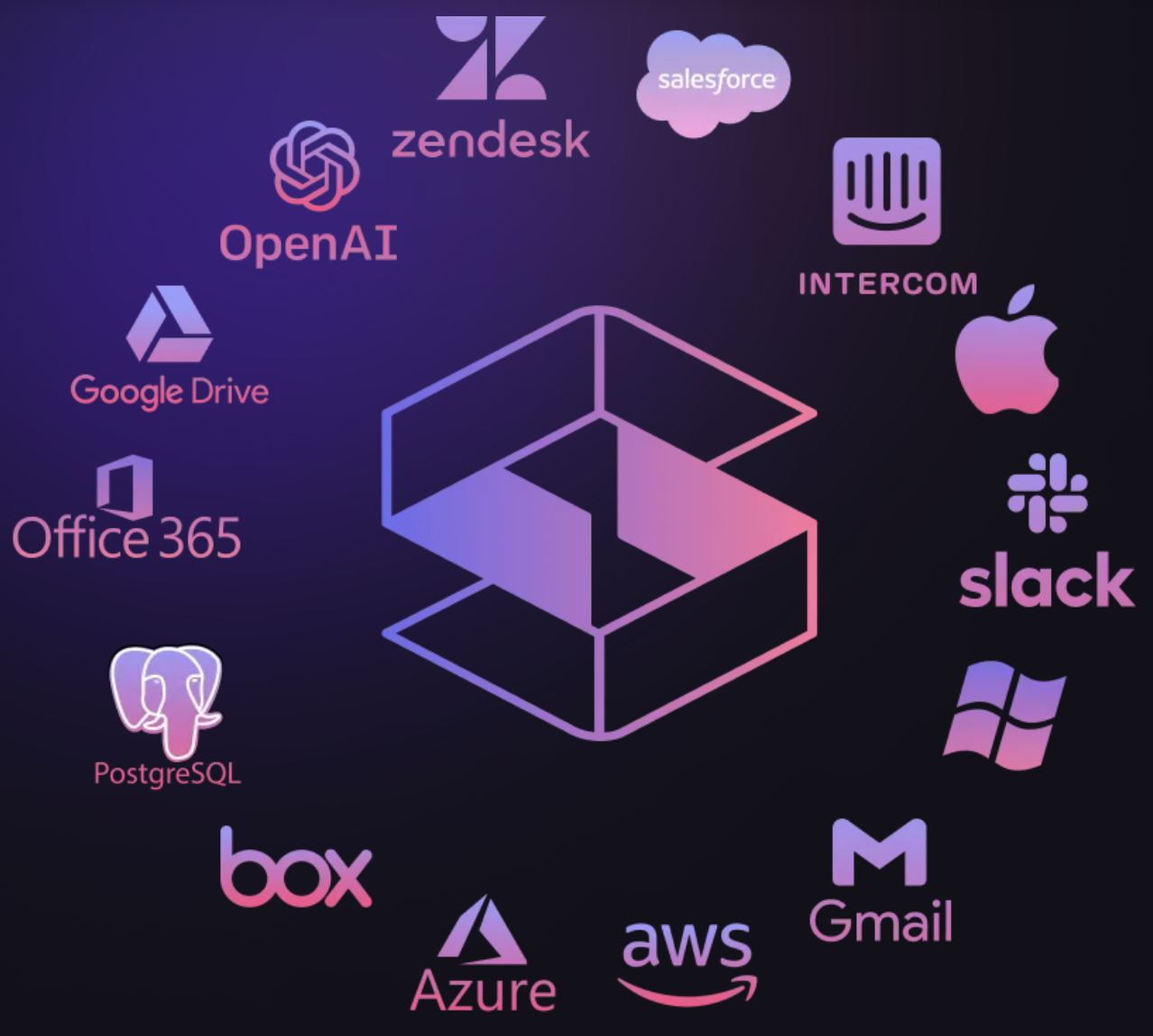
Coverage across the SaaS estate the AI Shadow problem is hiding inside:
Strac deploys in under 10 minutes, requires no proxy, no network changes, and no agent on every laptop — the browser extension is the only endpoint footprint, and it is optional for OAuth-only discovery.
What good Shadow AI governance looks like in practice
A mature Shadow AI program produces four things, on a continuous basis:
A live inventory of every AI tool, model, agent, and MCP server in use across the organization, with first-seen and last-seen timestamps.
Per-tool risk scores weighted by data volume submitted, sensitivity of that data, OAuth scopes granted, and vendor terms (training-on-prompt, retention, geography).
Per-user risk views so security can see which employees are highest exposure — with intervention as education, not punishment.
Continuous evidence mapped to whatever frameworks the company carries, so compliance does not need a fire drill at audit time.
The companies that get this right in 2026 will treat Shadow AI not as a one-time discovery exercise but as an always-on capability — the same way they treat Shadow IT, vulnerability management, and CSPM today.
What each AI tool actually collects and trains on: see the AI data privacy breakdown.
Once AI is sanctioned rather than shadow, the risks shift to the model and retrieval layers — see LLM security.
✨ How Strac Covers Every AI Surface
Discovery tells you shadow AI exists. These four controls decide what it can actually take with it:
Browser DLP — works on the personal, unmanaged account, which is precisely where shadow AI lives — the browser layer of AI DLP.
Endpoint DLP — catches the installed assistants and AI apps a browser control never sees.
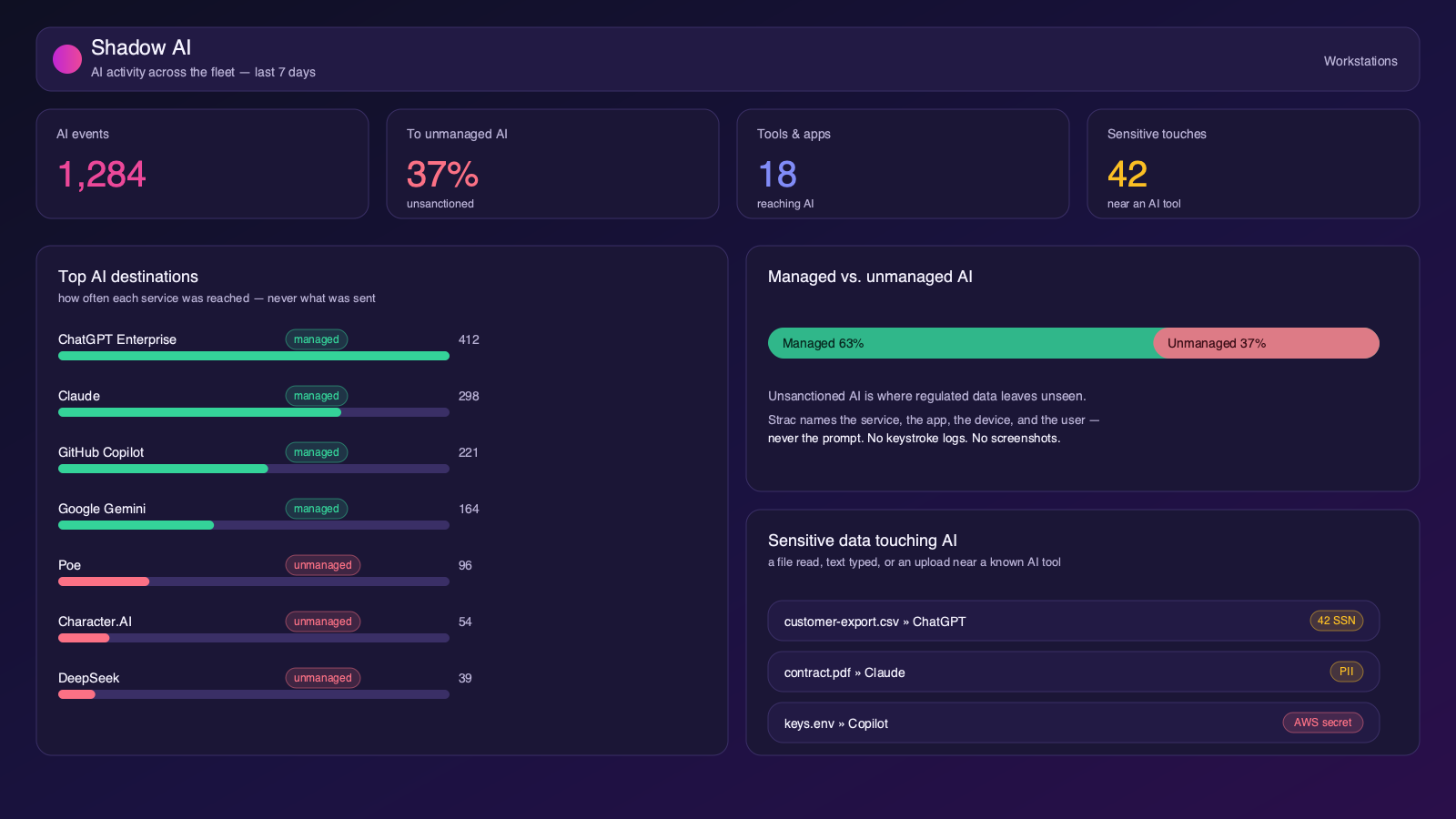
Knowing what shadow AI is only matters if you can see it on your own fleet. Strac’s Workstations agent surfaces every AI service your team reaches — in the browser and from desktop clients, plugins, and scripts — and tells you which are sanctioned and which nobody approved.
For each connection Strac shows the service, the app or browser that made it, the device, and the user, and flags when sensitive data comes near an AI tool (a file an AI app opened, sensitive text typed into a listed AI app, or a sensitive file picked into an upload). It does this without reading a single prompt, and with no keystroke logs and no screenshots anywhere in the product — visibility, not surveillance. When you’re ready to act, the same agent can block sensitive files and uploads to unsanctioned tools.
Strac Shadow AI: which services the fleet reaches, managed vs. unmanaged, and sensitive data touching AI — never the prompt.
Discover, govern, and control shadow AI from one agent. This is the Discover → Govern → Control loop for shadow AI, on the endpoint. Related: endpoint DLP agent, MCP DLP, GenAI DLP.
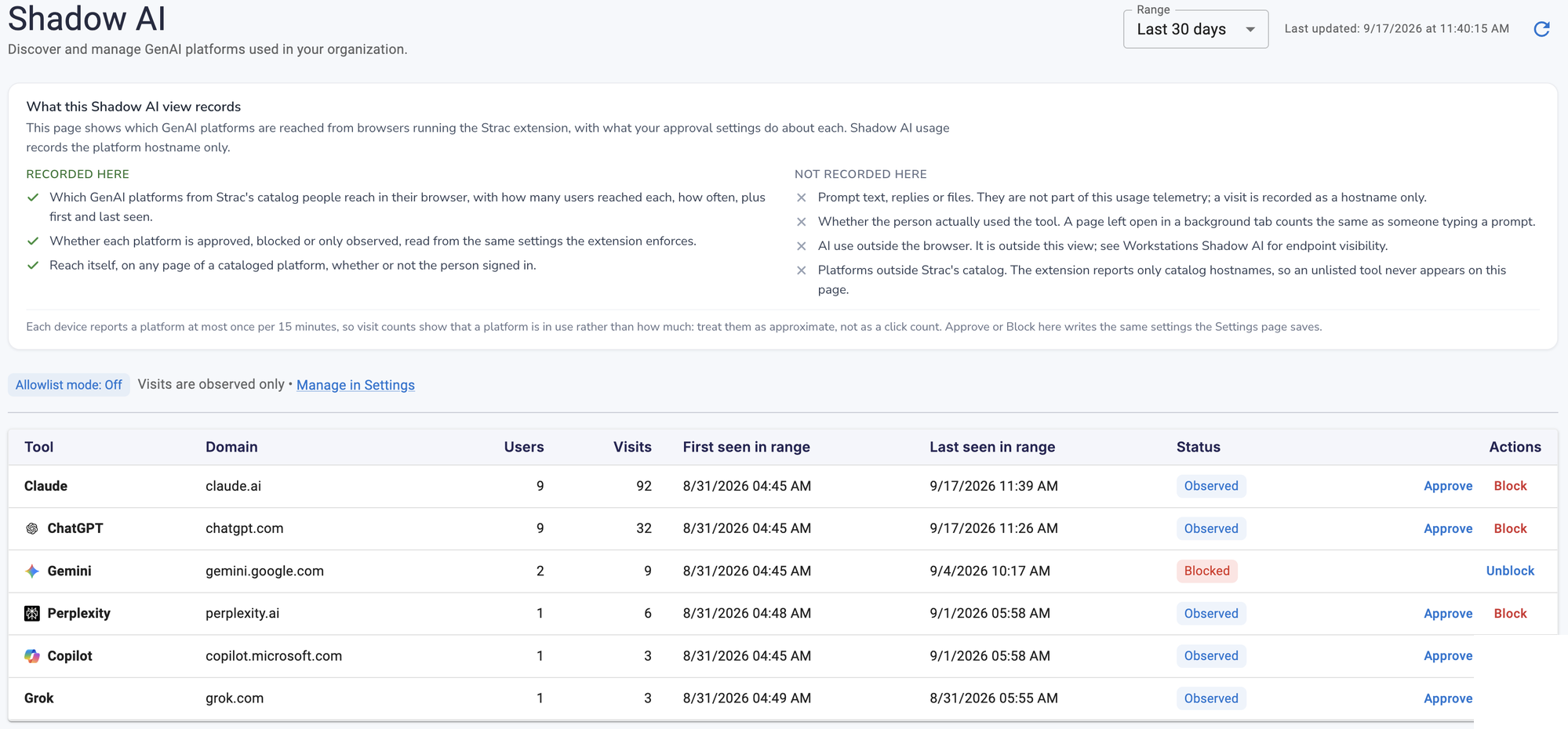
Strac’s Shadow AI dashboard: every GenAI platform reached from the browser — users, visits, first/last seen — with an approve, observe, or block action per tool. No prompt content is collected; a visit is a hostname only.
🌶️ Spicy FAQs for Shadow AI
How do you detect shadow AI? On the endpoint. Strac watches which AI services each device reaches — browser and desktop — names managed vs. unmanaged tools, and flags when sensitive data comes near them, without reading prompts or logging keystrokes.
What is Shadow AI in simple terms?
Shadow AI is any AI tool used inside a company that the IT, security, or compliance team has not approved or inventoried. It includes free ChatGPT accounts, AI Chrome extensions, AI features auto-enabled inside SaaS like Notion or Slack, AI apps authorized via OAuth, and locally-running MCP servers. If you cannot answer "who used what AI, with what data, when, and under whose authorization" — it is Shadow AI.
What is the difference between Shadow AI and Shadow IT?
Shadow IT is unsanctioned SaaS, hardware, and scripts — primarily a vendor and license management problem. Shadow AI is a strict subset focused on AI tools, with three risks Shadow IT did not have: prompt-level data leakage, prompt injection, and the AI vendor often acting as a third-party data processor whose retention and training behavior is opaque.
Is using ChatGPT at work Shadow AI?
It depends on the account. ChatGPT Enterprise, signed up under the company with SSO, no training on customer data, and a DPA is sanctioned AI. A personal gmail.com ChatGPT account used for work tasks is Shadow AI, even if the user pays for ChatGPT Plus.
How do I detect Shadow AI in my company?
Use three signals together: a browser extension that observes prompts and AI domain visits, an OAuth grant scan across Google Workspace / M365 / Slack / GitHub, and audit log filtering against a known AI tool catalog. If you have a secure web gateway like Cloudflare or Zscaler, add its egress logs as a fourth source. Network DNS and firewall logs alone are insufficient — most AI usage is browser-based and looks like ordinary HTTPS to a known SaaS domain.
Can DNS filtering or firewalls stop Shadow AI?
Partially, and only briefly. Blocking chat.openai.com at the firewall stops one tool but does not stop the AI features inside Notion, Slack, Google Workspace, or Microsoft 365 — which are the same domains the company already has to allow. Within two weeks, employees switch to phone hotspots or use the AI features embedded in approved SaaS. DNS filtering should be one tool in a layered approach, never the only one.
What is the biggest risk of Shadow AI?
Most security teams answer "data leakage." The more accurate answer is OAuth grants. A single click can give an AI vendor full read access to corporate Drive, Gmail, or Slack — and the grant persists indefinitely, including after the employee leaves. A complete Shadow AI program inventories OAuth grants alongside prompt content.
How does Shadow AI relate to SOC 2 compliance?
Shadow AI breaks SOC 2 CC1.4 (vendor risk), CC6.1 (logical access), and CC9.2 (third-party risk) — all of which assume the company has a complete inventory of services processing data. Auditors in 2026 are starting to ask specifically: "What is your inventory of AI tools, who approved them, and what controls prevent sensitive data from being submitted?" An empty answer is a finding.
Should we just block ChatGPT?
No. Blocking without providing an approved alternative drives usage underground — phone hotspots, personal laptops, and AI features inside SaaS the company cannot block. The pattern that works: tier AI tools as Approved / Conditional / Prohibited, give every team an approved alternative, and put a redaction layer in front of the conditional tier so productivity is preserved without sensitive data leaving the browser.
What is "shadow ai sorn security"?
"SORN" refers to System of Records Notice — a US federal Privacy Act concept. Shadow AI in a SORN context means AI tools or agents that process records covered by a System of Records Notice without being declared in that notice. Federal agencies and federal contractors face direct Privacy Act exposure if Shadow AI is processing covered records.
How does Strac detect Shadow AI without an agent on every laptop?
Strac's primary detection is agentless — OAuth grant scanning and SaaS audit log enrichment across Google Workspace, Microsoft 365, Slack, GitHub, and other connected SaaS surfaces 70–80% of Shadow AI without any endpoint footprint. The Strac browser extension adds prompt-level visibility (what data is being typed into AI tools) and is the only way to enforce real-time redaction at the prompt — but it is opt-in and incremental on top of the agentless layer.
What is shadow AI in simple terms?
Shadow AI is any AI tool an employee uses for work without approval from IT or security — most often a free personal account on ChatGPT, Claude, Gemini, or an AI browser extension. The term mirrors “shadow IT,” but the exposure is different: with shadow IT an unmanaged system exists; with shadow AI, company data has already been handed to a third party.
Why is shadow AI important to address?
Because the disclosure is irreversible. Once an employee pastes a customer record, a patient chart, or a production key into a consumer AI tool, it has left your environment permanently — it may be retained, used to train a model, and on some consumer tiers reviewed by a human. You cannot revoke a prompt. That is what makes it materially different from ordinary shadow IT, and why detection alone is not a sufficient response.
What are the risks of shadow AI?
Regulated data leaving your compliance boundary (PHI under HIPAA, cardholder data under PCI DSS, personal data under GDPR); secrets and API keys swept into prompts from error messages and config files; source code and IP leaving; no audit trail for an examiner; and vendor terms you never reviewed, since the employee accepted them on a personal account. The common thread is that none of it is visible in your logs.
How do you detect shadow AI?
Combine methods, because each is partial: network and DNS logs catch traffic to known AI domains on the corporate network; OAuth grants in Google Workspace or Microsoft 365 reveal AI notetakers and summarizers; endpoint agents catch installed assistants; expense reports catch paid plans. All of them miss the free personal account in a browser tab — which is the majority of shadow AI. Browser-level visibility is the only method that sees the prompt itself, and the only one that can act on it.
Should we just block AI tools?
Blocking reliably fails. The tools are genuinely useful, employees are measured on output, and the alternative is one tab away on a personal device you do not manage. Organizations that ban AI outright mostly succeed in making shadow AI invisible rather than absent. The approach that holds is to let people use AI and remove the sensitive data from the prompt — redact, warn, or block per data class, so productivity survives and the regulated data never leaves.
Shadow AI Guides: The Complete Series
Go deeper on every part of Shadow AI — detection, monitoring, governance, and prevention:
The companies that treat Shadow AI as a 2026 compliance checkbox will spend 2027 explaining a leaked customer dataset to a regulator. The companies that treat it as an always-on discovery and redaction capability — at the prompt level, across the SaaS estate, and into the new MCP surface — will be the ones still moving fast on AI without paying for it later.
Strac discovers every AI tool in use across your company, scores each one, redacts sensitive data at the prompt level, and produces audit evidence mapped to SOC 2, ISO 42001, NIST AI RMF, GDPR, and HIPAA — all in under 10 minutes to deploy.
Discover & Protect Data on SaaS, AI, MCP, Endpoints & Cloud
Strac provides end-to-end data loss prevention for all SaaS and Cloud apps. Integrate in under 10 minutes and experience the benefits of live DLP scanning, live redaction, and a fortified SaaS environment.


.webp)









.avif)



.gif)
