· SharePoint security in 2026 is no longer justabout permissions and access reviews. The bigger challenge is sensitive datamoving across SharePoint, OneDrive, Teams, Copilot, endpoints, and externalsharing links.
· Native Microsoft controls help, but they oftenleave gaps in content-aware detection, real-time remediation, file-levelvisibility, AI usage controls, and cross-app enforcement.
· A modern SharePoint security tool should combinedata discovery, classification, posture management, user activityvisibility, and inline DLP actions in one place.
· Strac gives security teams a way to discover,classify, monitor, and remediate sensitive data across Microsoft 365 and beyondusing agentless deployment, ML/OCR detection, and automated remediation.
· Instead of treating SharePoint as a silo, Strachelps teams secure the full data path: SharePoint, OneDrive, Teams,endpoints, browser uploads, email, cloud apps, GenAI tools, and MCP-connectedworkflows.
SharePoint has quietly become one of the most important repositories of sensitive enterprise data. Contracts, financial spreadsheets, HR files, customer exports, product roadmaps, healthcare documents, compliance evidence, internal presentations, and regulated records all end up in SharePoint or the broader Microsoft 365 ecosystem.
That centrality is exactly why SharePoint has become a major risk surface.
In 2026, SharePoint security is no longer just about whether a site has the right permissions. Security teams now have to deal with a much wider set of questions:
Which SharePoint files contain PII, PCI, PHI, secrets, or confidential business data?
Which of those files are shared externally, synced to laptops, downloaded locally, or copied into AI tools?
Are Teams conversations, OneDrive folders, and SharePoint document libraries governed consistently?
Can the organization automatically redact, block, quarantine, or revoke risky content without relying on manual cleanup?
Can the same controls extend beyond SharePoint into the rest of the modern data estate?
That is where a modern SharePoint security tool matters.
Why SharePoint Is a High-Risk Surface in 2026
SharePoint used to be treated primarily as a collaboration platform. Today it is also a major data exposure channel.
A typical organization might store sensitive files in SharePoint, collaborate on them in Teams, sync them through OneDrive, attach them to support tickets, download them to endpoints, and paste excerpts into ChatGPT, Copilot, Claude, or internal AI copilots. In larger environments, those same documents may also be surfaced to agents or MCP-connected applications that can access internal knowledge bases and shared repositories.
That means a SharePoint data leak no longer looks like a single event. It often looks like a chain:
A payroll spreadsheet is uploaded to a SharePoint folder.
The folder inherits overly broad permissions or gets shared externally.
A contractor downloads the file to a personal machine.
Someone pastes part of it into an AI assistant for analysis.
The same content is later forwarded into a ticketing system or stored in another SaaS app.
If your SharePoint security strategy only checks permissions once a quarter, you are missing most of the problem.
What a SharePoint Security Tool Should Do in 2026
A modern SharePoint security tool needs to do more than tell you whether a site is public or whether someone shared a folder externally. It should help answer four core questions:
What sensitive data lives in SharePoint?
Who can access it, share it, download it, or move it elsewhere?
What risky activity is happening right now?
What can be remediated automatically before it becomes an incident?
The strongest tools combine discovery, classification, posture analysis, monitoring, and enforcement rather than treating those as separate products.
Key Capabilities of a Modern SharePoint Security Tool
1) Sensitive Data Discovery and Classification Inside SharePoint
The first requirement is straightforward: you need to know what is actually in SharePoint.
That sounds obvious, but it is still where many teams struggle. Native labels and manual tagging only go so far. Sensitive data often lives inside spreadsheets, PDFs, Word files, exports, ZIPs, screenshots, forms, and legacy documents that were never consistently classified.
A modern SharePoint security tool should continuously discover and classify data across:
SharePoint document libraries
SharePoint sites and folders
OneDrive repositories
Files attached or referenced in Teams workflows
Common Microsoft 365 document types and unstructured files
That classification should go beyond regex. It should be able to identify sensitive information inside both structured and unstructured content, including:
Personally identifiable information (PII)
Protected health information (PHI)
Payment card data (PCI)
Customer financial records
Employee records
Secrets, tokens, and credentials
Internal confidential business documents
Custom data types specific to your organization
How Strac approaches this
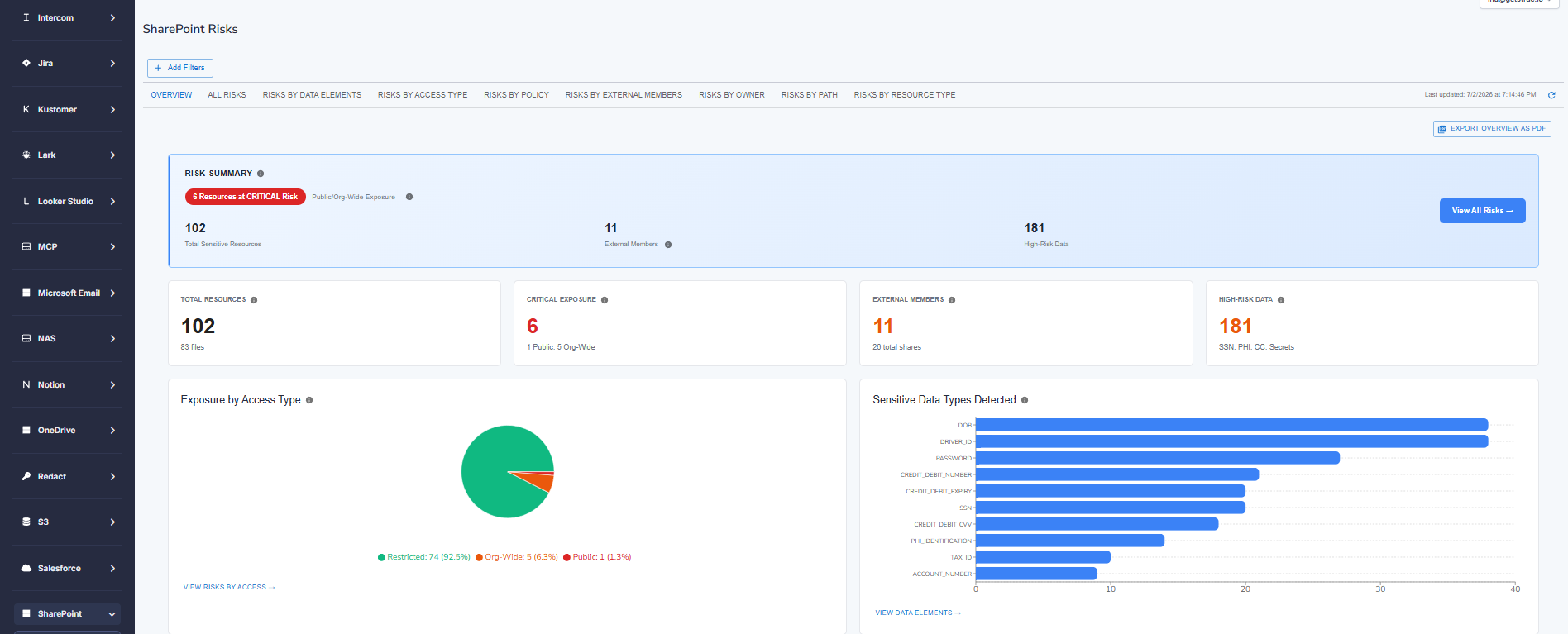
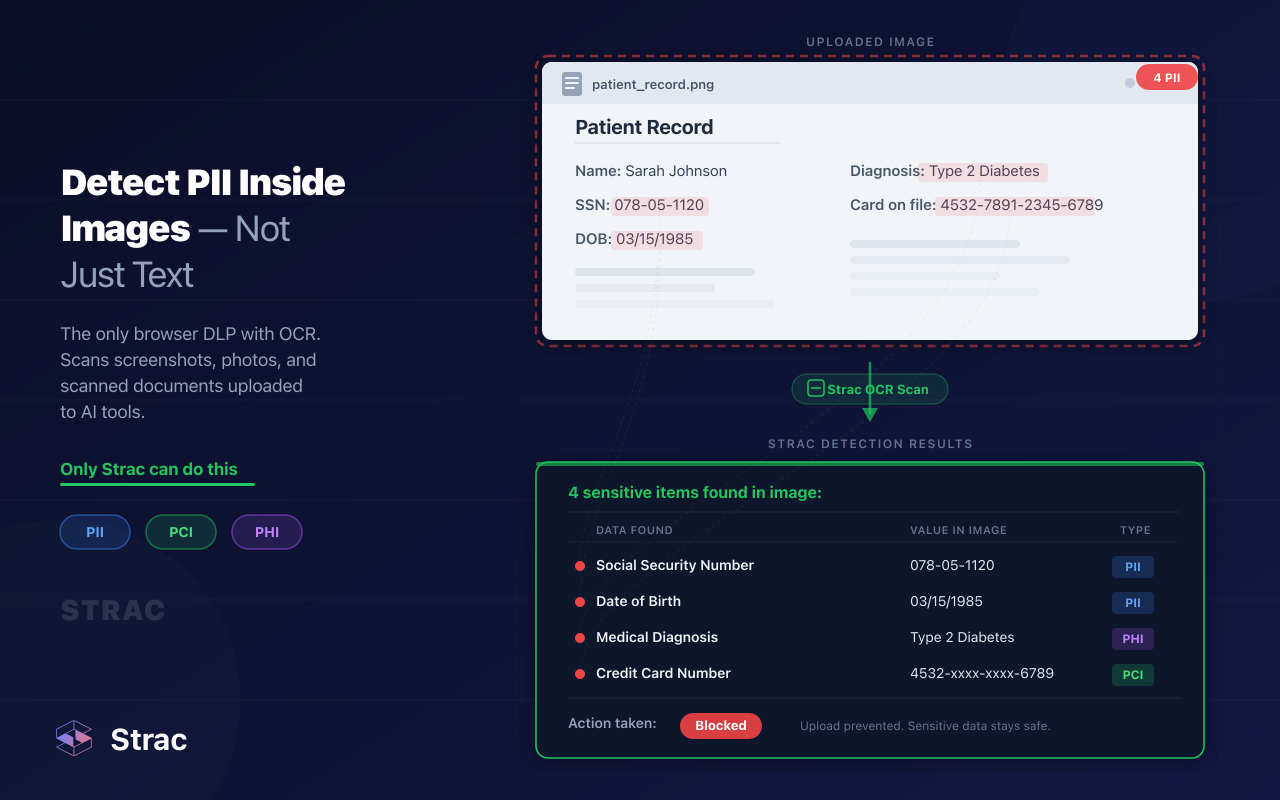
Strac’s SharePoint coverage is built around content-aware data discovery and classification, not just static rules. Instead of relying only on legacy regex patterns, Strac uses machine learning, OCR, and content-aware detection to identify sensitive data inside files, attachments, and documents across Microsoft 365 and adjacent environments. It is designed to work across structured and unstructured data types, including common business documents and image-based content, while reducing the noise that often makes DLP tools hard to operate.
That matters in SharePoint because some of the highest-risk content is hidden in places traditional controls miss: scanned forms, screenshots, exported reports, PDFs, and shared business documents that do not follow clean naming conventions.
2) Permission and Sharing Risk Visibility
Finding sensitive files is only half the job. You also need to know whether those files are exposed.
In SharePoint, risk often comes from configuration and sharing behavior rather than from malware. Common examples include:
A sensitive folder inherits permissions from a broader site
A file is shared with external guests without review
A public or anonymous link remains active long after a project ends
A site owner grants “temporary” access that becomes permanent
Former employees or contractors retain access to old workspaces
Highly sensitive files are accessible to large groups that do not need them
A SharePoint security tool should make those exposures visible in plain language. Security teams should be able to answer questions like:
Which sensitive files are externally shared?
Which SharePoint sites contain regulated data and broad internal access?
Which folders have broken inheritance or unusual permission sprawl?
Which users are downloading or sharing sensitive files at abnormal rates?
Which files have links that should be revoked immediately?
How Strac approaches this
Strac’s value in Microsoft environments is not limited to classification. It also helps security teams understand where sensitive data is exposed and how it is moving, including visibility into risky sharing behavior, file movement, and user activity across collaboration environments. The broader platform is designed around unified DSPM + DLP, so teams can move from “where is the sensitive file?” to “is it exposed, being downloaded, or being sent somewhere it shouldn’t?” in one workflow.
That is a major shift from older tools that either do posture discovery without enforcement or do alerting without enough context.
3) Real-Time Monitoring of User Activity
A SharePoint environment can look perfectly secure on paper and still be leaking data in practice.
That is because many incidents happen through normal user behavior:
A support rep downloads a customer export to work offline
A finance team member shares a spreadsheet with the wrong external contact
A manager uploads a sensitive document into the wrong team site
A contractor bulk-downloads folders before leaving a project
An employee copies content from a SharePoint document into a GenAI tool
A modern SharePoint security tool should monitor file interactions such as:
Uploads
Downloads
External sharing
Permission changes
Large-scale file access
Suspicious movement of regulated files
Copy/paste or downstream usage where supported by the broader platform
The goal is not surveillance for the sake of surveillance. The goal is to identify when sensitive data is being moved in ways that create real risk.
How Strac approaches this
Strac is built around inline data protection and visibility across collaboration surfaces, not just static scans. In practice, that means organizations can monitor sensitive data usage and apply remediation when needed across modern workflows, including Microsoft 365 environments and adjacent SaaS surfaces. Its broader architecture extends beyond SharePoint into SaaS, cloud, endpoints, browser activity, and GenAI interactions, which is important because a SharePoint file rarely stays inside SharePoint forever.
4) Inline Remediation, Not Just Alerts
This is where many SharePoint security programs break down.
An alert that says “this file contains PII and was shared externally” is useful, but it still leaves the security team doing manual cleanup. At scale, that does not work. Security teams need the ability to take action automatically.
A modern SharePoint security tool should support actions such as:
Redacting sensitive data
Masking specific fields
Blocking risky sharing or movement
Revoking external access
Quarantining or deleting files where policy requires it
Encrypting or restricting access to high-risk content
Triggering user coaching or policy guidance in real time
How Strac approaches this
One of Strac’s biggest differentiators is that it is not just a discovery tool. It is designed to support inline remediation such as redaction, masking, blocking, deletion, and related policy-driven actions when sensitive data is detected. That matters in SharePoint because the value of a security tool is not just knowing a file is risky. It is reducing the exposure window before that file is downloaded, shared again, or copied into another system.
Why Native SharePoint Security Controls Aren’t Enough on Their Own
Microsoft 365 offers valuable native security capabilities, and for many organizations they are an important part of the stack. But native controls are not always enough if your environment includes large volumes of sensitive data, distributed teams, contractors, customer-facing operations, or AI-heavy workflows.
Common gaps include:
Limited cross-platform visibility
SharePoint does not operate in isolation. Sensitive data moves between SharePoint, OneDrive, Teams, Outlook, endpoints, browser sessions, ticketing systems, CRM records, and AI tools. Native controls may not give you one consistent view across all of those surfaces.
Detection quality challenges
Legacy pattern matching can generate too much noise or miss context inside unstructured files. Security teams need content-aware detection that works inside the messy reality of business documents.
Manual remediation overhead
If every incident still requires an analyst to investigate, revoke access, contact an owner, and clean up downstream copies, the process does not scale.
Incomplete AI-era coverage
The modern leak path often includes AI tools. A document in SharePoint can become a prompt in Copilot, ChatGPT, or Claude within seconds. Security teams need controls that understand that reality.
Policy fragmentation
Many teams end up with one set of rules for SharePoint, another for email, another for endpoints, another for Slack, and no unified way to track how sensitive data moves between them.
✨ Strac as a SharePoint Security Tool in 2026
Strac’s role is not to replace the value of Microsoft 365. It is to close the gaps that appear when sensitive data moves across a much broader environment than SharePoint alone.
1) Agentless deployment for faster rollout
Strac is positioned as an agentless DSPM + DLP platform for modern data environments. That matters for SharePoint teams because deployment friction is one of the biggest reasons security projects stall. When a tool requires heavy endpoint rollouts, custom engineering, or long professional services engagements, it often loses momentum before it creates value.
Strac’s architecture is designed to help teams move faster across SaaS and cloud environments with less operational overhead.
2) Unified DSPM + DLP for Microsoft 365 and beyond
A lot of products force a split between posture and enforcement:
One tool tells you where sensitive data lives
Another tool tries to block or redact it
A third tool handles endpoints
A fourth is used for AI governance
Strac’s 2026 positioning is that these workflows should be unified. The platform combines sensitive data discovery, classification, posture visibility, and DLP remediation across modern environments rather than treating them as separate projects.
For SharePoint users, that means one workflow can connect:
This is one of the most important reasons to rethink SharePoint security in 2026.
SharePoint incidents are rarely “SharePoint only” incidents. They usually touch other systems:
A file synced to OneDrive
A Teams message containing a link to a sensitive document
A browser upload into an AI tool
A downloaded spreadsheet stored on a local endpoint
A customer export copied into Salesforce, Zendesk, or Jira
An MCP-connected agent retrieving internal content from a shared repository
Strac’s broader platform is built for this reality. Its positioning extends across SaaS, cloud, GenAI, browser activity, endpoints, and MCP-connected workflows, giving teams a way to protect the full data path instead of one repository at a time.
4) ML/OCR-powered detection for messy real-world content
SharePoint is full of content that does not fit neatly into a regex-based policy model. Think scanned onboarding forms, invoice screenshots, PDF contracts, exported reports, archived project folders, and slide decks with customer data buried in speaker notes.
Strac emphasizes ML- and OCR-powered content detection to help security teams identify sensitive content with better context and lower noise than tools that rely only on static patterns.
5) Inline actions that reduce exposure immediately
The difference between “we found a problem” and “we reduced risk” is remediation.
Strac’s platform supports policy-driven actions such as:
redaction
masking
blocking
deletion
quarantine
access-oriented remediation depending on the integration and workflow
That matters when the goal is to protect sensitive data before it spreads across Teams, downloads, email threads, and AI tools.
What a SharePoint Security Audit Tool Should Include
Security leaders often search for a “SharePoint security audit tool” when they are preparing for a compliance review, a Microsoft 365 cleanup, or an internal risk assessment. But a useful audit tool should do much more than produce a permissions report.
In 2026, a SharePoint security audit should cover five layers.
1) Sensitive data inventory
Which files, folders, and sites contain regulated or confidential data? Which business units own them? Which categories of data appear most often?
2) Exposure and access analysis
Which of those files are externally shared, broadly accessible, stale, or inherited into the wrong audiences?
3) User behavior and file movement
Who is downloading, sharing, syncing, or moving sensitive files? Are there anomalies that suggest overexposure, misuse, or offboarding risk?
4) Policy and control validation
Are existing policies actually being enforced? Are there gaps between stated governance and real-world behavior?
5) Remediation tracking
How many issues were fixed automatically, how many remain open, and where are the recurring patterns?
Real-World SharePoint Security Scenarios Strac Is Built For
Scenario 1: HR files exposed through inherited permissions
An HR team stores employee onboarding packets and compensation documents in SharePoint. Over time, a site inherits broader permissions than intended, and multiple managers gain access to files containing salaries, home addresses, and national IDs.
Strac can help discover those sensitive files, classify the exposed content, flag the risky access posture, and trigger remediation workflows before the exposure turns into a larger internal breach.
Scenario 2: Customer data downloaded from SharePoint and pasted into AI tools
A support operations team keeps customer exports in SharePoint. An analyst downloads a CSV, then pastes chunks of it into an AI assistant to summarize support trends. The SharePoint repository itself may look fine, but the data has already moved beyond it.
Because Strac’s broader platform covers GenAI workflows, browser activity, and other downstream surfaces, it helps organizations think about SharePoint security as part of the full data movement chain, not just the original file repository.
Scenario 3: Finance reports shared externally with no expiration
A finance team shares quarterly board material from SharePoint using a link that later gets forwarded to an external consultant. Months later, the same link still works and still exposes regulated financial data.
A modern security tool should detect the sensitive content, identify the external exposure, and support rapid remediation instead of waiting for an annual audit to catch it.
Scenario 4: Regulated healthcare documents spread across Teams, SharePoint, and support workflows
A healthcare company stores PHI-bearing documents in SharePoint, discusses cases in Teams, and references patient information in support systems. The real challenge is not securing one application. It is enforcing the same policy across the full workflow.
That is where a platform approach matters more than a point solution.
Data Security Across SaaS, Cloud, GenAI, and MCP: Why It Matters for SharePoint
This is the part many SharePoint security conversations still miss.
SharePoint is no longer the endpoint of collaboration. It is a node in a much larger data environment. The same sensitive file can move through:
SharePoint and OneDrive
Microsoft Teams
Outlook and attachments
Slack, Jira, Zendesk, Salesforce, Notion, or Confluence
local endpoints
browser uploads
ChatGPT, Claude, Copilot, Gemini, or internal AI apps
agentic systems that connect to internal repositories through MCP or other tool frameworks
That is why a 2026 SharePoint security strategy should not be built as a standalone control tower. It should fit into a broader data protection architecture.
Strac’s positioning reflects exactly that. The platform is built for modern data loss prevention and data security posture management across SaaS,cloud, GenAI, browser, endpoints, and MCP-connected workflows, with SharePoint as one important part of that estate rather than the whole story.
The Bottom Line
If your SharePoint security strategy is still mostly about permissions reviews and retention settings, it is incomplete.
In 2026, the bigger challenge is understanding what sensitive data lives in SharePoint, how exposed it is, how it moves across Microsoft 365 and other systems, and what can be remediated automatically before it becomes a breach.
That requires more than a basic audit report. It requires a modern platform that combines data discovery, classification, posture visibility, user activity monitoring, and inline DLP enforcement across the places where data actually moves.
That is where Strac fits. It gives organizations a way to secure SharePoint as part of a larger, modern data protection strategy spanning SaaS, cloud, GenAI, browser, endpoints, and MCP-connected workflows—without forcing security teams to stitch together separate tools for every surface.
🌶️ Spicy FAQs SharePoint Security
1. What is a SharePoint security tool?
A SharePoint security tool helps organizations protect sensitive data stored in Microsoft SharePoint by discovering exposed files, classifying regulated data, monitoring sharing activity, and enforcing policies such as blocking, redacting, or restricting access. In 2026, the best SharePoint security tools also extend beyond SharePoint into OneDrive, Teams, endpoints, browser uploads, and AI tools to stop data leakage across the full Microsoft 365 workflow.
2. Does Microsoft SharePoint have built-in security?
Yes, Microsoft SharePoint includes native security controls such as permissions, sharing policies, sensitivity labels, retention controls, and Microsoft Purview integrations. However, many organizations still need additional SharePoint security tooling for content-aware data discovery, real-time remediation, external sharing visibility, low-noise DLP, and protection across adjacent surfaces like OneDrive, Teams, GenAI tools, and endpoints.
3. What should a SharePoint security audit tool include in 2026?
A modern SharePoint security audit tool should do more than review permissions. It should identify where sensitive data lives, detect externally shared or overexposed files, track downloads and risky user activity, validate policy coverage, and support remediation. The strongest tools combine SharePoint auditing with DSPM and DLP capabilities so security teams can see both the posture risk and the actual movement of sensitive data.
4. How do you prevent sensitive data leaks in SharePoint and OneDrive?
Preventing SharePoint and OneDrive data leaks requires a mix of discovery, classification, access controls, activity monitoring, and real-time remediation. Organizations should continuously scan for PII, PHI, PCI, financial data, and confidential documents; identify risky sharing and permissions; monitor downloads and file movement; and apply automated actions such as redaction, masking, blocking, quarantine, or access revocation when sensitive content is exposed.
5. Why use Strac for SharePoint security?
Strac helps organizations secure SharePoint as part of a broader modern data protection strategy. Instead of treating SharePoint as a silo, Strac combines agentless DSPM + DLP across SharePoint, OneDrive, Teams, SaaS apps, cloud storage, endpoints, browser activity, GenAI tools, and MCP-connected workflows. It uses content-aware ML/OCR detection and supports inline remediation such as redaction, masking, blocking, and other policy-driven actions to reduce risk before sensitive data spreads further.
Discover & Protect Data on SaaS, AI, MCP, Endpoints & Cloud
Strac provides end-to-end data loss prevention for all SaaS and Cloud apps. Integrate in under 10 minutes and experience the benefits of live DLP scanning, live redaction, and a fortified SaaS environment.


.webp)









.gif)




.png)



.webp)




.avif)


.gif)
