

October 1, 2026

9
min read
If your business sends files to clients — contracts, tax documents, medical records, design comps, case files, onboarding kits — you have a compliance problem waiting to happen. Most client file sharing still goes through email attachments or "anyone with the link" Google Drive folders. Both fail the basic test a SOC 2 or HIPAA auditor will ask in your next review: show me who accessed this file, when, and from where — and prove the recipient was the intended one.
This guide covers the requirements for secure client file sharing in 2026, the free tools that actually meet them, and the workflow changes (custom branded dropzones, Zendesk/Salesforce integrations) that make secure sharing sustainable at scale.
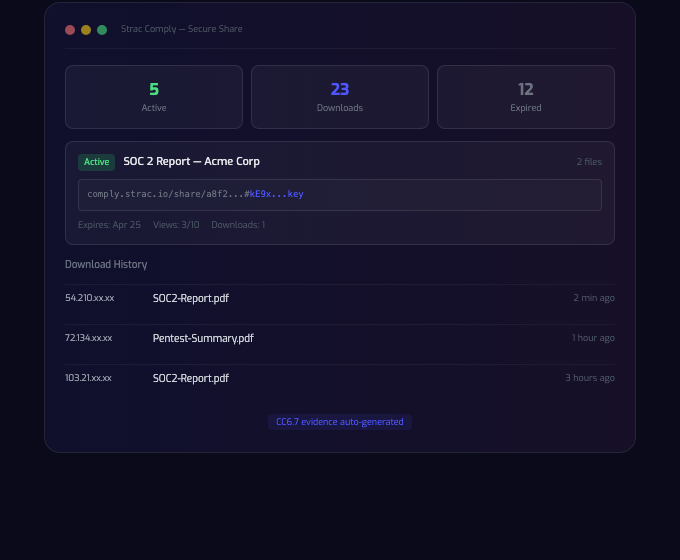
Three things break down simultaneously when you share files with clients:
The compliance consequences:
An auditor's typical question is not "do you use email?" It's "show me the log of every external file transfer in March, who sent it, who received it, and whether it was encrypted end-to-end." If your answer is "we use Gmail," you don't have an answer.
Anything less than these five is not secure client file sharing. It's just sharing.

Strac Secure Share is a free E2EE file transfer tool built by Strac, the data protection company. Strac's DLP product protects 55+ businesses including UiPath and Databricks; Secure Share brings the same cryptographic posture to the simplest possible workflow — send a link.
Architecture: AES-256-GCM encryption in the sender's browser. Strac's servers only see ciphertext. Keys are derived from a passcode that never touches Strac's infrastructure. This is called zero-knowledge architecture — Strac is cryptographically incapable of reading your files.
Free tier — for security reviews and light testing: - End-to-end encryption (AES-256-GCM) - Up to 10 MB per package - Up to 2 files per package - Max 3-day expiration - Passcode protection - View & download limits - Recipient email notification - 10 packages per month
Team tier, built for businesses handling client data: - Everything in Free - Up to 5 GB per package - Up to 20 files per package - Up to 90-day expiration - Unlimited packages - Admin dashboard with full audit trail - Download tracking (who, when, IP, device) - Revoke access to any package - Zendesk integration - Salesforce integration - Custom branded dropzone URL (your-company.strac.io/send) - Recipient email notifications - API access
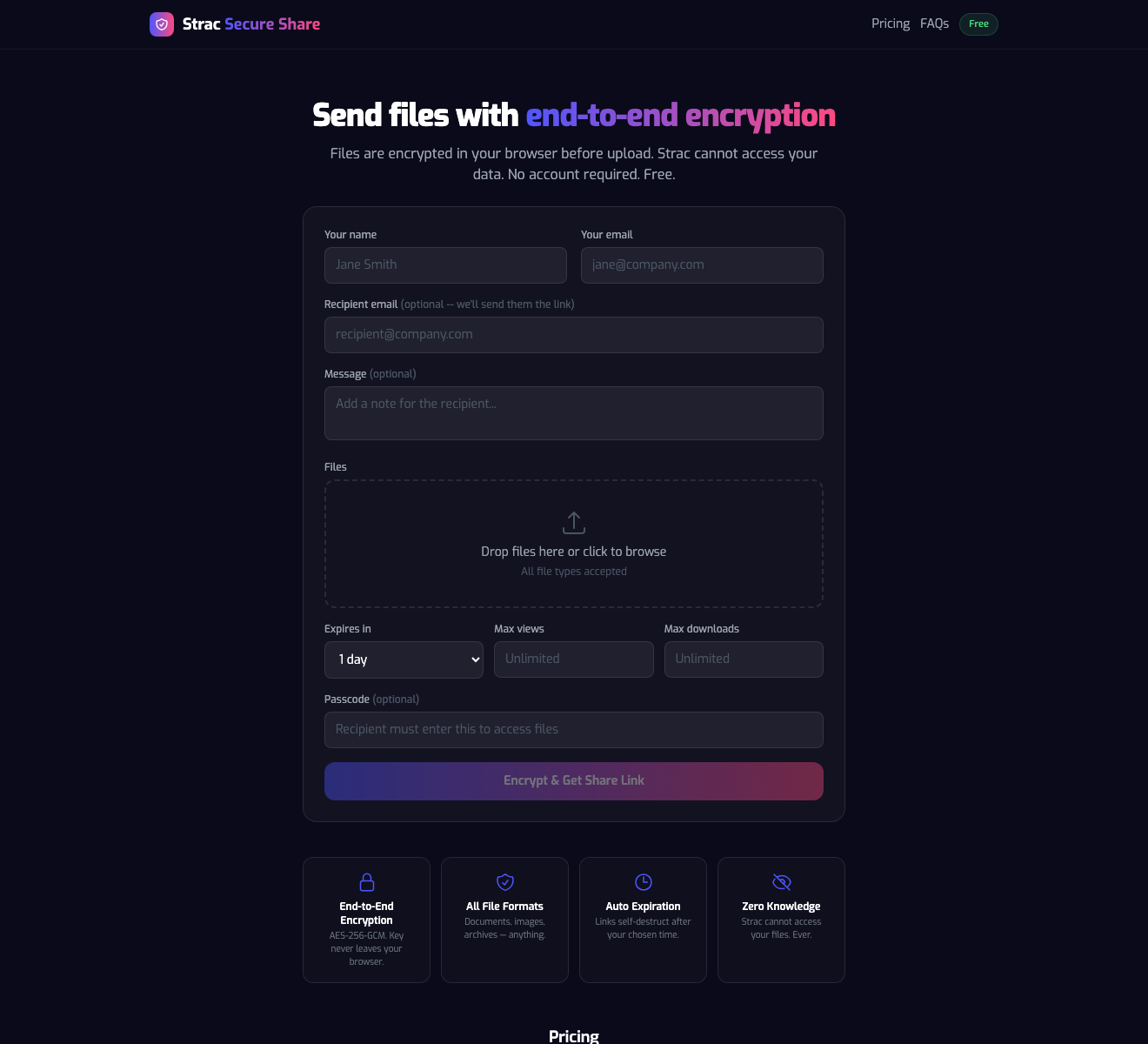
Most business client file sharing is one-way: clients send files to you (tax docs, identity verification, signed contracts) or you send files to clients (invoices, reports, deliverables). Strac handles both.
Outbound (you → client):
1. Go to your branded dropzone (e.g. yourfirm.strac.io/send) or comply.strac.io/send.
2. Drop the file, set a passcode + expiration, optionally require recipient email verification.
3. Copy the link, paste into email, Zendesk ticket, Salesforce opportunity, or text.
4. Client clicks the link, enters the passcode, and downloads in their browser.
5. You see access in the admin dashboard in real time.
Inbound (client → you): 1. Share your branded dropzone URL with the client. 2. Client uploads files directly — no account required on their end. 3. Files land encrypted in your organization's dashboard, routed to the right team member. 4. Every upload is logged with IP, device, timestamp, and file hash.
The branded dropzone URL matters more than it looks. It's the difference between a client clicking wetransfer.com/xyz (looks like consumer-grade convenience) and yourfirm.strac.io/send (looks like the firm's own secure portal).
Client file sharing in most businesses doesn't happen on a standalone web page — it happens inside the customer support ticket or the sales opportunity. That's why Strac Secure Share ships Zendesk and Salesforce integrations on the Team plan.
Zendesk: Attach a Strac Secure Share link directly from the ticket comment editor. The customer receives a secure link, not a raw attachment. Every access is logged back to the ticket for audit.
Salesforce: Send contracts, SOWs, and onboarding files from inside the opportunity record. Access logs appear as timeline events so the AE and success manager can see exactly when the customer opened the agreement.
Status note (April 2026): The Zendesk and Salesforce integrations are built and production-ready. The marketplace listings (Zendesk Marketplace, Salesforce AppExchange) are pending approval. Integration is available via API today — contact us for early access.
For auditors who ask "show me your encryption evidence" — the client-side encryption posture means Strac itself can hand the auditor a simple answer: the customer's plaintext data never touches our infrastructure.
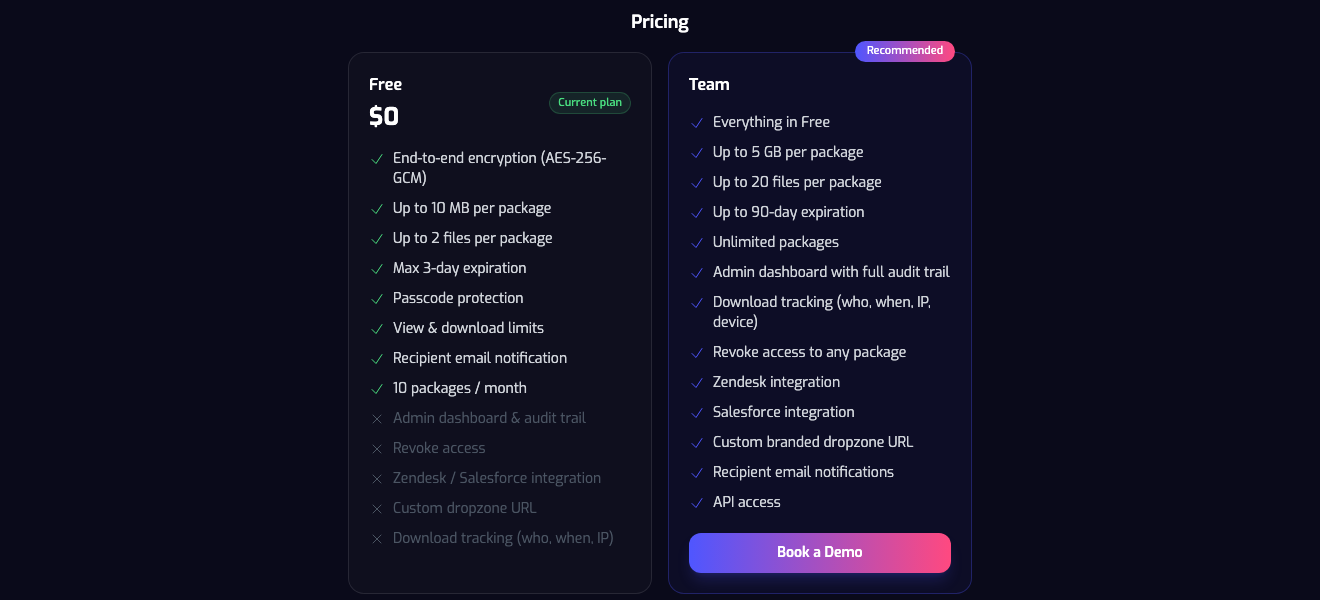
The free plan is sized for security review and internal testing. The Team plan is where client file sharing becomes a documented, auditable process rather than a series of hope-and-pray emails.
We don't think Strac is the right answer for every scenario — and pretending otherwise is the kind of claim auditors (and honest buyers) see right through.
What's the most secure free tool for sharing files with clients in 2026?
Strac Secure Share — client-side AES-256-GCM, passcode, expiration, SOC 2 Type II, HIPAA-eligible. Free tier: 10 MB per package, up to 2 files, 10 packages per month.
Can I use Google Drive to share files securely with clients?
Only with Workspace Enterprise client-side encryption (CSE), which requires a third-party key manager and costs ~$30+/user/mo. The default "anyone with link" Google Drive share is not secure for client data.
Is WeTransfer HIPAA compliant?
WeTransfer Pro can be configured for HIPAA, but it's not end-to-end encrypted — WeTransfer holds keys. For HIPAA, use SendSafely or Strac Secure Share Team (both offer BAAs).
Can I revoke a file I sent to a client by mistake?
With Strac Secure Share Team, yes — one click from the admin dashboard, the file is unreadable immediately. With email attachments, Google Drive free, or WeTransfer free, there's no real revocation.
Do my clients need to install anything to receive files?
No. Strac Secure Share works in any modern browser. The recipient clicks the link, enters the passcode (if set), and downloads. No account, no software, no browser extension.
Can I brand the upload page for my clients?
Yes, on the Team plan. You get a custom dropzone URL like yourfirm.strac.io/send so clients feel they're uploading directly to your firm, not a third party.
Does Strac Secure Share integrate with Zendesk and Salesforce?
Yes — integrations are built and production-ready. Marketplace listings are in review as of April 2026. Team-plan customers can deploy via API immediately.
What happens to files after they expire?
The encrypted ciphertext is deleted. Because Strac never held the decryption key, there's nothing to recover — even for Strac's internal team.
What does the audit trail look like?
Every package access is logged with timestamp, recipient identity (if email verification was required), IP address, device fingerprint, and outcome (success / passcode failure / expired / revoked). Exportable to CSV for auditor review.
Related reading:
Stop using email attachments and Google Drive for sensitive client files. Start with Strac Secure Share — free, no credit card, 10 packages per month with full AES-256-GCM client-side E2EE.
When you're ready for admin controls, audit trails, Zendesk/Salesforce integrations, custom dropzone URLs, and HIPAA BAAs, upgrade to the Team plan. Book a demo to see the admin dashboard and integrations live.
Your clients will notice the difference — a branded secure dropzone looks exactly like what they already expect from their bank and their law firm. Your auditor will notice the difference — the audit trail is literally their favorite exhibit. And your security team will stop getting paged about another "can we forward this PDF" incident.
.avif)


.gif)


.webp)







