SaaS Data Security: Navigating the Digital Landscape
Protect sensitive data across SaaS apps, cloud, endpoints, browsers, and AI workflows. Learn the biggest SaaS data security risks in 2026 and how modern DLP + DSPM helps reduce exposure.
· SaaS data security is no longer just aboutcloud app settings. Sensitive data now moves across SaaS apps, cloudstorage, endpoints, browsers, AI tools, and agentic workflows, which meanssecurity teams need visibility across the full data path.
· Traditional DLP is too narrow for modern SaaSenvironments. Alerts alone are not enough when data is being pasted into AItools, uploaded through browsers, shared in support tickets, or exposed incollaboration platforms.
· Modern SaaS security requires both DSPM andDLP. Organizations need to discover where sensitive data lives, understandexposure risk, and take action in real time when data is shared, pasted,uploaded, or mishandled.
· The biggest SaaS security risks in 2026 arehuman workflows, oversharing, AI usage, and shadow data movement. ThinkSlack threads, Google Drive links, Salesforce cases, Zendesk tickets, Notiondocs, browser uploads, and prompts to ChatGPT or Copilot.
· Strac helps secure data across modernbusiness systems. It combines agentless data discovery, classification,DSPM, and inline DLP remediation across SaaS, cloud, endpoints, browsers, andAI workflows, with support for actions like redact, mask, block, quarantine,delete, and coach users in real time.
SaaS data security used to be a narrower conversation. A company would adopt a handful of cloud apps, enable basic access controls, turn on MFA, and maybe deploy a DLP rule for email or file storage. That model no longer reflects how work actually happens.
In 2026, sensitive data moves constantly across business systems. Customer support teams copy data between Zendesk and Slack. Revenue teams upload exports into Salesforce or Google Drive. Engineers paste snippets into AI copilots. Operations teams work inside Notion, Jira, and shared cloud repositories. Employees move between managed SaaS apps, personal browser sessions, internal tools, and AI assistants in the same hour.
That shift changes the security problem.
SaaS data security is no longer just about protecting data at rest in a cloud application. It is about understanding how sensitive data moves across apps, users, endpoints, browsers, APIs, and AI workflows, then enforcing controls without breaking productivity.
The organizations that get this right are not relying on one legacy DLP product or one SaaS admin console. They are building a modern data security layer that combines:
Sensitive data discovery and classification
SaaS and cloud posture visibility
Real-time detection of risky data movement
Inline remediation when data is exposed or mishandled
Coverage for AI, browser, and endpoint workflows in addition to SaaS
That is the real SaaS data security challenge in 2026.
What Is SaaS Data Security?
SaaS data security is the set of controls, processes, and technologies used to protect sensitive information stored in or moving through Software-as-a-Service applications.
That includes obvious systems like Google Workspace, Microsoft 365, Slack, Salesforce, Jira, Zendesk, Notion, and Confluence. But in practice, SaaS data security now extends beyond the app itself to the workflows around it:
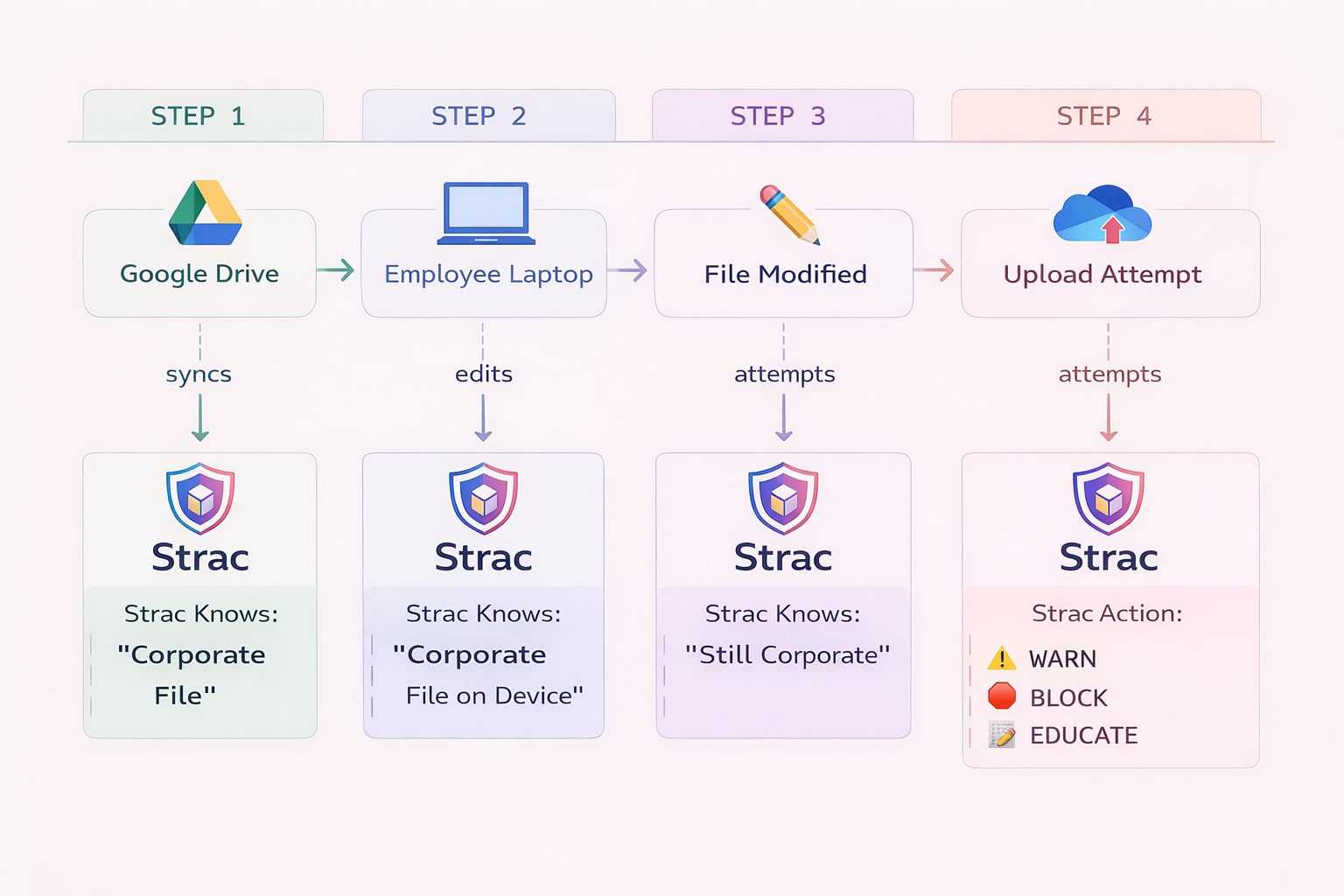
Files downloaded from SaaS apps to employee laptops
Copy/paste activity from internal systems into browser forms or AI tools
Attachments shared in support platforms and chat tools
Data flowing into LLMs, copilots, and agentic tools through prompts, connectors, or APIs
Sensitive records stored in cloud repositories and analytics systems
SaaS-to-SaaS syncs, automations, and integrations that move data without much visibility
A modern SaaS data security program should answer four questions:
🎥 Why SaaS Data Security Has Become Harder
The problem is not that SaaS apps are inherently insecure. The problem is that most organizations now run dozens or hundreds of apps, each with its own data model, permissions, sharing settings, APIs, integrations, and user behavior patterns.
Security teams are dealing with five major shifts at once.
1. Sensitive data is scattered across too many apps
Customer data no longer lives in one CRM or one file share. It is spread across support platforms, chat tools, document repositories, ticketing systems, cloud databases, and AI copilots. Even when each app is individually “secured,” the organization still lacks a unified picture of where sensitive data lives.
2. Data movement happens in the browser, not just inside managed systems
A large share of SaaS risk now happens through copy/paste, uploads, exports, and prompt submissions. Employees move data between internal systems and web apps all day long. That means browser activity has become a critical part of SaaS data security, especially when users interact with personal AI accounts or unknown web destinations.
3. AI tools created a new exfiltration path
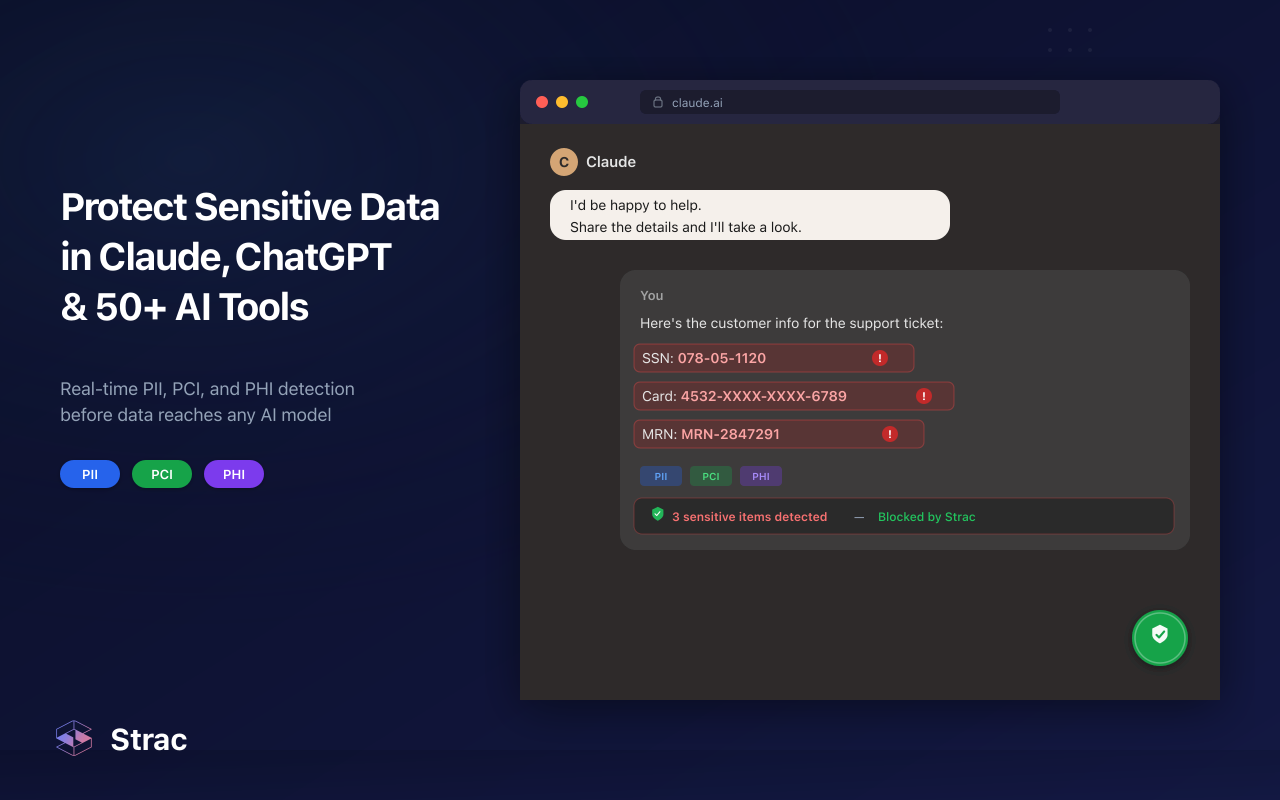
ChatGPT, Gemini, Copilot, Claude, and AI-enabled browser extensions changed the threat model. Employees can unintentionally send customer records, source code, contracts, payroll data, or healthcare information into LLM interfaces in seconds. Traditional DLP tools were not built for prompt-and-response workflows.
4. Collaboration and support tools contain more sensitive data than most teams realize
Slack, Teams, Zendesk, Intercom, Jira, Confluence, and Notion are often treated as “workflow tools,” not core data systems. In reality, they are full of customer conversations, troubleshooting logs, screenshots, financial details, access credentials, support attachments, and incident notes.
5. Security teams need to do more than detect
Finding a problem is useful. Fixing it immediately is better. If a tool can tell you that a Slack message contained a Social Security number three hours ago, that may help with forensics. But if the data has already been exposed, detection alone is not enough. Modern SaaS security needs inline action.
✨ The Biggest SaaS Data Security Risks in 2026
1. Data leakage through collaboration platforms
Slack, Teams, Google Chat, and similar tools are now central to daily work. Teams paste customer information, screenshots, logs, contracts, and incident details into these channels constantly. Sensitive data can end up in public channels, shared workspaces, or conversations that persist far longer than intended.
Common examples
A support rep pastes a customer’s full billing details into Slack to ask engineering for help
An HR manager shares a spreadsheet with employee data in a broad channel
A developer posts an access token or API key during troubleshooting
A sales team member shares a screenshot containing customer PII
2. Oversharing and exposure in cloud file repositories
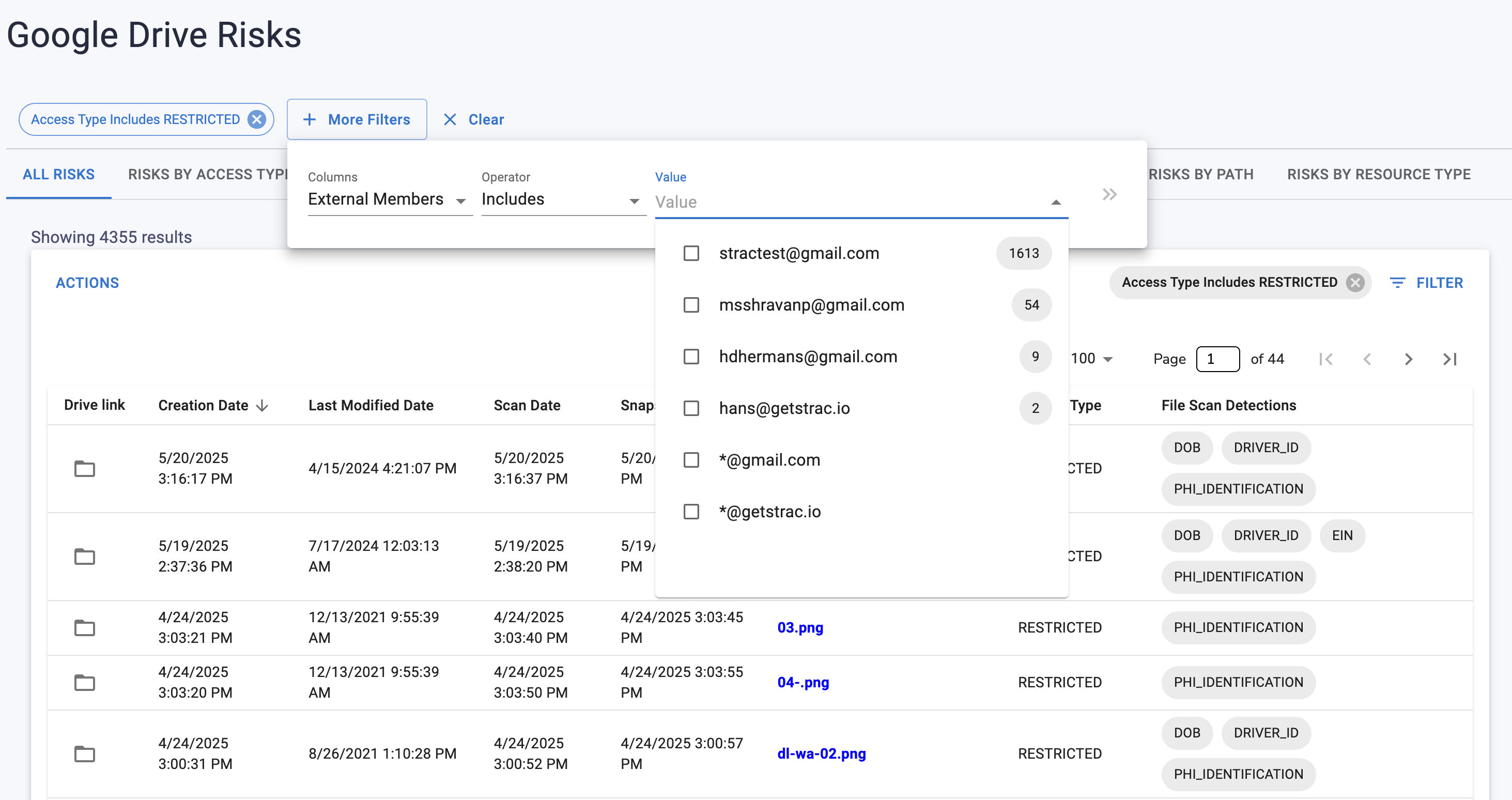
Google Drive, OneDrive, Box, Dropbox, SharePoint, and similar platforms make collaboration easy, but they also make oversharing easy. Sensitive files often become accessible to more users than intended, remain stored long after they are needed, or get synced into downstream tools and exports.
Common examples
“Anyone with the link” sharing on a document containing customer records
Large folders with no ownership review and years of accumulated sensitive files
Finance or HR files shared to broad groups for convenience
Sensitive documents duplicated across personal and team drives
3. Sensitive data inside support and customer operations systems
Zendesk, Intercom, Salesforce, Jira Service Management, and similar tools routinely collect customer information during support interactions. Tickets and case records often contain names, addresses, payment details, health information, screenshots, and uploaded documents.
Common examples
A customer uploads an ID or medical document to a support ticket
An agent copies raw card or account data into case notes
A ticket attachment containing regulated data is accessible to too many teams
Sensitive data is sent to downstream systems through ticket automations
4. AI prompt leakage and shadow AI usage
Employees increasingly use public LLMs and AI copilots to summarize documents, draft emails, debug code, analyze spreadsheets, or answer customer questions. Without controls, these tools can become a direct channel for leaking regulated or proprietary data.
Common examples
An employee pastes a customer escalation thread into ChatGPT for help writing a response
A developer submits production code or secrets to an AI assistant
A finance analyst uploads a spreadsheet containing payroll or revenue data into an AI notebook
A marketer pastes a confidential strategy deck into a public AI tool to generate campaign ideas
5. Browser uploads and unmanaged destinations
Not every leak happens inside a sanctioned app. Employees upload files to third-party services, browser-based tools, AI websites, file converters, survey tools, and temporary collaboration portals. Many of these flows happen outside traditional SaaS governance.
Common examples
Uploading a CSV export to a browser-based analytics tool
Sharing a contract through an ad hoc file transfer site
Pasting customer data into a web form for a plugin or extension
Uploading screenshots with visible sensitive information to an external vendor portal
6. Endpoint copies of SaaS data
Once SaaS data is downloaded to a laptop, it becomes an endpoint problem too. That is why modern SaaS security cannot stop at the SaaS layer. Local downloads, synced folders, cached files, and copied exports can all create risk.
Common examples
Customer exports saved locally to desktop folders
Shared spreadsheets synced from Google Drive to endpoints
PDFs downloaded from Salesforce or Zendesk and stored without controls
Sensitive data copied into local notes or screenshots
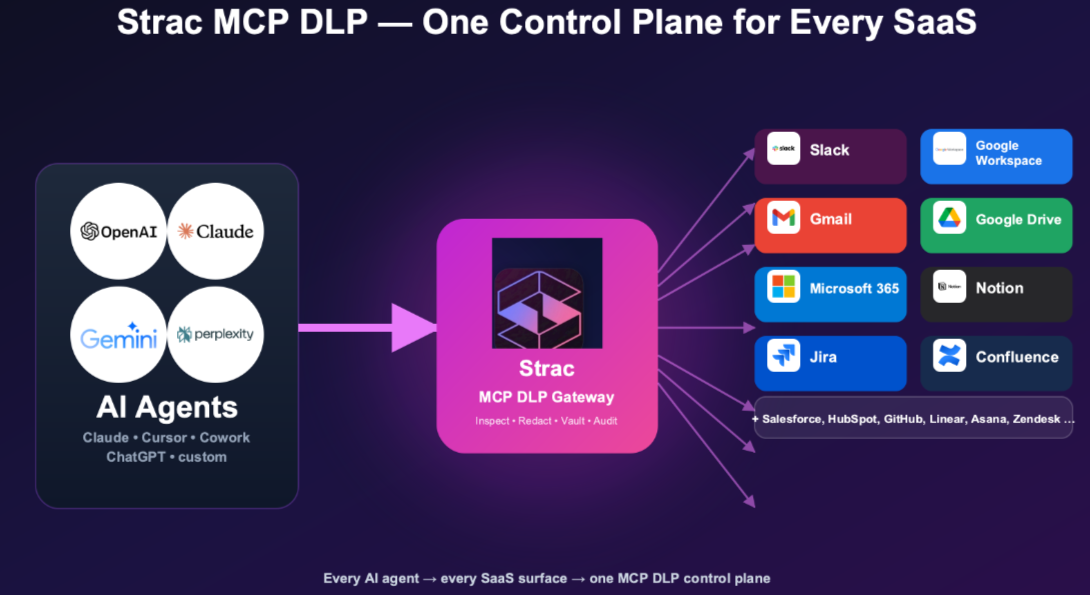
7. MCP-connected agents and AI workflows
As companies adopt MCP-based agents and AI assistants, sensitive SaaS data can now be pulled from one system and sent to another without a human manually moving it. An agent connected to Salesforce, Slack, Notion, Google Drive, or internal tools may access customer records, internal documents, support conversations, or source code and pass that data into external models or downstream workflows. This creates a new SaaS security risk that requires visibility and control over what agents can access, what data they retrieve, and where that data goes next.
Common examples
An AI agent pulls customer data from Salesforce and sends it to an external LLM for analysis
A support assistant connected to Zendesk, Slack, and Notion exposes sensitive ticket content across tools
An engineering agent accesses internal docs, code snippets, or credentials from multiple connected systems
A user-approved MCP agent is given broad access to SaaS apps, but no one monitors what sensitive data it retrieves or shares
8. Misconfigurations, stale access, and poor visibility
Sometimes the problem is not a dramatic leak. It is a quiet build-up of risk: over-permissioned SaaS apps, old folders with broad access, shadow integrations, unreviewed sharing settings, and sensitive data sitting in places nobody is monitoring.
That is why posture management matters alongside DLP.
🎥 Strac’s Approach to SaaS Data Security in 2026
Strac is built around a simple reality: sensitive data does not stay in one place. It moves across SaaS applications, cloud storage, endpoints, browsers, support systems, and AI workflows. That means SaaS data security has to cover the full path of data movement, not just one app or one channel.
In 2026, Strac’s approach is centered on four layers:
Discover and classify sensitive data across modern business systems
Strac helps organizations find and classify sensitive data across SaaS apps, cloud environments, endpoints, and connected workflows. The goal is to identify not only where regulated data lives, but where it is duplicated, exposed, or at risk of moving into the wrong place.
This includes support for data types such as:
PII
PHI
PCI
financial records
credentials and secrets
customer support data
internal business documents
source code and technical data
custom sensitive data categories defined by the organization
Strac’s positioning emphasizes content-aware detection with machine learning and OCR rather than relying only on regex-based matching, which helps with structured and unstructured data across tickets, messages, files, and images.
Combine DSPM and DLP in one platform
A major differentiator in Strac’s messaging is the combination of data discovery / posture management with real-time DLP action. Instead of treating discovery and enforcement as separate products, Strac brings them together so teams can understand where sensitive data exists and also respond when it is mishandled.
That matters in SaaS environments because risk comes from both:
exposed data sitting in the wrong place, and
active user behavior that moves data somewhere risky
A file broadly shared in Drive is a posture problem. A customer record pasted into an AI chatbot is a DLP problem. Most organizations need to handle both.
Apply inline remediation, not just alerting
Strac’s model is not limited to detection. It is designed to take action inline through remediation options such as redaction, masking, blocking, deleting, and other policy-driven responses. That is especially valuable in high-volume SaaS environments like support, collaboration, and AI workflows where data moves quickly and manual review is not practical.
In practice, that can mean:
Redacting sensitive customer data from support conversations
Blocking risky uploads or copy/paste events
Masking regulated fields before data reaches downstream teams
Quarantining exposed files
Coaching users at the moment of risky behavior
Extend protection beyond SaaS into cloud, browser, endpoint, and AI workflows
One of the clearest shifts in Strac’s 2026 positioning is that it is not framed as “just SaaS DLP.” It is positioned around broader data security coverage across:
This matters because SaaS risk rarely stays inside the SaaS application boundary. Data is copied from Salesforce into Slack, downloaded from Drive to a laptop, pasted into ChatGPT, attached to a Zendesk ticket, and uploaded to a browser-based tool. A modern data security platform has to follow that path.
The Bottom Line
SaaS data security in 2026 is no longer just about locking down a handful of cloud applications. It is about protecting sensitive data as it moves across collaboration tools, support platforms, cloud storage, endpoints, browsers, AI assistants, and increasingly agentic workflows.
That requires more than static DLP rules and occasional permission reviews. It requires a system that can discover sensitive data, understand where it is exposed, monitor how it moves, and take action in real time when it is mishandled.
Strac’s relevance in this market comes from that broader view. Instead of treating SaaS security as a narrow app-by-app problem, it brings together data discovery, posture management, and inline DLP remediation across the modern environments where sensitive data actually travels. For organizations trying to secure Slack threads, Zendesk tickets, Drive folders, browser uploads, endpoint copies, and AI prompt flows in one program, that is the direction SaaS data security is heading.
🌶️Spicy FAQs on SaaS Data Security
What is SaaS data security?
SaaS data security refers to the policies, tools, and controls used to protect sensitive information stored in or moving through Software-as-a-Service applications such as Google Workspace, Slack, Salesforce, Zendesk, Microsoft 365, Notion, and similar platforms. In 2026, it also includes related browser, endpoint, and AI workflows because SaaS data rarely stays inside one application.
What are the biggest SaaS data security risks in 2026?
The biggest risks include overshared files in cloud storage, sensitive data inside support tickets and collaboration tools, AI prompt leakage, browser uploads to unmanaged destinations, stale access permissions, and local endpoint copies of SaaS data. Human workflows now drive a large share of SaaS exposure.
How is SaaS data security different from traditional DLP?
Traditional DLP often focuses on email, endpoints, or simple pattern matching. SaaS data security today requires broader visibility across SaaS apps, cloud systems, support platforms, collaboration tools, AI tools, and browser workflows. It also increasingly requires posture visibility and inline remediation, not just alerts.
Why is AI now part of SaaS data security?
Because employees use AI tools to process business information. They paste support logs into ChatGPT, upload spreadsheets into copilots, and use LLMs to summarize documents or debug code. If those prompts contain customer data, payroll details, PHI, source code, or confidential records, AI becomes a direct data exposure path.
What should I look for in a SaaS data security platform?
Look for broad integration coverage, sensitive data discovery, strong classification accuracy, SaaS posture visibility, real-time remediation, browser and AI coverage, endpoint awareness, and support for compliance requirements such as GDPR, HIPAA, PCI DSS, and SOC 2. If the platform only detects issues but cannot help you remediate them, it will leave a lot of risk unresolved.
Discover & Protect Data on SaaS, AI, MCP, Endpoints & Cloud
Strac provides end-to-end data loss prevention for all SaaS and Cloud apps. Integrate in under 10 minutes and experience the benefits of live DLP scanning, live redaction, and a fortified SaaS environment.


.webp)
.webp)









.avif)




.gif)
