August 10, 2026

5
min read
How to Set Up PII Alerts in Google Drive Automatically
Learn how to automatically alert on personal data (PII) stored in Google Drive using Strac’s real-time DLP detection for documents, images, PDFs, and shared drives.
Google Drive holds large volumes of personal data across Shared Drives, HR folders, customer documentation, and collaborative workspaces; however Drive cannot identify or alert on PII automatically. GDPR requires organizations to detect and monitor personal data exposure; CPRA requires monitoring and limiting sensitive personal information. Without real-time alerts, PII may go unnoticed for months, resulting in overexposure, privacy violations, or regulatory penalties.
Strac solves this by detecting PII instantly and sending detailed alerts the moment personal data appears.
Google Drive does not scan file contents for personal data; cannot detect PII in PDFs or images; and cannot notify admins when sensitive data is stored or uploaded. Since Drive integrates with countless workflows, PII can enter from employees, customers, partners, or automated systems.
Google Drive lacks:
• PII-specific detection engines;
• Alerts for GDPR/CPRA-sensitive data;
• OCR for scanned documents and images;
• Notification workflows for security teams;
• Historical PII exposure visibility;
• Compliance-grade audit logs.
Strac provides the real-time PII detection and alerting that Google Drive does not offer.
PII appears across multiple file formats inside Drive; and alerts must detect structured and unstructured personal data. GDPR Article 4 defines personal data broadly; CPRA extends this to sensitive personal information such as identification numbers, precise locations, and household data.
Strac triggers alerts for:
• Names and email addresses;
• Phone numbers and contact details;
• Addresses and demographic information;
• Government IDs or employee numbers;
• Customer profile exports;
• Screenshots or images containing PII;
• PDFs with personal data fields;
• CRM or support attachments.
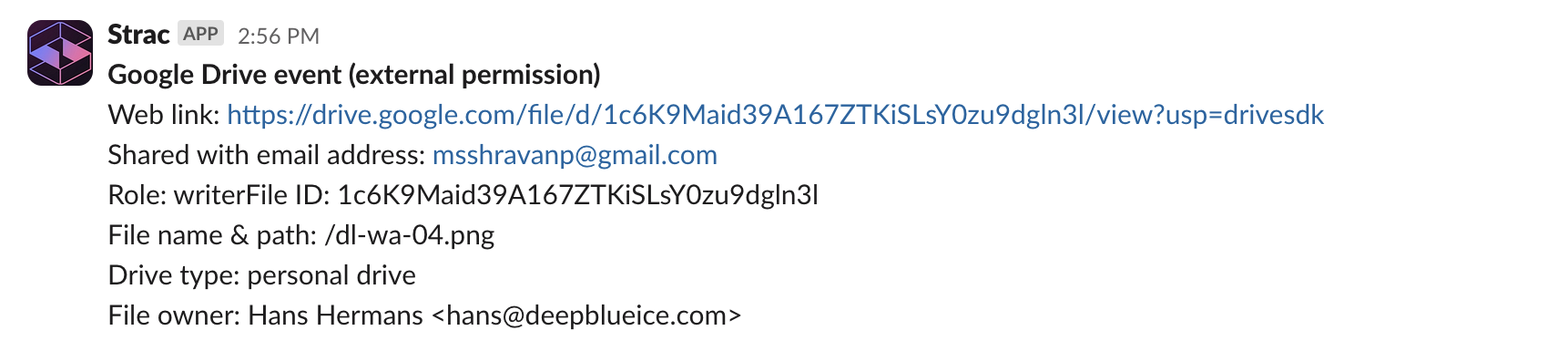
Each alert includes:
• File name and location;
• File owner and access permissions;
• PII elements detected;
• Recommended remediation;
• Whether the file is publicly or externally shared.
This enables rapid privacy incident response.
Strac scans Drive continuously using AI and OCR; detects PII exposure; and sends alerts automatically to security teams and admins. Alerts help prevent unauthorized access and support GDPR Article 32 compliance.
Alerting workflows include:
• Slack notifications for security channels;
• Email alerts for privacy or compliance teams;
• SIEM forwarding for SOC monitoring;
• API/webhook alerts for ticketing systems;
• Optional automatic redaction or deletion;
• Full GDPR + CPRA audit logs.
This gives security teams immediate visibility into personal data exposure.
Strac gives complete visibility into PII exposure across Google Drive; helping organizations detect, monitor, and respond to privacy risks in real time. GDPR requires identifying and reporting personal data breaches; CPRA requires tracking sensitive information flows. Strac’s real-time alert engine supports both.
Strac provides:
• Instant PII alerts across all Drive surfaces;
• OCR-powered detection for images and scans;
• Context-aware privacy alerts with low false positives;
• Alerts routed to Slack, SIEM, and SOC tools;
• GDPR + CPRA aligned audit logs;
• Bulk remediation options;
• Fast, no-code deployment.
No; Drive cannot detect or notify on personal data.
Yes; OCR identifies PII across visual formats.
Yes; both regulations require monitoring and protecting personal data.
Yes; alerts work across all Drive surfaces.
Yes; Strac supports multi-step remediation workflows.
Strac alerts you instantly when personal data appears in Google Drive; helping maintain GDPR and CPRA compliance across your cloud storage environment.
.avif)


.gif)


.webp)