August 10, 2026

min read
How to Redact Sensitive Credit Cards (PCI) in Gmail
.webp)
Gmail is one of the most common places where PCI data unintentionally appears; support teams, sales teams, and billing teams often receive emails containing payment information. However, Gmail does not have native PCI remediation; it cannot auto-redact, mask, or remove credit card numbers from emails. Gmail’s built-in protections do not include contextual PCI detection; they do not include redaction for PANs; and they do not include OCR for images, screenshots, or PDFs.
Organizations handling payments must keep PCI out of Gmail to remain compliant with PCI DSS 3.5, 3.6, and 4.2.1. Automated PCI redaction ensures emails remain usable while removing sensitive elements instantly.
Gmail’s native security capabilities are strong in general email protection; however they do not support the PCI-specific workflows modern companies require. Gmail cannot redact credit card information; it cannot scan PDFs for credit card numbers using OCR; and it cannot identify PCI data inside screenshots or images.
Gmail also cannot apply PCI-specific rules such as masking PANs, deleting sensitive content from threads, or automatically blocking emails containing PCI data. These gaps frequently lead to accidental exposure of card numbers in inboxes, replies, or forwarded messages.
• Customers email screenshots of their credit cards;
• Billing teams receive full PAN numbers in support emails;
• PDF invoices contain complete credit card details;
• Files in attachments hold raw card numbers;
• Forwarded threads propagate PCI across multiple users.
Strac prevents this by scanning content with AI; recognizing PAN formats and context; and applying redaction instantly.
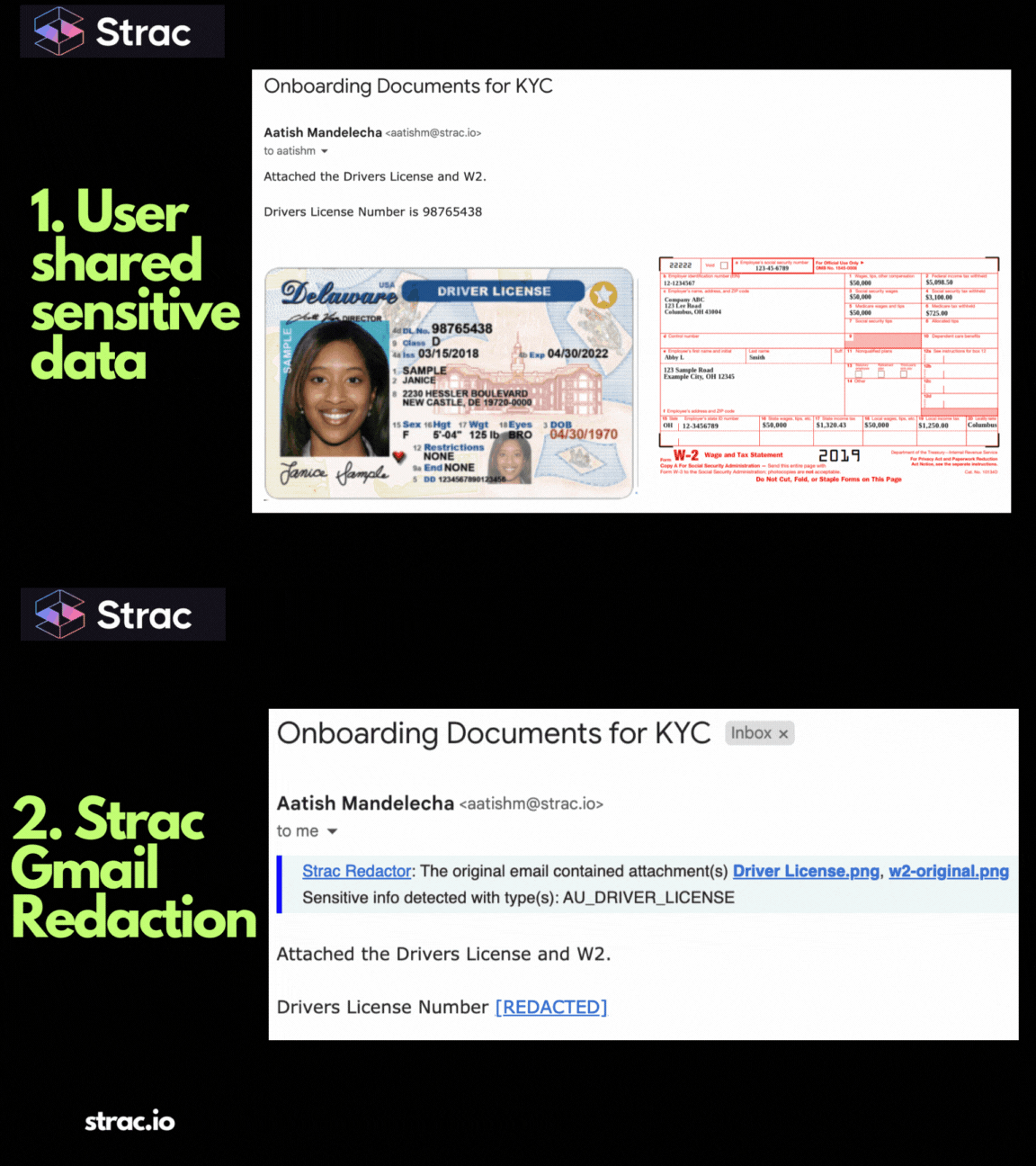
Gmail inboxes often contain sensitive data because users copy, forward, and upload information without realizing the risk. Credit card details are especially dangerous because PCI DSS forbids storing full PANs in unprotected systems.
Common PCI exposures in Gmail include:
• “Here is my credit card: 4242 4242 4242 4242”
• Screenshots of online checkout pages;
• Billing forms with cardholder name, expiration date, CVV;
• Exported CSV files containing customer payment data;
• PDFs from third-party billing systems that reveal card numbers.
Gmail does not mask this information; it does not neutralize it; and it does not prevent forwarding or copying.
Strac identifies PCI in:
• Emails
• Replies and forwarded threads
• Attachments (PDF, PNG, JPG, DOCX, CSV)
• Google Drive files linked through Gmail
• Email signatures
• Mixed content (HTML + images + text)
Strac uses context cues like “payment,” “billing,” “transaction,” and “cardholder” to improve accuracy while reducing false positives.
Redaction in Gmail means replacing credit card numbers with masked characters while preserving message readability. This allows support teams and compliance teams to read the context without exposing PCI.
Example of redaction:
4242 4242 4242 4242
becomes
****** **** **** 4242**
Redaction is safer than deletion because:
• Conversation flow is preserved;
• Sensitive data is neutralized instantly;
• Audit logs remain accurate;
• Users do not lose the context of an email thread.
Gmail cannot do this; Strac does.
Strac redacts PCI in:
• Real-time emails
• Replies and forwards
• Attachments with OCR
• HTML emails
• Inline images
• Third-party app emails flowing through Gmail
• Google Workspace linked content
Example 1 — Customer emails their credit card number
Strac redacts the PAN inside the email instantly before it hits the inbox.
Example 2 — Screenshot of a credit card attached
Strac uses OCR to detect the PAN and redacts it inside the image.
Example 3 — PDF invoice with full card details
Strac parses the PDF layers and masks sensitive values automatically.
Example 4 — Payment CSV exported from Stripe or Shopify
Strac detects PANs in spreadsheet columns and redacts them before the file is opened.
Example 5 — Forwarded threads containing older PCI data
Strac cleans the entire thread in real time, preventing propagation.
Strac provides full PCI protection across the entire Google Workspace ecosystem by combining AI detection with automated remediation. Most email security tools only alert; Strac redacts, blocks, deletes, or quarantines in real time.
Strac offers:
• Real-time & historical Gmail scanning;
• OCR for images and PDFs;
• Context-aware PCI detection;
• Automated redaction, deletion, or blocking;
• PCI DSS-aligned controls and audit logs;
• No-code deployment for Gmail and Workspace;
• Protection across Drive, Slack, Salesforce, Jira, Confluence, and GenAI.
Strac automatically detects, classifies, and redacts credit card numbers (PCI data) inside Gmail emails, threads, and attachments; it protects your team without slowing down your workflows.
No; Gmail cannot redact, mask, or neutralize PCI data.
Yes; Strac uses OCR to detect card numbers in PDFs, images, and documents.
Yes; Strac supports PCI DSS 3.5, 3.6, and 4.2.1 by eliminating unprotected PCI storage.
Yes; Strac can block, alert, delete, or quarantine PCI-containing emails.
Yes; historical scanning identifies and remediates past exposures.
.avif)


.gif)