October 1, 2026

5
min read
How to Redact PII in Google Drive Automatically
Learn how to automatically detect and redact personal data (PII) in Google Drive using Strac’s real-time DLP redaction engine for documents, spreadsheets, PDFs, and images.
Google Drive stores massive amounts of documents, spreadsheets, HR files, invoices, and customer records; however Drive does not natively support PII redaction. This means personal data like names, emails, phone numbers, and home addresses can remain stored in shared or externally accessible folders. This exposes organizations to GDPR penalties under Article 5 and Article 32; and CPRA violations for mishandling Sensitive Personal Information (SPI). Redaction is essential to remove the sensitive portion of data while keeping files usable.
Strac automatically detects and redacts PII across all Drive content types; ensuring privacy protection without disrupting workflows.
Google Drive does not classify PII; does not automatically mask personal data inside files; and does not scan uploaded images or PDFs for sensitive content. As a result, HR folders, Shared Drives, customer support uploads, and partner-shared documents often contain unprotected PII. GDPR requires organizations to protect personal data and minimize exposure; CPRA requires limiting retention and use of sensitive personal information.
Google Drive lacks:
• Automatic masking or redaction of PII;
• OCR detection for images and scans;
• Context-aware detection of personal identifiers;
• Bulk remediation for existing PII;
• Real-time redaction during uploads;
• Compliance logging for GDPR + CPRA.
Strac fills these gaps with enterprise-grade PII detection and automated redaction.
PII appears in Drive through everyday business operations; and redacting it requires recognizing patterns in text-based files and across images or scanned documents. GDPR defines personal data broadly; CPRA expands this to sensitive categories such as government IDs, precise geolocation, and account numbers.
Common PII exposures in Drive include:
• Names and email addresses in HR or customer files;
• Phone numbers in onboarding documents;
• Home or mailing addresses inside PDFs;
• Identification numbers such as employee IDs;
• Customer profile exports from CRM platforms;
• Uploaded receipts and documents containing personal details;
• Screenshots of customer conversations;
• Images containing personal information.
Strac detects PII using:
• AI-based classifiers;
• OCR for images and PDFs;
• Context-aware language models;
• GDPR + CPRA aligned detection rules.
This ensures accurate and compliant redaction at scale.
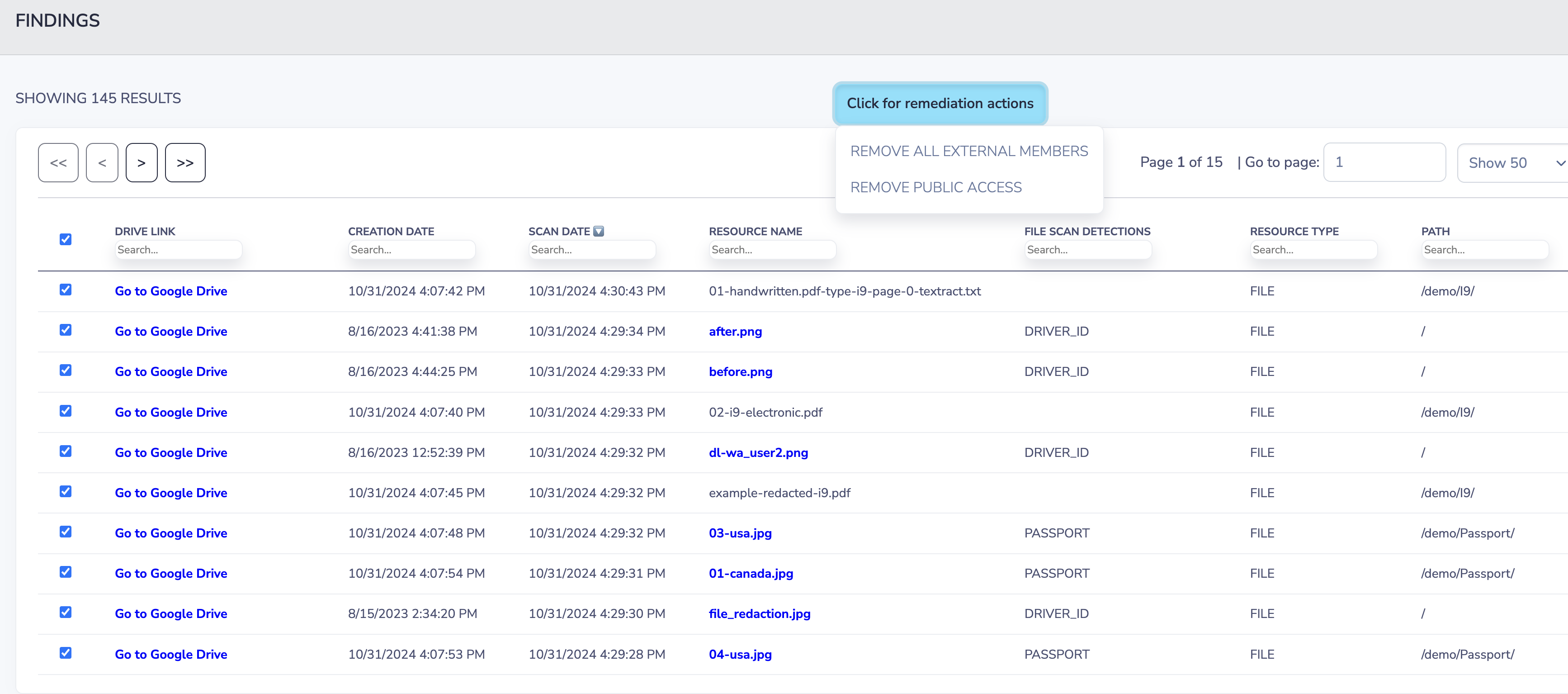
Redaction masks only the personal data portion of the content; preserving document usability while removing sensitive information. This aligns with GDPR principles such as minimization and privacy-by-design; and with CPRA obligations for limiting the use of Sensitive Personal Information.
Examples:john.doe@example.com → ****@example.com555-918-3729 → ***-***-3729Laura Peterson → L**** P*******
Redaction is the preferred remediation because:
• The document remains intact;
• Context is preserved;
• PII is permanently neutralized;
• Teams can still use the file normally.
Strac redacts PII across:
• Google Docs
• Google Sheets
• PDFs
• Images (JPG, PNG)
• CSVs
• Scanned files
• My Drive and Shared Drives
Example 1 — HR PDF containing employee names and phone numbers
Strac scans the PDF text layer and redacts PII automatically.
Example 2 — Customer-uploaded image containing email addresses
Strac uses OCR to detect and mask PII inside images.
Example 3 — Spreadsheet with thousands of customer contact details
Strac detects names, emails, and phone numbers; redacts them while preserving spreadsheet structure.
Example 4 — CRM export synced into a Shared Drive
Strac redacts PII across all exported fields.
Example 5 — Screenshot of customer support chat
Strac redacts visible PII across the image instantly.
Strac delivers accurate PII redaction powered by AI, OCR, and privacy-specific detection logic. It supports GDPR and CPRA compliance by ensuring personal data is masked automatically; preventing unauthorized access, over-sharing, or prolonged retention.
Strac provides:
• Real-time PII redaction;
• OCR for images and PDF scans;
• Context-aware detection;
• Bulk remediation across entire Drive environments;
• GDPR + CPRA aligned privacy workflows;
• Historical scanning;
• Fast, no-code deployment.
No; Drive cannot detect or mask personal data.
Yes; OCR supports all formats.
Yes; redaction reduces exposure and supports privacy-by-design.
Yes; all Drive surfaces are supported.
Yes; Strac supports bulk historical cleanup and redaction.
Related reading:
Strac redacts personal data across Drive files, folders, and shared environments; helping you maintain GDPR and CPRA compliance.
.avif)


.gif)


.webp)