Calendar Icon White
December 2, 2025
Clock Icon
5
 min read

How to Redact PHI in SharePoint Automatically

Learn how to automatically redact Protected Health Information (PHI) in SharePoint using AI-powered DLP with OCR and real-time detection.

How to Redact PHI in SharePoint Automatically
ChatGPT
Perplexity
Grok
Google AI
Claude
Summarize and analyze this article with:

TL;DR

  • 1. SharePoint does not natively redact PHI such as diagnoses, medical record numbers, insurance IDs, treatment details, or lab results.
  • 2. PHI enters SharePoint through medical forms, patient intake files, claims documents, screenshots, PDFs, spreadsheets, and synced OneDrive content.
  • 3. HIPAA requires covered entities and business associates to protect PHI in all storage systems—including SharePoint.
  • 4. Manual redaction fails because PHI hides inside PDF layers, images, scans, and multi-tab spreadsheets.
  • 5. Strac automatically redacts PHI in SharePoint across files, folders, libraries, images, forms, PDFs, and synced OneDrive content.
  • SharePoint is widely used in healthcare, but it lacks native PHI redaction capabilities. While SharePoint offers access controls, it does not inspect a file’s contents to identify HIPAA-sensitive information.

    SharePoint’s PHI limitations include:

    • No automatic PHI redaction
    • No detection of PHI terms or identifiers
    • No OCR for scanned health documents or medical images
    • No redaction for PDFs or multi-layer documents
    • No PHI-specific HIPAA DLP rules
    • No monitoring of OneDrive sync uploads containing PHI
    • No historical redaction of existing PHI in libraries

    This exposes healthcare organizations to HIPAA violations and data breaches.

    What PHI Looks Like Inside SharePoint

    PHI shows up across many file types stored in SharePoint. Common examples include:

    • Patient intake forms
    • Medical claims documents
    • PDF EOBs (Explanation of Benefits)
    • Insurance forms and member numbers
    • Lab results and diagnostic summaries
    • Treatment records
    • Appointment forms
    • Care instructions and discharge notes
    • Spreadsheets containing patient data
    • Medical ID cards
    • Screenshots from EHR or patient portals

    Strac detects and redacts PHI such as:

    • Patient names
    • Medical record numbers (MRNs)
    • Insurance policy numbers
    • Treatment details and diagnoses
    • Dates of service
    • Provider information
    • Prescription details
    • Lab results
    • Health conditions
    • Clinical documentation
    • PHI inside images, PDFs, scans, and spreadsheets

    Healthcare data is highly sensitive, making automated redaction essential.

    ✨What It Means to Redact PHI in SharePoint

    Redaction removes or masks PHI inside documents so the rest of the file remains usable. This allows teams to collaborate safely while protecting patient information.

    Examples:
    Original:
    Diagnosis: Type II Diabetes
    MRN: 00937284

    Redacted:
    Diagnosis: ***************
    MRN: ********

    Why redaction is critical for PHI:

    • Prevents HIPAA violations
    • Reduces breach risk
    • Protects patient privacy
    • Allows documents to remain functional
    • Supports secure internal collaboration
    • Minimizes insider exposure
    • Provides clean audit logs

    Strac redacts PHI in:

    • PDFs (including OCR text layers)
    • Scanned medical forms
    • JPG/PNG images of health documents
    • Excel sheets and CSVs
    • Word documents
    • ZIP archives
    • Synced OneDrive folders connected to SharePoint

    Redaction events are logged for HIPAA auditing.
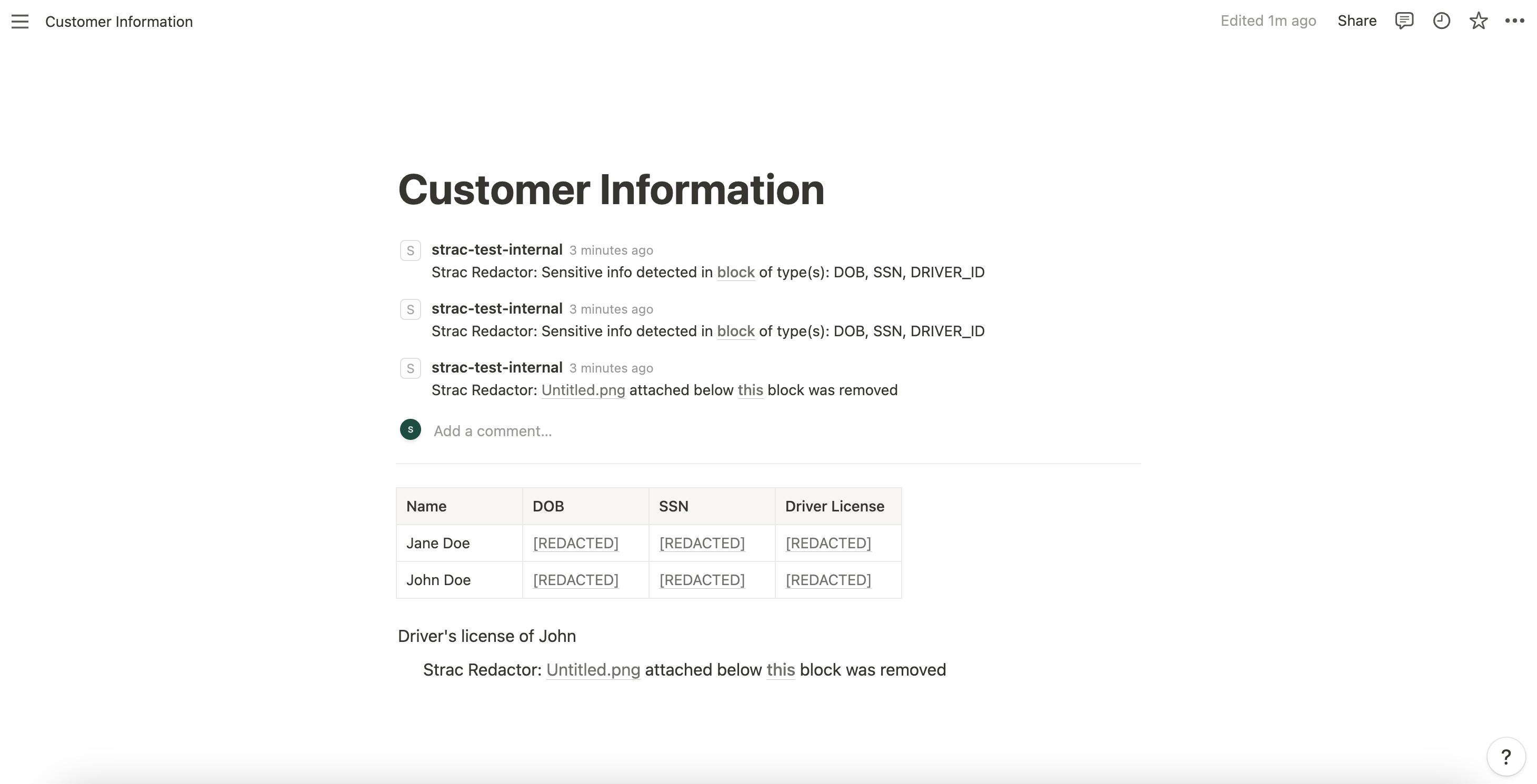
    Strac PHI Redactor in SharePoint

    How to Automatically Redact PHI in SharePoint with Strac

    Strac continuously scans SharePoint libraries and synced OneDrive folders. When PHI is detected, it redacts sensitive fields instantly.

    How Strac’s PHI redaction works:

    • Uses AI, OCR, and NLP to detect PHI
    • Inspects files in real time during upload or edits
    • Redacts sensitive text and identifiers
    • Preserves file structure and formatting
    • Logs redactions for HIPAA compliance
    • Supports granular policies (e.g., redact only MRNs, not dates)
    • Applies PHI categories based on HIPAA definitions
    • Redacts historical PHI on demand

    Organizations can configure:

    • Auto-redaction
    • Alert + redact
    • Redact by site or library
    • Redact based on user group or department
    • Redact only high-risk PHI

    This creates a safe, HIPAA-aligned collaboration environment across all SharePoint ecosystems.

    Real Examples of PHI Redaction in SharePoint

    Example 1 — Medical intake PDF uploaded
    Strac redacts patient name, DOB, MRN, and diagnosis descriptions.

    Example 2 — Scanned insurance card
    OCR detects policy numbers and redacts them.

    Example 3 — Lab results spreadsheet
    Strac selectively redacts PHI columns while preserving table structure.

    Example 4 — Screenshots from an EHR system
    Strac redacts names, IDs, and clinical details.

    This minimizes exposure across every department handling healthcare information.

    Why Strac Is the Best Way to Redact PHI in SharePoint

    • Automated PHI redaction across SharePoint + OneDrive
    • OCR + AI detection for medical images, PDFs, and scans
    • Supports the full HIPAA PHI identifier list
    • Real-time + historical scanning
    • Zero-agent deployment
    • Reduces insider risk and accidental exposure
    • Creates clean audit logs for compliance teams
    • Also supports PCI, PII, secrets, and other sensitive data types

    Spicy FAQs on How to Redact PHI in SharePoint

    Does SharePoint have native PHI redaction?

    No. SharePoint does not detect or redact HIPAA-protected health information.

    Can Strac redact PHI inside scanned medical forms?

    Yes. OCR detects PHI inside images, scans, and multi-layer PDFs.

    Does Strac handle lab results and clinical documents?

    Yes. Strac detects medical terminology, identifiers, and structured/unstructured PHI.

    Can Strac redact PHI only for certain libraries or departments?

    Yes. Policies can be targeted by site, library, user group, or sensitivity level.

    Does Strac maintain HIPAA audit logs?

    Yes. Every redaction is logged for compliance.

    Try Strac for SharePoint PHI Redaction & DLP

    Strac helps healthcare organizations automatically detect, classify, and redact PHI across SharePoint libraries, folders, synced OneDrive directories, and shared documents—ensuring HIPAA compliance and eliminating exposure risk.

    Discover & Protect Data on SaaS, Cloud, Generative AI
    Strac provides end-to-end data loss prevention for all SaaS and Cloud apps. Integrate in under 10 minutes and experience the benefits of live DLP scanning, live redaction, and a fortified SaaS environment.
    Users Most Likely To Recommend 2024 BadgeG2 High Performer America 2024 BadgeBest Relationship 2024 BadgeEasiest to Use 2024 Badge
    Trusted by enterprises
    Discover & Remediate PII, PCI, PHI, Sensitive Data

    Latest articles

    Browse all

    Get Your Datasheet

    Thank you! Your submission has been received!
    Oops! Something went wrong while submitting the form.
    Close Icon