Calendar Icon White
December 2, 2025
Clock Icon
5
 min read

How to Redact PCI Data in SharePoint Automatically

Learn how to automatically redact credit card and bank account data (PCI) in SharePoint using real-time DLP and content-aware redaction.

How to Redact PCI Data in SharePoint Automatically
ChatGPT
Perplexity
Grok
Google AI
Claude
Summarize and analyze this article with:

TL;DR

  • 1. SharePoint does not natively redact credit card or bank account numbers; it only manages access controls, not content-level PCI remediation.
  • 2. PCI data often leaks into SharePoint via invoices, payment forms, screenshots, synced OneDrive folders, or automated document uploads.
  • 3. PCI DSS requires sensitive payment data to be unreadable, masked, or removed; unredacted PCI in SharePoint creates instant compliance risk.
  • 4. Manual redaction fails because PCI hides inside PDFs, images, scans, spreadsheets, and embedded objects.
  • 5. Strac automatically detects and redacts PCI in SharePoint files, libraries, folders, attachments, PDFs, screenshots, and synced OneDrive content.
  • SharePoint is not built to automatically redact PCI data. It focuses on document access management, versioning, and collaboration, not PCI DSS–level content inspection. Key gaps include:

    • No automated redaction for cardholder data
    • No PCI scanning inside PDFs, scans, or images
    • No OCR to detect card numbers inside screenshots
    • No real-time remediation (mask, redact, delete)
    • No continuous monitoring of synced OneDrive folders
    • No PCI DSS rule templates or audit trails
    • No historical scanning to clean already-uploaded files

    To remain compliant with PCI DSS 3.5, 3.6, 3.7, and 4.2, organizations must ensure card numbers are not stored in raw form inside collaboration platforms. SharePoint alone cannot meet these requirements without a dedicated PCI DLP solution.

    What (PCI) Credit Card Numbers Data Looks Like Inside SharePoint

    PCI exposure inside SharePoint is extremely common, because users upload a wide variety of financial documents every day, such as:

    • Scanned payment authorization forms
    • Credit card photos or screenshots
    • Bank statements and ACH forms
    • PDF invoices with full PAN numbers
    • CSV exports containing account and routing numbers
    • Payment confirmation emails with embedded card details
    • Contract attachments containing financial identifiers

    Examples of PCI that Strac detects include:

    • 4242 4242 4242 4242
    • 4111-1111-1111-1111
    • 5500 0000 0000 0004
    • AMEX, Visa, Mastercard, Discover formats
    • Bank account + routing combinations
    • IBAN and international account numbers
    • PCI hidden inside images, receipts, scans, and multi-page PDFs

    Strac uses OCR + AI + contextual signals like “cardholder”, “billing”, “transaction”, “payment” to dramatically reduce false positives.

    What It Means to Redact (PCI) Credit Card Numbers in SharePoint

    Redaction removes or masks only the sensitive portion of the card data while preserving the rest of the document.
    Example:
    The text:
    Card Number: 4242 4242 4242 4242
    becomes:
    Card Number: **** **** **** 4242

    Why redaction is better than outright deletion:

    • File context remains intact
    • Users can still collaborate on documents
    • Payment info can be referenced without exposing raw PCI
    • Compliance officers maintain clean, auditable logs
    • No interruption to business workflows

    Strac redacts PCI automatically in:

    • Word documents
    • Excel sheets
    • PDFs
    • JPG/PNG screenshots
    • Scanned forms
    • CSV exports
    • ZIP uploads
    • Synced OneDrive folders connected to SharePoint
    • Metadata, embedded text layers, and attachments
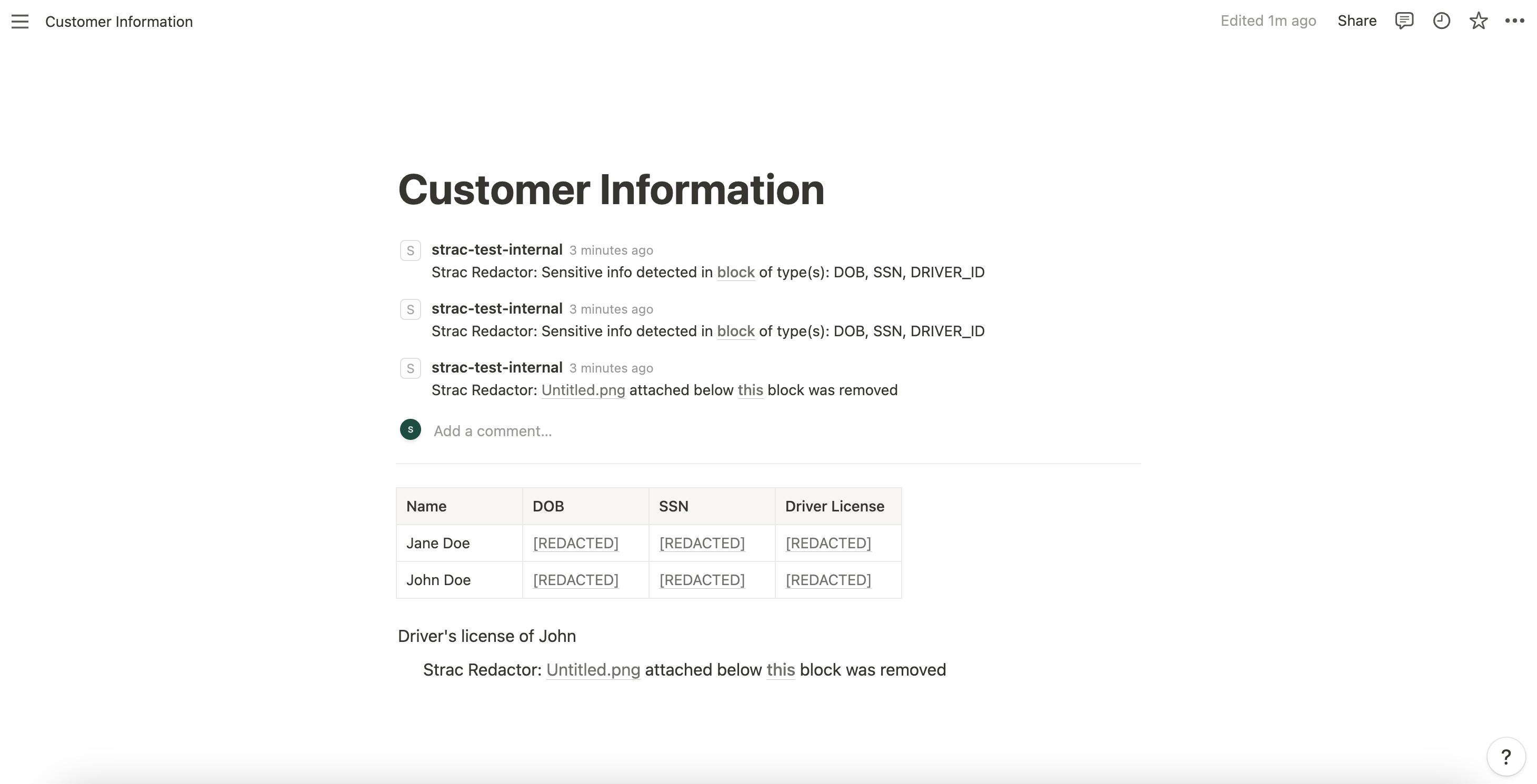
    Strac PCI Redactor SharePoint

    How to Automatically Redact (PCI) Credit Card Numbers in SharePoint with Strac

    Strac continuously monitors SharePoint libraries and synced OneDrive folders for PCI data. The platform scans uploaded files, edits, new versions, shared links, and bulk imports. Once PCI is detected, Strac applies content-aware redaction instantly, replacing sensitive data with masked or obfuscated text.

    How Strac works:

    • Scans new and existing SharePoint files
    • Applies PCI redaction before users open the file
    • Logs every redaction with timestamps for audits
    • Supports custom PCI detection rules
    • Uses OCR for images and PDFs
    • Eliminates PCI across the entire document lifecycle
    • Requires zero agents and deploys in minutes

    Real Examples of (PCI) Credit Card Numbers Redaction in SharePoint

    Example 1 — Invoice with full credit card number
    Strac redacts the PAN inside the PDF instantly.

    Example 2 — Screenshot of a customer’s credit card
    OCR identifies the numbers and redacts them inside the image.

    Example 3 — CSV export with bank account + routing numbers
    Strac redacts all PCI fields but keeps column formatting intact.

    Example 4 — Scanned authorization form
    Strac detects handwritten and printed PCI data and redacts it.

    Strac protects every PCI format across every SharePoint workflow.

    Why Strac Is the Best Way to Redact (PCI) Credit Card Numbers in SharePoint

    • Works across SharePoint, OneDrive, Teams, Outlook, Gmail, Slack, Salesforce, Jira, Confluence, and GenAI tools
    • Supports PCI, PII, PHI, bank accounts, IBANs, routing numbers, secrets, and documents
    • Real-time + historical scanning
    • OCR for images, screenshots, PDFs, forms
    • Context-aware detection minimizes noise
    • Fastest agentless deployment in the market
    • Enterprise-grade audit logs and compliance reporting

    🌶️Spicy FAQs on How to Redact (PCI) Credit Card Numbers in SharePoint

    Does SharePoint natively redact credit card numbers?

    No. SharePoint can restrict access but cannot scan or redact PCI inside files.

    Can Strac redact PCI inside PDFs, scans, and images?

    Yes. Strac’s OCR engine identifies PCI and redacts it automatically.

    Does this help with PCI DSS compliance?

    Yes. Strac supports PCI DSS requirements for data masking, storage minimization, audit logging, and redaction.

    Can Strac redact PCI in synced OneDrive folders?

    Yes. OneDrive sync content is included, ensuring files never leave desktops with raw PCI data.

    Can Strac find PCI already stored in old SharePoint libraries?

    Yes. Historical scanning is fully supported.

    Try Strac for SharePoint (PCI) Credit Card Numbers Redaction & DLP

    Strac helps you automatically detect, classify, and redact credit card numbers and bank account information across SharePoint files, folders, and document libraries—without slowing collaboration.

    Discover & Protect Data on SaaS, Cloud, Generative AI
    Strac provides end-to-end data loss prevention for all SaaS and Cloud apps. Integrate in under 10 minutes and experience the benefits of live DLP scanning, live redaction, and a fortified SaaS environment.
    Users Most Likely To Recommend 2024 BadgeG2 High Performer America 2024 BadgeBest Relationship 2024 BadgeEasiest to Use 2024 Badge
    Trusted by enterprises
    Discover & Remediate PII, PCI, PHI, Sensitive Data

    Latest articles

    Browse all

    Get Your Datasheet

    Thank you! Your submission has been received!
    Oops! Something went wrong while submitting the form.
    Close Icon