SharePoint sensitivity labels require content detection—but SharePoint cannot detect PII such as SSNs, emails, names, or ID numbers.
PII enters SharePoint through HR forms, spreadsheets, ID photos, contracts, customer lists, and synced OneDrive content.
Labeling PII is essential for GDPR, CCPA, HIPAA, and global privacy frameworks.
Manual labeling fails because PII is embedded in PDFs, scans, images, spreadsheets, and multi-format attachments.
Strac automatically detects, classifies, and labels PII in SharePoint—across files, folders, libraries, historical content, and synced OneDrive locations.
SharePoint supports sensitivity labels, but cannot recognize PII on its own. It cannot apply labels automatically, because it lacks deep content inspection and PII detection.
SharePoint limitations include:
No automatic classification of personal data
No detection of PII inside PDFs, images, scans, or spreadsheets
No OCR for screenshots or ID documents
No PII-driven labeling workflows
No labeling based on GDPR/CCPA rules
No historical labeling support
No metadata enrichment for privacy audits
This leaves most PII in SharePoint unlabeled and unprotected.
✨What PII (Personal Data) Classification Looks Like Inside SharePoint
PII appears in nearly every department’s content. Files requiring labeling include:
HR onboarding and employee files
Customer intake forms
Scanned passports, IDs, and driver’s licenses
Spreadsheets containing names and emails
Address lists and contact directories
Payroll documents and tax forms
Medical identifiers in administrative documents
PDF contracts containing personal data
Screenshots from internal systems
ZIP folders containing mixed PII documents
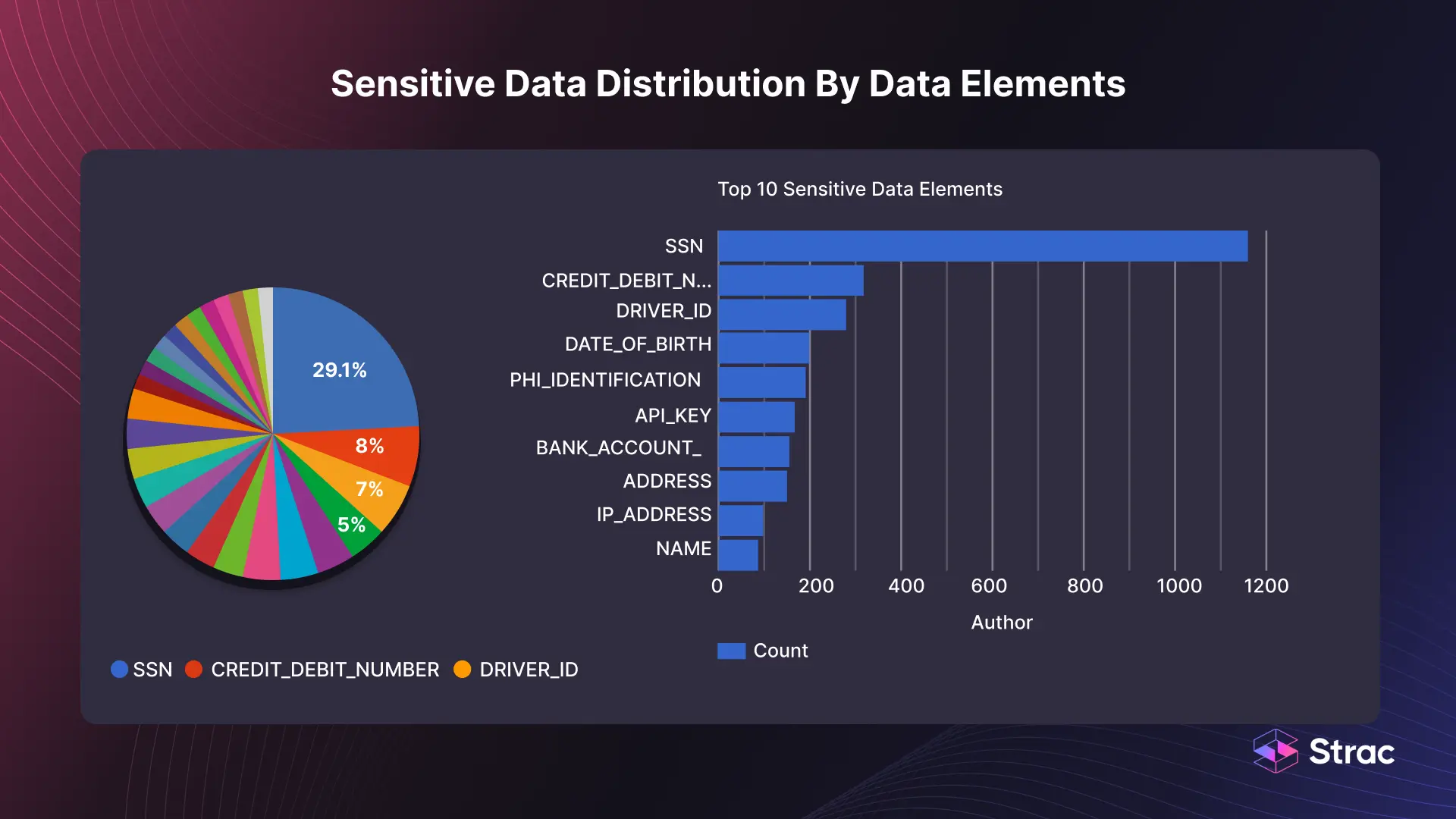
Strac detects and labels PII such as:
Names
Phone numbers
Email addresses
Physical addresses
SSNs and national ID numbers
Birthdates
Passport and license numbers
Tax identifiers
Contact info inside spreadsheets
PII inside images and multi-layer PDFs
Classification applies consistently across all locations.
Strac Data Classiffiacton
✨What It Means to Label PII (Personal Data) in SharePoint
Labeling PII is more than tagging a document—it enforces governance and compliance. Once labeled, organizations can:
Control access to sensitive documents
Prioritize high-risk PII content
Prevent unauthorized sharing
Apply retention and deletion rules
Trigger alerts and remediation
Feed labels into Microsoft Purview
Generate audit-ready logs
Ensure consistent compliance across departments
Because SharePoint cannot detect PII, organizations must rely on automated solutions to apply labels accurately and consistently.
How to Automatically Label PII (Personal Data) in SharePoint with Strac
Strac detects PII across documents, PDFs, spreadsheets, and images—and automatically applies accurate labels to each file.
How Strac labeling works:
Scans every file uploaded or modified
Detects PII using ML + OCR + NLP
Applies structured labels instantly
Updates metadata for privacy audits
Supports custom classification categories
Relabels files when new PII appears
Labels files across all SharePoint sites and libraries
Works seamlessly with OneDrive content
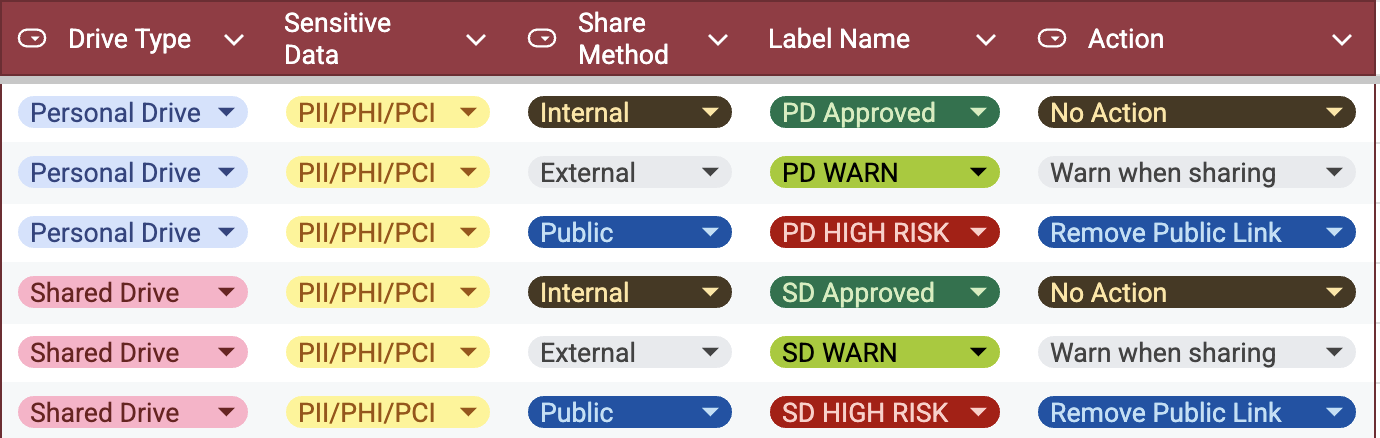
Organizations can configure:
Standard PII labels
High-risk PII labels (e.g., SSNs)
Department-specific labels
Retention rules tied to labels
Auto-redaction or auto-delete based on labels
This turns SharePoint into a governed, compliant repository instead of an uncontrolled storage space.
Real Examples of PII (Personal Data) Labeling in SharePoint
Example 1 — Employee onboarding form with address + SSN Strac applies a “High Sensitivity – PII” label automatically.
Example 2 — Customer list spreadsheet Names, emails, and phone numbers trigger a PII classification tag.
Example 3 — Scanned ID document uploaded to OneDrive OCR detects ID numbers and applies the correct label.
Example 4 — Contract with addresses and personal details Strac labels the PDF and updates metadata instantly.
Each label is logged for audit readiness.
Why Strac Is the Best Way to Label PII (Personal Data) in SharePoint
Automatic PII classification across SharePoint + OneDrive
AI + OCR detection for images, scans, PDFs, spreadsheets
Works with Microsoft Purview sensitivity labels
Real-time + historical scanning
Zero-agent deployment
Full audit trails for compliance teams
Supports GDPR, CCPA, HIPAA, FERPA, GLBA, and more
Spicy FAQs on How to Label PII (Personal Data) in SharePoint
Does SharePoint automatically label PII?
No. SharePoint cannot detect personal data and therefore cannot auto-label it.
Can Strac label PII inside images and scanned IDs?
Yes. OCR extracts PII and applies the correct labels.
Can labels trigger automated actions?
Yes. Labels can trigger redaction, blocking, deletion, or alerts.
Does Strac support Microsoft Purview?
Yes. Strac can automatically initiate Purview labels after detecting PII.
Can Strac label historical documents?
Yes. Strac can scan and label all existing content across libraries.
Try Strac for SharePoint PII (Personal Data) Labeling & DLP
Strac helps you automatically detect, classify, and label personal data (PII) across SharePoint libraries, folders, and synced OneDrive locations—ensuring data governance, privacy compliance, and complete visibility.
Discover & Protect Data on SaaS, AI, MCP, Endpoints & Cloud
Strac provides end-to-end data loss prevention for all SaaS and Cloud apps. Integrate in under 10 minutes and experience the benefits of live DLP scanning, live redaction, and a fortified SaaS environment.


.avif)


.gif)


.webp)