How to Label PCI Credit Card Numbers in Google Drive Automatically
Learn how to automatically detect and label credit card numbers (PCI data) in Google Drive using Strac’s real-time DLP engine for classification and compliance monitoring.
1. Google Drive cannot automatically classify or label PCI data across files, PDFs, or images.
2. PCI appears in Drive through invoices, billing exports, scanned receipts, and customer-uploaded documents.
3. Strac detects PCI instantly and applies automatic labels to files, folders, and Shared Drives for compliance and monitoring.
Google Drive is used for financial operations, billing workflows, and support documentation; but it does not identify PCI data or label files accordingly. Without classification labels, sensitive card information can be mismanaged, overshared, or improperly retained. PCI DSS requires organizations to identify and track where card numbers exist to control exposure.
Strac provides automated PCI labeling across Google Drive; helping teams classify at scale, track compliance posture, and take appropriate remediation actions.
✨Why Google Drive Cannot Reliably Label (PCI) Credit Card Numbers
Google Drive lacks native PCI classification; cannot scan file contents for card numbers; and cannot apply sensitivity labels or metadata tags. This makes it difficult for organizations to know where PCI is stored; what files are at risk; or whether data retention policies are being followed. Even Google's native labels cannot classify content based on PCI-specific rules.
Google Drive lacks: • PCI-specific classification rules; • File-level or folder-level labeling; • Real-time labeling during upload; • OCR scanning for visual content; • Compliance dashboards for PCI data; • Bulk classification or tag automation.
Strac delivers PCI labeling across entire Drive environments using automated scanning and classification.
Slack Data Labeling
What (PCI) Credit Card Numbers Labeling Looks Like Inside Google Drive
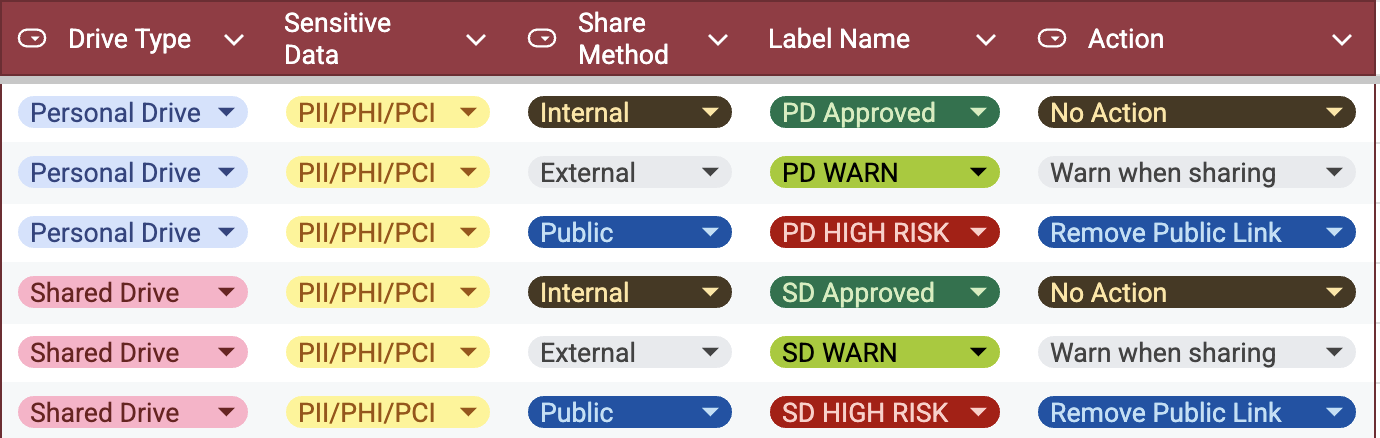
PCI labeling helps organizations identify sensitive files instantly and track how card data flows across cloud storage environments. Labels make it easy to group PCI files; apply retention rules; escalate remediation; or prevent external sharing.
Strac labels files containing: • Full credit card numbers (PANs) • PDFs with cardholder information • Payment logs • Billing exports from CRM systems • Screenshots of checkout pages • Customer-uploaded receipts • Images containing printed card numbers • Embedded card data in spreadsheets
Labels are also used to trigger: • Alerts • Redaction • Blocking • Auto-deletion • Access restrictions
✨How (PCI) Credit Card Numbers Labeling Works in Google Drive with Strac
Strac continuously scans Drive using AI, PCI-specific patterns, and OCR for images and PDFs. When a file contains card information, Strac applies a label; updates risk dashboards; and optionally triggers alerts or remediation.
Labeling workflows include: • Automatic labeling during upload • Retroactive labeling across historical files • Folder-level labeling for bulk classification • Tag-based alerts to Slack, SIEM, or email • Labels that tie into redaction or deletion workflows • Datapoint mapping across Drive for PCI audits
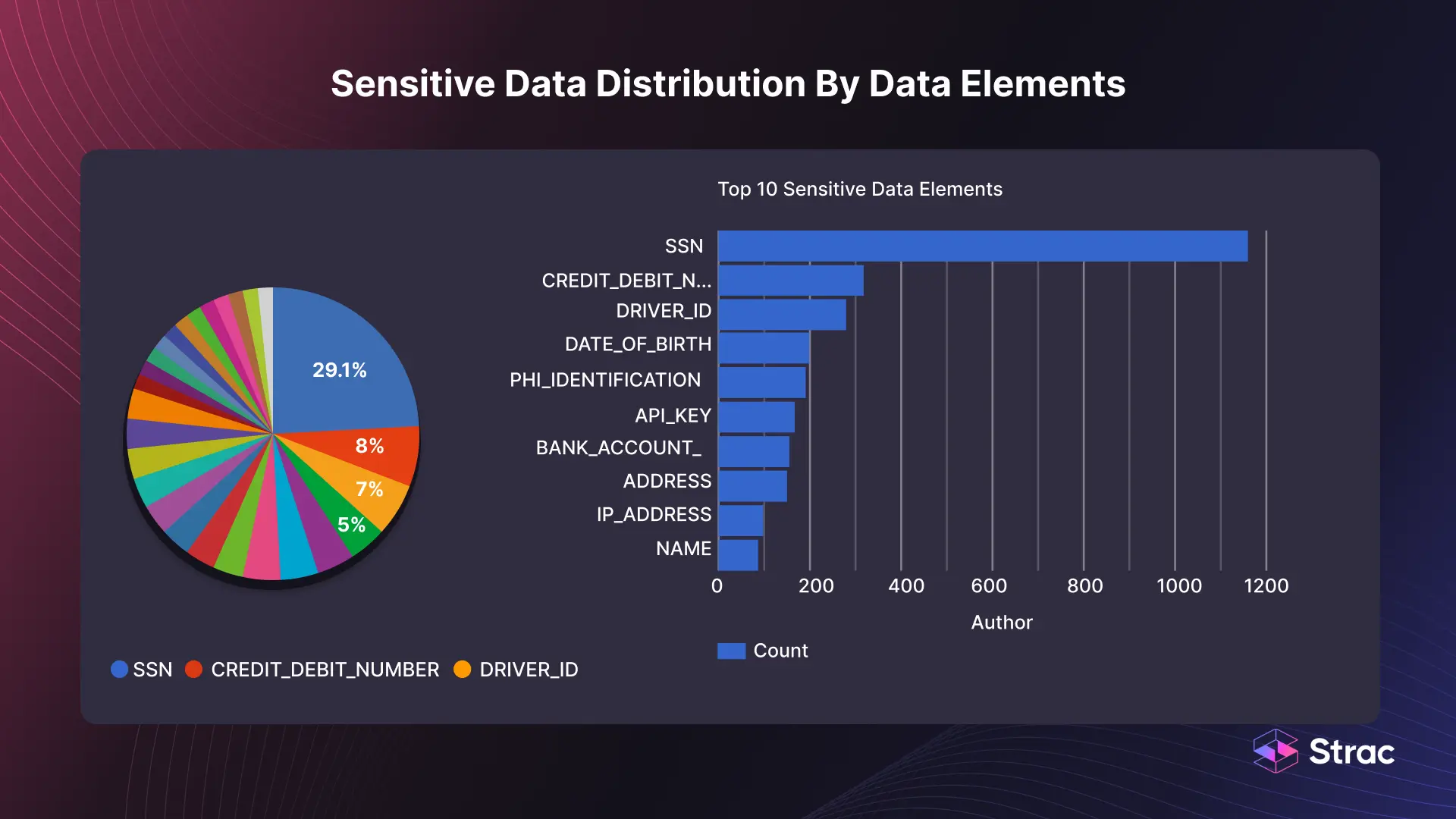
These labels create an inventory of all PCI data inside Drive; essential for PCI DSS compliance.
How to Configure (PCI) Credit Card Numbers Labeling in Google Drive with Strac
Connect Google Drive or Shared Drive to Strac.
Enable PCI Detection in the Strac policy dashboard.
Select Label as the remediation action.
Configure the naming convention for PCI labels.
Apply policies to specific folders, user drives, or Shared Drives.
Enable OCR for PDFs and images.
Use Strac dashboards to monitor PCI-labeled files.
Trigger automated follow-up actions (alert, redact, delete) when needed.
✨Why Strac Is the Best Way to Label (PCI) Credit Card Numbers in Google Drive
Strac provides accurate PCI labeling using AI, OCR, and context-aware detection. Labels help teams classify high-risk files, comply with PCI DSS requirements, and automate downstream remediation workflows. Unlike native tools, Strac performs continuous scanning and labeling across all Drive surfaces.
Strac offers: • Real-time PCI classification and tagging • OCR for scanning complex documents • Historical PCI data labeling • Automated workflows tied to labels • Enterprise risk dashboards • PCI DSS audit readiness • Fast deployment without agents
Strac Data Classification and Labeling
🌶️Spicy FAQs on How to Label (PCI) Credit Card Numbers in Google Drive
Does Google Drive automatically label PCI files?
No; Drive cannot detect PCI patterns or apply sensitivity labels.
Can Strac label PCI inside PDFs and scanned images?
Yes; OCR supports image-based PCI detection.
Can labels trigger alerts or remediation?
Yes; labels can activate automated workflows.
Are PCI labels required for compliance?
Labeling supports asset tracking and PCI DSS evidence.
Can Strac label historical PCI across Shared Drives?
Yes; Strac scans and labels files retroactively.
Try Strac for Google Drive (PCI) Credit Card Numbers Labeling
Strac classifies and labels PCI data across Google Drive; enabling you to locate, prioritize, and remediate high-risk files with confidence.
Discover & Protect Data on SaaS, AI, MCP, Endpoints & Cloud
Strac provides end-to-end data loss prevention for all SaaS and Cloud apps. Integrate in under 10 minutes and experience the benefits of live DLP scanning, live redaction, and a fortified SaaS environment.


.webp)








.avif)


.gif)
