How to Delete PCI Credit Card Numbers in Google Drive Automatically
Learn how to automatically delete credit card numbers (PCI data) from Google Drive using Strac’s real-time DLP policies for documents, images, spreadsheets, and shared drives.
Google Drive does not automatically delete files containing PCI data such as credit card numbers, receipts, invoices, or payment exports.
PCI often enters Drive through screenshots, PDFs, financial exports, and customer-uploaded documents.
Strac detects PCI in real time and automatically deletes PCI-containing files from Drive to maintain PCI DSS compliance.
Google Drive stores everything unless deleted manually; which means card numbers in invoices, receipts, or payment logs can remain accessible across teams for months or years. Storing unprotected primary account numbers (PANs) violates PCI DSS; and manual deletion is slow, inconsistent, and unreliable. PCI must be removed immediately from any cloud storage system without exception.
Strac solves this by detecting and automatically deleting PCI-containing files from Drive in real time; ensuring sensitive payment data never remains stored.
Why Google Drive Cannot Reliably Delete (PCI) Credit Card Numbers Data
Google Drive does not scan uploaded files for PCI; does not detect credit card numbers in PDFs or images; and does not delete files automatically when they contain sensitive data. Users continue to share, sync, and store billing documents or payment information without realizing the compliance risk.
Google Drive lacks: • PCI-aware auto-delete workflows; • Automatic removal of PCI-containing files; • OCR detection for scans or screenshots; • Folder-level PCI enforcement; • Bulk deletion for historical PCI; • PCI DSS-aligned audit logs.
Strac provides the deletion engine Google Drive is missing; ensuring PCI never stays in Drive longer than a few seconds.
✨What (PCI) Credit Card Numbers Auto-Deletion Looks Like Inside Google Drive
PCI can hide inside any file format stored in Drive; and deletion must detect credit card data regardless of structure or layout. Strac scans the file content using AI and OCR; identifies visible or embedded PCI; and deletes files instantly.
Strac auto-deletes files containing: • Full card numbers (PANs) • Billing PDFs with visible card details • Screenshots of checkout pages • CSV files with card numbers • CRM or ticketing exports • Dispute or fraud investigations containing PANs • Customer-uploaded images or PDFs • Logs or backups showing card numbers
Deletion applies to: • My Drive • Shared Drives • Publicly shared folders • Synced folders • Uploaded files • Files created by apps or integrations
Files are deleted instantly; and logs are recorded for compliance.
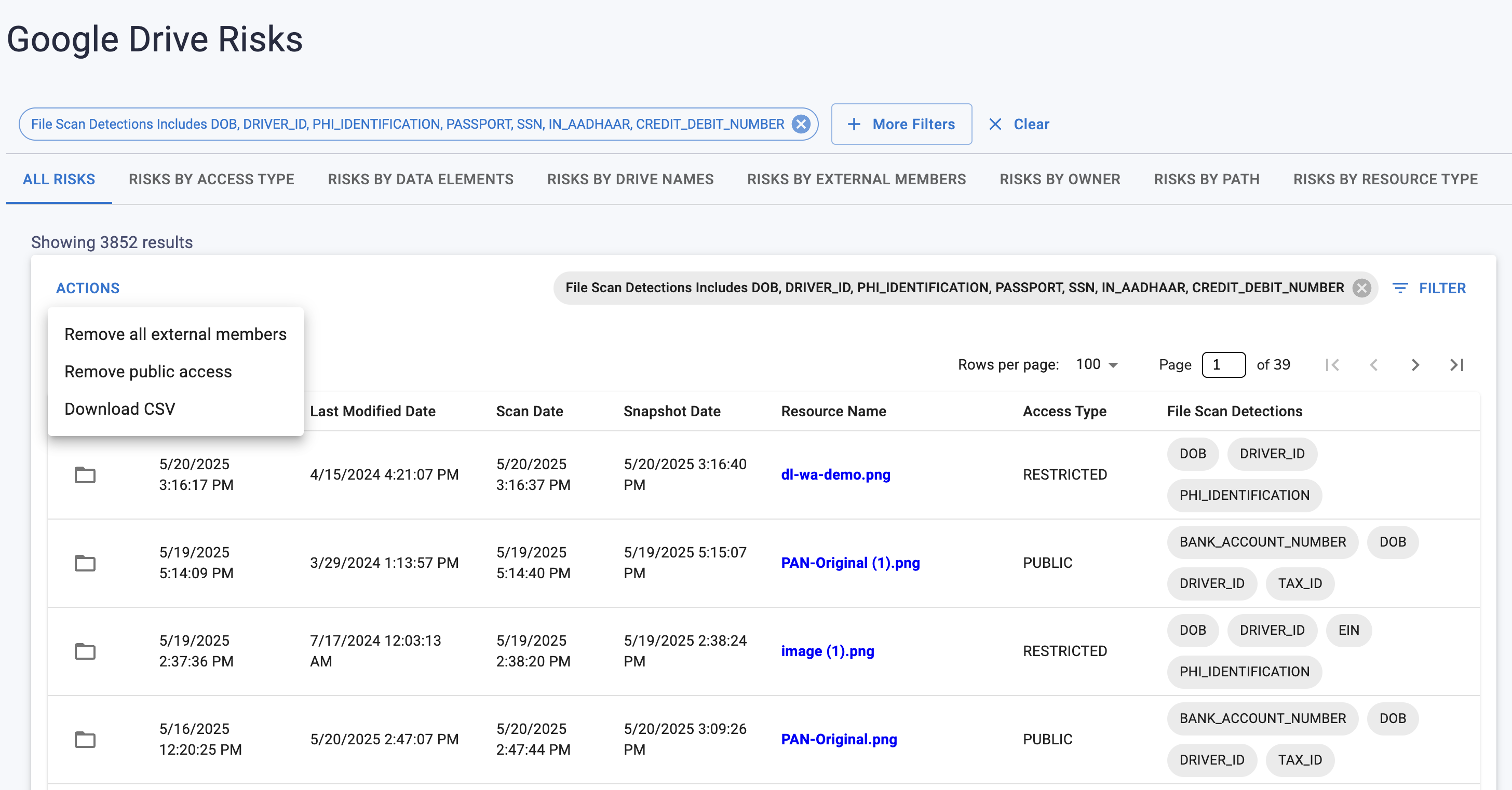
Strac Google Drive DLP
How (PCI) Credit Card Numbers Auto-Deletion Works in Google Drive with Strac
Strac integrates at the Drive API layer; scans content in real time; and applies PCI detection patterns, OCR scanning, and context-aware logic. When PCI is found, the file is immediately deleted to prevent unprotected storage of payment card data.
Deletion workflows include: • Immediate removal of PCI-containing files; • Optional replacement with a redacted version; • Alerts to Slack or email; • SIEM notifications for SOC teams; • Event logging for PCI DSS audits; • Removal of public or external access if needed.
This ensures no unauthorized PCI remains in the cloud.
How to Configure (PCI) Credit Card Numbers Auto-Deletion in Google Drive with Strac
Connect Google Drive to Strac with OAuth.
Enable PCI Detection in the policy dashboard.
Select Delete as the remediation action.
Enable OCR scanning for PDFs, images, and screenshots.
Apply policies to My Drive, Shared Drives, and synced folders.
Configure alerts to Slack, SIEM, or email for deleted files.
Review deletion logs to support PCI DSS controls.
✨Why Strac Is the Best Way to Delete (PCI) Credit Card Numbers in Google Drive
Strac eliminates PCI risk by removing credit card data from Drive before unauthorized users can access it. With intelligent detection, OCR scanning, and real-time deletion, Strac ensures Drive remains PCI-free and audit-ready.
Strac offers: • Instant PCI auto-deletion; • OCR-powered file cleanup; • Bulk remediation for historical PCI; • Cross-surface detection for all Drive content; • Audit logging for PCI DSS; • Fast, no-code deployment.
Slack Google Drive DLP
🌶️FAQs on How to Delete (PCI) Credit Card Numbers in Google Drive
Does Google Drive automatically delete PCI data?
No; Drive cannot detect or delete PCI.
Can Strac delete PCI inside PDFs and images?
Yes; Strac uses OCR to detect and remove PCI.
Will users be notified when a file is deleted?
Yes; user or admin notifications can be enabled.
Does deleting PCI support PCI DSS compliance?
Yes; PCI DSS prohibits storing full PANs unprotected.
Can Strac delete historical PCI data in Drive?
Yes; Strac supports historical scanning and cleanup.
Try Strac for Google Drive (PCI) Credit Card Numbers Deletion
Strac automatically deletes PCI data from Google Drive; keeping your cloud storage PCI compliant and free of sensitive card numbers.
Discover & Protect Data on SaaS, AI, MCP, Endpoints & Cloud
Strac provides end-to-end data loss prevention for all SaaS and Cloud apps. Integrate in under 10 minutes and experience the benefits of live DLP scanning, live redaction, and a fortified SaaS environment.


.webp)






.avif)





.gif)
