How to Block PCI Credit Card Numbers in Google Drive Automatically
Learn how to automatically block credit card numbers (PCI data) in Google Drive using Strac’s real-time DLP engine to prevent sensitive files from being stored or shared.
Google Drive cannot block files or documents containing credit card numbers before they are stored or shared.
PCI data enters Drive through uploaded invoices, PDFs, screenshots, and payment exports.
Strac automatically blocks PCI-containing files from being uploaded, synced, or shared; preventing PCI DSS violations.
Google Drive stores massive amounts of financial and operational data; however it has no built-in mechanism to block card numbers before they are uploaded or shared. That means invoices with full PANs, Stripe/Shopify exports, or screenshots containing full card details can enter Drive and become accessible across teams or externally. This violates PCI DSS rules because unprotected PANs cannot be stored in shared repositories.
Strac prevents this by blocking files that contain PCI data before they reach Drive folders or Shared Drives.
Why Google Drive Cannot Reliably Block (PCI) Credit Card Numbers
Google Drive does not inspect file contents before upload; cannot recognize credit card patterns; and cannot stop a file from being saved if it contains PCI. Files with PANs can spread across shared folders; become synced to user devices; or be shared externally without visibility.
Google Drive lacks: • PCI detection during upload; • Pre-storage content scanning; • OCR for images containing card numbers; • Real-time blocking workflows; • Misconfiguration detection for public or external sharing; • PCI DSS audit logs.
Strac solves this by scanning the content of files before they reach Drive; blocking uploads or shares if PCI is detected.
What (PCI) Credit Card Numbers Blocking Looks Like in Google Drive
PCI often enters Drive from operational workflows; and blocking must detect PANs across all file formats. Strac identifies PCI in text, spreadsheets, images, PDFs, and zipped folders; then blocks uploads or sharing actions to ensure compliance.
Strac blocks files containing: • PANs such as 4242 4242 4242 4242; • Full credit card numbers in spreadsheets; • Screenshots containing card details; • Payment exports from CRM or billing tools; • PDFs with cardholder data or receipts; • Transaction logs with visible card numbers; • Customer disputes or chargeback documents.
When blocking occurs, Strac: • Prevents the file from being stored in Drive; • Notifies the uploader; • Alerts admins or security teams; • Logs the event for PCI DSS compliance.
Blocking applies across: • My Drive • Shared Drives • Team Drives • Synced folders • Uploads via web or mobile • File sharing events • Third-party tool integrations
✨How (PCI) Credit Card Numbers Blocking Works in Google Drive with Strac
Strac integrates with Google Drive using API-level scanning; performing deep content inspection before files are stored or shared. Using AI, OCR, and PCI detection patterns, Strac ensures no unprotected card numbers enter Drive.
Blocking workflows include: • Pre-upload PCI scanning; • Preventing file creation when PCI is detected; • Blocking external sharing of PCI-containing files; • Notifying admins or security channels; • Triggering SIEM alerts; • Logging events for PCI DSS evidence; • Optional redaction-first or delete-first workflows.
This prevents PCI from being stored in Drive while maintaining operational continuity.
Slack Google Drive DLP
How to Configure (PCI) Credit Card Numbers Blocking in Google Drive with Strac
Connect Google Drive to Strac using OAuth.
Enable PCI Detection policies.
Set Block as the remediation action.
Configure user notifications for blocked uploads.
Enable OCR to block PCI inside images and scanned PDFs.
Apply policies to My Drive, Shared Drives, or specific folders.
Route blocking events to Slack, email, or SIEM.
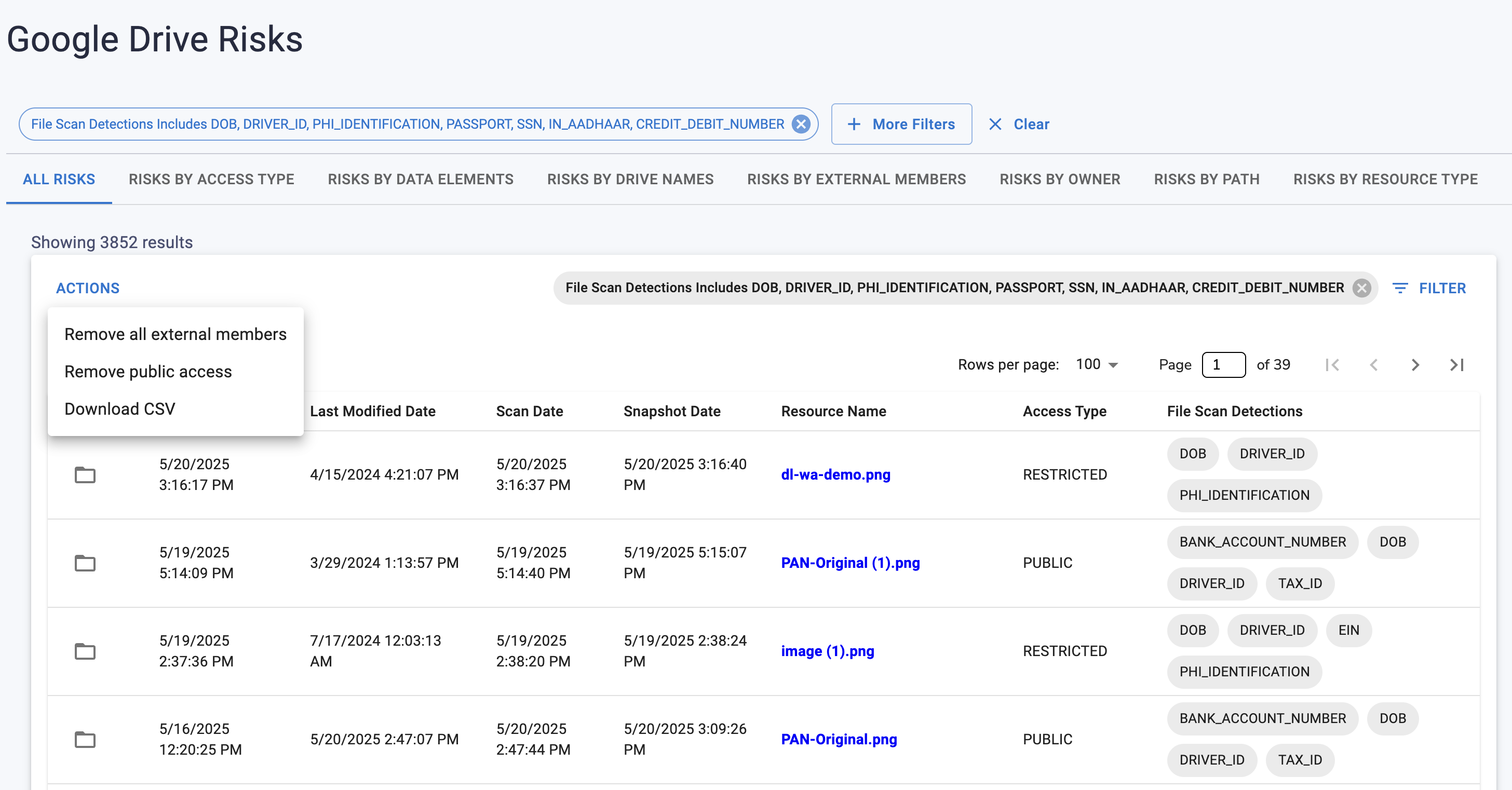
Review PCI events in the Strac dashboard.
🎥Why Strac Is the Best Way to Block (PCI) Credit Card Numbers in Google Drive
Strac prevents PCI from entering Drive entirely. With AI-powered scanning, OCR, contextual PCI logic, and pre-upload blocking, Strac ensures your Google Drive remains compliant with PCI DSS and free of sensitive customer payment data.
Strac delivers: • Real-time PCI blocking; • OCR-based scanning for images and PDFs; • Prevention of PCI storage in My Drive and Shared Drives; • External sharing controls; • Compliance-grade logs for audits; • Fast, no-code deployment; • Broad app coverage beyond Drive.
🌶️FAQs on How to Block (PCI) Credit Card Numbers in Google Drive
Does Google Drive block credit card numbers?
No; Drive cannot block PCI or inspect files for sensitive data.
Can Strac block PCI inside images and PDFs?
Yes; OCR allows blocking of scanned or visual content.
Does PCI blocking prevent Drive sync issues?
Yes; blocked files never enter Drive or user sync folders.
Can Strac block PCI in Shared Drives and folders used by contractors?
Yes; policies apply to all Drive surfaces.
Does blocking support PCI DSS compliance?
Yes; PCI DSS requires preventing unauthorized storage of PANs.
Try Strac for Google Drive (PCI) Credit Card Numbers Blocking
Strac ensures PCI never reaches Google Drive; protecting sensitive customer data and maintaining PCI DSS compliance.
Discover & Protect Data on SaaS, AI, MCP, Endpoints & Cloud
Strac provides end-to-end data loss prevention for all SaaS and Cloud apps. Integrate in under 10 minutes and experience the benefits of live DLP scanning, live redaction, and a fortified SaaS environment.


.webp)






.avif)





.gif)
