Data Redaction Software: The Complete Guide to Protecting Sensitive Information
Learn what data redaction software does in 2026, how automatic redaction works across files, SaaS apps, screenshots, tickets, and AI tools, and what to look for in a modern enterprise redaction solution.
· Data redaction software removes or maskssensitive information such as PII, PHI, PCI, credentials, and internalbusiness data before it gets exposed in files, chats, tickets, cloud apps, orAI tools.
· Manual redaction still exists, but it doesnot scale. Modern teams need automatic redaction across PDFs, screenshots,spreadsheets, support tickets, SaaS apps, and browser-based workflows.
· The best data redaction software does morethan find sensitive data. It should also take action in real time byredacting, masking, blocking, quarantining, or deleting risky content.
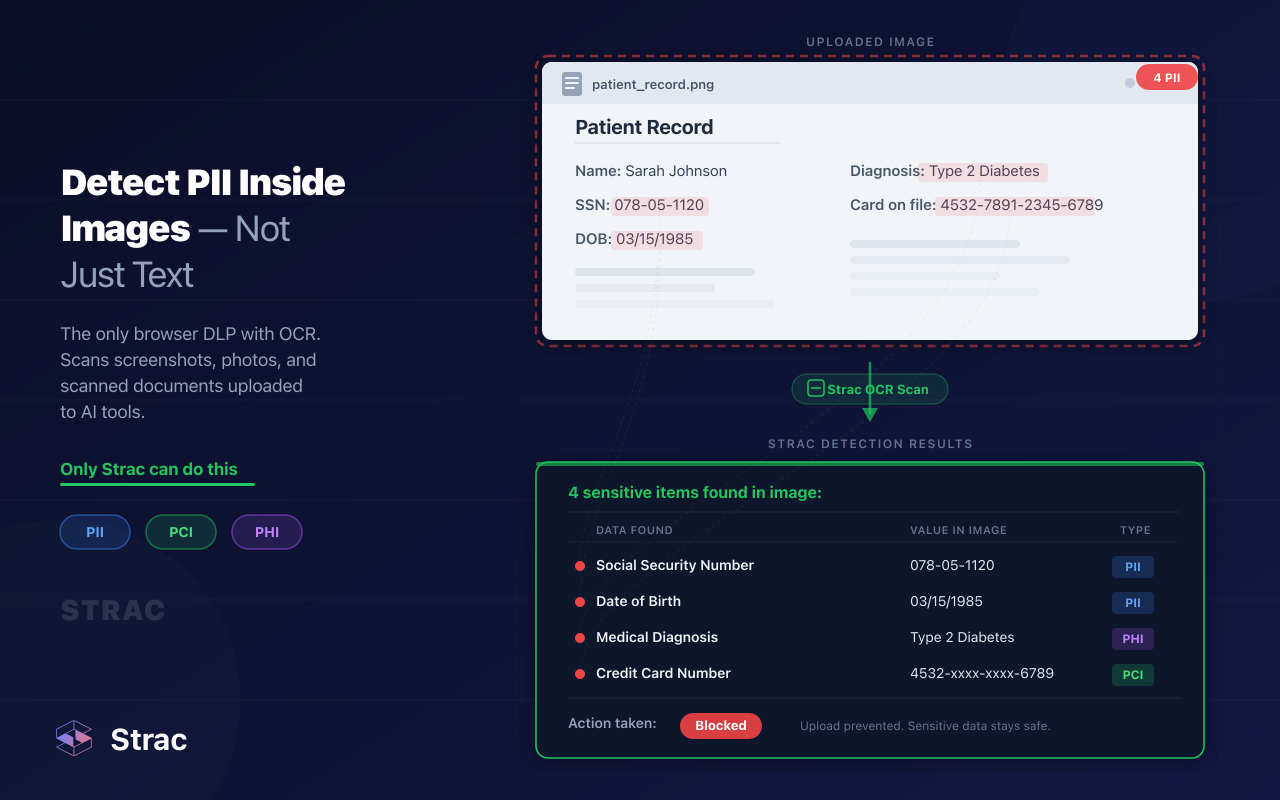
· OCR and content-aware detection matter.Sensitive data often lives inside images, scanned forms, support attachments,and messy unstructured files where regex alone falls short.
· Modern redaction is now part of day-to-daydata security. It helps reduce data exposure, supports HIPAA, PCI DSS,GDPR, and SOC 2 requirements, and keeps teams from leaking sensitive data intosupport tools, shared drives, and AI apps.
A few years ago, “redaction software” mostly meant a tool used by legal teams to black out names or account numbers in a PDF before sharing it. That still happens. But in 2026, that is only a small part of the problem.
Sensitive data now moves through support tickets, Slack messages,Google Drive folders, screenshots, spreadsheets, AI prompts, CRM notes, browser uploads, and internal documents shared across dozens of SaaS tools. A customer sends a credit card screenshot to support. A rep pastes a patient ID into a ticket. A sales team uploads a spreadsheet full of customer records into an AI tool to summarize it. None of that looks like a traditional redaction workflow, but it is exactly where sensitive data gets exposed.
That is why data redaction software matters now. It is no longer just about preparing documents for disclosure. It is about reducing the chance that sensitive data spreads across the business in the first place.
When done well, data redaction software helps organizations:
remove or mask sensitive information before it is shared internally or externally
reduce the risk of exposing customer, employee, patient, or payment data
clean up historical sensitive data already sitting in cloud apps and file repositories
stop support, HR, finance, and engineering workflows from becoming accidental data leak channels
support compliance efforts for HIPAA, PCI DSS, GDPR, SOC 2, and similar frameworks
What Is Data Redaction Software?
How Do You Redact Sensitive Data Automatically?
To redact sensitive data automatically, use a tool that detects regulated data (PII, PHI, PCI, secrets) and applies redaction inline across the places data lives and moves. Strac automates redaction across SaaS apps, cloud storage, endpoints, email, and AI tools — it finds sensitive data with pre-built and custom detectors, including OCR for images and documents, and redacts, masks, or removes it without manual review.
Data redaction software is a tool that detects and removes, masks, or obscures sensitive information from documents, images, chat logs, tickets, spreadsheets, records, and other content so it cannot be exposed to the wrong person, system, or destination.
Depending on the workflow, redaction can mean different things:
Permanent redaction: the sensitive text is fully removed or blacked out so it cannot be recovered
Masking: only part of the value is hidden, such as showing the last four digits of a credit card number
Tokenization or replacement: the original value is replaced with a placeholder or safe substitute
Inline sanitization: the content is cleaned automatically before it is sent, saved, or synced elsewhere
The goal is always the same: keep sensitive data from moving around in plain text when it does not need to.
✨ What Counts as Sensitive Data?
Most companies start with obvious regulated data, but modern redaction software usually needs to cover much more than that.
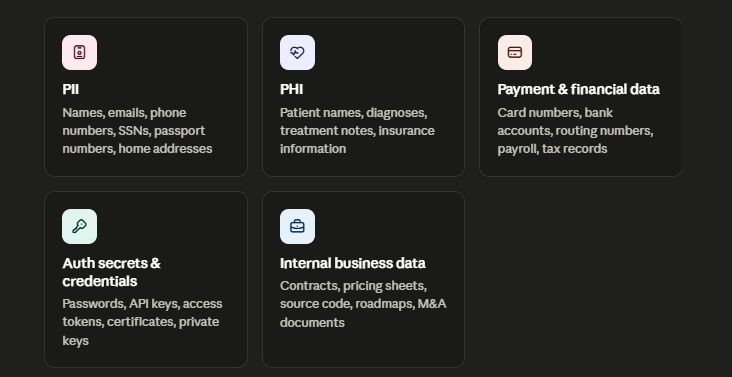
Common data types that need redaction
Personally Identifiable Information (PII) Names, email addresses, phone numbers, national IDs, passport numbers, home addresses, tax IDs, social security numbers.
Protected Health Information (PHI) Patient names, medical record numbers, diagnoses, appointment notes, treatment details, insurance information.
Payment and financial data Credit card numbers, bank account details, routing numbers, invoices, payroll records, tax documents, loan data.
Authentication secrets and credentials Passwords, API keys, access tokens, certificates, private keys, database credentials.
Internal business data Contracts, pricing sheets, customer exports, source code, product roadmaps, incident reports, M&A documents, employee files.
That last category matters more than many teams realize. A company does not need to be under HIPAA or PCI to have a serious redaction problem. Sometimes the highest-risk data is simply internal IP or customer records sitting in the wrong place.
Manual vs Automatic Data Redaction
There are two broad ways to redact data: manually or automatically.
Manual redaction
Manual redaction means a person opens a file, reviews it line by line, highlights the sensitive content, and redacts it by hand.
This is still common in legal workflows, investigations, FOIA responses, and one-off disclosure requests where every document needs human review.
Example: A legal team manually redacts witness names, addresses, and financial details from a court filing before it is sent to opposing counsel.
Where manual redaction still works well
small batches of documents
legal review workflows
one-off disclosures with lots of nuance
situations where every page needs a human decision
Where manual redaction breaks
support tickets and chat logs
large document repositories
screenshots and scanned forms
fast-moving SaaS workflows
ongoing customer support or operations teams
AI prompts, browser uploads, and shared drives
Manual redaction is not inherently bad. It is just slow, expensive, inconsistent, and impossible to scale across modern systems.
Automatic redaction
Automatic redaction software scans content, detects sensitive data based on policy, and redacts or masks it without waiting for a person to do the work manually.
Example: A healthtech company automatically redacts patient names, dates of birth, and medical IDs from support tickets, uploaded screenshots, and PDF attachments before those items are routed to an external support vendor.
Automatic redaction is what most security, compliance, and support teams actually need in 2026 because sensitive data is moving all day across systems that nobody has time to review one by one.
Benefits of automatic redaction
handles large volumes of files, tickets, and messages
reduces human error
works in real time instead of after the damage is done
supports historical clean-up of old data
makes redaction part of normal business workflows instead of a separate project
The strongest setups use automatic redaction by default, then allow human review where needed for high-stakes legal or compliance workflows.
✨ Where Sensitive Data Actually Shows Up in 2026
If you are evaluating data redaction software, this is the part that matters most. You are not buying a “PDF tool.” You are buying protection for the places where your employees and customers actually put sensitive data.
1. PDFs, Word docs, spreadsheets, and exported reports
This is still the classic redaction use case. Teams share contracts, audit exports, support reports, HR documents, loan packages, and medical forms every day. Those files often contain names, account numbers, employee data, or customer information that should not be exposed to every recipient.
2. Screenshots, scans, and image attachments
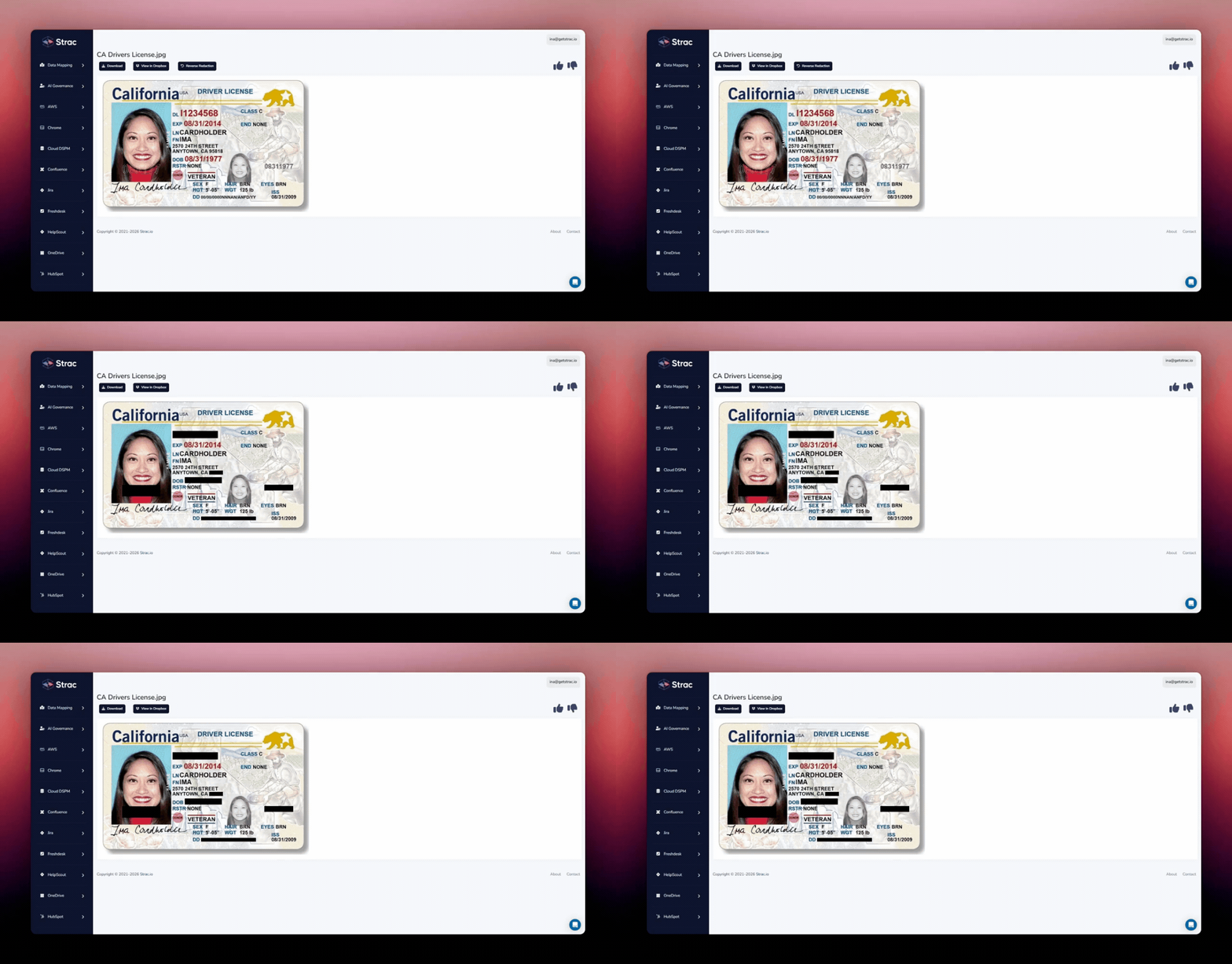
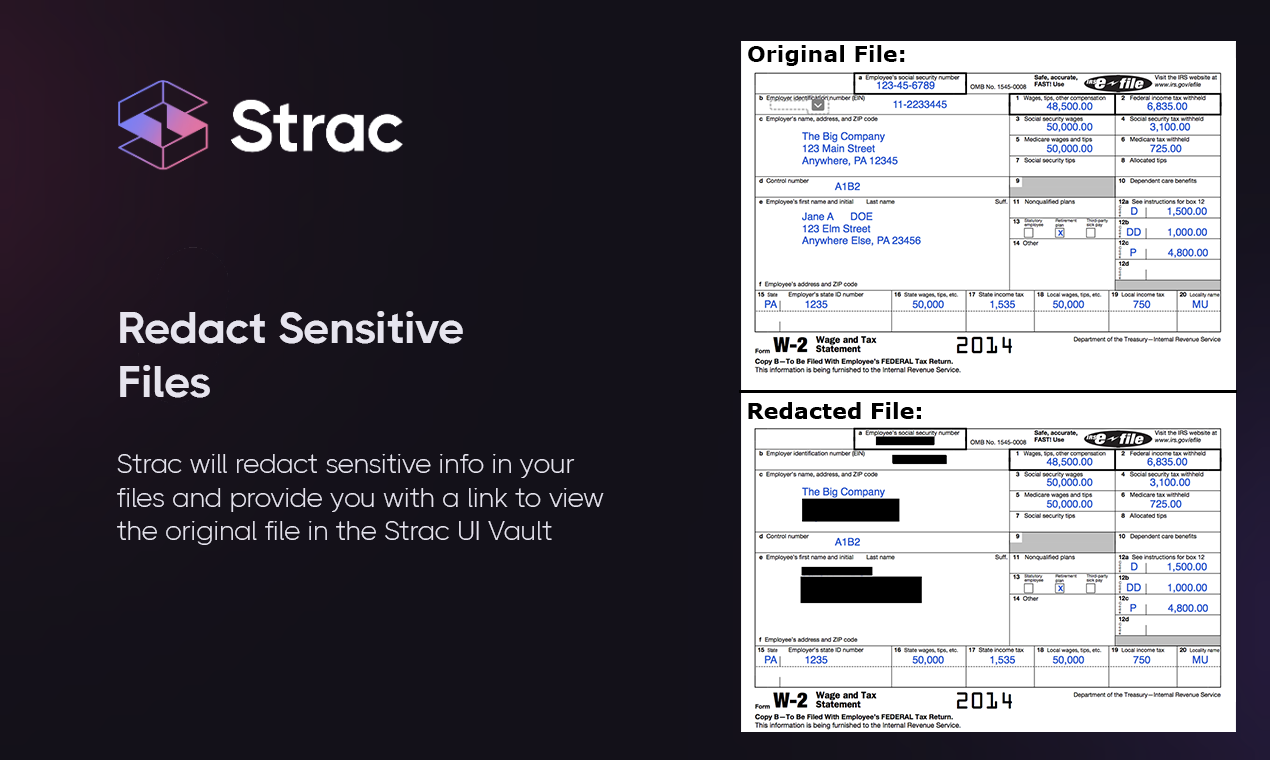
Support teams and customers constantly exchange screenshots of billing pages, medical records, admin consoles, and identity documents. Finance teams upload scans of invoices and forms. OCR is critical here because the data is often embedded inside an image, not a clean text field.
3. Support tickets and chat conversations
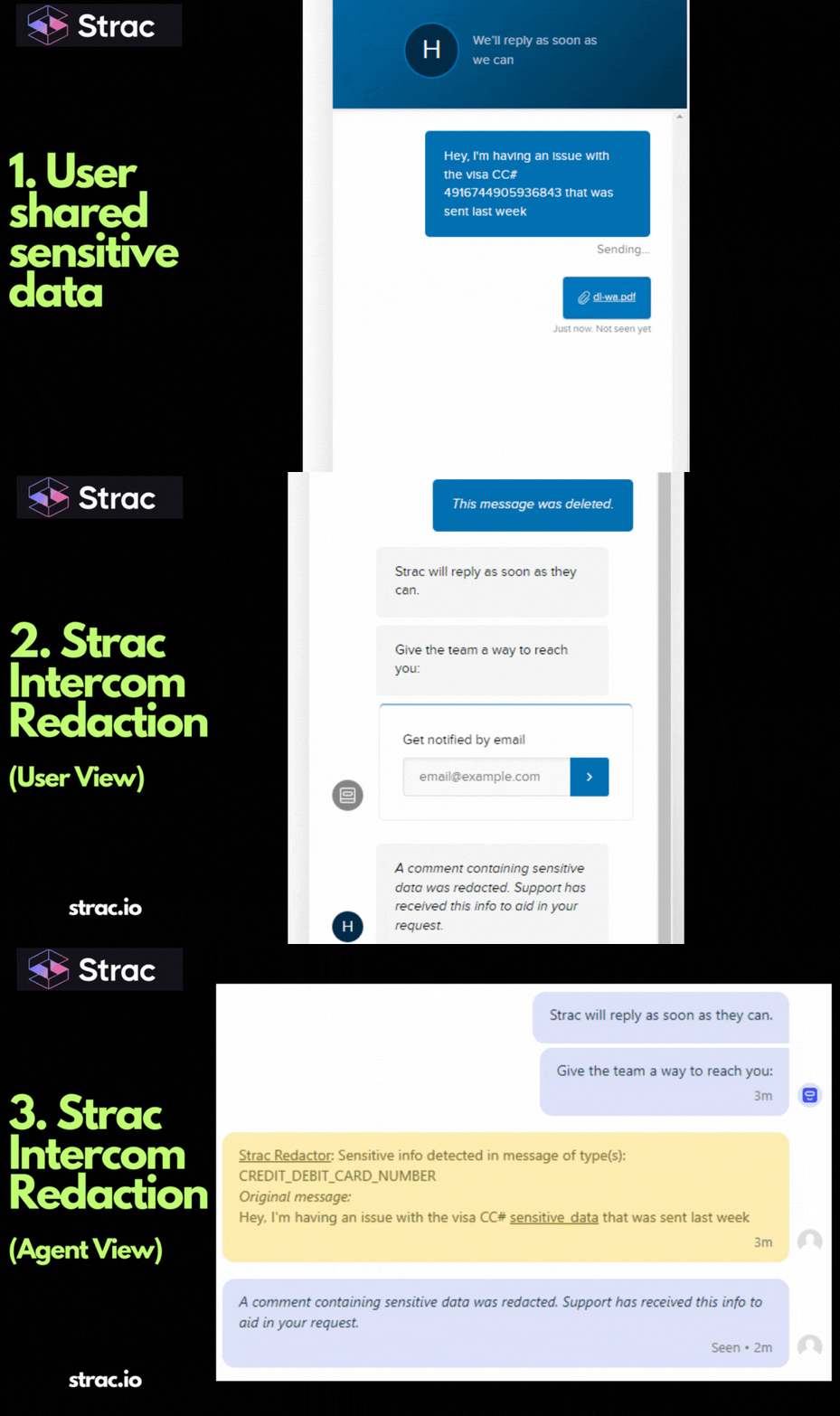
This is one of the biggest real-world redaction problems. Customers paste credit card numbers into tickets. Patients send screenshots with PHI. Internal teams discuss sensitive issues in Slack or Teams. A surprising amount of regulated data lives in support and collaboration tools that were never meant to be long-term data stores.
4. Shared cloud storage
Google Drive, OneDrive, SharePoint, Dropbox, Box, and internal file repositories become long-term dumping grounds for sensitive data. Files are copied, renamed, reshared, and forgotten. Redaction software helps not only with new files, but also with the historical mess that already exists.
5. CRM, CX, and internal business apps
Salesforce notes, Zendesk tickets, Jira issues, Confluence pages, HR records, and customer onboarding workflows often contain far more sensitive information than security teams expect. The issue is not only what gets stored there, but also who can access it later.
6. AI tools and browser-based workflows
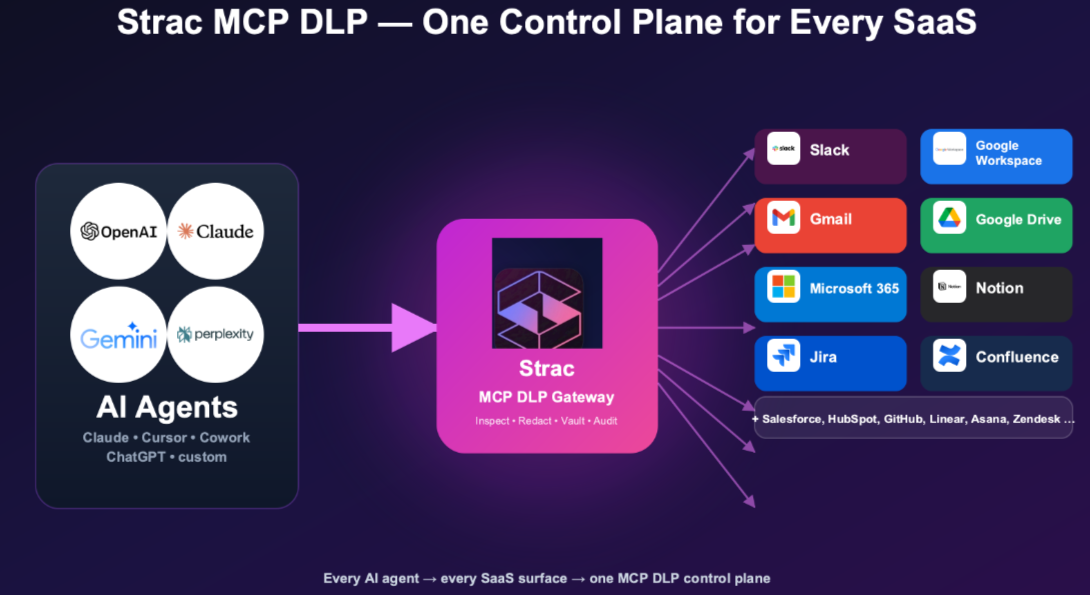
Employees now paste raw customer data into AI tools, upload screenshots into LLMs, summarize support tickets with generative AI, and use browser-based copilots for everyday work. If redaction software does not account for AI prompts, uploads, and browser workflows, it is missing one of the fastest-growing leak paths in the business.
Why Modern Teams Need More Than a PDF Redaction Tool
This is the core shift happening in the market.
A basic PDF redaction tool solves a narrow problem: “I need to hide something inside this one file.”
A modern data redaction platform solves a much bigger one: “Sensitive data keeps showing up across our systems, and we need a reliable way to detect it, clean it up, and stop it from spreading.”
That means the right solution should help with questions like:
How do we redact customer PII from support tickets automatically?
How do we clean up historical PHI sitting in shared drives?
How do we mask payment data before a ticket syncs into another system?
How do we prevent employees from dropping raw customer data into AI tools?
How do we handle screenshots, scans, and messy files, not just perfect text?
How do we show auditors that sensitive data was actually remediated?
Those are not PDF questions. They are operational security questions. That is why redaction software has become part of modern DLP, privacy, and data security programs.
🎥 How Strac Helps With Data Redaction in 2026
Strac is built for the kind of redaction problems companies actually face now, not just the old “black out a paragraph in a PDF” workflow.
Instead of treating redaction as a standalone document task, Strac helps teams find and remediate sensitive data across the places it tends to spread most: support tools, shared cloud apps, attachments, screenshots, internal systems, and day-to-day employee workflows.
Real-time redaction inside business workflows
Strac can automatically identify and redact sensitive data in environments where employees and customers exchange information every day. That includes things like support conversations, SaaS records, attachments, and shared files, rather than only static documents.
This matters because most modern redaction problems happen in live workflows, not in a legal review room.
OCR and content-aware detection for messy data
A lot of sensitive data is buried inside screenshots, scanned PDFs, spreadsheets, and unstructured text. Strac uses content-aware detection and OCR so teams can find and redact data in formats that traditional regex-heavy tools often miss.
That is especially useful for support teams, healthcare workflows, financial records, and cloud file repositories where image-based and unstructured content is common.
Historical clean-up plus ongoing protection
Redaction is not only about the next file or message. Most companies already have years of exposed data sitting in cloud storage, support systems, and internal tools.
Strac helps with both sides of the problem:
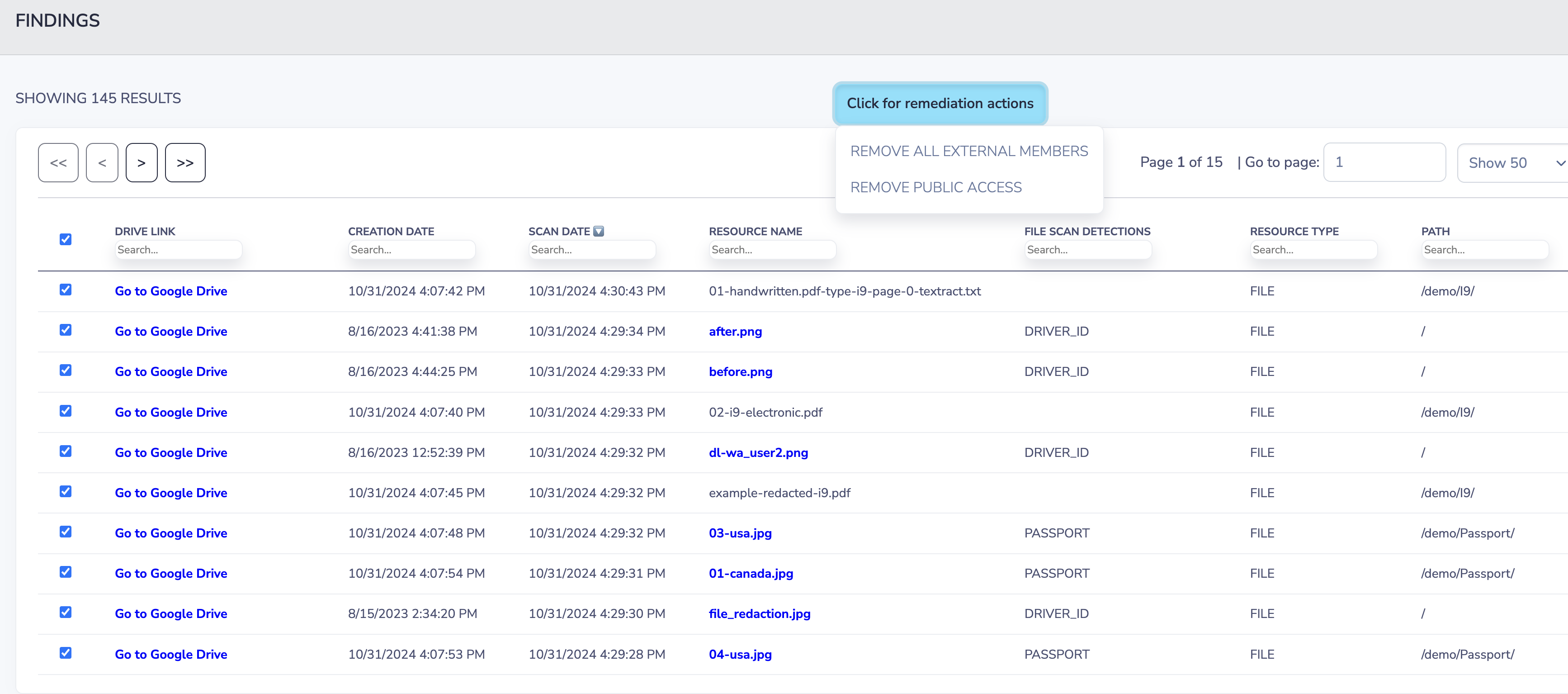
historical discovery and remediation for sensitive data that is already sitting in SaaS apps, cloud storage, or files
ongoing protection for new content moving through day-to-day workflows
More than one remediation option
Different workflows need different actions. Sometimes a value should be fully redacted. Sometimes it should be masked. Sometimes the file should be quarantined or deleted. Sometimes the action should be blocked before the data leaves the environment.
Strac supports this kind of flexible remediation so teams are not stuck with a single all-or-nothing response.
Coverage for modern leak paths
In practice, sensitive data does not stay neatly inside approved systems. It ends up in attachments, screenshots, browser uploads, support tickets, and AI tools. Strac is useful here because it is designed around those modern leak paths rather than treating redaction as a narrow desktop editing problem.
Bottom Line
Data redaction software has changed.
It used to be something legal teams used when they needed to black out a few lines in a document before sending it out. In 2026, it is a practical security control for everyday business workflows. Sensitive data now shows up in support tickets, screenshots, spreadsheets, shared drives, CRM notes, AI prompts, and browser uploads far more often than it shows up in a formal disclosure packet.
That changes what buyers should expect from redaction software. It should not just help someone edit a file manually. It should help teams detect sensitive data across the systems they already use, redact or mask it automatically, clean up historical exposure, and reduce the odds that regulated or confidential data keeps spreading internally and externally.
If a tool only works on a single PDF at a time, it is solving yesterday’s problem. The modern redaction challenge is much bigger than that.
1. What is the difference between data redaction software and data masking software?
Data redaction software usually removes or permanently obscures sensitive information so it cannot be viewed or recovered. Data masking software typically hides part of the value while keeping some of it visible, such as the last four digits of a credit card number. In practice, the best modern platforms support both because different workflows need different levels of protection.
2. Can data redaction software redact screenshots, scanned forms, and image attachments?
Yes, but only if it includes OCR. This is a huge gap in older tools. Sensitive data often shows up in screenshots, ID scans, medical forms, or image-based PDFs. If a redaction tool cannot read the text inside those images, it will miss a lot of real-world exposure.
3. Is manual redaction safer than automatic redaction?
Not necessarily. Manual redaction gives humans more control, but it is also slow and error-prone. It is easy to miss a field, forget an attachment, or redact the visible text while leaving metadata behind. Automatic redaction is usually the safer choice for day-to-day operations because it scales and reduces human error, especially when paired with review workflows for high-risk cases.
4. Can data redaction software help with AI data leakage?
Yes. This is one of the biggest reasons companies are revisiting redaction now. Employees increasingly paste customer records, screenshots, support logs, and internal documents into AI tools. A modern redaction platform can help sanitize or block that data before it gets uploaded, stored, or shared in the wrong place.
5. What should I look for in enterprise data redaction software in 2026?
Look for automatic redaction, OCR, support for both structured and unstructured data, historical scanning, SaaS and cloud integrations, flexible remediation options, audit logs, and the ability to protect data beyond documents alone. If it only helps you black out text in a PDF, it is probably too limited for how sensitive data actually moves today.
Discover & Protect Data on SaaS, AI, MCP, Endpoints & Cloud
Strac provides end-to-end data loss prevention for all SaaS and Cloud apps. Integrate in under 10 minutes and experience the benefits of live DLP scanning, live redaction, and a fortified SaaS environment.


.webp)











.png)
.avif)



.gif)
