August 10, 2026

5
min read
How to Redact PHI in Google Drive Automatically
Learn how to automatically detect and redact protected health information (PHI) in Google Drive using Strac’s AI + OCR redaction engine for HIPAA and GDPR compliance.
Healthcare organizations, telemedicine platforms, wellness programs, and employer health teams rely heavily on Google Drive for document storage; however Drive does not natively detect or redact PHI. This results in medical details — names, diagnoses, lab values, insurance numbers, or clinical notes — being stored for long periods in shared or externally accessible folders. HIPAA requires protecting PHI; and GDPR treats health information as “special-category data” that requires heightened safeguards.
Strac automatically redacts PHI in Google Drive; masking only the sensitive portion while keeping documents usable.
Google Drive does not include medical-specific detection rules; cannot OCR health documents; and cannot automatically redact PHI inside PDFs, spreadsheets, or images. This creates significant compliance risk under HIPAA because unprotected PHI cannot be stored or shared without proper safeguards. GDPR also restricts storing special-category data without controls.
Google Drive lacks:
• PHI detection or classification;
• Automatic redaction of medical identifiers;
• OCR for clinical scans or screenshots;
• Bulk PHI remediation;
• Historical PHI cleanup;
• HIPAA-aligned audit logs.
Strac closes these gaps with real-time PHI redaction across all Drive content types.
PHI spreads inside Drive through normal healthcare workflows; and redaction requires detecting medical terminology, identifiers, and structured health values. HIPAA defines PHI broadly, covering any information that relates to a person’s health status, care, or payment information.
Common PHI exposures in Drive include:
• Patient names associated with diagnoses;
• Lab results, test values, and measurements;
• EHR screenshots;
• Clinical notes or treatment summaries;
• Medical images or scanned forms;
• Insurance numbers or claim data;
• ICD/CPT codes in billing files;
• Prescription histories;
• Documents uploaded by patients.
Strac detects PHI using:
• Medical-context AI models;
• OCR for clinical images and PDFs;
• Pattern recognition for IDs and lab values;
• HIPAA-specific rulesets.
This ensures high-fidelity redaction.
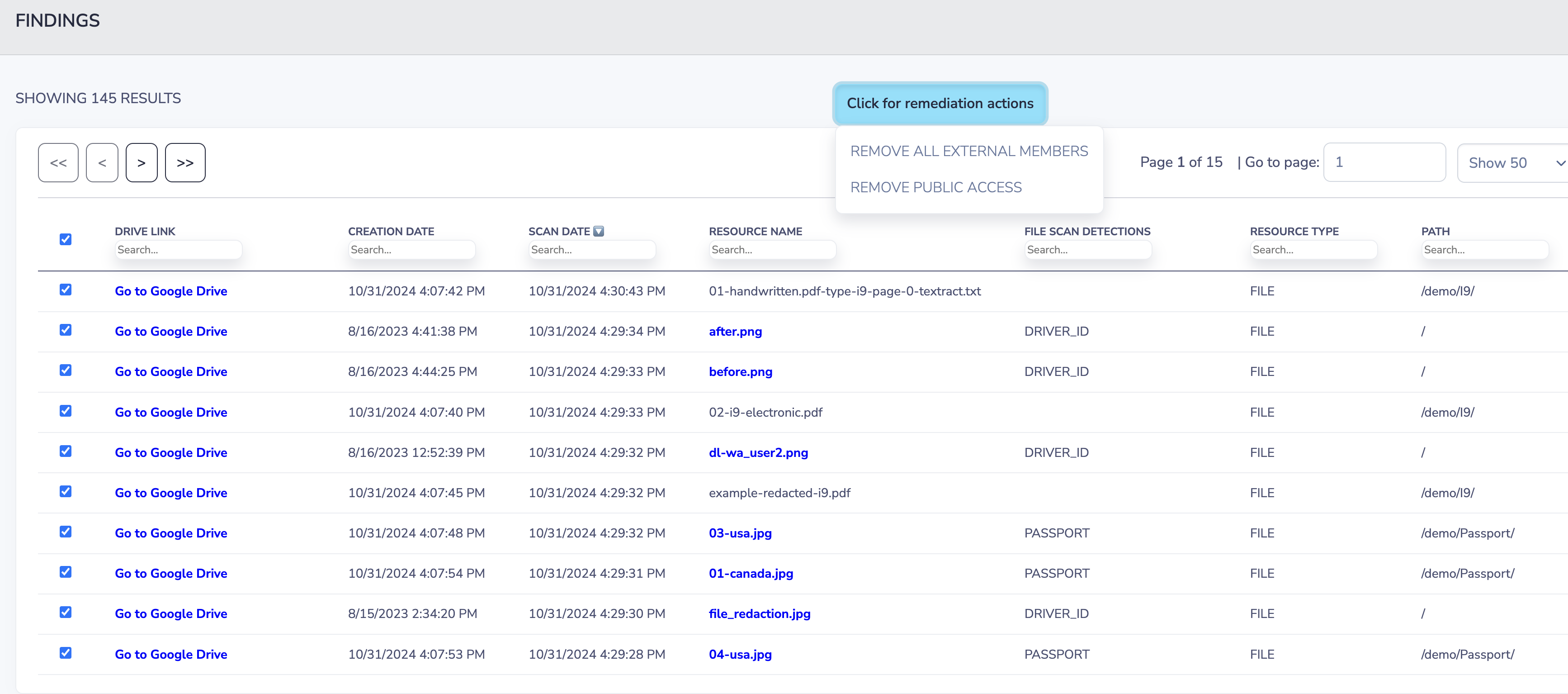
Redaction removes only the PHI portion of the content; preserving the rest of the file so teams can continue working. This supports HIPAA’s Minimum Necessary Standard and GDPR’s special-category processing rules.
Examples:
“Patient: Sarah Thompson; Diagnosis: Hypothyroidism”
→ “Patient: S**** T*******; Diagnosis: *************”
Redaction is ideal because:
• Files remain usable;
• Clinical context stays intact;
• PHI is permanently neutralized;
• Compliance audit trails remain clean.
Strac redacts PHI across:
• Google Docs
• Google Sheets
• PDFs
• Images (JPG, PNG)
• CSVs
• Scanned medical forms
• Shared Drives + My Drive
Example 1 — PDF with lab results
Strac reads the PDF layer and redacts PHI instantly.
Example 2 — Clinical screenshot uploaded by a care coordinator
OCR identifies patient names, values, and identifiers; redacting them automatically.
Example 3 — Spreadsheet with patient lists
Strac redacts names, MRNs, phone numbers, or notes while preserving the table.
Example 4 — Scanned medical forms
Strac removes PHI across form fields using OCR.
Example 5 — Insurance claim PDFs
Strac redacts member IDs and medical details.
Strac provides medical-grade detection across all file types; supports HIPAA’s privacy and security rules; and delivers GDPR-compliant handling of special-category data. Redaction ensures PHI exposure is neutralized immediately and consistently.
Strac offers:
• Real-time PHI redaction;
• OCR for clinical documents;
• Context-aware medical detection;
• Bulk remediation across Drive;
• HIPAA-aligned logging;
• Historical scanning;
• Fast, no-code deployment.
No; Drive cannot detect or mask PHI.
Yes; OCR identifies PHI across visual formats.
Yes; redaction removes exposure while preserving workflow context.
Yes; Strac supports all Drive surfaces.
Yes; Strac can retroactively search and redact PHI.
Strac automatically redacts protected health information inside Drive; helping organizations maintain HIPAA and GDPR compliance.
.avif)


.gif)


.webp)