How to Redact PCI Credit Card Numbers in Google Drive Automatically
Learn how to automatically detect and redact credit card numbers (PCI data) in Google Drive using Strac’s real-time DLP engine for files, folders, and shared drives.
Google Drive cannot redact PCI data in documents, PDFs, images, or shared folders.
Credit card numbers leak into Drive through invoices, exports, screenshots, and uploaded spreadsheets.
Strac detects and redacts PCI instantly across Drive files using AI, OCR, and bulk remediation workflows.
Google Drive stores millions of sensitive documents; yet Drive cannot detect or redact credit card numbers stored inside PDFs, spreadsheets, or images. PCI data appears regularly during billing operations, finance workflows, customer support escalations, and engineering troubleshooting. Without redaction, organizations risk violating PCI DSS 3.5, 3.6, and 4.2.1 when full primary account numbers (PANs) are stored unprotected in shared folders.
Strac solves this by automatically identifying and masking PCI inside Drive files; removing the sensitive portion of card numbers without disrupting workflows.
Why Google Drive Cannot Reliably Redact (PCI) Credit Card Numbers
Google Drive offers powerful collaboration features; but it does not provide PCI-specific detection or redaction. Drive cannot scan PDFs for credit card numbers; it cannot OCR images containing PANs; and it cannot remediate sensitive data inside shared or public folders. Files containing card numbers can remain accessible to teams, contractors, or external collaborators, creating serious PCI compliance exposure.
Google Drive lacks: • PCI pattern recognition across documents and images; • OCR scanning for screenshots and PDFs; • Automatic masking or redaction; • Bulk remediation at the folder or shared-drive level; • Historical cleanup for stored PCI; • PCI DSS–aligned controls.
Strac provides redaction for stored PCI by scanning Drive continuously and masking sensitive content instantly.
✨What (PCI) Credit Card Numbers Data Looks Like Inside Google Drive
PCI data lives inside Drive in every file format because teams often upload or sync information directly from other systems. Detecting it requires analyzing structured and unstructured content across documents, scans, and images.
Common PCI exposures in Google Drive include: • Invoices containing full card numbers; • Billing exports from Stripe, Shopify, or CRM systems; • Screenshots of customer payment details; • PDFs containing cardholder information; • Spreadsheets listing payment data; • Customer disputes or fraud claims with visible PANs; • Engineering logs containing test cards; • Receipts or invoices shared with external partners.
Strac detects these patterns using: • AI-powered PCI detection; • OCR for images and PDFs; • Context-aware scanning (“payment”, “cardholder”, “billing”); • Luhn checksum validation for card numbers.
This ensures high accuracy and reliable redaction.
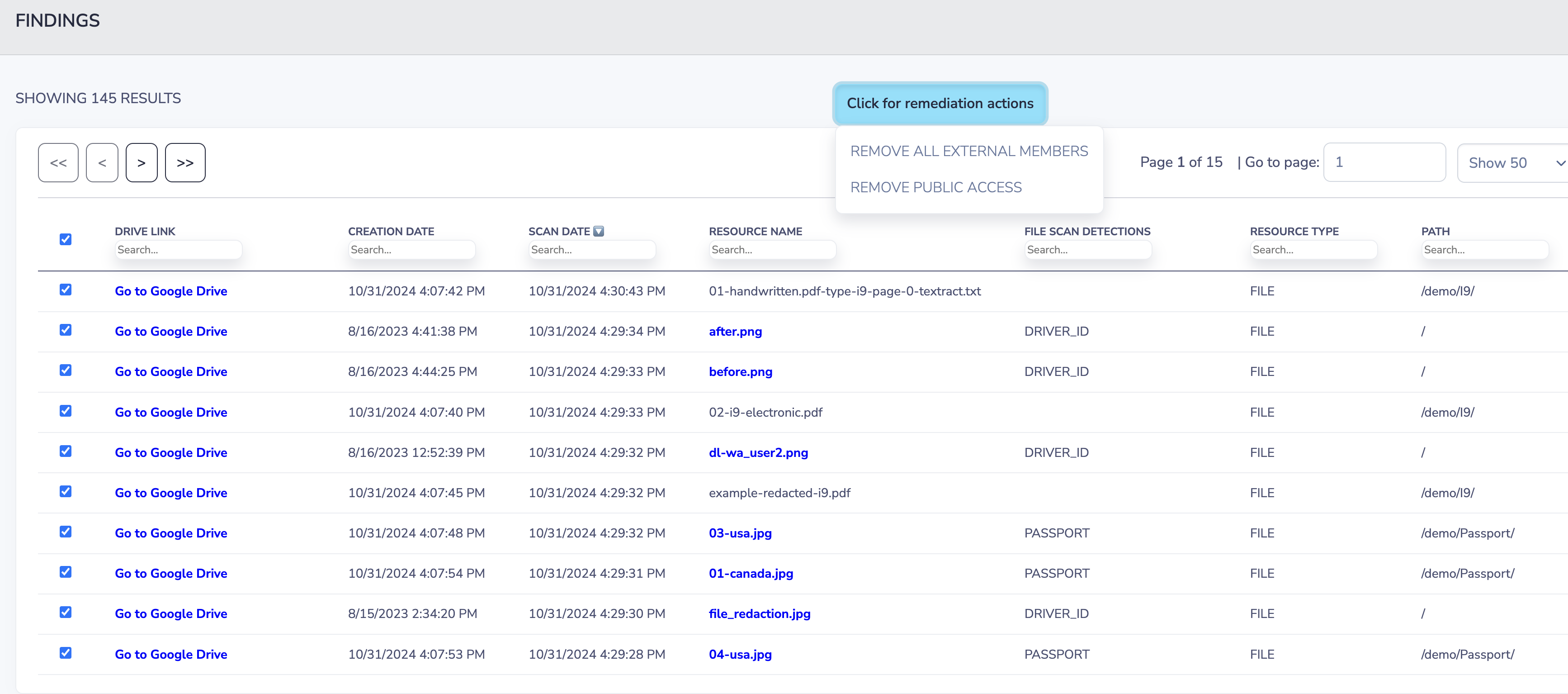
Strac Google Drive Remediation
What It Means to Redact (PCI) Credit Card Numbers in Google Drive
Redaction in Google Drive means masking only the sensitive portion of the card number while preserving the rest of the document. This keeps files readable; maintains business context; and neutralizes PCI risk.
Redaction is superior to deletion because: • Files remain intact; • Workflows stay uninterrupted; • Auditors receive clean, compliant documents; • Sensitive PCI is removed instantly.
Strac redacts PCI across: • Google Docs • Google Sheets • PDFs • Images (PNG, JPG) • CSV files • Scanned invoices • Shared Drives • My Drive and Team Drives
Real Examples of (PCI) Credit Card Numbers Redaction in Google Drive
Example 1 — PDF invoice with visible card number Strac scans the text layer and masks the PCI instantly.
Example 2 — Screenshot of a checkout page uploaded OCR identifies the PCI value and redacts the image.
Example 3 — Google Sheet containing exported payment data Strac masks all full PANs while preserving the spreadsheet structure.
Example 4 — Shared Drive synced with billing ops Redaction applies across every folder recursively.
Example 5 — External partner uploads a customer receipt Strac redacts the PCI before internal users access the file.
🎥Why Strac Is the Best Way to Redact (PCI) Credit Card Numbers in Google Drive
Strac provides advanced PCI redaction across all Drive content types. Unlike tools that only scan text-based files, Strac identifies card numbers in images, PDFs, documents, spreadsheets, and compressed folders. Redaction helps organizations reduce PCI scope and protect sensitive customer data.
Strac delivers: • Real-time and scheduled PCI redaction • OCR for images and scanned PDFs • Bulk folder remediation • Misconfiguration detection • PCI DSS–ready audit trails • No-code deployment • Cross-app redaction across Slack, Gmail, Salesforce, and more
FAQs on How to Redact (PCI) Credit Card Numbers in Google Drive
Does Google Drive natively redact PCI?
No; Drive does not provide PCI detection or redaction.
Can Strac redact PCI inside PDFs and images?
Yes; Strac applies OCR across all Drive surfaces.
Does redaction help with PCI DSS compliance?
Yes; redaction prevents unprotected PCI storage.
Can Strac redact PCI in Shared Drives and Team Drives?
Yes; all Drive surfaces are supported.
Can Strac find and clean historical PCI in Drive?
Yes; historical scans are fully supported.
Try Strac for Google Drive (PCI) Credit Card Numbers Redaction
Strac keeps Google Drive PCI-free by redacting card numbers instantly across documents, sheets, and images; maintaining compliance and reducing risk.
Discover & Protect Data on SaaS, AI, MCP, Endpoints & Cloud
Strac provides end-to-end data loss prevention for all SaaS and Cloud apps. Integrate in under 10 minutes and experience the benefits of live DLP scanning, live redaction, and a fortified SaaS environment.


.webp)






.avif)





.gif)
