

October 1, 2026

11
min read
Every week, someone on your team sends a file that shouldn't leave a tightly controlled perimeter — a contract, a customer export, an internal financial model, a pen-test report, a PII sample. And most of the time it goes out as a Gmail attachment or a Google Drive "anyone with the link" share. That's not secure file sharing. That's convenient file sharing.
"Secure file sharing" has a real meaning: the vendor moving the bits can't read them, the link is protected by a passcode, it expires, it's revocable, and every access is logged for your next SOC 2 or HIPAA audit. Only a small subset of tools actually clear that bar.
This is a ranked, team-focused comparison of the seven tools most security-conscious companies shortlist in 2026. We built one of them (Strac Secure Share) — the comparisons below are honest about where it wins and where it doesn't.
Skip to the full comparison table.
Before comparing tools, it's worth getting the definition right. If your security or compliance review hasn't been this explicit, steal this list:
A tool that nails 1–5 is secure. A tool that nails 1–9 is enterprise-ready. Anything less than 1–5 is just shared.
Pricing is directional as of April 2026 — always verify on vendor sites before procurement. The encryption / audit / compliance columns are the ones to lead with, because those don't change month-to-month.
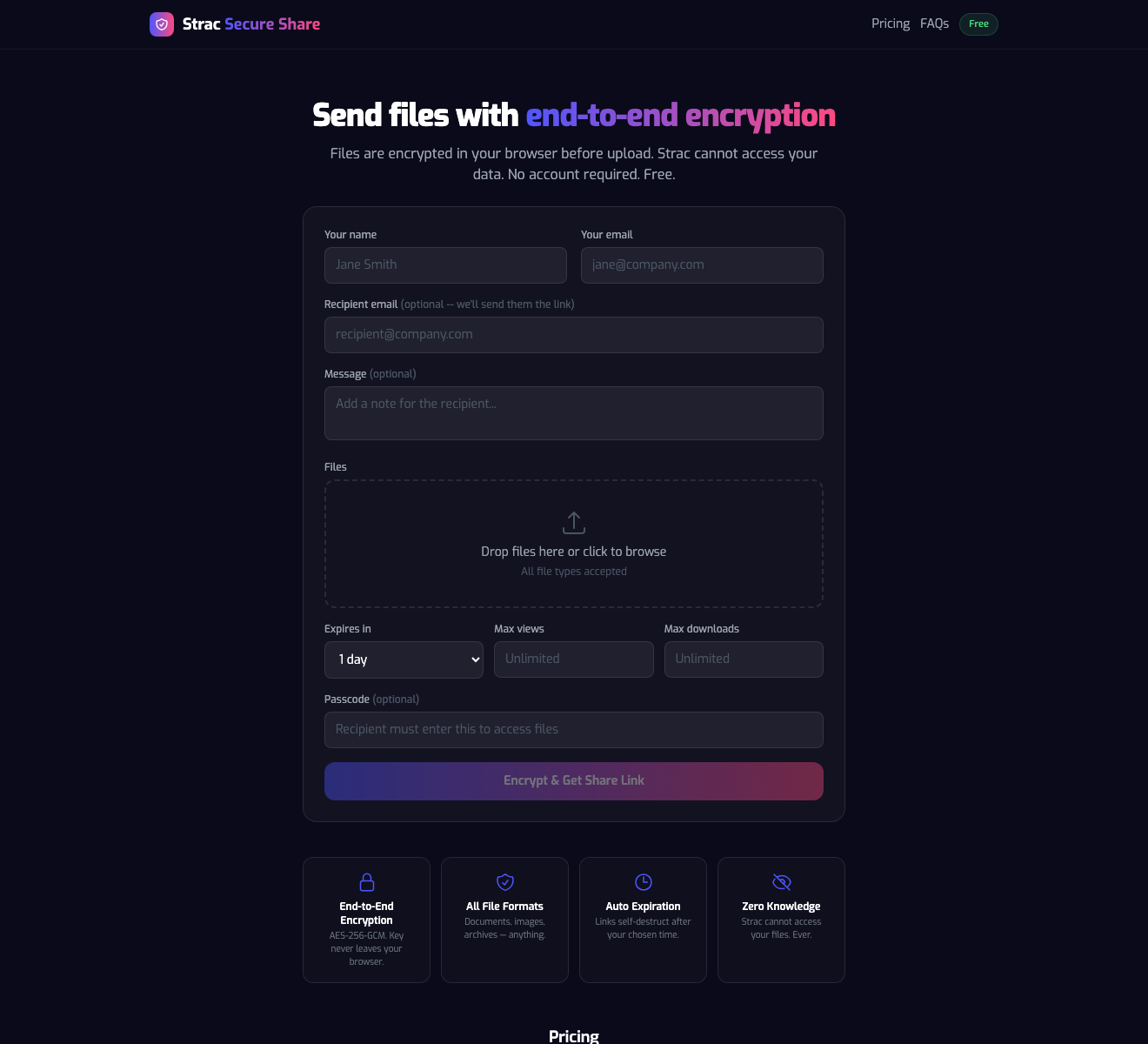
What it is: A client-side E2EE file transfer tool built by Strac — the data protection company trusted by teams at UiPath, Databricks, and 50+ others. Files are encrypted with AES-256-GCM in the sender's browser before upload. The key is derived from a passcode that never touches Strac's infrastructure. Strac's servers hold ciphertext only.
How a team actually uses it:
- Sender goes to comply.strac.io/send or your custom branded dropzone (yourfirm.strac.io/send on Team).
- Drops files, sets a passcode and expiration, copies the link, pastes into email / Slack / Zendesk ticket / Salesforce opportunity.
- Recipient clicks, enters the passcode, and downloads in-browser — no account, no software.
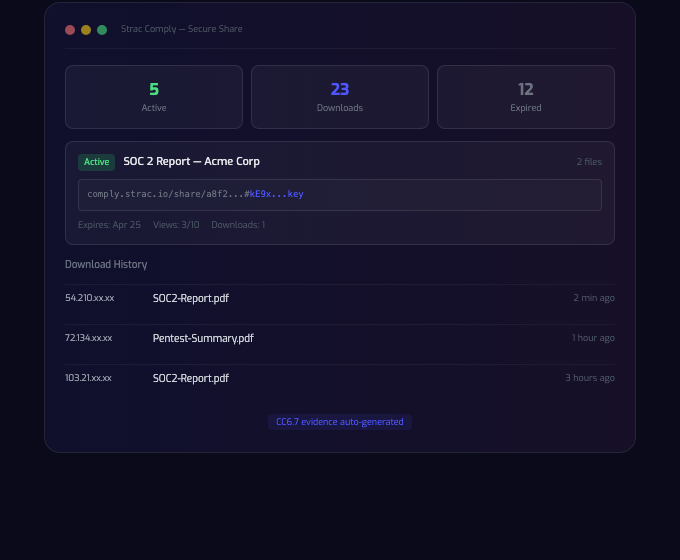
- Admin sees every access (who / when / IP / device) in the dashboard, and the event auto-maps to SOC 2 CC6.1 / CC6.3 / CC6.7 evidence.
Why teams pick it over Tresorit / SendSafely: - Actual client-side E2EE, not marketing-grade E2EE - SOC 2 Type II + HIPAA BAA on Team - Zendesk + Salesforce integrations (API today; marketplace listings pending) - Custom branded dropzone URL (your firm's domain, not a vendor's) - Free tier for a team to test before procurement
Where it's not the right pick: - Engineering transfers over 5 GB → use a dedicated MFT or Tresorit Business - Teams already paying enterprise-wide for Tresorit/SendSafely → no compelling reason to switch mid-contract - Public, non-sensitive distribution (marketing assets, podcast audio) → a CDN is cheaper
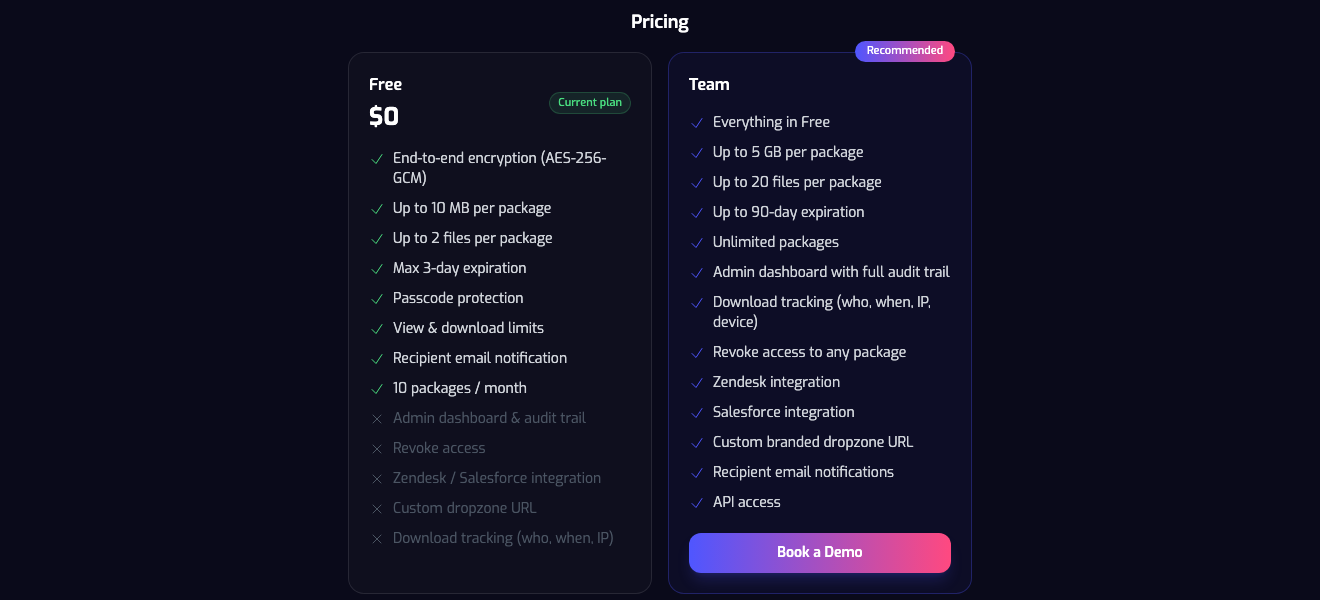
Team plan ships: - Up to 5 GB per package, up to 20 files - Up to 90-day expiration, unlimited packages - Admin dashboard with full audit trail - Download tracking (who, when, IP, device) - Revoke access to any package - Zendesk + Salesforce integrations - Custom branded dropzone URL - API access - HIPAA BAA available
What it is: A Swiss E2EE file-sharing platform since 2011. Tresorit Send is the one-off transfer product; Tresorit Business is their collaboration suite.
Strengths: - Mature, FIPS 140-2 validated cryptography - Swiss jurisdiction (appealing to EU legal teams) - Extensive admin controls, DLP, and content-type policies on Business tier
Trade-offs: - No meaningful free tier — evaluation requires a trial - Pricing starts at $14.50/user/mo; enterprise deals typically $25+/user - Larger transfers sometimes ask the recipient to create a Tresorit account
Pick it when: your procurement team specifically wants Swiss-jurisdiction paperwork, or you're already standardized on Tresorit Business.
What it is: Proton (makers of Proton Mail) extended E2EE to storage and shares.
Strengths: - Strong privacy reputation, Swiss jurisdiction, open-source clients - E2EE consistent across Mail / Drive / Calendar - Bundle pricing with Proton Unlimited
Trade-offs: - Built for personal privacy — admin, audit trail, and team-ops features are limited compared to Tresorit or Strac Team - No native Zendesk/Salesforce integrations - Larger shares sometimes require recipient to open Proton's web app
Pick it when: your team is already standardized on Proton for privacy reasons and team-ops depth isn't a requirement.
What it is: A mature SaaS E2EE sharing platform with deep integrations for helpdesk, CRM, and eDiscovery.
Strengths: - HIPAA-first DNA, widely deployed in healthcare - Live marketplace apps for Zendesk, Salesforce, Outlook, Gmail - Strong audit trails, DLP, and data retention controls
Trade-offs: - Starts around $17/user/mo - No free tier - UI is functional rather than friendly; onboarding is heavier than Strac or Proton
Pick it when: your healthcare, legal, or support team already runs client-file workflows in Zendesk or Salesforce and you want marketplace-certified integrations today.
Strengths: Fastest way to send a 2 GB file. Minimal friction. Huge file support on Premium.
Trade-offs: Not E2EE. WeTransfer holds the keys. Free tier has no passcode and no revocation. SOC 2 is the only major cert.
Pick it when: the file is non-sensitive — marketing assets, event photos, podcast audio. Never for contracts, PII, PHI, or financials.
Strengths: Tight integration with Dropbox storage, decent audit log for Business, passcode + expiration on Pro.
Trade-offs: Not E2EE — files are encrypted at rest with Dropbox-held keys. Passcodes and longer expiration behind the paywall. Locks you to Dropbox accounts.
Pick it when: you're already on Dropbox Business and E2EE isn't a hard requirement from your security review.
Strengths: Real E2EE inside Google Workspace. Tight native integration.
Trade-offs: Enterprise Plus only, ~$30+/user/mo, and requires a third-party key manager (Thales, Fortanix, Virtru). Complex setup — most Workspace admins we talk to have never turned it on. Recipient must also be on CSE-enabled Workspace.
Pick it when: your company is already committed to Workspace Enterprise Plus and has budget for a key-manager vendor.
Sending over email? See how to send encrypted email in Gmail and Outlook.
What's the single most important feature for secure file sharing?
Client-side end-to-end encryption. Everything else (passcodes, expiration, audit logs, integrations) is layered on top. If the vendor holds the decryption keys, they can be subpoenaed, breached, or tempted into reading your files. If encryption happens in the sender's browser, they can't.
Is sending files via Gmail or Outlook attachments ever secure for business?
Not for anything sensitive. Gmail and Outlook encrypt in transit (TLS) and at rest with provider-held keys. That's not E2EE. For confidential files, upload to an E2EE tool and paste the link in the email body instead.
How large a file can I send with Strac Secure Share?
Free tier: 10 MB per package, up to 2 files, 10 packages per month — useful for testing. Team: 5 GB per package, up to 20 files, unlimited packages.
Does E2EE mean the vendor is "unhackable"?
No — but it means a breach of the vendor's storage yields ciphertext only. The attacker still needs the passcode and session state from the sender or recipient to decrypt.
Does Strac Secure Share integrate with Zendesk and Salesforce?
Yes. Integrations are built and production-ready. Marketplace listings (Zendesk Marketplace, Salesforce AppExchange) are in review as of April 2026; API access is available today for Team-plan customers.
Is SOC 2 Type II enough for secure sharing?
SOC 2 Type II means the vendor followed stated controls for at least six months. It doesn't guarantee E2EE. Require both — SOC 2 Type II and documented client-side encryption.
What's the difference between Strac Secure Share and SendSafely?
Both use client-side E2EE, both support SOC 2 and HIPAA. SendSafely has mature marketplace apps today; Strac has the integrations built but the listings are pending. Strac is built by a data-protection company and lives inside the broader Strac Comply platform — Secure Share events auto-map to SOC 2 CC6.1/CC6.7 evidence without your team touching a spreadsheet.
Can we test before buying?
Yes. Strac Secure Share has a free tier — 10 MB per package, 10 packages per month — designed for a security review to kick the tires before a procurement conversation. No credit card, no account required to send.
Related reading:
If you want the shortest possible answer for a growing team: start with Strac Secure Share free. Have your security reviewer send a test file, validate the client-side encryption by reading the share URL's key fragment, and inspect the download audit log. When you're ready, the Team plan adds admin dashboard, full audit trail, revocation, Zendesk/Salesforce integrations, custom branded dropzone, API access, and HIPAA BAA.
For regulated enterprises with active vendor relationships, Tresorit and SendSafely are solid alternatives — expect to pay $15–25 per user per month.
For non-sensitive files where convenience beats confidentiality, WeTransfer is fine. Just don't reach for it when the file is a contract, a customer export, a patient record, a wire instruction, or anything else you'd cringe about seeing on Twitter.
.avif)


.gif)


.webp)







