August 28, 2026

6
min read
How to mask a Credit Card Number?
Users who send credit card numbers via insecure means expose themselves - and you - to risk. Here's how to stop it.
There are secure and insecure ways to send a credit card number online. Unfortunately, many people opt for the insecure route. In this article, I'll examine why and how people share credit card information online. I'll also discuss ways to detect and mask (or redact) a real credit card number in various business applications.
Masking a credit card number means hiding most digits of the PAN (Primary Account Number) so only the last few remain visible. This is a core PCI DSS requirement because it prevents unauthorized users from viewing sensitive financial data while still allowing teams to identify or reference the card. Masking protects credit card information as it moves across SaaS tools, support workflows, email, chat, cloud apps, and internal systems.
Typical masking formats include:
• **************1234
• XXXX-XXXX-XXXX-4321
• •••• 5678
Masking is irreversible; unlike encryption or tokenization, it does not allow recovery of the hidden digits. Because credit card numbers often show up in unexpected places; support tickets, spreadsheets, chat messages, documents; masking is one of the fastest and most reliable ways to neutralize exposure.
When applied automatically and consistently, masking ensures that even if data appears in the wrong tool, it never appears in a readable or exploitable format.
Exposing a credit card or a debit card number and related information exposes a user to extreme risk. If a malicious agent gets a hold of a user's credit card information, they can use it to rack up thousands of dollars of charges.
Hackers are constantly looking for ways to obtain a user's sensitive data. These techniques include everything from sniffing data on public wi-fi networks to shoulder-surfing. Users who send real credit card data over an insecure channel can expose themselves to fraud.

Businesses must also always be mindful of handling credit card and debit card data. The Payment Card Industry Data Security Standard (PCI-DSS) is de facto mandatory for companies worldwide. One of PCI-DSS's core stipulations is limiting internal access to credit card data. That's impossible if this data exists in multiple locations, such as emails and instant messages.
Some users think sending a credit card number is safe so long as it's on an encrypted channel (e.g., a Slack chat, or WhatsApp). But this can still expose a business to legal liability. For example, the General Data Protection Regulation (GDPR) in the European Union defines credit card data as personal data. Under GDPR, users have a "right to be forgotten." This is hard - if not impossible - to implement if personal data isn't centralized. If your company inadvertently exposes a user's credit card information, it can be held liable for a data protection violation. Such violations cost companies severe penalties and fines.
Users should feel safe submitting credit card and debit card data via an encrypted form that securely stores and controls access to this sensitive data. Unfortunately, many users also share credit card numbers via other business tools, including:
You should find and mask (aka redact) credit card numbers in all of these cases. Ideally, you're storing this information in a single location and tokenizing its use elsewhere across your business. This ensures your customer's safety and compliance posture.
Let's look at each of these cases more closely.
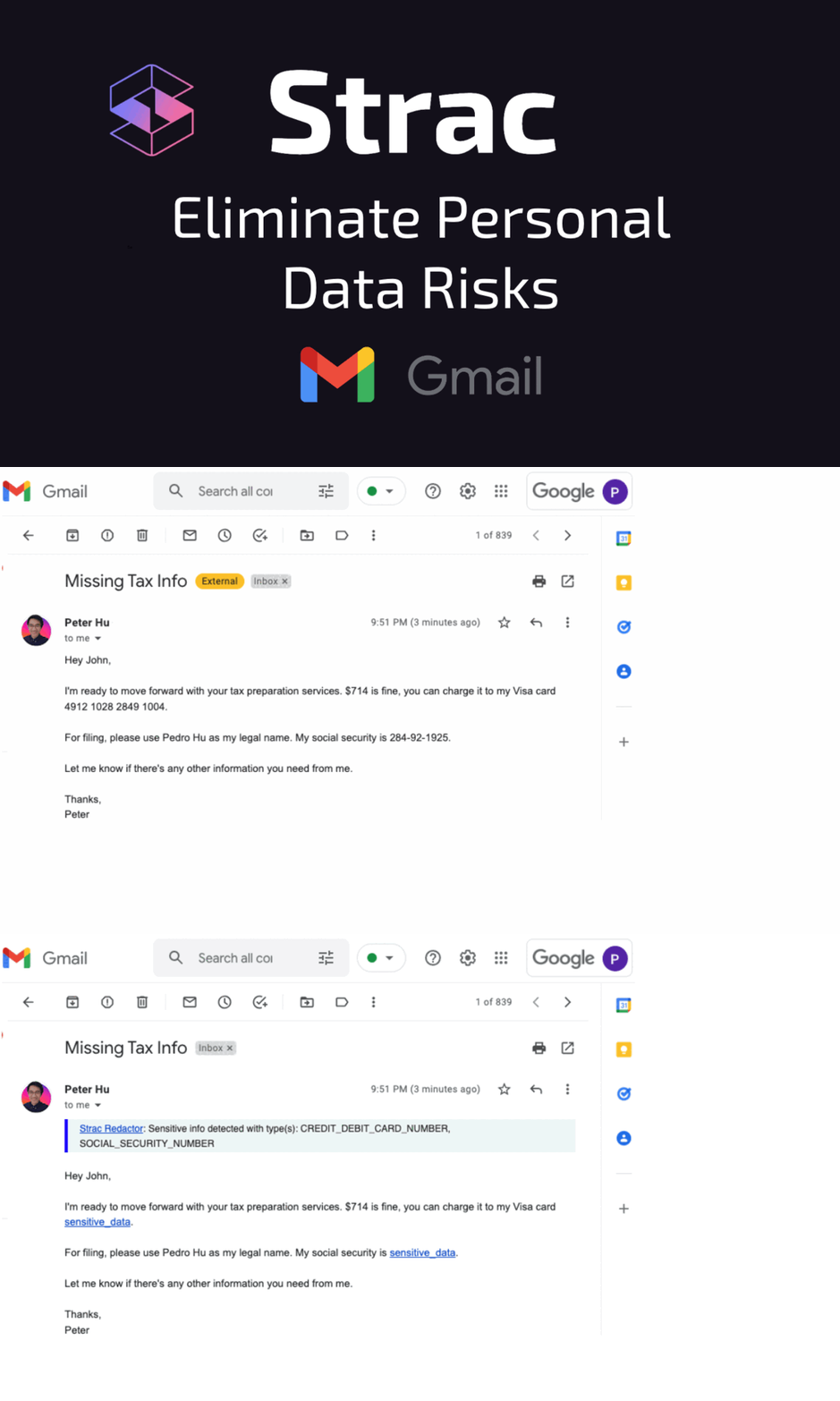
Email is so convenient that users often don't think twice about sending personal information. For example, customers may send their credit card number to a store's service reps to verify their purchase.
However, email is an inherently insecure medium. Hackers can intercept and read unencrypted email messages easily.
A sender or receiver can recall a message containing credit card or debit card information. However, this process is time-consuming as well as error-prone.
To mask information in email, you can use email masking software. Such software scans incoming and outgoing messages and removes any information that matches a certain pattern.
A company agent may ask a customer to send their credit card information via a help system, such as ZenDesk, Intercom, or FreshDesk. Both the customer and agent may feel this is secure since the channel is encrypted. However, this still exposes the company to the data protection issues we discussed above.

In tools such as ZenDesk, administrators and certain agents can leverage the software's built-in redaction tools to remove sensitive information. You can also use the tools' privacy and security features to limit access to potentially sensitive data.
Company personnel who realize email isn't secure may use cloud storage to upload credit card and debit card data. This is slightly better than sending the same information via email.
But cloud storage can still expose a user's sensitive information to unauthorized personnel if improperly configured. It could even expose that information to the general public.
With cloud storage, you can write code that uses your cloud provider's Application Programming Interfaces (APIs) to enumerate files and scan their contents. If the code finds information matching a real credit card number format, it can mask (aka redact) it - or even delete the file.
The benefit of this technique is that you can automate it. The downside is that it requires months of investment from technical staff.
Slack and instant messaging apps are other examples where customers and agents may be tempted to exchange credit card information. It's convenient, fast, and encrypted.
But Slack may not be as secure as we like to believe. The tool has been the target of hackers in recent years. In 2015, Slack admitted that at least one successfully infiltrated its system and stole customer data.
It's not possible to directly edit another user's messages in slack. However, you could implement masking credit card numbers by implementing a bot. The bot could block any messages containing credit card numbers and then repost them with the numbers masked.
Additionally, be sure to secure your company's usage of Slack to limit the possibility of intrusion and data leakage.
It's possible to mask credit card numbers across various applications. But implementing this yourself is error-prone and time-consuming.
Strac performs automated masking of credit card numbers and other personally identifiable information across several apps, including Gmail, Slack, ZenDesk, Slack, Office365, and more.
Book a demo today to see it in action!

Not masking credit card numbers exposes organizations to major compliance, security, and operational risks. Credit card data spreads extremely easily, especially in customer support and sales workflows, and once the PAN is stored in the wrong system, the organization becomes liable under PCI DSS.
Key risks include:
• PCI DSS violations due to storing full PANs in non-compliant systems
• Data breaches and financial fraud if attackers access unmasked numbers
• Internal misuse or accidental sharing through screenshots or forwarded messages
• Expanded audit scope because any system containing full PAN becomes subject to PCI controls
• Customer trust damage when credit card numbers appear in unsecured channels
• Higher incident response costs because exposed PANs require containment, remediation, and reporting
Without automatic masking, even one user sharing a credit card number in chat or email can create dozens of unmasked copies; each one a separate point of risk.
Strac automatically detects and masks credit card numbers across SaaS, cloud, email, chat, browsers, uploads, and internal tools in real time. Its content-aware ML/OCR engine identifies PANs inside text, PDFs, images, spreadsheets, logs, attachments, and screenshots. Once detected, Strac masks or redacts the number instantly, preventing it from being stored or shared in readable form.
Organizations choose Strac for masking because it combines precision, speed, and broad coverage without requiring agents or heavy setup.
How Strac performs automatic credit card masking:
• Real-time detection and masking in Slack, Zendesk, Gmail, Intercom, Google Drive, Salesforce, and LLMs
Strac GenAI DLP
• ML/OCR-based identification that works on structured and unstructured data, text and images

• Inline remediation masking, redaction, blocking, or deletion before the data is stored
• Agentless deployment that covers SaaS, Cloud, GenAI, and browsers with minimal friction
• Custom masking rules to support internal workflows and PCI compliance requirements
• Continuous enforcement so credit card data never spreads across systems
By automating credit card masking across all surfaces, Strac prevents exposure, reduces PCI scope, and ensures cardholder data never appears in a form that could harm customers or the organization.
If you have any questions or want to learn how to protect Credit Card numbers on your SaaS or cloud apps, please book a meeting with us.

Masking is the remediation; classification is what tells you where to apply it. See PCI data classification.
For the standard's precise requirements on primary account numbers, see PCI DSS PAN masking.
The formal requirements behind this are covered in PCI masking requirements for credit cards.
Related reading:
Related reading:
For PCI compliance, a credit card number must be masked so that only the last four digits are visible. All preceding digits must be replaced with symbols such as X, •, or *. PCI DSS also requires that masked PANs cannot be reconstructed or reverse-engineered. Examples of PCI-compliant formats include:
• ************1234
• XXXX-XXXX-XXXX-1234
• •••• •••• •••• 1234
The key requirement is simple: no more than the last four digits may be displayed anywhere outside a PCI-compliant environment.
In most cases, no. Companies are allowed to store full PANs only if they meet strict PCI DSS requirements, maintain a fully compliant cardholder data environment (CDE), and implement additional controls such as encryption, access restrictions, key management, and network segmentation.
For the majority of businesses using SaaS tools, CRM systems, support platforms, or general-purpose cloud storage, storing full credit card numbers is prohibited. That is why automated masking, redaction, and tokenization are critical for reducing PCI scope and preventing accidental exposure.
Masking hides parts of a credit card number so it becomes unreadable. It is irreversible and intended for display safety; for example, showing •••• 1234 to an agent or customer. Masking prevents exposure but does not preserve the original number in a usable format.
Tokenization replaces the credit card number with a secure, randomly generated token. It is reversible only by the tokenization provider. Tokenization enables secure storage and transaction processing without keeping the real PAN in internal systems.
In short:
• Masking = hides digits; irreversible; for display.
• Tokenization = replaces digits; reversible by provider; for processing.
Yes. Credit card numbers are frequently leaked in Slack, email, Zendesk, Google Drive, CRM notes, ChatGPT prompts, and other SaaS tools. Customers often paste credit card details into support messages, and employees may accidentally forward emails or upload screenshots containing full PANs.
Because these tools are not PCI-compliant environments, even one unmasked card number can create a reportable PCI violation and expand audit scope. Without automated detection and masking, leaks in collaboration tools happen in seconds and are nearly impossible to clean up.
Strac uses real-time ML/OCR detection to identify credit card numbers across SaaS platforms, cloud storage, email, chat, browsers, uploads, and AI tools. As soon as a card number appears, Strac automatically applies inline remediation; masking, redaction, blocking, or deletion; before the PAN is stored, viewed, or shared.
Strac’s automatic redaction works by:
• Detecting PANs inside text, PDFs, images, screenshots, and attachments
• Masking or redacting digits in real time across Slack, Gmail, Zendesk, Intercom, Salesforce, and more
• Preventing card data from spreading across internal systems
• Enforcing PCI DSS controls consistently without requiring agents or heavy configuration
This ensures that full credit card numbers never appear in readable form and never create PCI exposure inside SaaS or cloud environments.
.avif)


.gif)


.webp)