Gmail DLP scans message body, subject, headers, and attachments, then enforces policy before delivery.
Strong programs pair predefined detectors with context rules, attachment scanning, and role-based scope.
Start in Security → Data protection → Rules and Gmail → Compliance, pilot on a small OU, then harden.
Add inline remediation across SaaS and GenAI so sensitive data gets redacted, masked, or blocked everywhere, not just in email.
See how Strac extends Gmail DLP with cross-surface protection: Strac Gmail DLP
What is Gmail DLP
Gmail DLP is a set of data loss prevention controls that detects sensitive information in email and attachments, then takes action before the message leaves your tenant. You can block, quarantine, warn, or route messages that contain PCI, PII, PHI, secrets, or source code.
Why it matters: Email remains a top exfiltration path. Gmail DLP gives security and IT admins enforcement at the edge while creating audit evidence that policy is applied consistently.
How Gmail DLP works
Gmail DLP evaluates each message against your conditions and actions:
Detectors: Prebuilt and custom detectors find sensitive patterns in body, subject, headers, and attachments.
Conditions: Thresholds, proximity, file types, and directionality refine matches.
Actions: Warn the sender, modify the message, quarantine, reject, or route through a specific gateway or archive.
Outcome: Risky messages are stopped or corrected at send time, and incident details are available for review and tuning.
Strac Gmail DLP
Where to configure Gmail DLP
You will typically use two places in the Admin console:
Security → Data protection → Rules for modern data protection rules and templates.
Apps → Google Workspace → Gmail → Compliance for message-level routing, quarantine, rejection messages, and additional compliance controls.
Tip: Keep rule names short and structured. Example, DLP_PCI_Outbound_Finance_High makes filtering and reporting easier.
Step-by-step setup
1) Plan scope and outcomes
Scope: Decide whether the rule targets outbound, inbound, and internal traffic. Start with outbound from high-risk OUs such as Finance and Support.
Outcomes: Choose quarantine or warn during pilot, then move to reject for high-confidence matches once noise is low.
2) Pick a template and customize
Start from a credit card, national ID, or health data template.
Adjust detection confidence and match count to balance precision and recall.
3) Add context signals
Pair detectors with context keywords like “SSN,” “Card,” “PAN,” or internal project names.
Require proximity between the detector and the keyword to cut random hits.
4) Attachments first
Prioritize PDFs, CSVs, spreadsheets, and export formats.
Apply stricter actions on attachments than on body text because attachments often hold the payload.
5) Set actions and user experience
Warn with a clear coaching banner for medium risk.
Quarantine and notify managers for high risk to build accountability.
Reject for secrets and tokens, and include user-friendly guidance.
6) Pilot, then expand
Start with a small OU. Share a two-page enablement guide with examples of allowed and blocked emails.
Roll out to more OUs when false positive rates stabilize.
7) Monitor and iterate
Review incidents weekly. Track hit rates, top senders, and noisy patterns.
Tighten thresholds or add allowlists for trusted domains and systems.
High-fidelity rule patterns
Use these building blocks to make Gmail DLP accurate and usable:
Compound conditions: Detector plus keyword plus match count.
Attachment-only blocks: Allow benign body text, block risky attachments.
Role-based OUs: Finance, HR, Legal, and Support get stricter controls.
Domain allowlists: Payroll processor or payment gateway domains remain functional while still logged.
File-type targeting: CSV and PDF exports from SaaS apps get higher scrutiny.
Secrets and keys: Add detectors for API keys, access tokens, private keys, and repo artifacts.
Source code indicators: Look for code blocks, filenames, and language markers for engineering teams.
Testing, tuning, and visibility
Shadow first: Start with warn or quarantine. Compare blocks to actual business needs.
Sender coaching: Use clear banners and internal docs so users understand how to resend safely.
False positive triage: Track the top three noisy patterns and tune weekly until stable.
Evidence at hand: Keep incident details and rule changes documented for audits.
Gmail DLP vs broader SaaS exposure
Gmail DLP covers email egress. Real exposure also lives in Drive, Slack, Jira, Salesforce, and GenAI tools where data is shared, exported, and copied. Email controls alone cannot reduce risk if the same spreadsheet is posted to a channel, synced to a folder, or pasted into a prompt.
Program playbook:
Keep Gmail DLP strong and precise.
Extend the same detection logic and outcomes to other tools your teams use daily.
Prefer inline remediation that fixes the problem in place rather than creating more alerts.
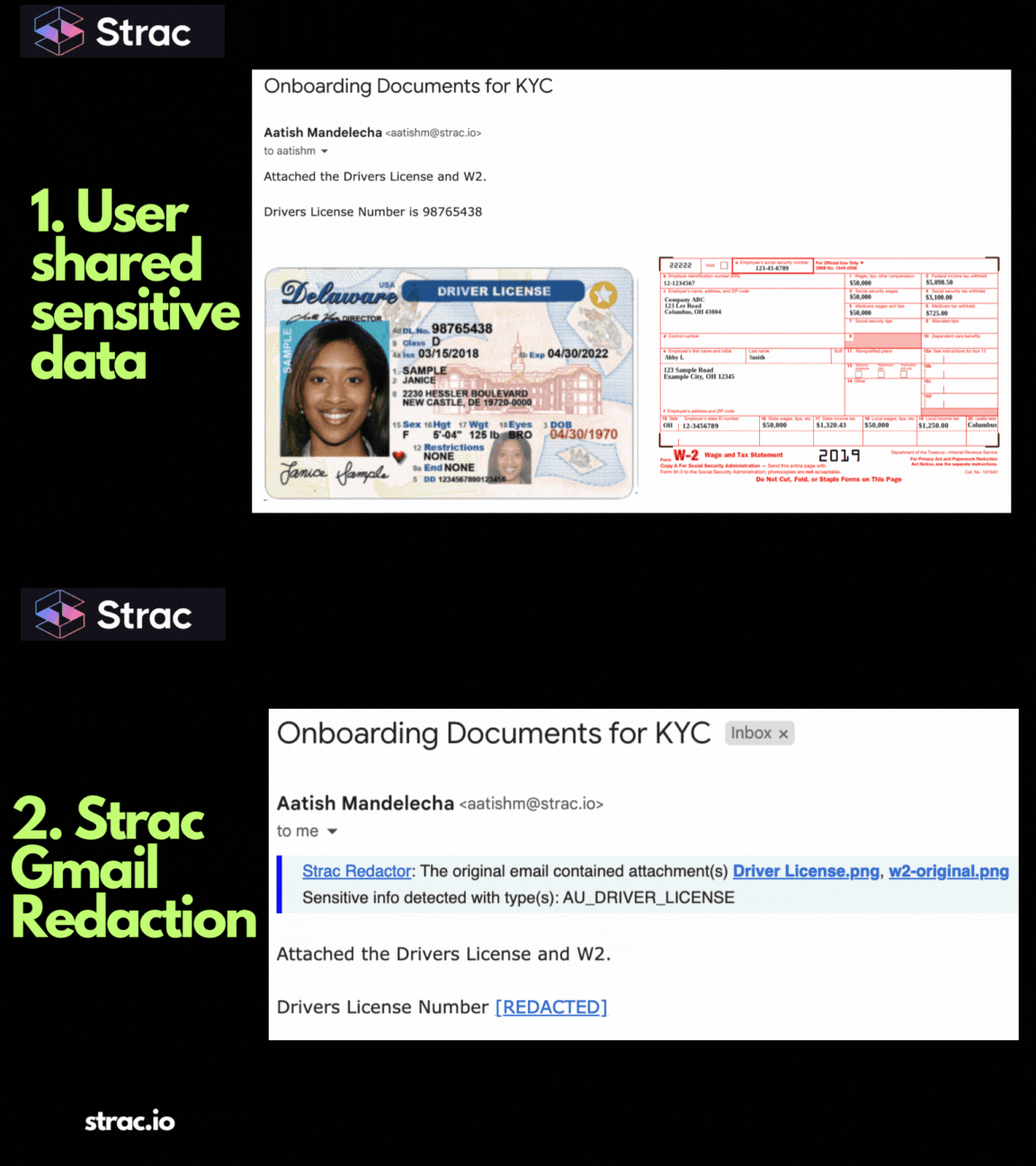
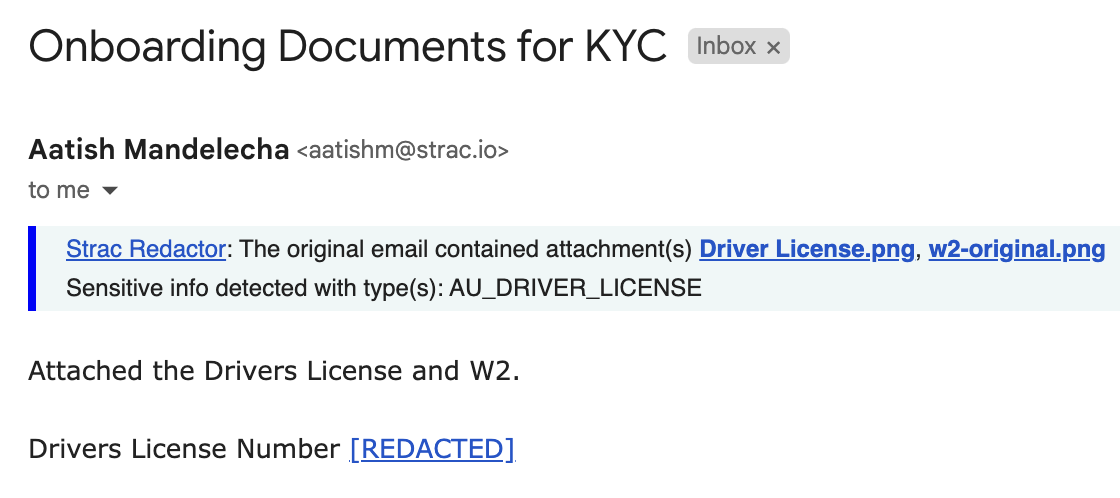
Strac Gmail DLP After Redaction
Strac value insert, unified DSPM plus DLP for Gmail
Strac unifies DSPM and DLP in one platform. It discovers, classifies, and remediates sensitive data across SaaS, Cloud, GenAI, Endpoint, and Browser so your Gmail DLP strategy is part of a single control plane.
Architecture and deployment
Agentless and no-code. Connect in minutes with zero endpoint friction.
Centralized policy definitions that apply to Gmail and your broader SaaS stack.
Coverage
Gmail, Google Drive, Slack, Microsoft 365, Salesforce, Confluence, Jira, Box, Git providers, and GenAI tools such as ChatGPT.
Core capabilities
Real-time redaction, masking, blocking, deletion, and auto-labeling.
ML plus OCR for content-aware detection, including screenshots and PDFs.
Inline remediation so issues are fixed at the moment of risk, not after a ticket.
Compliance
Policy packs for SOC 2, HIPAA, PCI, GDPR, ISO 27001 with evidence that is ready for auditors.
Outcome: Gmail DLP stops risky email. Strac prevents leaks across everything else your users touch, with the same policy intent and with real-time remediation.
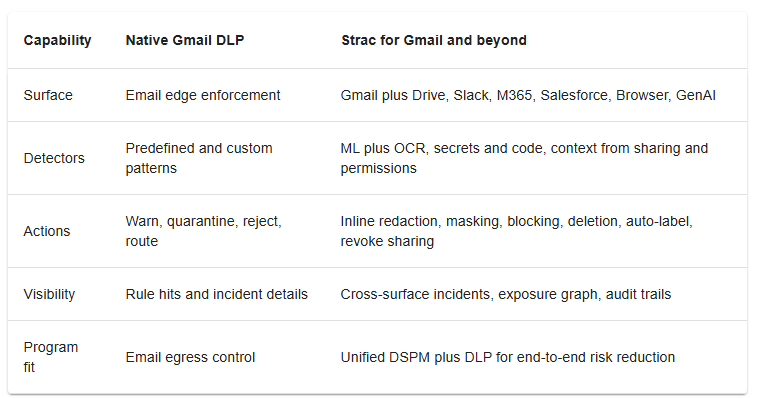
Gmail DLP Comparison snapshot
Gmail DLP Comparison
Example Gmail DLP rule pack
PCI out of domain
Scope: Outbound, Finance OU.
Detect: Credit cards with high confidence.
Action: Reject with user guidance and notify Finance lead.
PII to personal webmail
Scope: All users.
Detect: National ID plus context keywords.
Action: Quarantine, notify manager, add case note.
Secrets in attachments
Scope: Engineering and Product.
Detect: API keys, tokens, private keys.
Action: Reject, open ticket to security mailbox.
Customer exports
Scope: Support and Success.
Detect: CSV or PDF containing customer fields.
Action: Warn with coaching banner, auto-route via compliance archive.
Source code indicators
Scope: Engineering.
Detect: Code patterns and repository markers.
Action: Quarantine and require security approval.
Admin console quick path
Security → Data protection → Rules → Templates to seed policies fast.
Apps → Google Workspace → Gmail → Compliance to set routing, quarantine, and rejection messages.
Rule lifecycle: Pilot on a small OU, measure, harden, then standardize naming and documentation.
In summary
Gmail DLP is a powerful control for stopping sensitive data at the email edge. The strongest programs tune detectors, add attachment focus, and coach users so the control is precise and respected. To shrink real risk, apply the same detection quality and inline remediation across the rest of your stack. That is where Strac’s unified DSPM plus DLP turns policy into outcomes.
CTA: See Strac in action with Gmail DLP. Book a demo
1) What does Gmail DLP actually scan and how precise can it get?
Gmail DLP scans the full email envelope, including body, subject, headers, and attachments, to detect sensitive data before delivery. Precision comes from using predefined detectors for PCI, PII, PHI, secrets, and source code, then layering context and thresholds.
How to make Gmail DLP precise
Use compound logic, for example credit card detector plus “Visa” or “payment.”
Raise match counts and require proximity between a detector and a context keyword.
Treat attachments like CSV, PDF, and XLSX as high risk.
Limit scope to outbound and high-risk OUs first, such as Finance, HR, and Support.
Examples of high-fidelity detections
PCI in invoices attached as PDF.
National ID in HR exports.
API tokens or private keys inside ZIP attachments.
Bottom line: Gmail DLP can be highly accurate when you combine detectors, context, and attachment focus, then roll out by OU with measured thresholds.
2) How should I configure Gmail DLP rules in the Admin console for fast wins?
Start with a small, outcome-driven rule pack. Keep naming consistent and keep user experience front and center.
Quick-start Gmail DLP rule pack
PCI outbound, Finance OU, high confidence, action reject or quarantine.
PII to personal webmail, all users, action warn with coaching banner.
Secrets and keys in attachments, Engineering OU, action reject and notify SecOps.
Customer exports (CSV, PDF), Support OU, action quarantine and manager notify.
Admin console tips
Build under Security, Data protection, Rules.
Use templates for faster setup, then tune match counts.
Add allowlists for payroll processors or trusted vendors.
In short: a focused Gmail DLP pack gives fast coverage while you tune noise down and confidence up.
3) How do I reduce false positives in Gmail DLP without missing real leaks?
False positives kill adoption. The goal is precise Gmail DLP, not blocked business.
Noise-reduction checklist
Require two signals, for example detector plus context term.
Set proximity windows so matched text appears near the keyword.
Increase match counts for generic identifiers.
Target file types that carry payloads and relax for low-risk formats.
Use scoped exceptions for trusted domains, internal tools, and automated senders.
Pilot with warn or quarantine. Move to reject only for high-confidence matches.
Field tactic
Track the top three noisy patterns weekly and adjust thresholds or context terms.
Bottom line: with compound conditions, proximity, and scoped exceptions, Gmail DLP stays accurate and credible with users.
4) How do I handle attachments and exports with Gmail DLP so nothing slips through?
Most real incidents hide in attachments, not the email body. Treat attachment handling as a separate Gmail DLP track.
Attachment strategy for Gmail DLP
Prioritize CSV, PDF, XLSX, and ZIP.
Enforce stricter actions on attachment matches than on plain text.
Detect secrets in code bundles and build artifacts.
Add file size and file type conditions to catch bulk exports.
Coach senders with clear remediation steps, for example “store in Drive, share by link, remove PII column.”
Example policy
If detector equals credit card in PDF or CSV, action reject. Include guidance to share a redacted Drive link instead.
In short: attachments get the firmest controls and the clearest coaching so Gmail DLP blocks leaks without blocking work.
5) Why layer Strac with Gmail DLP and what outcomes should I expect?
Gmail DLP protects the email edge. Modern exposure also happens in Drive, Slack, Microsoft 365, Salesforce, Jira, browsers, and GenAI tools. Strac extends your Gmail DLP intent across the stack with real-time remediation.
How Strac amplifies Gmail DLP
Unified DSPM plus DLP: discover, classify, and remediate across Google Workspace, Slack, M365, Salesforce, and GenAI.
Inline remediation: redact, mask, block, delete, and auto-label in real time, not just alert.
ML plus OCR: detect sensitive data in screenshots, PDFs, and scanned docs.
Compliance by design: policy packs for SOC 2, HIPAA, PCI, GDPR, and ISO 27001 with audit-ready evidence.
Agentless deployment: connect in minutes, zero endpoint friction.
Outcome examples
A CSV with PCI blocked in Gmail and also quarantined if uploaded to Drive or pasted into Slack.
A prompt with customer PII redacted before it reaches a GenAI tool.
Sharing permissions auto-revoked when a sensitive file leaves trusted domains.
Bottom line: Gmail DLP stops risky emails. Strac makes the same policy enforceable everywhere work happens. See details at Strac Gmail DLP
Discover & Protect Data on SaaS, AI, MCP, Endpoints & Cloud
Strac provides end-to-end data loss prevention for all SaaS and Cloud apps. Integrate in under 10 minutes and experience the benefits of live DLP scanning, live redaction, and a fortified SaaS environment.


.avif)


.gif)


.webp)