Source code protection combines access controls, code scanning, monitoring, and data loss prevention (DLP) to keep proprietary code from being stolen, leaked, or changed.
The risk has moved beyond the repository. Code now lives on developer laptops and travels through SaaS apps, personal cloud drives, email, chat, and AI tools.
Repository controls stop at the repository. They do not see a developer pasting a function into a personal AI account or copying a project to a USB drive.
Source code protection is the practice of keeping proprietary code away from anyone who should not read, copy, or change it. It covers the repository, the laptops that hold local copies, and every app the code passes through.
Source code is the set of instructions, written in a programming language, that tells software what to do. Apps, websites, and operating systems all run on it. Like a secret recipe, it is often what makes a product different from its competitors.
Source code looks like plain text, which is why it moves so easily and why it needs its own controls.
Why Source Code Protection Matters
A leak costs more than the files themselves, because code reveals how a product works and where it is weak.
Intellectual property: Code represents years of engineering work. It deserves the same protection as a brand or a patent.
Competitive edge: Unique algorithms and features lose their value once a competitor can read them.
Exposed weaknesses: Attackers can study stolen code for security flaws, and any API keys or passwords left in it give them a direct way in.
Tampering: Someone with write access can insert malicious code that ships through normal updates, as happened in the SolarWinds breach.
Financial and legal damage: Companies can face downtime, breach costs, lost customers, and fines, especially in regulated industries.
✨ How Source Code Leaks Today
Most source code leaks now start outside the repository. The code is copied to a laptop, shared in an app, or pasted into a tool that the security team does not control.
Weak Spots in SaaS and Cloud
Misconfigured storage: Poor settings can leave code exposed, and they can undo the protection that encryption would otherwise give.
Shared infrastructure: Cloud customers share resources, so weak isolation at the provider can lead to cross-tenant exposure.
Third-party providers: Your code is only as safe as each vendor's security.
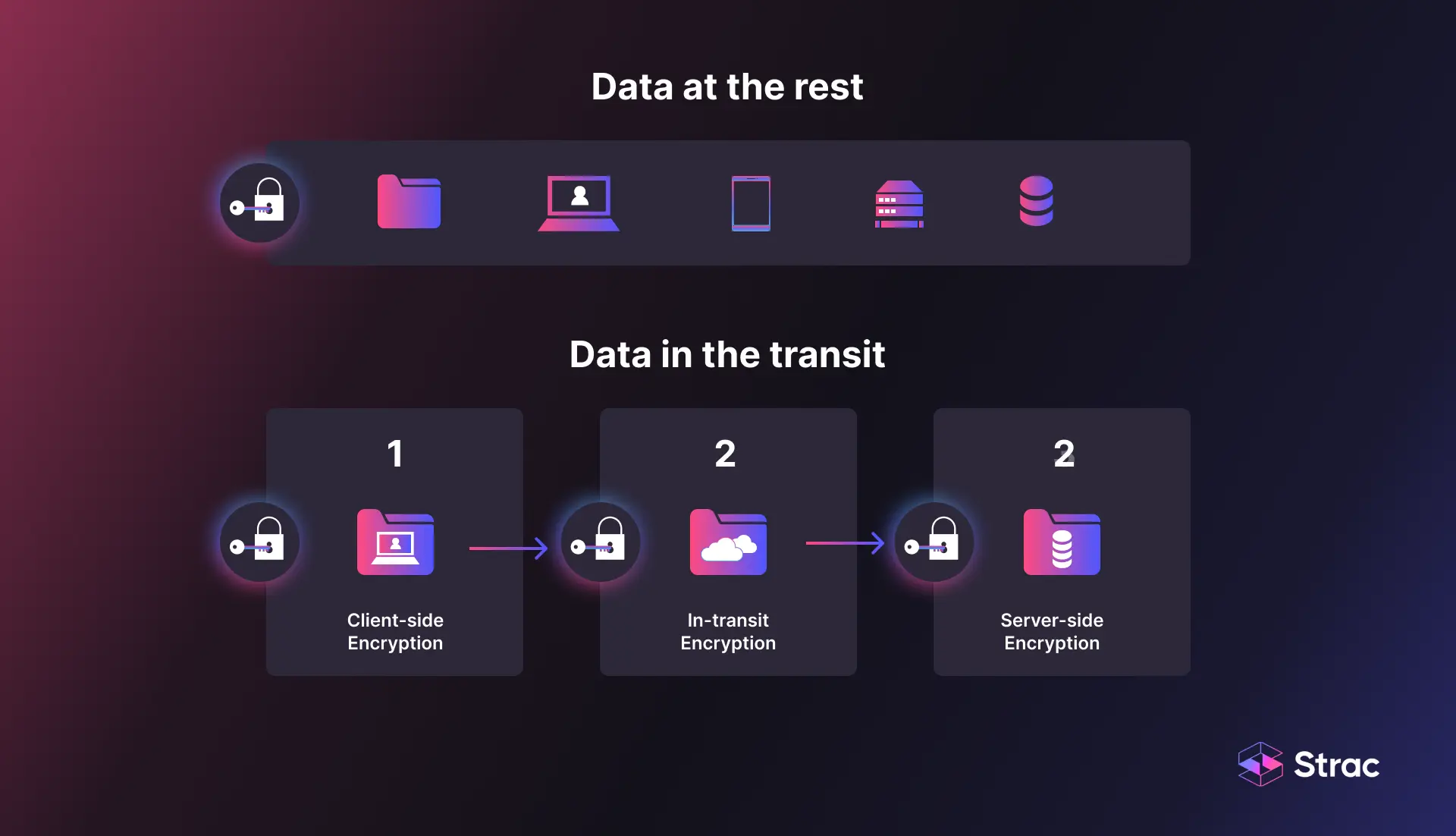
Data in transit: Code sent without encryption can be intercepted.
Loose access controls: Easy sharing often leaves people with access to repositories they do not need.
Encrypting stored code is only half the job; code in motion needs the same protection.
Common Threats
Compromised developer devices: One infected laptop or malicious editor extension can open a path to private repositories.
Stolen credentials: Exposed API keys and access tokens let attackers into private repositories without breaking anything.
Insiders: Departing employees and contractors already have legitimate access, and access controls alone will not stop them from copying code.
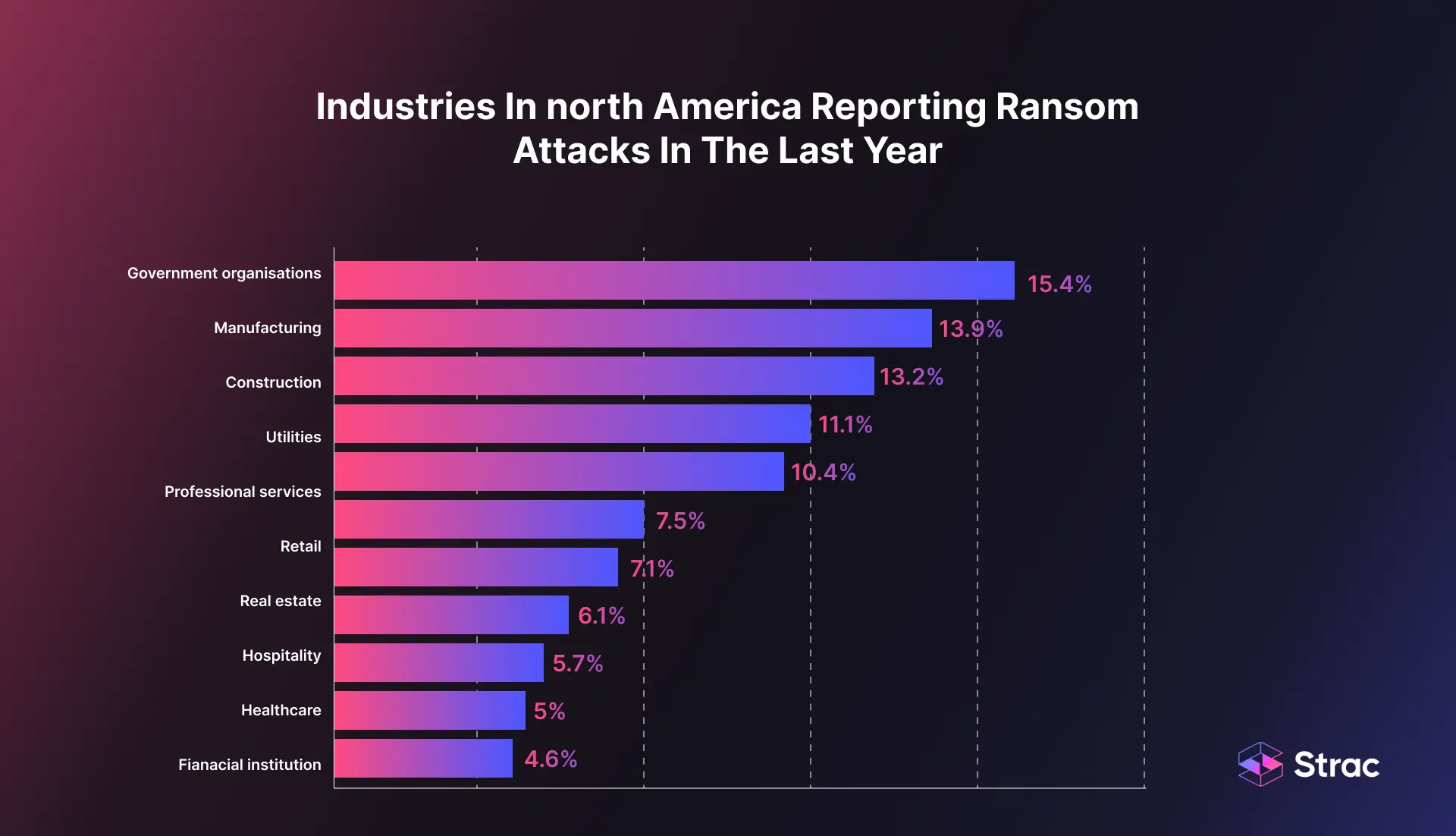
Ransom demands: Attackers who reach a repository can threaten to publish or lock its contents.
Dependency poisoning: Malicious code in an open source package reaches every project that installs it.
Server-side request forgery (SSRF): This attack tricks a server into reaching cloud metadata services, which can expose credentials that lead to code.
Ransom attacks reach many industries, so any company that writes software should plan for one.
The GitHub incident in May 2026 shows how this plays out. GitHub said it contained the compromise of an employee device through a poisoned VS Code extension. The attacker claimed about 3,800 internal repositories, and GitHub called that figure directionally consistent with its investigation. Strong repository settings could not stop a threat that began on a trusted laptop.
AI Tools and Personal Accounts
AI tools are now a major route for source code to leave a company, usually with no bad intent. A developer pastes in a function to debug it, and the code is now in an account the company does not manage.
Banning these tools rarely works. Developers find them useful, so the better goal is to keep proprietary code out of unapproved accounts while approved tools stay available.
✨ Source Code Protection Best Practices
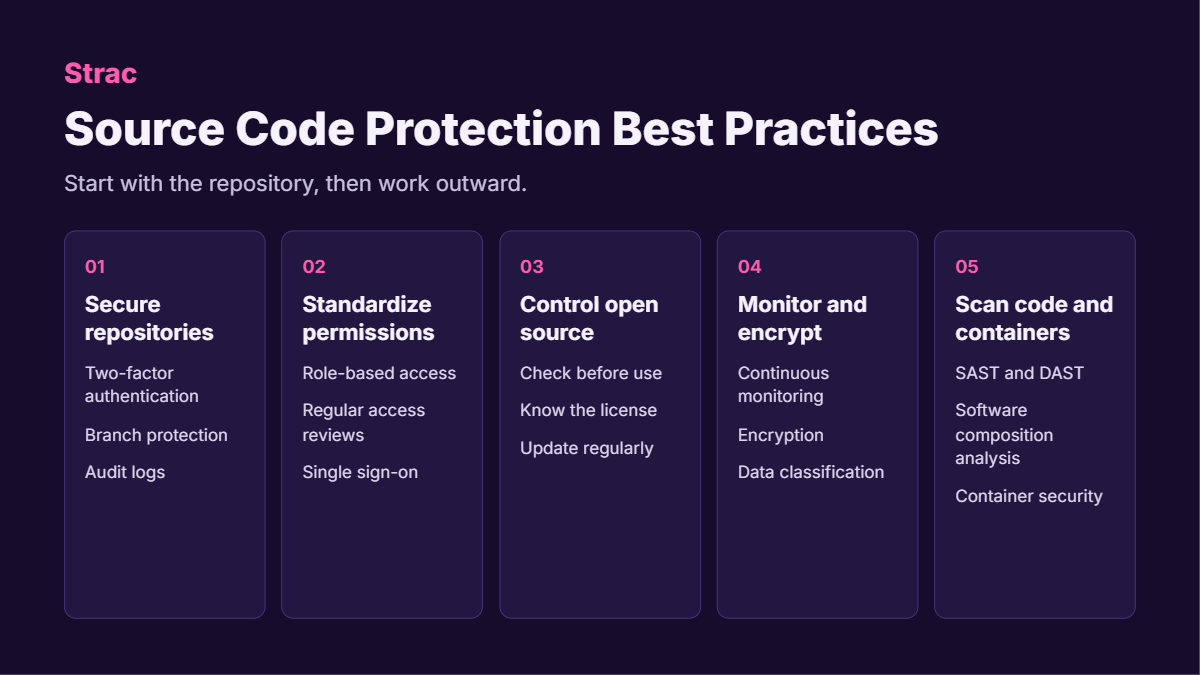
Strong source code security uses several layers, because each one fails in a different way. Start with the repository, then work outward to people, dependencies, and devices.
Secure Your Repositories
Two-factor authentication (2FA): Require it on GitHub and similar platforms, so a stolen password is not enough.
Need-to-know access: Grant access by team or project, and only to people who need it.
Branch protection: Block direct pushes to important branches and require a reviewed pull request.
Audit logs: Review who accessed what, what changed, and which attempts failed.
Secret removal: Keep API keys and passwords out of code, and store them in a dedicated secrets manager.
Standardize Permissions
One permission model: Use the same model across software, cloud services, and databases to reduce errors.
Role-based access control (RBAC): Limit each role to what its work requires, so a stolen account reaches less.
Regular access reviews: Remove access for former employees and people who have changed roles.
Central identity management: Use single sign-on (SSO) or identity and access management (IAM) to see who can reach what.
Control Open Source Code
Check before you use it: Review a project's security, quality, and update history.
Know the license: Some licenses place conditions on how you can use or distribute your own code.
Use trusted repositories: Download only from reputable sources.
Keep it separate: Isolate open source components so you can replace them easily.
Update regularly: New versions often contain security fixes.
Monitor and Encrypt
Continuous monitoring: Alert on unauthorized access and configuration changes as they happen.
Encryption: Protect code at rest and in transit, and manage the keys carefully.
Data classification: Use sensitive data classification to find where code and secrets are stored outside approved systems.
Scan Code and Containers
Static application security testing (SAST): Finds flaws by analyzing code without running it.
Dynamic application security testing (DAST): Finds flaws by testing the running application.
Software composition analysis (SCA): Tracks dependencies, flags known vulnerabilities, and reports their licenses.
Container security: Scan images before release and monitor containers while they run.
These controls protect the code where it is stored. They do little once a developer has a legitimate copy on a laptop, which is where DLP takes over.
✨ The Role of DLP in Source Code Protection
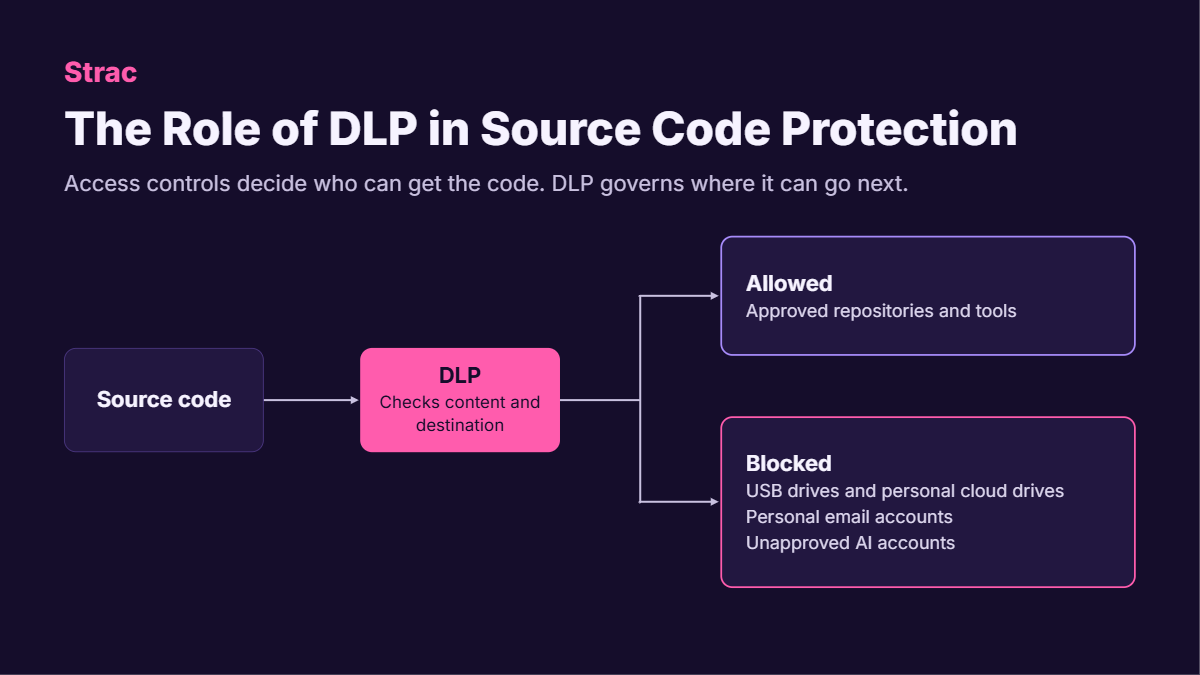
Data loss prevention (DLP) detects source code as it moves and stops transfers that break your policy. Access controls decide who can get the code; DLP governs where it can go next.
Real-time monitoring: Watches data in motion and at rest, and alerts your team to unauthorized activity.
Contextual analysis: Uses context to separate routine development from suspicious copying.
Policy enforcement: Applies rules such as no uploads to personal cloud storage.
Alerts and reporting: Notifies the right people quickly and keeps a record of each violation.
Security tool integration: Sends events to a security information and event management (SIEM) system, so incidents are easier to investigate.
How to Block Source Code Transfers
Cover each channel that code can leave through, starting with the ones your developers use most.
Repository settings protect code where it is stored; DLP protects it wherever it goes next. Secure the repository, limit access, scan what you ship, and control the channels code can leave through. Access controls will fail eventually, so protection at the data layer is your backstop.
Book a demo to see how Strac protects your source code.
🌶️ Spicy FAQs on Source Code Protection
Is source code protection the same as application security?
No. Application security looks for flaws in the software. Source code protection also stops the code from being stolen, leaked, or changed, so most companies need both programs working together.
Why doesn't our Git platform cover this?
Git platforms control access to the repository. They cannot see what happens after a developer clones the code to a laptop and copies it elsewhere. Endpoint and browser controls cover that gap.
Will DLP slow down developers?
It should not when policies are targeted. Allow approved repositories and tools, then block only unapproved destinations such as personal drives. Developers keep working normally, and security focuses on the transfers that carry real risk.
Can you fully prevent source code theft?
No. A determined insider can always photograph a screen, for example. Good controls still block the most common routes, shrink what any one account can reach, and leave a record for investigation.
Should we block AI tools to protect source code?
Usually not, because a ban tends to push usage toward personal accounts. Approve the tools your team needs and control unapproved ones. See how to prevent shadow AI for a practical approach.
Customer story
“Don’t just alert on problems, fix them.”
Scott Roberts, Chief Information Security Officer, UiPath
Discover & Protect Data on SaaS, AI, MCP, Endpoints & Cloud
Strac provides end-to-end data loss prevention for all SaaS and Cloud apps. Integrate in under 10 minutes and experience the benefits of live DLP scanning, live redaction, and a fortified SaaS environment.