October 29, 2026

5
min read
Sensitive Data Classification
Learn how to classify sensitive data in 2026 across SaaS, cloud, GenAI and MCP. Find PII, PHI, PCI and secrets, rank risk, and fix exposure automatically.
The basics of classification have not changed. You still sort data by sensitivity and protect the top tiers hardest. What changed is where sensitive data lives and who touches it.
A few years ago, most sensitive data sat in databases and file shares. Today a customer's card number might arrive in a Zendesk ticket, get pasted into Slack, end up in a Google Doc and then get dropped into ChatGPT for a summary.
AI agents add another path. Through the Model Context Protocol (MCP), an agent can read Jira issues, Salesforce records, Notion pages or an S3 bucket on a user's behalf. Each of those reads can pull sensitive data into a model without anyone opening a file.
You cannot protect data you have not found. Classification tells you where the risky data is, so you spend effort there instead of everywhere.
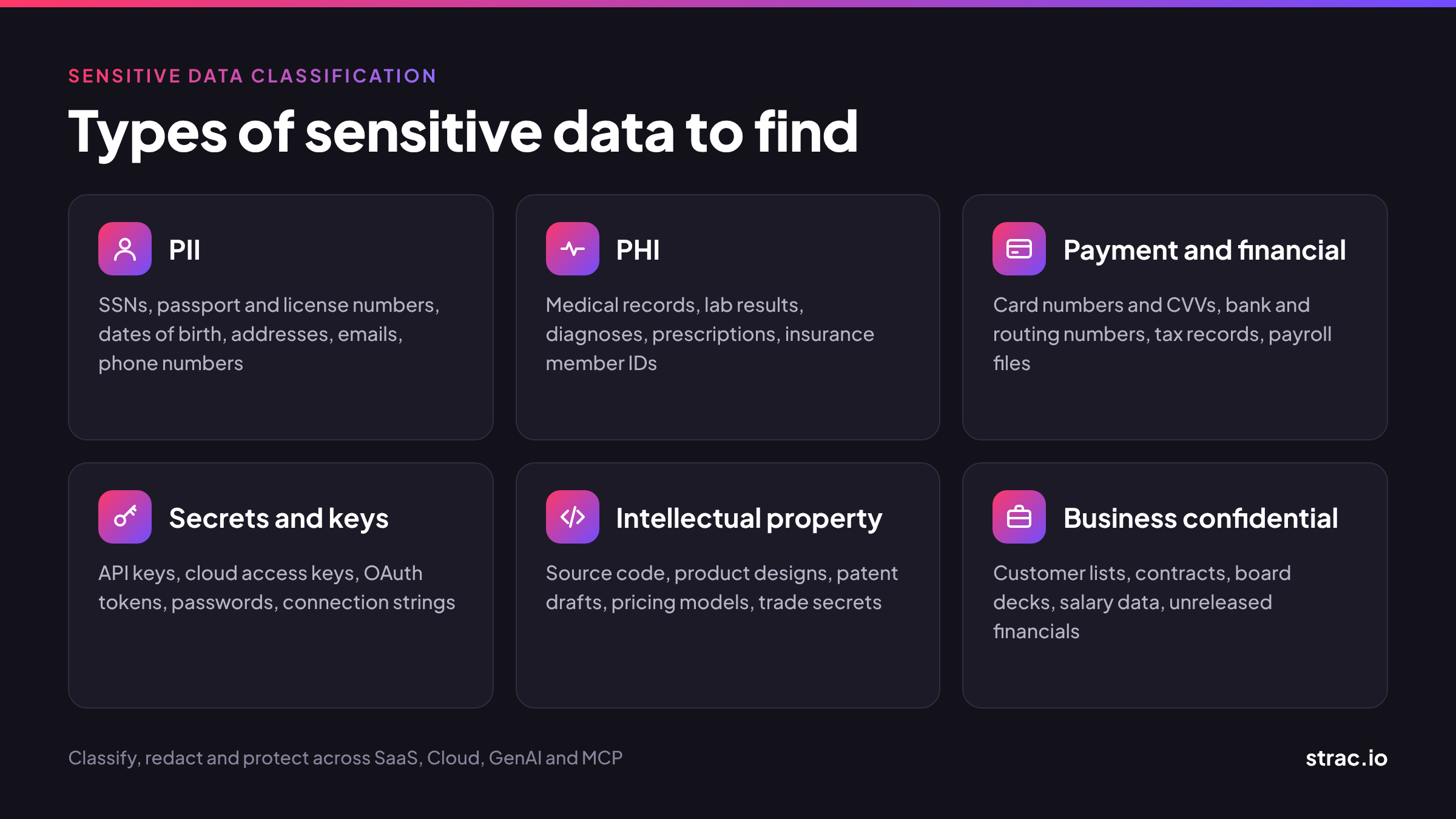
Most programs start with the same core categories. Secrets now belong on that list too, because AI tools and agents handle them all the time.
Any data that points to a specific person. Examples include names with addresses, Social Security numbers, passport and driver's license numbers, dates of birth, email addresses and phone numbers. Leaks lead to identity theft, fraud and harassment.
Health data tied to a person, such as medical records, lab results, diagnoses, prescriptions, billing codes and insurance member IDs. HIPAA names 18 identifiers that turn health data into PHI, including medical record numbers, health plan numbers, device IDs, IP addresses and full face photos. See the full list in our HIPAA PHI data elements guide.
Card numbers, CVVs and expiry dates fall under PCI DSS. Bank account and routing numbers, tax records, payroll files and transaction histories also belong here. Leaks lead to direct fraud and fines.
API keys, cloud access keys, OAuth tokens, passwords, database connection strings, private keys and crypto seed phrases. One leaked key can open far more data than any single file. Developers paste these into chat, tickets, logs and AI prompts every day.
Source code, product designs, patent drafts, pricing models and trade secrets. These rarely match a fixed pattern, so they need classification based on content and context rather than simple rules.
Customer lists, contracts, board decks, M&A plans, salary data and unreleased financials. What counts here differs by company, so you need custom definitions.
For every data element Strac detects, see the Strac catalog of sensitive data elements.
Four levels are enough for most companies. More levels sound precise, but people stop applying them correctly.
Two rules keep this working. First, when a file mixes levels, it takes the highest one. Second, the level should follow the data when it is copied, pasted or sent to an AI tool, not stay with the original file.
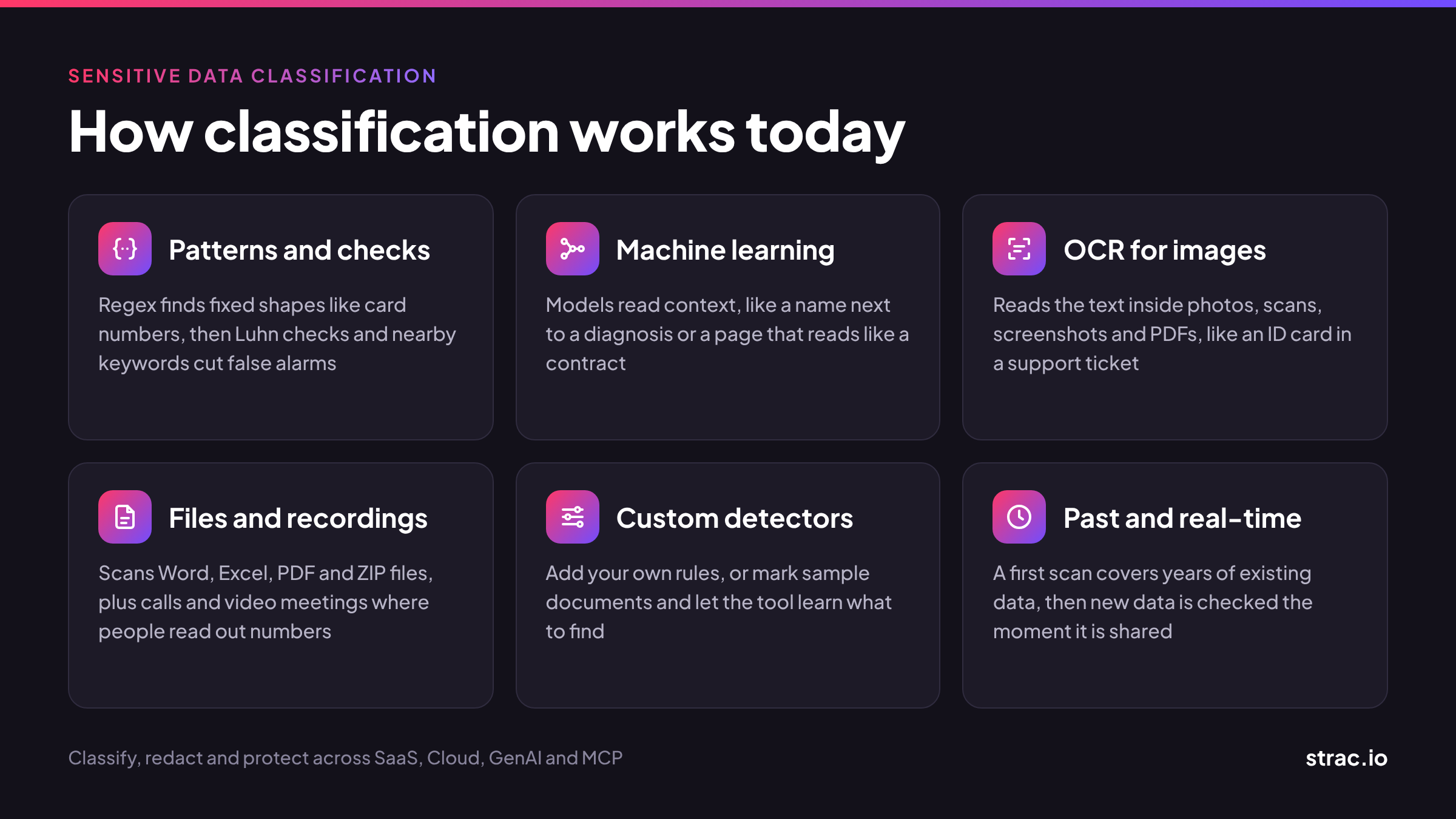
Manual tagging does not scale past a few teams. Modern tools scan content automatically and combine several detection methods, because no single method catches everything.
Regular expressions find things with a fixed shape, like card numbers or SSNs. On their own they cause false alarms. Good tools add checks such as the Luhn test for card numbers and look at nearby words like "SSN" or "DOB" before raising a flag.
Trained models catch what patterns miss: a name next to a diagnosis, an address written in a sentence, or a document that reads like a contract. They also cut false positives by judging the context around a match.
A lot of sensitive data lives in pictures. Think of driver's license photos in support tickets, scanned medical forms, or screenshots pasted into Slack. Optical character recognition (OCR) reads the text inside images and PDFs so it can be classified like any other text.
Scanning should cover Word, Excel, PDF, PNG, JPEG and ZIP files, not just message text. Call recordings and video meetings matter too, since people read out card numbers and account details on calls.
Every company has data that no built-in rule knows about, such as internal project codes, customer IDs or contract templates. You should be able to add your own rules, or show the tool examples and let it learn what to look for.
A first scan finds what already exists across years of files and messages. After that, real-time scanning checks new data as it is created or shared, so problems are caught in seconds rather than at the next audit.
This is the biggest change since the old playbook. Sensitive data now leaves through prompts and agent requests, not just email and file shares.

Employees paste customer emails into ChatGPT, upload spreadsheets to Claude and ask Copilot to summarize contracts. Classification has to run on the prompt and the upload before they reach the model. The usual fix is to redact the sensitive parts and let the rest through, so people can keep working.
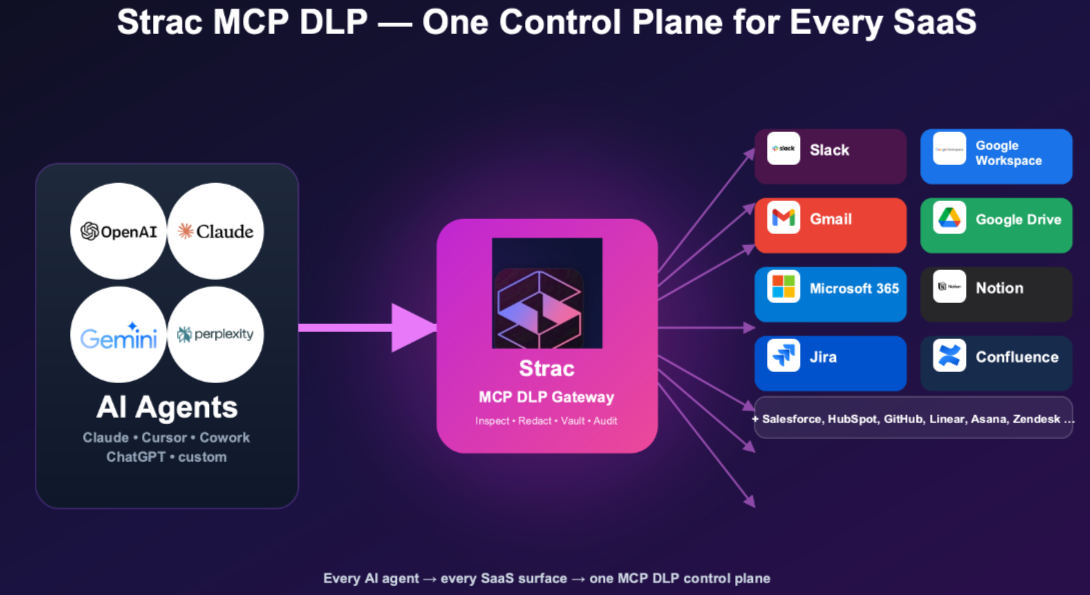
MCP lets an AI agent connect to business apps and read from them directly. An agent in Claude Desktop or Cursor might pull a Salesforce record, a Jira ticket or a file from S3 to answer a question. No person opens the file, so classic file-based controls never see it.
To cover this path, classification has to sit between the agent and the app. Each tool call gets inspected: which tool was called, what data came back, and which person the agent was acting for. Sensitive fields get redacted before they reach the model, and secrets get blocked outright.
A "Restricted" label tells you what the data is. It does not tell you how exposed it is. Data security posture management (DSPM) adds that missing context.
Take two files that both contain customer SSNs. One sits in a locked HR folder that three people can open. The other is in a Google Drive folder shared with "anyone with the link." Same label, very different risk.
To rank risk, look at four things alongside the label:
When you combine sensitivity with these factors, you get a short list of real problems to fix first instead of thousands of equal alerts.
A patient emails a photo of their insurance card and a lab report to a clinic's support inbox. The ticket syncs to Zendesk, and a staff member pastes part of it into an AI tool to draft a reply.
An engineer debugging a payment issue pastes a log line into Slack. It contains a full card number and a live API key. Later, a coding agent reads the same log through an MCP connection.
A sales team shares a customer export in Google Drive with "anyone with the link" so a partner can review it.
Strac finds, classifies and fixes sensitive data in one platform, across SaaS, cloud, endpoints, browsers, GenAI tools and MCP.
Want to see what sensitive data is sitting in your apps and AI tools right now? Book a demo to see Strac working on your own data.
Classification is no longer a one-time labeling project. Sensitive data now moves through chat apps, AI prompts and AI agents faster than any person can tag it. To keep up, you need tools that scan files, images and recordings automatically, rank findings by real exposure, and fix problems on the spot. That includes data flowing into GenAI tools and through MCP. If your program cannot see what your AI agents are reading, it has a gap.
It is the process of finding data that could cause harm if exposed, then tagging it by level, such as public, internal, confidential or restricted. The tag decides how the data must be stored, shared and protected.
Classification tells you what the data is. Data loss prevention (DLP) acts on that answer by redacting, blocking or alerting when sensitive data goes somewhere it should not. Classification without DLP is a report. DLP without good classification is noise.
DSPM uses classification as its starting point, then adds who can access the data, where it lives and how it has spread. That turns a list of sensitive files into a ranked list of real exposures.
Yes, if the tool uses OCR. It reads the text inside images, scans and PDFs, so a photo of a passport is caught just like a typed passport number.
Scan prompts and file uploads before they are sent, and redact the sensitive parts. This lets employees keep using AI tools while regulated data stays out.
MCP DLP inspects the data that AI agents pull from business apps over the Model Context Protocol. It redacts or blocks sensitive data in each tool call before the agent passes it to a model, and logs what was accessed.
New data should be classified as it is created or shared. Review your rules and access settings at least every quarter, and whenever you add a new app or AI tool.
“Don’t just alert on problems, fix them.”
Scott Roberts, Chief Information Security Officer, UiPath









Customers include