September 11, 2026

5
min read
Is Zendesk HIPAA Compliant?
Learn how your organization's use of Zendesk can be brought into full compliance with HIPAA standards
Zendesk is not HIPAA compliant out of the box.
It can be configured to support HIPAA requirements, but only if organizations implement additional controls and sign the appropriate agreements. Even then, compliance depends heavily on how Zendesk is used in practice.
Zendesk provides security features such as encryption, access controls, and audit logs. However, it was not designed specifically for handling Protected Health Information (PHI).
👉 The key issue:
Zendesk cannot natively control how sensitive data moves inside tickets, comments, attachments, and integrations.
And that’s where compliance actually breaks.

Zendesk provides a standardized addendum within its Master Services Agreement that functions similarly to a Business Associate Agreement (BAA).
This addendum outlines responsibilities between Zendesk and the customer and defines which services fall under compliance scope.
However, it’s important to understand:
👉 A BAA does not prevent data exposure.
It defines responsibility — not protection.
Even with a BAA in place, organizations are still responsible for ensuring PHI is properly secured within Zendesk workflows.
Zendesk can be configured to support PHI storage. But in practice, storing PHI in Zendesk introduces significant risk.

Zendesk lacks native capabilities to automatically:
This means PHI can easily be:
Without automated controls, PHI exposure becomes a workflow problem — not a configuration problem.
Zendesk doesn’t fail at compliance because of missing certifications. It fails because of how data flows through real workflows.
Sensitive data doesn’t stay contained — it moves across tickets, files, integrations, and people. That’s where exposure happens.

Here are the most common points where PHI leaks:
None of these are controlled natively by Zendesk. And once PHI is exposed, it’s already a compliance issue.
Even with security configurations in place, PHI can still be leaked from Zendesk.
Common causes include:
Zendesk provides infrastructure-level security, but it does not actively prevent sensitive data from being shared inside workflows.
👉 This creates a gap between “secure platform” and “secure data.”
And that gap is where most compliance failures occur.
Zendesk was not built to control sensitive data in motion. Strac fills that gap.
Strac acts as a real-time data protection layer across Zendesk and the rest of your stack ensuring PHI is detected, controlled, and remediated automatically.
Here’s how Strac works in practice:

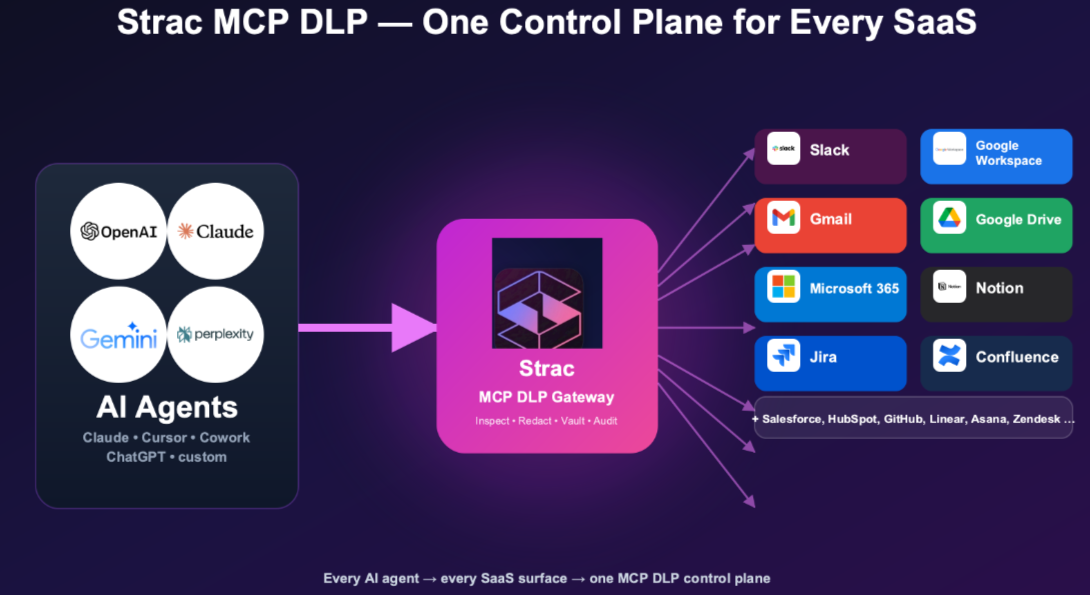
Modern data risk doesn’t live in one tool. It lives in SaaS, Cloud, GenAI and Enpoint enviroments.

Zendesk is just one surface where PHI exists. The real challenge is controlling sensitive data across:
Strac unifies DSPM + DLP into a single platform:
👉 This ensures consistent protection — no matter where data moves.
Zendesk runs your support desk, which means it routinely holds patient details shared inside support tickets — PHI covered by your BAA. The newest HIPAA risk isn’t Zendesk itself; it’s what happens when someone connects Zendesk to an AI assistant over the Model Context Protocol (MCP). Many teams now use Claude Cowork, and Anthropic does not sign a BAA for it. The moment an agent queries Zendesk over MCP, that PHI can flow straight to a model sitting outside your BAA — a reportable exposure, even though the underlying app is configured correctly.
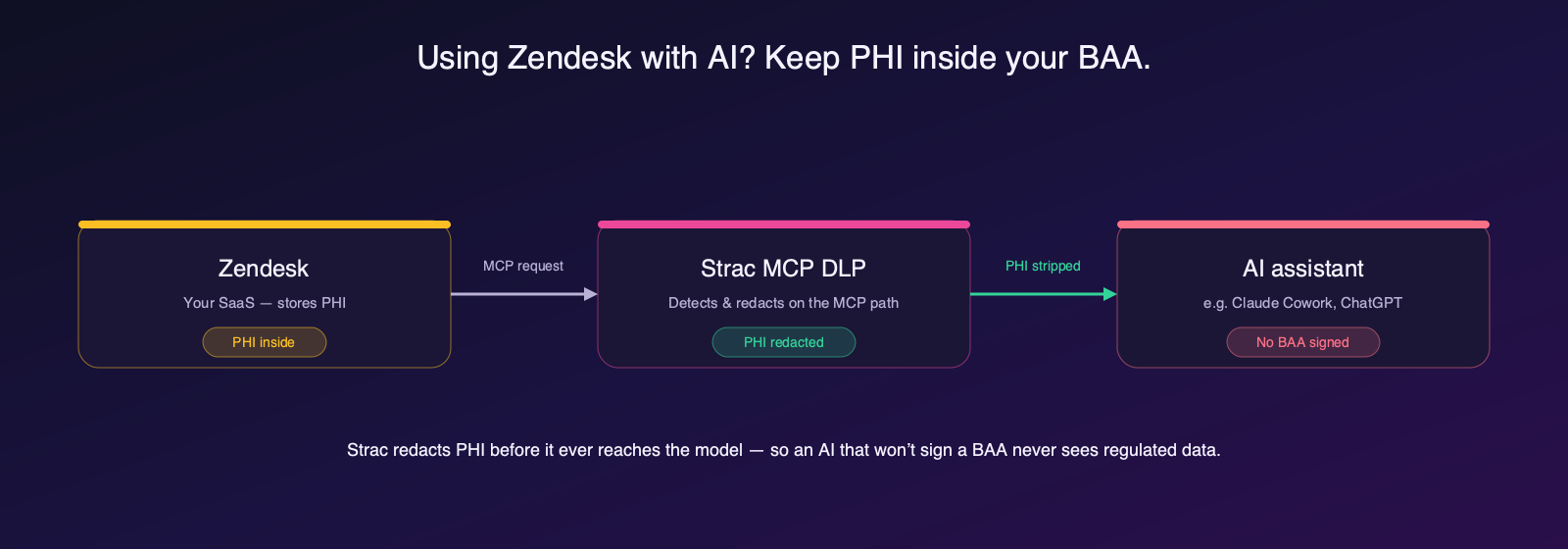
Strac MCP DLP closes that gap. It sits on the MCP path between Zendesk and the AI, detects PHI in every request and response, and redacts, masks, or blocks it before it reaches the assistant — so an AI that won’t sign a BAA never sees regulated data. Every action is audit-logged for HIPAA. See Zendesk MCP server for how the connection works.
Zendesk can be used in a HIPAA-compliant environment — but it is not compliant by default.
Configuration and agreements (like a BAA) are necessary, but not sufficient.
👉 The real issue is not infrastructure — it’s data movement.
If PHI can still be:
Then compliance is still at risk.
To truly secure Zendesk for HIPAA use, organizations need:
That’s where Strac comes in.

No. Zendesk must be configured properly and paired with additional controls to meet HIPAA requirements.
Zendesk offers a standardized addendum similar to a BAA, but it does not replace the need for proper data protection controls.
PHI can be stored, but without automated detection and redaction, it remains at risk of exposure.
The biggest risks come from human behavior, attachments, integrations, and lack of real-time data control.
Strac detects and redacts PHI in real time across tickets, files, and integrations, while also scanning historical data and protecting AI workflows.
.avif)


.gif)


.webp)