October 1, 2026

5
min read
Is SharePoint HIPAA Compliant?
Learn how Strac safeguards SharePoint against critical concerns such as data breaches, insider threats, and regulatory non-compliance
SharePoint HIPAA, the direct answer. SharePoint can be used in a HIPAA-compliant way only on a Microsoft 365 plan covered by the Microsoft 365 BAA — with the BAA executed and tenant security controls configured. Even with the BAA, Microsoft's contractual coverage does not stop PHI from being pasted, uploaded, or shared in ways that violate HIPAA. Strac SharePoint DLP closes that data-layer gap. See Strac HIPAA DLP →
SharePoint is Microsoft’s cloud-based collaboration and document-management platform used by enterprises to store files, manage internal knowledge, automate workflows, and collaborate across teams. Because SharePoint integrates deeply with Microsoft 365 apps like OneDrive, Teams, and Outlook, it quickly becomes a central repository for business-critical information; including PHI, PII, and other regulated data.
For healthcare, insurance, and benefits organizations, SharePoint often evolves into a storage layer for patient documents, claims records, onboarding files, vendor contracts, billing reports, and audit-related materials. This is where HIPAA risk grows; once PHI enters SharePoint, it must be protected under strict access controls, logging, and DLP monitoring to remain compliant.
However, while SharePoint can be configured to be HIPAA-aligned, it is not automatically compliant out of the box. Organizations must configure administrative safeguards, enable logging, apply proper permission models, restrict external sharing, and deploy DLP that can discover, classify, and protect PHI inside files, lists, pages, and synced OneDrive folders. This is exactly where a HIPAA-ready DLP platform like Strac becomes critical.
In the healthcare industry, where patient confidentiality and data security are paramount, the Health Insurance Portability and Accountability Act (HIPAA) sets the standard for protecting sensitive patient information.
SharePoint is a web-based document management and storage platform owned by Microsoft. SharePoint integrates natively with Office and Microsoft 365 and is used by organizations to improve team collaboration, project management and other internal processes.
As standard, SharePoint is not HIPAA compliant.
To ensure the safe and compliant handling of Protected Health Information (PHI), healthcare organizations must ensure that SharePoint is configured specifically to comply with HIPAA standards.

To comply with HIPAA, business associates must have a Business Associate Agreement (BAA) in place with all organizations that are classified as HIPAA-covered entities.
Yes —Microsoft is willing to sign a BAA with healthcare organizations that covers the use of SharePoint.
Microsoft’s BAA for Office 365 Enterprise and Microsoft 365 Enterprise covers the use of SharePoint. This means that SharePoint users must have an Office 365 Enterprise or Microsoft 365 Enterprise plan.
The BAA outlines Microsoft's responsibility in managing and protecting PHI, and brings the use of SharePoint into compliance with HIPAA.
However, signing a BAA with Microsoft does not ensure compliance. Healthcare organizations must also ensure their use of SharePoint remains compliant, at all times. This involves configuring SharePoint’s security settings, including applying strict access controls and sharing permissions. Employees must also be trained on data security protocol and how to handle sensitive data in a compliant manner.
Yes — it is possible to store Protected Health Information in SharePoint, but only when certain requirements are met.
Firstly, healthcare organizations planning on using SharePoint to handle and store PHI must have an Office 365 Enterprise or Microsoft 365 Enterprise plan and have signed a relevant BAA with Microsoft.
Secondly, SharePoint settings must be configured in-line with HIPAA requirements. This includes enabling strict user access controls, activity monitoring functions, and conducting regular security assessments.
Finally, healthcare organizations need to ensure their staff are trained on how to handle PHI and sensitive data, or risk non-compliance with HIPAA.
Improper handling of sensitive data and protected information within SharePoint can open your organization up to significant regulatory and litigation risks.

Considering SharePoint’s popularity and the fact it is a cloud-based collaboration tool, without implementing additional security mechanisms, there will always be a risk of data leaks.
Although SharePoint has security features designed to protect against unauthorized access, data breaches, and other cyber risks, no system is completely invulnerable to leaks and external cyber threats. In fact, a company using SharePoint suffered a ransomware attack back in June 2023, where the attacker stole hundreds of files.
The potential for the leaking of sensitive data such as PHI will always exist. The Incorrect configuration of security settings can lead to unauthorized access, whilst user error can lead to an accidental leak. There is also the risk of malicious insider threats.
As well as technical security protocol, your employees also play a crucial role in ensuring internal data security, especially when handling sensitive patient data.
This ever-present risk of data leaks sees many healthcare organizations adopt additional security mechanisms that not only ensure compliance, but effectively safeguard PHI against breaches and leaks.

HIPAA violations in SharePoint typically occur not because the platform is insecure, but because users store, share, or access PHI without proper controls, visibility, or monitoring. These risks increase as organizations scale and more employees use SharePoint as a default file hub.
Here are the most frequent HIPAA violations seen inside SharePoint environments:
Employees often upload medical documents, ID scans, claims forms, lab results, or intake files into shared folders that lack restricted permissions. If “Everyone,” “All Employees,” or external users have access, this becomes an immediate HIPAA violation. This commonly happens when users sync SharePoint with OneDrive and unintentionally expose folders to broad groups.
SharePoint allows file and folder sharing via links; but without strict configuration, links may be set to “Anyone with the link.” This allows PHI to be accessed by unauthorized parties. Many HIPAA breaches stem from an employee sending a patient-related Excel file or PDF to a vendor without proper access control.
HIPAA requires full audit trails for who accessed, modified, or downloaded PHI. SharePoint provides logs, but organizations often fail to enable advanced auditing, retention, or alerting. This results in blind spots when investigating potential breaches.
SharePoint preserves version history, which means older versions containing PHI may remain accessible even if redacted later. Without DLP scanning and version-level detection, sensitive information remains exposed.
Employees often upload documents generated from EMR, patient portals, or intake systems without marking them as sensitive. Unclassified files bypass controls, get shared broadly, or remain unmonitored.
When SharePoint syncs to local devices, PHI stored in SharePoint can quietly propagate to laptops — including unmanaged or BYOD endpoints. Lost or unencrypted devices containing synced PHI create HIPAA liability.
Strac provides real-time, automated protection that identifies and remediates PHI across SharePoint, OneDrive, and the broader Microsoft 365 ecosystem. With ML-based classification; OCR; inline redaction; policy-based blocking; and continuous scanning, Strac ensures PHI is never exposed through risky folders, misconfigured sharing, document versions, or synced devices.
Strac’s agentless DSPM + DLP also provides complete HIPAA-grade audit trails, posture analysis, risk scoring, and automated detection of PHI buried inside PDFs, scans, spreadsheets, and uploaded healthcare records.
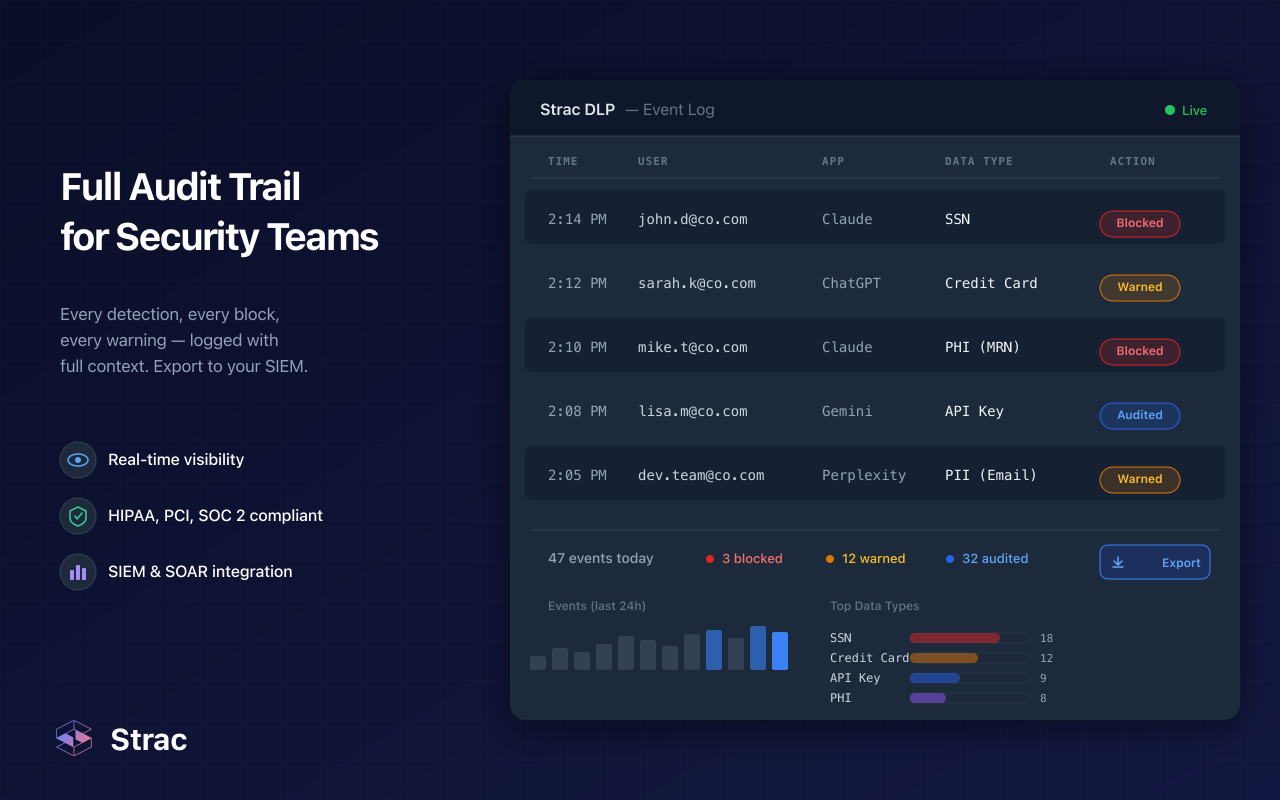
Strac SharePoint DLP is a comprehensive data leak prevention tool that adds an additional layer of security to SharePoint.
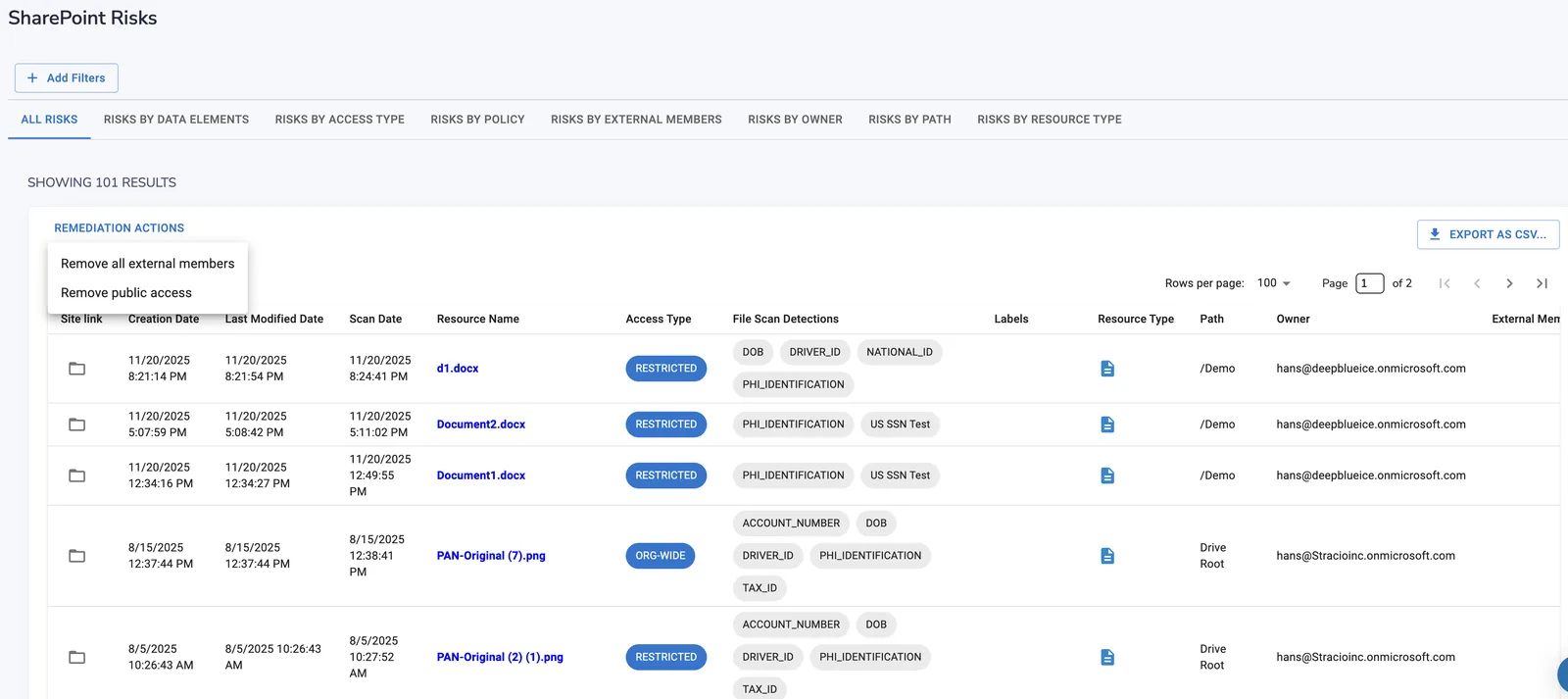
SharePoint DLP ensures your use of SharePoint remains compliant through comprehensive real-time monitoring, automated data categorization, advanced redaction, intelligent alerts, and streamlined compliance management.
All of this is delivered through a user-friendly interface tailored for organizational needs:
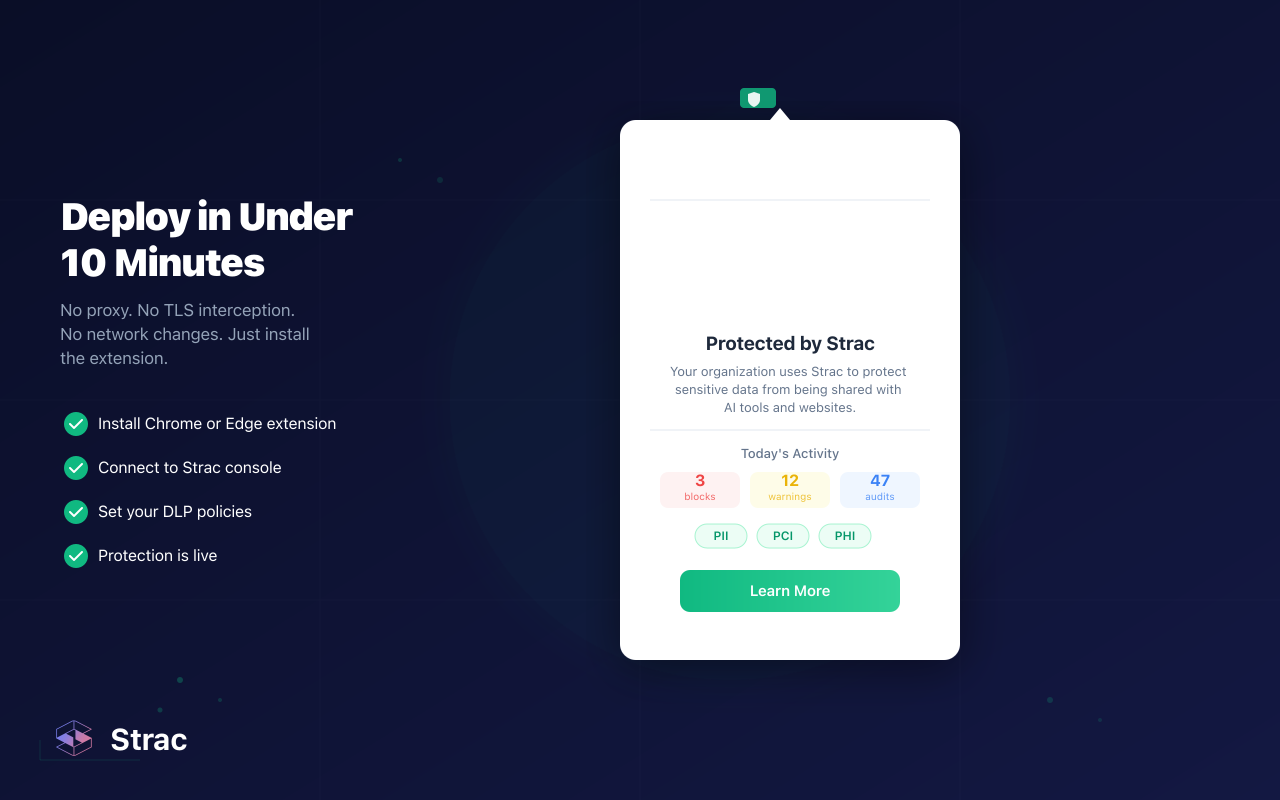
To learn more about how Strac adds an extra layer of security and helps organizations comply with HIPAA regulations, see our guide to HIPAA Compliance.
Book a free 30-minute demo for more.

SharePoint hosts document libraries and team sites, which means it routinely holds clinical records, forms, and scanned charts — PHI covered by your BAA. The newest HIPAA risk isn’t SharePoint itself; it’s what happens when someone connects SharePoint to an AI assistant over the Model Context Protocol (MCP). Many teams now use Claude Cowork, and Anthropic does not sign a BAA for it. The moment an agent queries SharePoint over MCP, that PHI can flow straight to a model sitting outside your BAA — a reportable exposure, even though the underlying app is configured correctly.
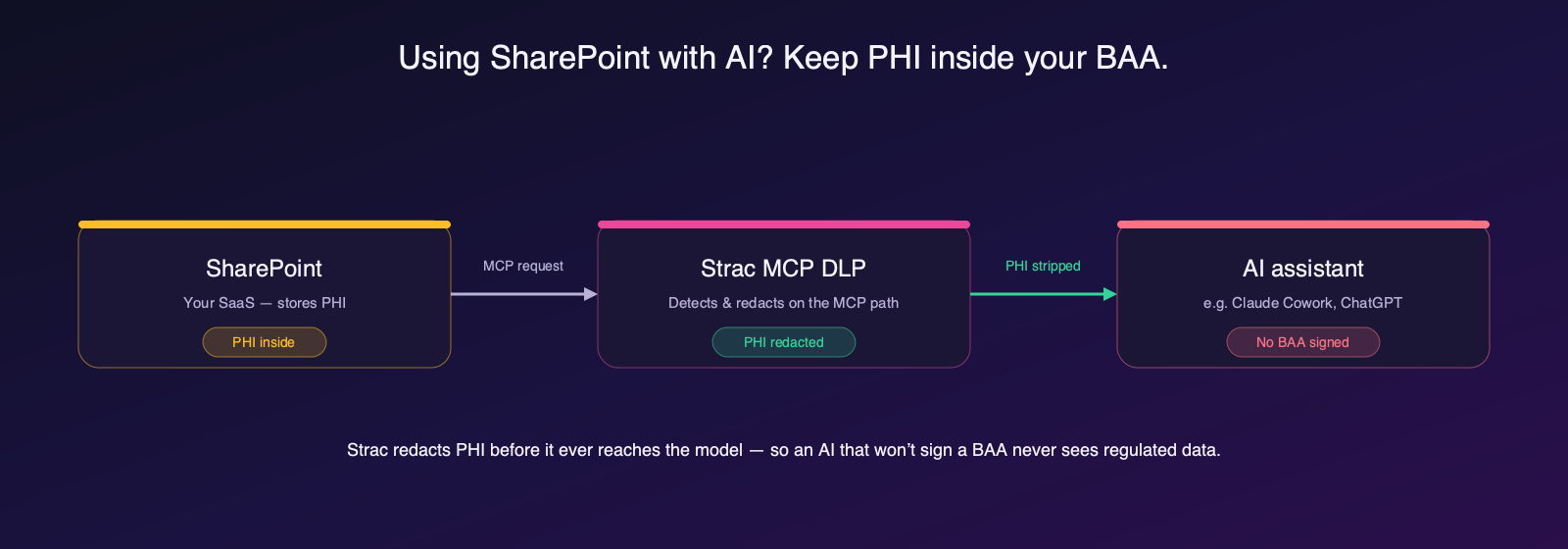
Strac MCP DLP closes that gap. It sits on the MCP path between SharePoint and the AI, detects PHI in every request and response, and redacts, masks, or blocks it before it reaches the assistant — so an AI that won’t sign a BAA never sees regulated data. Every action is audit-logged for HIPAA. See SharePoint MCP server for how the connection works.
Can I use SharePoint with Claude or ChatGPT and stay HIPAA compliant? Only if PHI never reaches a model that isn’t under a BAA. Claude Cowork does not sign one, so connecting SharePoint over MCP can expose PHI. Strac MCP DLP redacts PHI on the MCP path before it reaches the assistant, keeping the connection HIPAA-safe with a full audit trail.
Yes; Microsoft will sign a Business Associate Agreement (BAA) for SharePoint, but only when the organization is using Microsoft 365 plans that include HIPAA-eligible services. Once the BAA is signed, Microsoft contractually commits to handling PHI in accordance with HIPAA requirements. However, the BAA does not make your SharePoint environment automatically HIPAA-compliant; it only covers Microsoft’s responsibilities as the cloud provider. You are still responsible for configuring access controls, auditing, DLP, sharing policies, and monitoring.
SharePoint can be secure enough for PHI storage when correctly configured. It includes strong encryption, access permissions, auditing capabilities, and integration with Microsoft Purview. But the default configuration is not sufficient for HIPAA-grade protection. Real HIPAA compliance requires strict sharing controls; continuous auditing; PHI classification; least-privilege access; and monitoring for files, pages, lists, and synced devices. Without these controls; PHI in SharePoint can still leak through public links, misconfigured folders, or synced endpoints.
You can make SharePoint HIPAA-compliant by enabling security controls; restricting PHI access; and layering monitoring on top of Microsoft’s native protections. Organizations typically follow these steps:
Once these safeguards are in place, SharePoint can be used as a compliant PHI repository.
Yes; DLP is still required even if SharePoint is configured for HIPAA. SharePoint’s built-in controls do not automatically detect PHI inside uploaded files, scans, PDFs, spreadsheets, or synced OneDrive folders. They also do not remediate sensitive content in real time. A HIPAA-grade DLP solution provides:
Without DLP, organizations cannot reliably prevent PHI leakage or maintain the visibility HIPAA requires.
.avif)


.gif)


.webp)