October 11, 2026

5
min read
How do Companies Protect Customer Data: A Detailed Checklist
A 2026 checklist for protecting customer data: 15 controls covering Slack, Google Drive, AI prompts, MCP agents, and endpoints, with Strac redaction built in.
Protecting customer data means controlling three things: where it is stored, who can reach it, and where it is allowed to go. A company that knows all three can prove it to customers and auditors. A company that knows only one is guessing.
Customer data includes PII such as names, addresses, and Social Security numbers, PHI such as medical records, PCI data such as card numbers, and account details such as login credentials and API keys. Each type carries its own rules under GDPR, CCPA, HIPAA, and PCI DSS.
The cost of getting it wrong keeps rising. IBM's 2025 Cost of a Data Breach Report puts the average breach in the United States at $10.22 million. In May 2025, the Irish Data Protection Commission fined TikTok €530 million for sending EU user data to China.
The classic customer data checklist was built for a company with an office network, a database, and email. It covered firewalls, antivirus, strong passwords, and backups. Those controls still matter. They just guard the wrong doors.
Today a support agent copies a ticket into an AI tool to draft a reply. A sales rep shares a customer list from Google Drive with a personal account. An AI agent connected to Salesforce pulls a full customer record to answer one question. None of this crosses the firewall, and none of it looks like an attack.
IBM's 2025 report found that shadow AI was involved in 20% of breaches, and 97% of companies with an AI-related breach had no proper AI access controls. This is why legacy DLP fails for AI: it watches the network, while customer data now moves through apps, browsers, and agents.
A firewall tells you who came in. It does not tell you what went out.
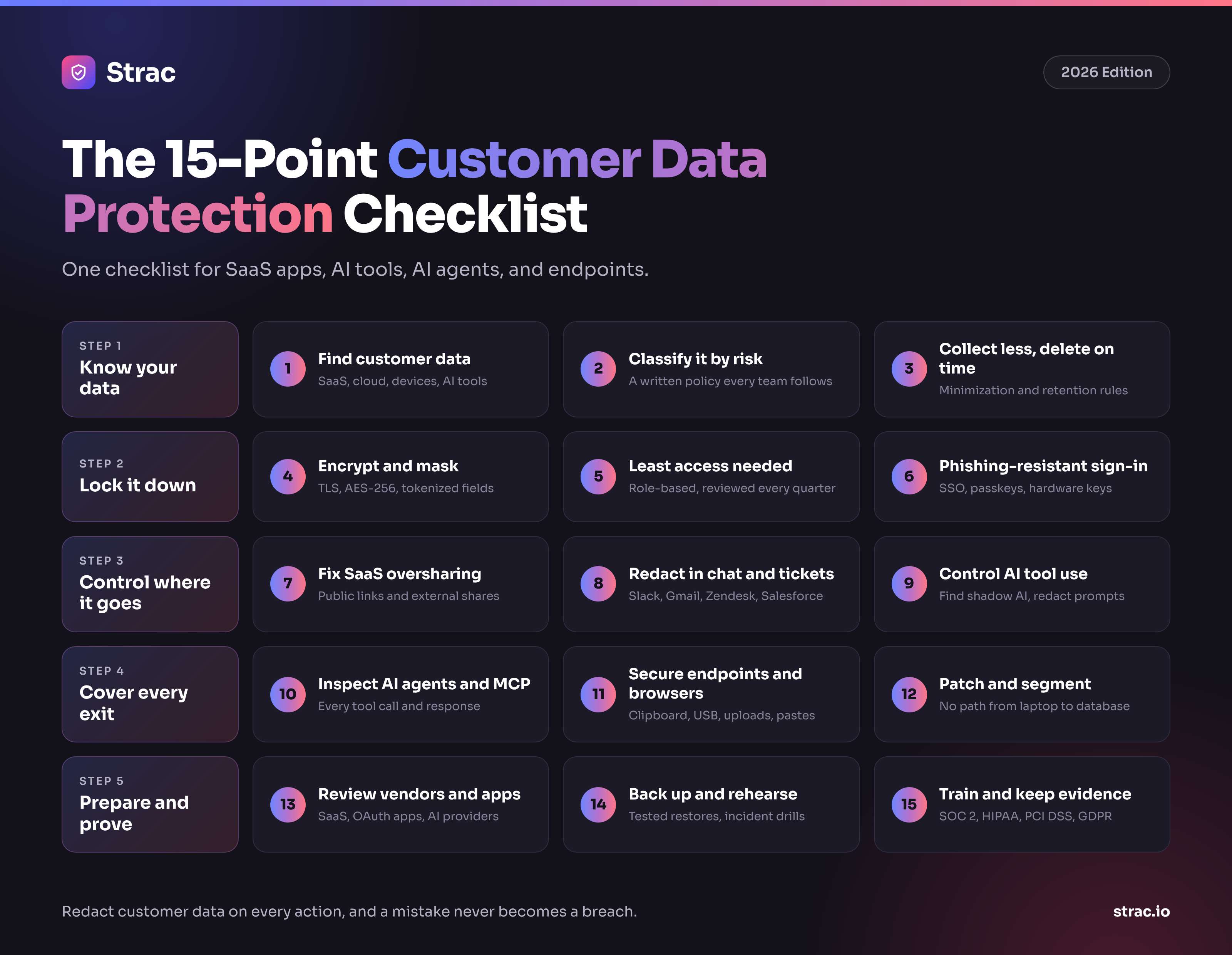
You cannot protect data you have not found. Run sensitive data discovery and classification across SaaS apps, cloud storage, and devices, not only your production database. Customer data hides in Slack threads, Zendesk tickets, Google Sheets exports, and old PDFs. A PII scanner that reads images and attachments finds the copies people forget.
Label each data type by how much harm a leak would cause. A card number and a support chat message do not need the same rules. A clear data classification policy tells every team what counts as restricted and what they can share.
The safest customer record is the one you never stored. Apply data minimization at the point of collection, then set retention periods that match your data retention requirements for compliance. Delete old exports and stale backups on a schedule, not once a year.
Use TLS for data in transit and AES-256 for data at rest. Data encryption protects stored files, but anyone with access still sees the raw values. Data masking and tokenization go further: card numbers and Social Security numbers are replaced with tokens, so a leaked table holds nothing useful.
Grant access by role, review it every quarter, and remove it when people change jobs or leave. Apply the same rule to apps and AI tools through AI access control. Most customer data leaks start with access that was never taken back.
Turn on single sign-on and multi-factor authentication for every system that holds customer data. Prefer passkeys or hardware keys over SMS codes. Drop forced password rotation; current guidance favors long, unique passwords stored in a password manager.
Public links, "anyone with the link" files, and external Slack channels expose customer data without any attack at all. DSPM finds overshared files and misconfigured storage and removes public links and old permissions. Start with Google Drive DLP, where most exports end up.
Customers paste card numbers into support chats. Agents paste customer records into Slack to ask for help. Slack DLP, Gmail DLP, Zendesk DLP, Intercom DLP, and Salesforce DLP remove the sensitive fields in place and leave the rest of the conversation intact.
Employees use ChatGPT, Claude, Gemini, and Copilot every day, often with personal accounts. Find out which tools are in use with how to detect shadow AI, then apply AI DLP so customer data is removed from prompts and uploads before they are sent. ChatGPT DLP and Claude DLP let people keep the tools they like.
AI agents read CRMs, ticket systems, and file stores through the Model Context Protocol (MCP). One agent can pull thousands of customer records in seconds. MCP DLP checks every tool call and response and removes PII, PHI, and secrets before they reach the model. It is how you protect AI agents without taking away their access.
Laptops are where customer data gets copied, printed, uploaded, and screenshotted. Endpoint DLP for Windows, Mac DLP, and Linux DLP control the clipboard, USB, and uploads on any network. Browser DLP checks pastes and form submissions at the moment they happen.
Keep operating systems, browsers, and libraries patched, and replace software that no longer gets updates. Separate the systems that hold customer data from the rest of the network, so one compromised laptop cannot reach the production database.
Every SaaS vendor, AI tool, and connected app that touches customer data is part of your risk. Check vendors for SOC 2 or ISO 27001, review the OAuth apps employees connect to Google and Microsoft, and treat AI vendors the same way. See cybersecurity third-party risk management for a working process.
Keep encrypted, tested backups that ransomware cannot reach, and know how long a restore takes. Write an incident response playbook that names who does what in the first hour, and run a drill at least twice a year.
Show staff what a phishing email, a risky AI prompt, and an overshared file look like in your own tools. Then map every control to SOC 2, ISO 27001, HIPAA, PCI DSS, GDPR, CCPA, and the EU AI Act, and collect evidence as you go rather than before the audit.
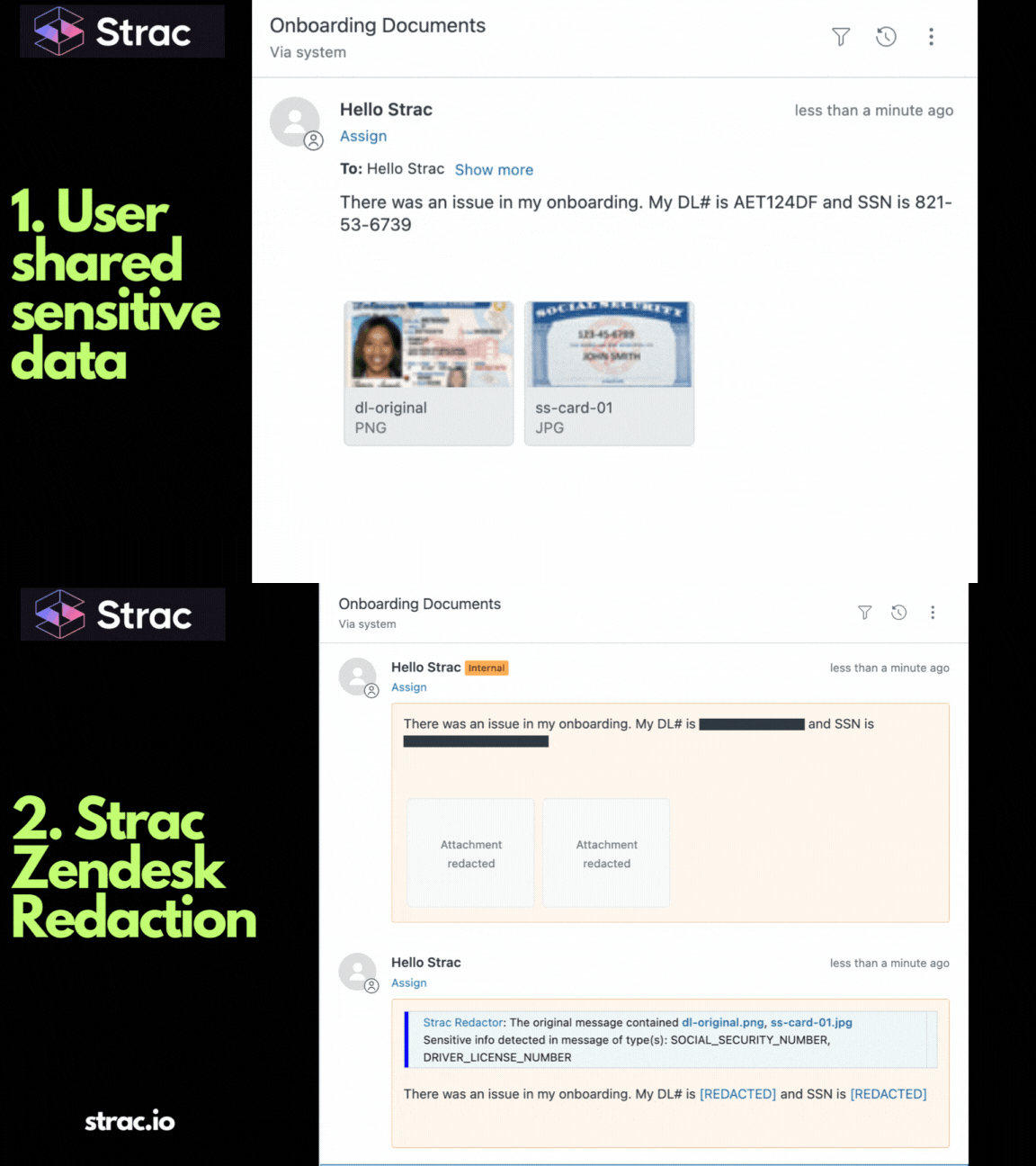
A support agent pastes a customer's card number and date of birth into a Slack thread to ask a teammate for help. Strac detects both and replaces them with masked values in seconds. The agent then pastes the same ticket into ChatGPT to draft a reply. The browser extension removes the card number before the prompt is sent.
Later, an AI agent connected over MCP pulls the customer's full Salesforce record. Strac strips the sensitive fields from the tool response, so the model gets what it needs and nothing more. The security team sees each event, the data type, and the destination. Nobody sees keystrokes or screenshots, because Strac records neither.
Strac is a DLP, Data Discovery, and DSPM platform that applies one set of policies across SaaS, cloud, browser, AI tools, MCP, and endpoints.
SaaS DLP. SaaS DLP connects by API to Slack, Google Workspace, Gmail, Microsoft 365, Zendesk, Salesforce, HubSpot, and more. It scans messages, files, and tickets in real time and across history. Most integrations go live in under 10 minutes. See all integrations.
Endpoint and Browser DLP. One endpoint DLP agent covers Windows, macOS, and Linux. Browser DLP in Chrome and Edge checks pastes, uploads, and form submissions.
AI DLP and shadow AI. AI DLP redacts customer data from prompts and uploads to ChatGPT, Claude, Gemini, and Copilot. Strac also shows which AI tools are in use, so shadow AI becomes a list you can act on.
MCP DLP. MCP DLP inspects every agent tool call and response across the MCP integrations and removes customer data before it reaches the model.
DSPM, discovery, and lineage. DSPM finds customer data at rest and removes risky sharing. Data lineage tracks a file from its source, so a renamed copy is still stopped on its way to a personal account or an AI tool. Data masking replaces raw values with tokens in your own systems.
[PRODUCT SCREENSHOT · Strac console showing one customer data policy applied across Slack, Google Drive, ChatGPT, endpoint, and MCP]One policy for every exit. The rule that protects a Slack thread also protects the prompt and the agent.
Remediation follows the same order on every surface:
Companies used to protect customer data by locking down the network. Today the data lives in Slack, Google Drive, support tools, AI prompts, and agent tool calls, and the network sees almost none of it. Identity, network, and training controls each fail at some point; the data layer is what still protects you when they do. Redact customer data on every action and a mistake never becomes a breach.
No. Data privacy sets the rules for how customer data may be collected and used. Customer data protection is the set of controls that enforce those rules, such as discovery, access control, encryption, and redaction. Privacy is the promise; protection is how you keep it.
Because most of it guards the network and the login, not the data. A firewall and MFA cannot see a customer record pasted into an AI prompt or shared from Google Drive. Strac inspects content inside the app, browser, endpoint, and agent.
Yes, by redacting instead of blocking. Strac removes the sensitive fields from a prompt, message, or upload and lets the rest go through. People keep their AI tools, and customer data stays out of them.
No. People make mistakes, and some attacks will get past identity and network controls. That is why the data layer matters: if customer data is redacted on every message, prompt, and agent action, a mistake or a stolen login does not expose raw records.
It is the enforcement layer. Governance decides which AI tools and agents may touch customer data; protection makes sure only the right fields reach them. Start with AI data governance and MCP DLP for the full picture.
.avif)


.gif)


.webp)