Securing Trust: A Conversation with the Founder on Redaction's Vital Role in Customer Support Channels
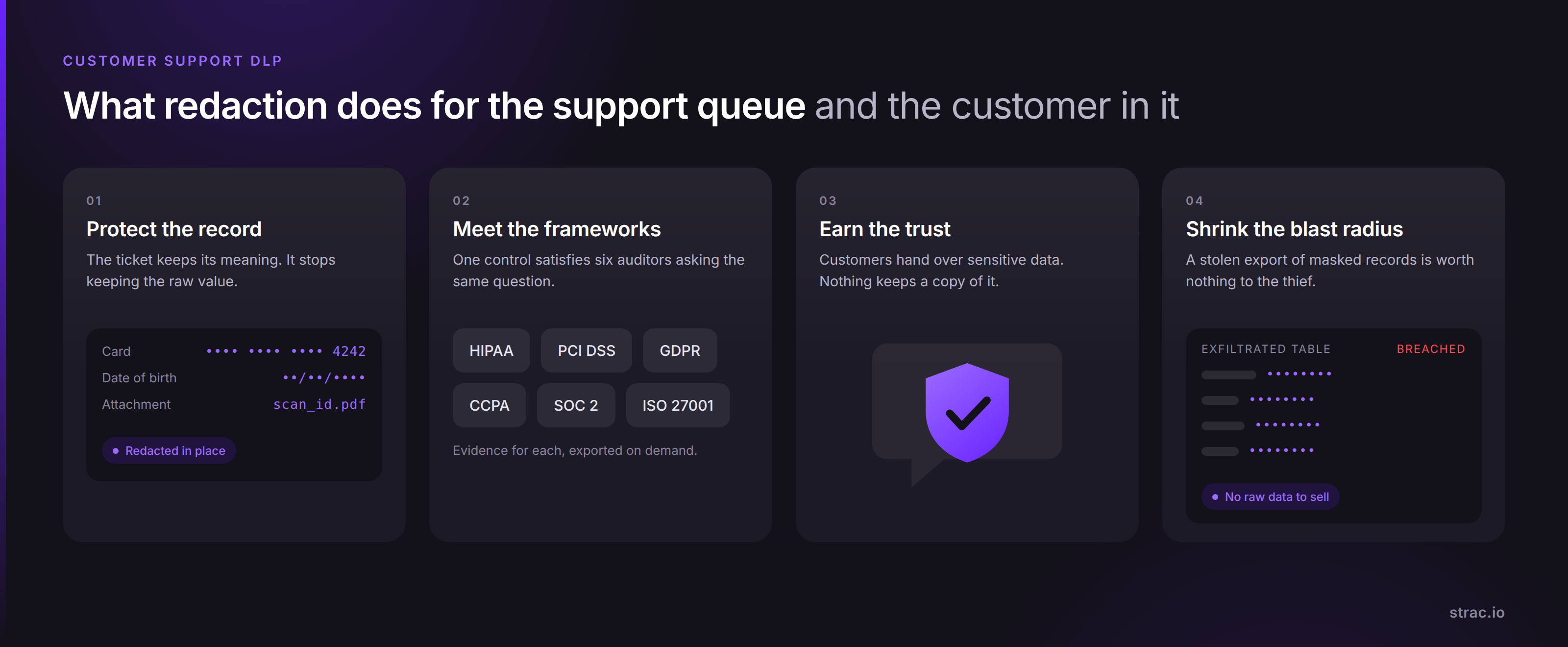
Customer support DLP finds and redacts PII, PHI and card data inside tickets, chats and attachments. Strac redacts at the data layer, before a copy escapes.
· Customer support DLP finds and redacts sensitivedata inside tickets, chats, emails, transcripts and attachments, so a supportrecord stops being a copy of the customer's identity.
· Support is the one queue in the business wherecustomers hand over card numbers, medical details and passport scansvoluntarily, and where an agent pastes them into a second tool a minute later.
· Most teams cover the perimeter and the inbox andstop there. The ticket body, the attachment, the CRM note and the AI assistantreading all three are still plain text.
· Strac redacts at the data layer across SaaS, endpoint DLP, Browser DLP, GenAIand MCP DLP, covering Zendesk,Intercom, Freshdesk, Salesforce, Jira, Slack and Gmail.
· Supporttooling now includes AI assistants and connectors, so start from the pillar on AI data governance.
What Is Customer Support DLP?
Customer support DLP is data loss prevention applied to the systems where customers talk to your company: the helpdesk, the live chat widget, the shared inbox, the CRM record and the call transcript.
It does three things. It discovers sensitive data already sitting in years of closed tickets. It classifies that data as PII, PHI, PCI or secrets. It remediates, which in practice means redaction, because a support ticket needs to stay readable to the agent working it.
The distinction matters. Classic DLP asks whether a file should leave the network. Customer support DLP asks a narrower and more useful question: does this record need to hold the raw value at all? Almost always, it does not. The agent needs to know a card was declined, not the sixteen digits.
Why Support Is Where Sensitive Data Collects
Every other team guards its data. Support is handed it.
A customer pastes a full card number into chat to prove a charge. A patient attaches a lab result to explain a billing dispute. An applicant uploads a passport scan because an agent asked for identity verification. None of this is exfiltration. It is the job.
The data then multiplies. The ticket is copied into a CRM note. The attachment is downloaded to a laptop so an agent can read it. A screenshot lands in a Slack channel where the escalation happens. A summary flows into a reporting warehouse. One customer disclosure becomes six copies across four systems, and the copies outlive the ticket by years.
Support is also the highest turnover queue in most companies, staffed at volume, often across vendors and time zones. Access reviews assume a stable team. Support is not one.
This is the antithesis at the heart of the problem. Access control decides who may open the ticket; redaction decides what is inside it when they do. Only the second one survives a stolen session, an overpermissioned integration or a contractor who left last month.
🎥 What Redaction Looks Like On A Live Ticket
Strac inspects the content of a support record as it is created, not on a nightly batch.
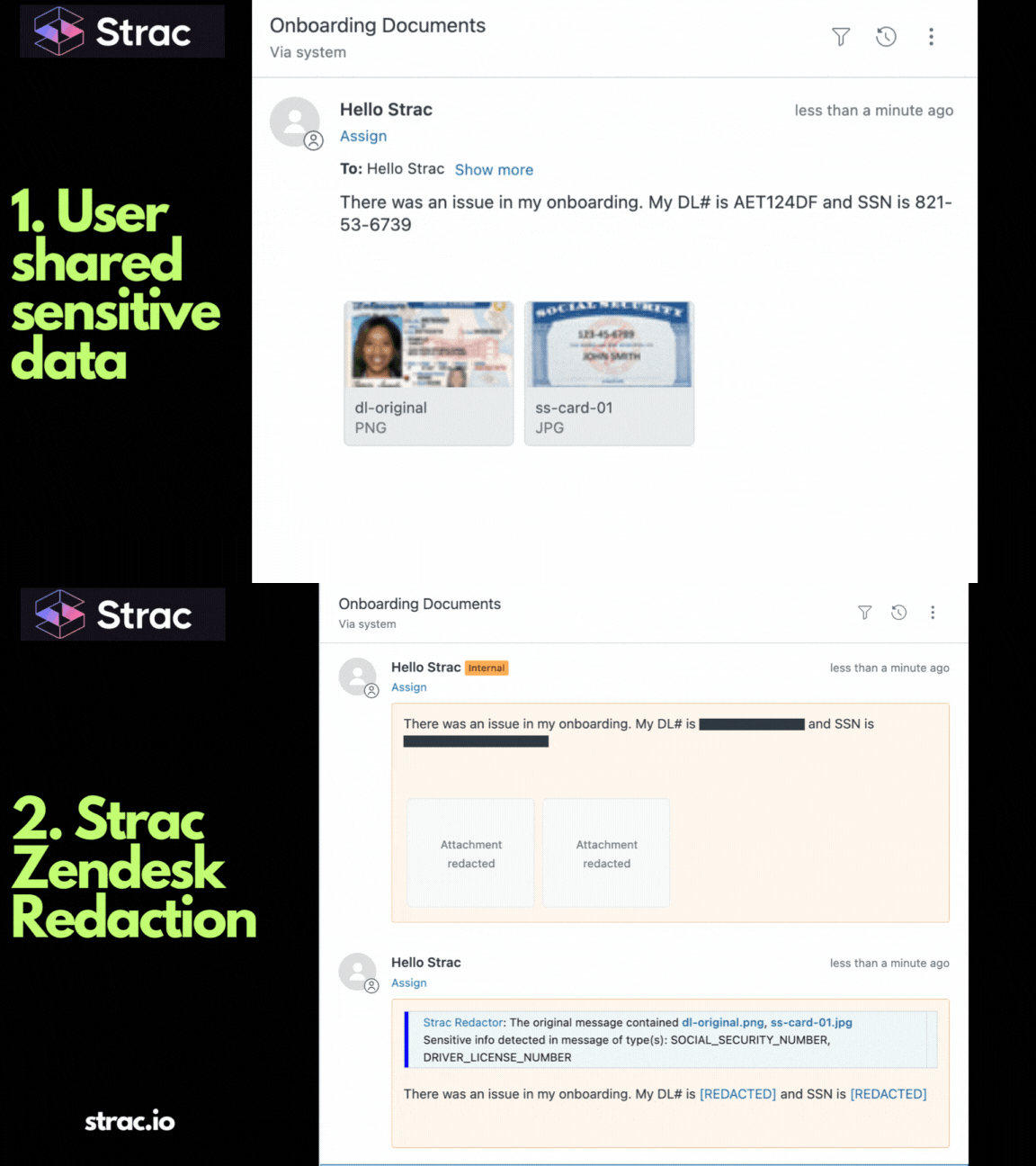
A customer sends a card number into Intercom. Strac detects the PCI pattern in the message, replaces the digits in place with a masked token, stores the original in a vault that agents can reach only through a request that is logged, and leaves the conversation flowing. The agent sees •••• 4242. The customer sees nothing change. The audit trail sees a redaction event with a policy name attached.
The same applies to what the agent does next. Downloading the attachment, pasting the transcript into a browser tab, dragging a customer export onto a personal drive: each of those is an action on a surface Strac already covers.
Where Support Data Travels Next
In 2026, the support stack is no longer four apps and a shared inbox.
An AI assistant drafts the reply, which means it reads the ticket. A summarizer condenses the call transcript, which means it reads the transcript. A connector exposes the helpdesk to an agent over the Model Context Protocol, which means the ticket body is now a tool response that a model can request, quote and pass on. The ticket became training material, context and an API payload all at once.
Every one of those paths carries the raw value unless something removes it first. This is why redaction has to happen at the data layer rather than at any single tool. Block one assistant and the data still reaches the next one. Redact the record and every downstream reader, sanctioned or not, receives a masked value.
For a support organization that means coverage of the tools the work actually happens in. Zendesk, Intercom, Freshdesk, Zoho Desk, Kustomer and Salesforce for the ticket itself. Gmail, Office 365, Slack, Microsoft Teams and Zoom for the escalation. Jira, Confluence and Notion for the engineering handoff. Google Drive, OneDrive, Box and SharePoint for the attachment that was saved "just for now". Endpoint DLP for the laptop, Browser DLP for the tab, AI DLP for ChatGPT, Claude, Gemini and Copilot, and MCP DLP for the connector layer underneath the new assistants.
Remediation runs in a fixed order:
Redact or mask. Sensitive values are replaced in place inside Zendesk, Intercom, Salesforce, Slack, email, Jira, Google Drive, SharePoint and Box, with the original held in a vault.
Block. Uploads and pastes carrying PII, PHI, PCI or secrets are stopped on the endpoint, in the browser and on the way to generative AI tools.
Warn and coach. The agent gets an inline message naming the data type and the policy, at the moment of the action rather than in a training module next quarter.
Revoke access. Oversharing on a file or a folder is pulled back, including public links created during an escalation.
Detection covers more than card numbers: names, addresses, dates of birth, government identifiers, medical record numbers, API keys, access tokens and the PDF or image attachments that hold them, read with optical character recognition rather than filename guessing.
Your First 90 Days
Days 0 to 30, discover. Connect the helpdesk, the CRM and the shared inbox in read mode. Scan the back catalog of closed tickets. Report the count of records holding PCI, PHI and PII, broken down by application. This number is the business case.
Days 30 to 60, protect. Turn on redaction for card numbers, government identifiers and medical identifiers in live tickets and chats. Add attachment scanning. Extend to the browser and the endpoint for the agents who download.
Days 60 to 90, prove and scale. Add the AI assistants and the MCP connectors. Route redaction events into your SIEM. Hand your auditor a report showing what was found, what was masked and who requested an unmasked value.
Run this checklist before you call it done:
☐ Closed tickets scanned, not just new ones
☐ Attachments read by content, not by file type
☐ Chat transcripts and call transcripts included
☐ Agent laptops and browsers covered
☐ Every AI assistant and connector touching the helpdesk enrolled
Support teams are handed sensitive data as a condition of doing their job, and every control above the data layer eventually fails: sessions get stolen, integrations get overpermissioned, contractors keep access they no longer need, assistants read more than anyone intended. Access control decides who opens the ticket; redaction decides what is in it. Strac redacts PII, PHI, PCI and secrets across the helpdesk, the CRM, the inbox, the endpoint, the browser and the connector layer, so a compromise never becomes a breach. Book a demo to see Strac redact a live support ticket in your own stack.
🌶️ Spicy FAQs for Customer Support DLP
Is customer support DLP different from email DLP?
Yes. Email DLP inspects messages in transit. Customer support DLP inspects the records that persist: ticket bodies, chat transcripts, CRM notes and attachments that sit in a helpdesk for years after the conversation ended.
Why doesn't our existing DLP cover the helpdesk?
Most legacy tools watch the network and the endpoint and treat SaaS as a destination rather than a store. They never open the ticket body or read the attachment inside it, so the sensitive data that support collects is never seen. See why legacy DLP fails for AI.
Will redaction slow our agents down?
No, because the answer is redaction and vaulting rather than blocking. The agent keeps the full conversation and the masked value, and requests the original only when the task genuinely needs it, which is rare and logged.
Can you catch every sensitive value in a free text ticket?
Not every one. Free text is open ended and a customer can describe a medical condition without ever naming it. Pattern and context detection catch the structured values reliably, and the data layer contains the rest by limiting what a compromised account or connector can pull out in bulk.
Does this cover the AI assistant reading our tickets?
Yes. An assistant reaching the helpdesk through a connector receives the redacted value, not the raw one, because the redaction happens in the record and in the tool response. Start from the pillar on AI data governance.
Discover & Protect Data on SaaS, AI, MCP, Endpoints & Cloud
Strac provides end-to-end data loss prevention for all SaaS and Cloud apps. Integrate in under 10 minutes and experience the benefits of live DLP scanning, live redaction, and a fortified SaaS environment.


.webp)
.webp)






.avif)


.gif)
