November 6, 2026

8
min read
The Importance of DLP Scanning: A Comprehensive Look
DLP scanning finds sensitive data across SaaS apps, cloud storage, AI tools, and laptops. See what to scan and how Strac fixes exposure where it sits.
DLP scanning is how a data loss prevention tool reads your data and decides what is sensitive. It looks inside messages, tickets, documents, and attachments, then checks each match against your DLP policy.
A full scan does three jobs. It runs sensitive data discovery on what you already store. It checks new data as it arrives. And it triggers DLP remediation on anything that breaks policy.
File scans were built for data that stays put. Today, an analyst can paste a customer export into a free summarizer in one second, and no storage scan will ever see it.
The same gap applies to AI agents. The Model Context Protocol (MCP) lets an AI assistant read directly from Gmail, Microsoft 365, or a CRM, so sensitive data can reach the AI provider without anyone pasting a thing.
A storage scan tells you what you hold. A scan at the point of use stops it from leaving. You need both, along with a way to act on the results.
You cannot protect data you have not found. Regular scanning pays off in five ways:
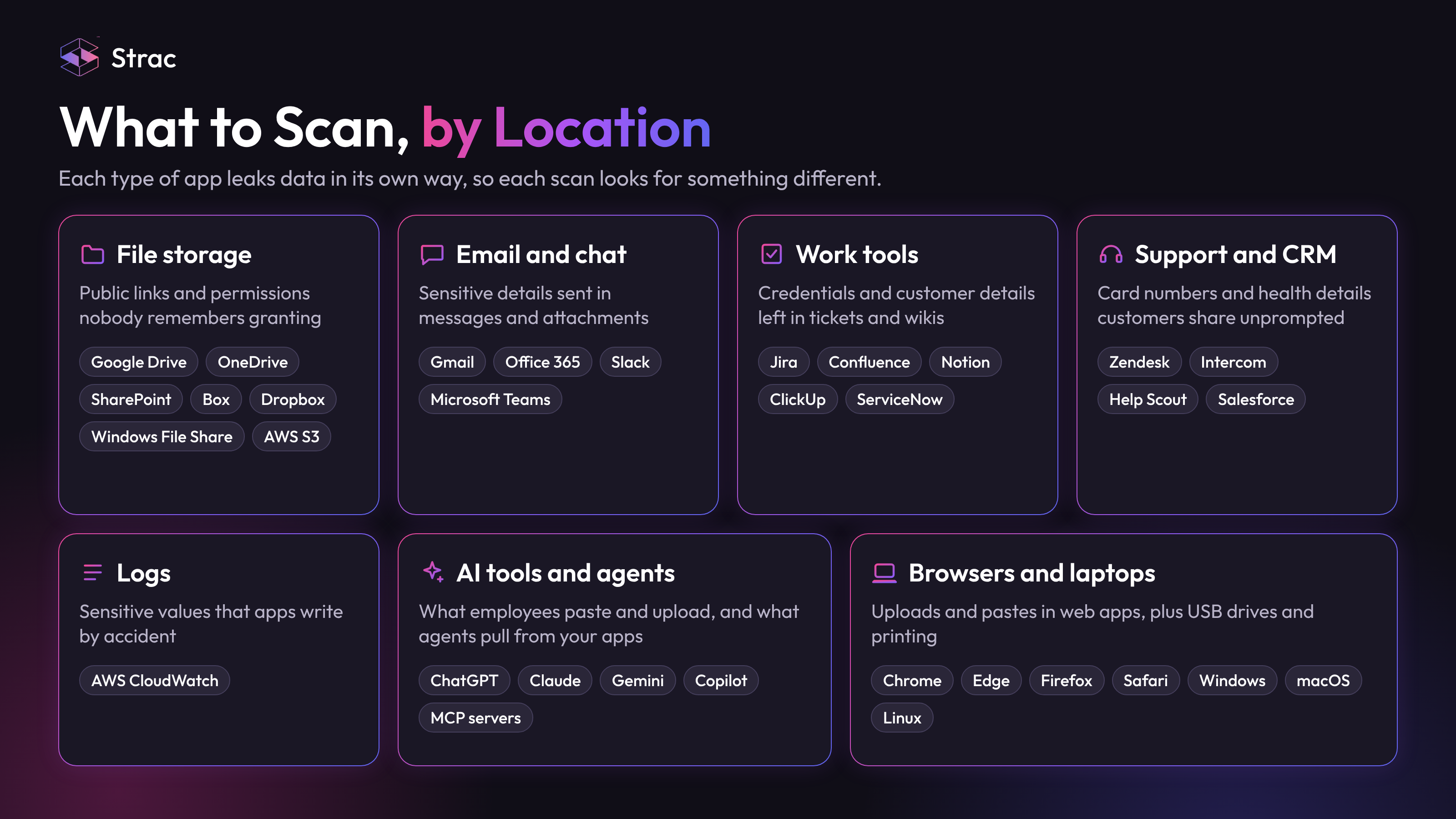
Each type of app leaks data in its own way, so each scan looks for something different.
File storage. The risk is sharing: public links, external guests, and permissions nobody remembers granting.
Email and chat. People send things in a message they would never put in a document.
Work tools. Tickets and wikis collect credentials and customer details over the years.
Customer support and CRM. Customers share card numbers and health details without being asked, and your systems keep them.
Logs. AWS CloudWatch DLP catches sensitive values that applications write to logs by accident.
AI tools and agents. AI DLP checks what employees paste, type, and upload into ChatGPT, Claude, Gemini, and Copilot. MCP DLP checks what AI agents pull from your apps.
Browsers and laptops. Browser DLP covers uploads and pastes into web apps. Endpoint DLP covers USB drives, printing, and file movement that a browser cannot see.
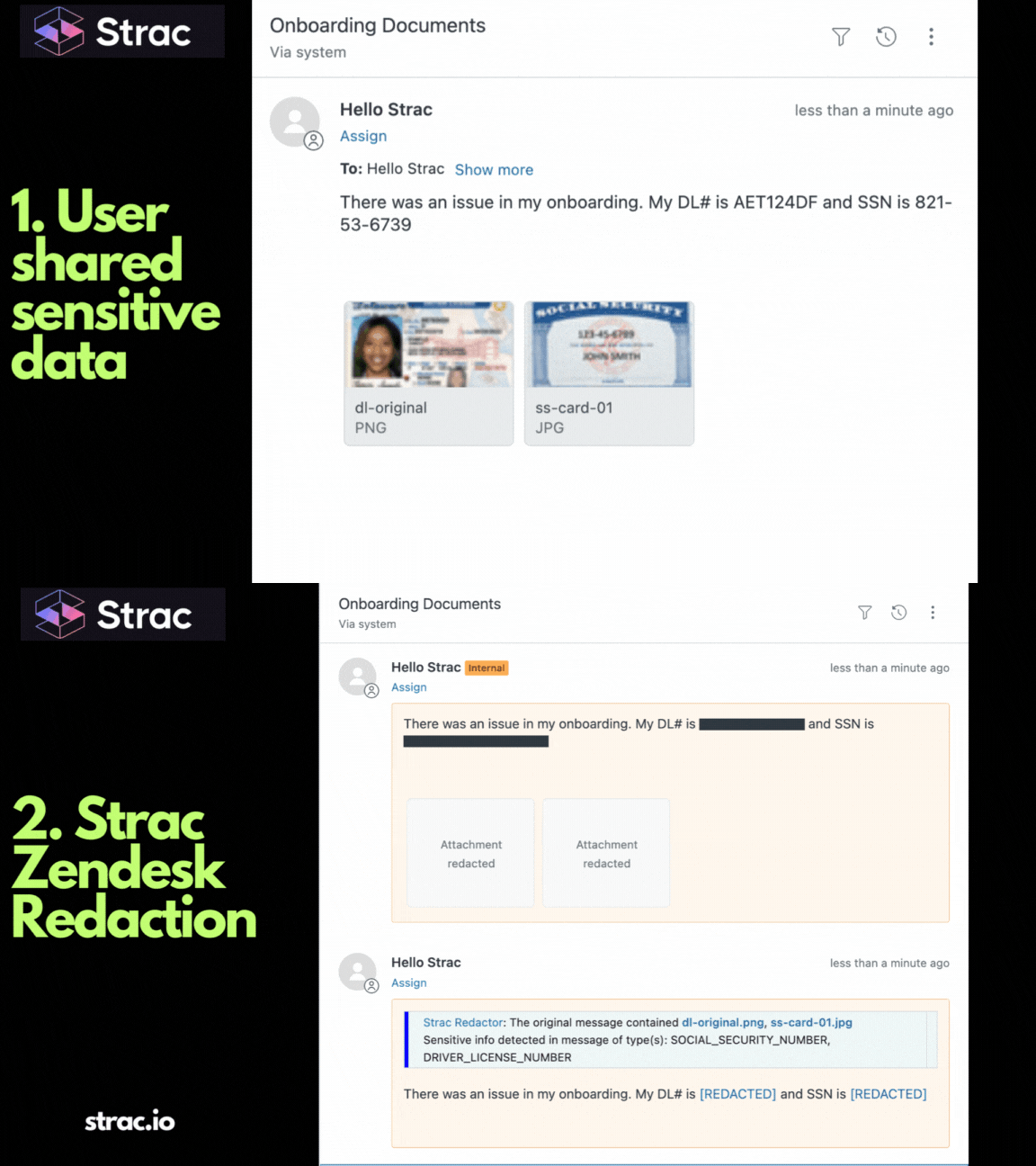
Strac connects to each app, reads the text and attachments, and checks them against the sensitive data elements in your policy. On a laptop, the DLP agent reads file contents and uses OCR for scans and images.
When it finds a match, Strac applies the action you chose for that data type. It can work in detection-only mode first, so you see the results before you change anything.
Strac redacts the sensitive value and leaves the rest of the ticket usable, so the fix does not cost your team any context.
Strac scans SaaS DLP, cloud, Browser DLP, endpoint DLP, AI DLP, and MCP DLP from one platform, with DSPM for data at rest. An alert tells you data is exposed; remediation is what ends the exposure.
Strac remediates each finding in four ways:
For external sharing on Google Drive, OneDrive, and Box, you can also require approval. A manager, IT admin, or security admin signs off in Slack, Teams, or email; without approval, the file does not go out.
For AI agents, Strac sits between the agent and the MCP server and inspects each tool call before the content reaches the agent. The Gmail MCP server and Microsoft 365 MCP server guides show that path in detail.
Strac connects to SaaS apps in under 10 minutes. The endpoint agent runs on Windows, macOS, and Linux, and each channel can be set to block, warn, or audit.
👉 Related reading:
DLP scanning shows you where sensitive data lives, but finding it only matters if you fix it. Identity, network, and prompt controls all fail eventually; the data layer is the backstop. Scan every app, AI tool, and laptop, redact what you find, and a compromise never becomes a breach.
Book a demo to see what Strac finds in your own apps.
No. A vulnerability scan looks for weaknesses in software and systems. A DLP scan looks for sensitive data, such as card numbers or patient records, and checks where it sits and who can reach it.
Often because it was built for email, networks, and storage. Prompts typed into a browser and tool calls made by AI agents need inspection at those points, which is what AI DLP and MCP DLP add.
No, if you remediate with redaction instead of blanket blocking. Strac removes only the sensitive value, so the ticket, message, or prompt keeps working. Teams stay productive, and the data stays out of reach.
Not on its own. No detector is perfect, and a scan cannot stop a stolen password. That is why the data layer matters: a value that has been redacted cannot be stolen, even when an account is.
Continuously for new data, with a historical scan to cover what you already store. A once-a-year audit misses everything shared in between. See AI data governance for how scanning fits the wider program.
“Don’t just alert on problems, fix them.”
Scott Roberts, Chief Information Security Officer, UiPath









Customers include