Jira Security Best Practices to Safeguard PII ,PHI and Confidential Elements
Learn how to safeguard sensitive data in Jira with the best practices available, from optimizing user management to increasing data protection with Strac.
Jira holds far more sensitive data than most teams realize. Customer PII, patient PHI, card numbers, API keys and contracts end up in descriptions, comments, custom fields and attachments.
Most of the risk sits in old tickets. Years of closed issues are still searchable by anyone with the right permissions, and now by AI agents too.
Native Jira controls decide who can open a ticket. They do not find or remove a Social Security number pasted into a comment in 2021.
A sound 2026 program has three layers: tight access controls, DSPM to find and clean up what already exists, and DLP to stop new leaks as they happen.
AI agents connected through the Atlassian Rovo MCP server can read every issue the signed-in user can see. That traffic needs its own inspection and audit trail.
Strac covers all three layers for Jira: historical scanning and bulk redaction, real-time redaction of new content, and an MCP layer that redacts sensitive data before an AI model ever receives it.
Jira is where engineering, support, product and operations teams record their work. That also makes it one of the largest stores of unstructured sensitive data in most companies. A support agent pastes a customer's date of birth into a bug report. An engineer drops a stack trace with a live database password into a comment. A nurse coordinator attaches a screenshot of a patient record, full of PHI, to a Jira Service Management request.
None of this is unusual, and none of it goes away when the ticket is closed. In 2026 the stakes are higher, because Jira data no longer stays inside Jira. Atlassian Rovo, Claude, ChatGPT, Cursor and custom agents can now search and summarize your issues on behalf of any user through the Jira MCP server.
Jira does offer good building blocks, including SSO, MFA, permission schemes and issue security levels. Default settings are not enough on their own. This guide covers the Jira security best practices that matter in 2026 and how Jira DLP and Jira DSPM protect PII, PHI and confidential data across people, apps and AI agents.
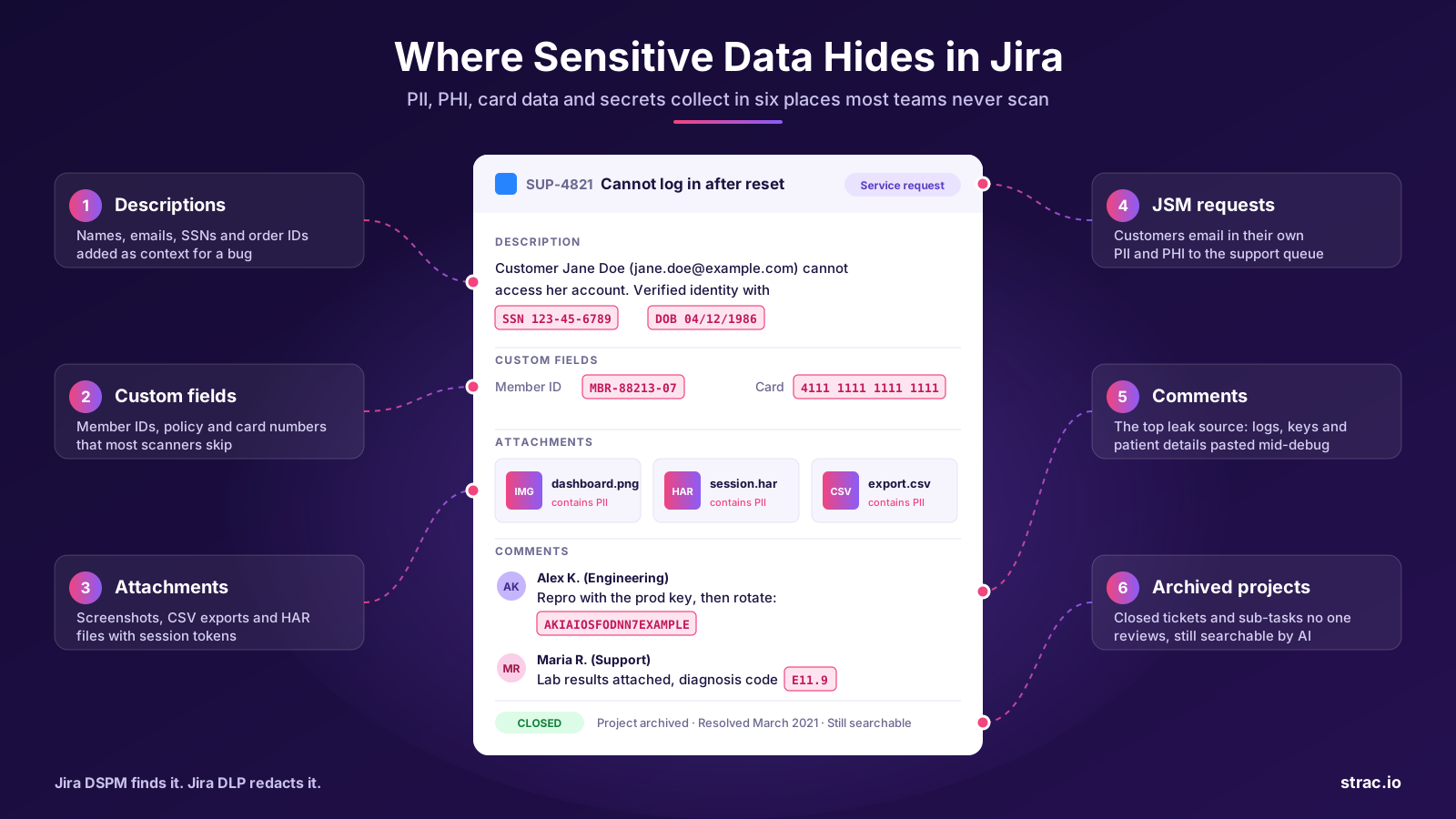
✨ Where sensitive data hides in Jira
Before you can protect sensitive data in Jira, you need to know where it collects. These are the places we see it most often.
Descriptions and summaries. Customer names, emails, account numbers and order IDs added as context for a bug.
Comments. The most common source of leaks. People paste logs, credentials and customer details while working through a problem.
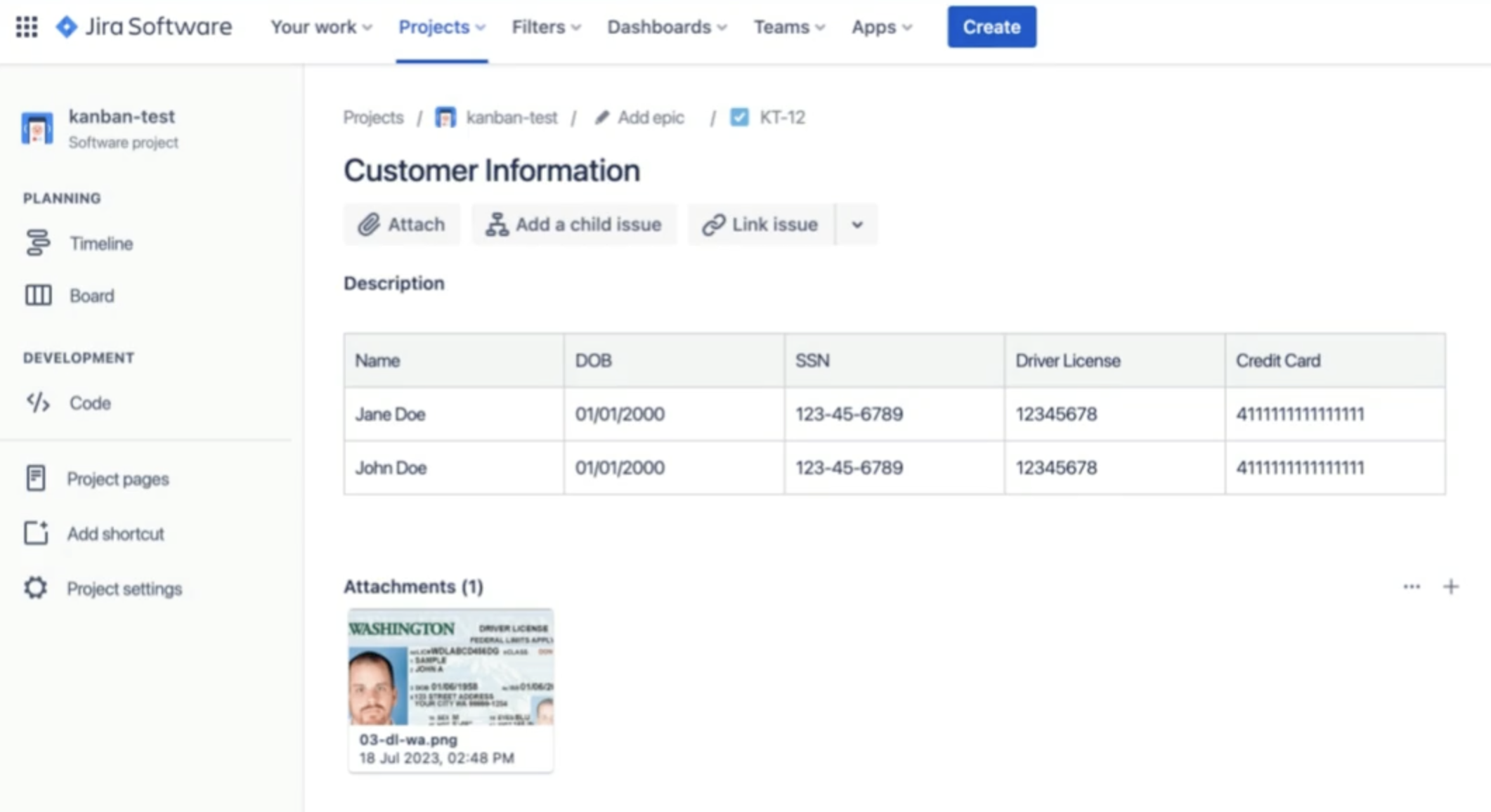
Attachments. Screenshots of customer dashboards, exported CSVs, PDFs of contracts and HAR files that carry session tokens and auth headers.
Custom fields. Member IDs, policy numbers and internal account identifiers that most scanning tools never look at.
Jira Service Management requests. Customers email in their own PII and PHI, and every agent in the queue can read it.
Archived projects and sub-tasks. Old work that nobody reviews but that is still searchable and still covered by permissions.
The common thread is unstructured text. Jira was built for fast collaboration, not for knowing that a string of digits is a card number. See the full catalog of sensitive data elements Strac detects.
Why sensitive data is not secure in Jira
The risks below are the ones security teams run into most often in 2026. The first five have been around for years. The last two are newer and are growing fast.
1. Misconfigured permissions
Jira permission schemes are flexible, which also makes them easy to get wrong. Projects open to "any logged-in user", public filters and dashboards, and broad groups added for convenience all expose more than intended. A Jira misconfiguration reported by SecurityWeek exposed internal data from several Fortune 500 companies through publicly shared filters and dashboards.
2. Phishing and stolen sessions
Attackers send emails that look like Jira notifications to collect credentials. A single compromised account gives them every ticket that user can read, including years of history. See recent examples on our cyber attacks tracker.
3. API tokens and connected apps
Personal API tokens, OAuth apps and Marketplace apps often hold wide read access. Tokens that never expire, or apps nobody remembers installing, are a quiet path into your data. Leaked tokens and keys are a core part of SaaS DLP for this reason.
4. External users and departed staff
Contractors, vendors and partners are often given access to specific projects. Tickets get moved between projects, and accounts are not always removed when people leave. Sensitive tickets can end up visible to people who should never see them.
5. Insider risk and simple mistakes
Most Jira leaks are accidental. Someone pastes the wrong log or attaches an unredacted export. A smaller share are deliberate, such as bulk exporting issues before leaving the company. Our data loss prevention guide covers both patterns.
6. AI assistants indexing old tickets
Atlassian Rovo and other AI tools index Jira so they can answer questions. If a production password was pasted into a ticket three years ago, an assistant can surface it to anyone who asks the right question and has access to that project. Data that was hard to find is now easy to find, which is why generative AI data governance starts with cleaning the source.
7. AI agents reading Jira over MCP
The Atlassian Rovo MCP server lets Claude, ChatGPT, Cursor and custom agents search, read and update Jira issues. It respects the signed-in user's permissions, but that is exactly the issue. Each tool call returns everything that user can see, including comments, attachments and custom fields, straight into the model's context. Traditional DLP at the network edge or inside Jira does not sit in that path. That gap is what MCP DLP closes.
One more point on outdated software: Atlassian ended support for its Server products on February 15, 2024. Teams still running unsupported self-managed Jira should treat that as a priority on its own.
✨ 11 Jira security best practices for 2026
The first five practices tighten who can get in. The next three deal with the data itself. The last three cover AI agents, monitoring and upkeep.
1. Enforce SSO and MFA for every account
Route all Jira sign-ins through your identity provider with SAML SSO, and require MFA for everyone, including admins and external users. On Atlassian Cloud this is managed through Atlassian Guard. Central sign-in means that when someone leaves, one change in your identity provider removes their Jira access too.
2. Apply least privilege to projects and issues
Give each user only the access their role needs. In practice that means:
Remove "any logged-in user" and anonymous access from permission schemes on projects that hold customer or patient data.
Review public and shared filters and dashboards, which are a common source of accidental exposure.
Use separate permission schemes for sensitive projects instead of one shared scheme.
Turn on issue security levels for tickets that carry PII, PHI or financial data, so only named roles can view them.
3. Review external users and departed staff every quarter
List every account from outside your company domain and confirm it still needs access. Check for tickets owned by people who have left. Watch for tickets moved from restricted projects into projects that vendors can see.
4. Control API tokens and connected apps
Set expiry dates on API tokens, rotate them on a schedule and revoke any that are unused. Before installing a Marketplace or OAuth app, check the scopes it asks for and how its vendor handles data. Remove apps that are no longer in use.
5. Set clear rules for what never goes in a ticket
Write down which data types must never be pasted into Jira, such as full card numbers, Social Security numbers, passwords, API keys and full medical records. Give people a safe alternative, like a secure vault or a free secure sharing tool, so they can still share what the work needs.
6. Scan your existing Jira history first
Most exposure is in tickets that are already closed. Run a full scan across issues, comments, attachments, custom fields, sub-tasks and archived projects. Include text inside screenshots and PDFs, which plain keyword search cannot read. This is the job of data security posture management (DSPM): find what exists, where it sits and who can see it. A PII scanner built for unstructured text and files is the starting point.
7. Redact sensitive data as it is created
Cleaning up once is not enough, because new tickets arrive every day. Use Jira DLP that inspects new issues, comments and attachments in real time and applies redaction or data masking in place. Let the reporter know what happened so the habit changes over time.
8. Keep data only as long as you need it
Old tickets with customer data are a liability, not an asset. Set retention rules for closed tickets in sensitive projects, and redact or delete regulated data once the work is done. Data minimization means less to protect and less to report on.
9. Clean up and govern data before turning on AI
Before enabling Rovo or connecting outside agents through the Jira MCP server, remove secrets and regulated data from ticket history. Then set limits on the agents themselves, as part of a wider AI data governance program:
In Atlassian Administration, restrict which AI tools and domains can connect to the Rovo MCP server, and use IP allowlists where you can.
Decide which agents may write to Jira, such as creating tickets or changing status, and which may only read.
Inspect every MCP tool response for sensitive data with MCP DLP before it reaches the model, and keep a log of each call.
10. Monitor audit logs and send alerts to your SIEM
Review Jira audit logs for permission changes, bulk exports, new API tokens and unusual sign-ins. Send these events, along with DLP findings, to your SIEM so your security team sees Jira activity next to everything else. Data lineage helps show where a leaked value came from and where it went next.
11. Keep Jira, apps and encryption settings current
Use supported Jira versions and keep Marketplace apps up to date. Atlassian Cloud applies data encryption in transit and at rest. If you have data residency or key management requirements, confirm what your plan supports. For self-managed Jira, enforce TLS on every connection and patch quickly.
🎥 How Strac secures sensitive data in Jira
Strac protects Jira at three points: the data already sitting in your tickets, new content as people create it, and the data AI agents pull out through MCP. All three run from one platform with one set of policies, combining DSPM and DLP. Setup is agentless through OAuth and takes under 10 minutes.
Jira DSPM: find and fix what is already there
Strac Jira DSPM scans your full Jira history, not just new tickets.
Historical scanning across summaries, descriptions, comments, attachments, sub-tasks and archived projects.
Classification of PII, PHI, PCI, secrets, API keys and confidential business data.
Access visibility that shows which sensitive tickets are open to any logged-in user, to external email domains or to accounts of people who have left.
Risk scoring, so a cloud access key in a project vendors can see rises to the top of the list.
Bulk remediation to redact a data type across an entire project in one action, label tickets, or quarantine and delete risky attachments.
Jira DLP: stop new leaks as they happen
Strac Jira DLP inspects new issues, comments and attachments in real time.
Real-time detection of SSNs, dates of birth, driver's license and passport numbers, card numbers, bank details, medical record numbers, API keys and more.
Inline redaction that masks only the sensitive value and leaves the rest of the ticket readable for the team.
Vault redaction that replaces the value with a secure link, so authorized people can still view the original in the Strac vault while everyone else sees a masked value.
Deep file inspection of PDFs, Word and Excel files, HAR files and images, with OCR for screenshots and scanned documents.
Custom detectors and policies that match your own data handling rules, plus custom field scanning.
Alerts and audit reports for security, risk and compliance teams, including who accessed which redacted item.
Jira MCP DLP: control what AI agents can see and do
Strac Jira MCP DLP sits between AI agents and the Jira MCP server. It works with Claude, ChatGPT, Cursor and custom agents through one configuration change, with no changes to your code or to Jira permissions.
See every tool call each agent makes into Jira, with the user, the agent, the tool and the data involved.
Control what each agent can reach. Allow or block actions per agent, and require approval for higher risk writes such as creating tickets or changing status.
Protect the response. Sensitive values in issues, comments, custom fields and attachments are redacted, masked, tokenized, pseudonymized or vaulted before the model receives them. Non-sensitive content passes through so the agent can still do its job.
Prove it. Every call is logged and can stream to Microsoft Sentinel, Datadog or Splunk as audit evidence.
The same layer covers the wider Atlassian MCP server, including Confluence and Bitbucket.
Strac maps findings and actions to the frameworks auditors ask about, including HIPAA, SOC 2, PCI DSS, GDPR, CCPA and ISO 27001. For AI agent activity, Strac logs also support the EU AI Act and ISO 42001. Reports show what sensitive data existed, what was fixed and when, which is the evidence a Jira compliance review usually asks for.
Protect Jira data across people, apps and AI agents
Jira will keep collecting sensitive data because that is how teams work. The goal is not to stop people from using it. The goal is to know what is in it, keep new leaks out and control what AI agents can take out of it.
Strac gives you DSPM, DLP and MCP DLP for Jira in one platform, with redaction that keeps tickets useful and audit evidence your compliance team can hand to an auditor.
✨ The Bottom Line
Jira will keep collecting sensitive data because that is how teams work. Customer PII, patient PHI, card numbers and secrets will keep landing in tickets, comments and attachments. The goal is not to stop people from using Jira. The goal is to know what is in it, keep new leaks out and control what AI agents can take out of it.
Access controls like SSO, MFA and least privilege are the baseline, but they only decide who can open a ticket. They do not clean up the SSN pasted into a comment in 2021, and they do not stop an AI agent from reading it today. In 2026, a complete Jira security program needs three things working together:
Jira DSPM to find and fix the sensitive data already sitting in years of ticket history.
Jira DLP to redact new PII, PHI and secrets the moment they are added.
Jira MCP DLP to inspect, control and log every AI agent call into Jira before data reaches the model.
Teams that put these layers in place before turning on Rovo or outside AI agents will pass audits with less effort and avoid the incidents that start with a forgotten ticket. Teams that wait will be cleaning up after the fact.
Strac gives you DSPM, DLP and MCP DLP for Jira in one platform, with redaction that keeps tickets useful and audit evidence your compliance team can hand to an auditor.
Jira gives you solid access controls, but it does not find or redact sensitive values inside ticket text, comments or attachments. For regulated data, most teams add DSPM and DLP on top of Jira's native settings. Atlassian offers a business associate agreement for eligible cloud plans, so check current eligibility with Atlassian before storing PHI. Read more in Is Jira HIPAA compliant?
What is the difference between Jira DSPM and Jira DLP?
DSPM looks backward. It scans the tickets you already have, finds sensitive data and shows who can see it. DLP looks forward. It catches sensitive data in new tickets and comments as they are created. You need both, and Strac runs both in one platform.
How do I remove PII from old Jira tickets?
Manual cleanup does not scale past a few dozen tickets. A DSPM tool can scan every project, list each finding and redact a data type across thousands of tickets in one action, while keeping the rest of each ticket readable.
Can sensitive data hide in Jira attachments and screenshots?
Yes, and it often does. Screenshots, PDFs, spreadsheets and HAR files regularly contain customer data, tokens and passwords. Detection needs OCR and file parsing to read them. Strac inspects attachments and can quarantine or delete risky files.
Is the Jira MCP server safe to use with sensitive data?
Not on its own. The Rovo MCP server respects user permissions, but it returns everything the user can see, including regulated data, straight to the AI model. An MCP layer such as Strac Jira MCP DLP inspects each response and redacts sensitive values first, and logs every call.
Does this work for Jira Service Management?
Yes. Jira Service Management is often the highest risk area because customers send in their own PII and PHI. Strac scans and redacts JSM requests so agents are not exposed to data they do not need, the same way it protects other support tools like Zendesk and Intercom.
How long does Strac take to set up for Jira?
Under 10 minutes. You authorize Strac with Jira through OAuth, choose a policy template for HIPAA, PCI, SOC 2 or GDPR, and scanning starts right away. There is no software to install. See the Strac API docs for details.
Customer story
“Don’t just alert on problems, fix them.”
Scott Roberts, Chief Information Security Officer, UiPath
Discover & Protect Data on SaaS, AI, MCP, Endpoints & Cloud
Strac provides end-to-end data loss prevention for all SaaS and Cloud apps. Integrate in under 10 minutes and experience the benefits of live DLP scanning, live redaction, and a fortified SaaS environment.