Calendar Icon White
November 17, 2026
Clock Icon
8
 min read

Safeguard Your Data With Microsoft Azure Data Loss Prevention

Microsoft Azure data loss prevention is not one product. See what Purview and Defender cover in Blob, SQL, and Cosmos DB, and where Strac adds remediation.

Safeguard Your Data With Microsoft Azure Data Loss Prevention
ChatGPT
Perplexity
Grok
Google AI
Claude
Summarize and analyze this article with:

TL;DR

  • Microsoft Azure data loss prevention finds sensitive data in services such as Azure Blob Storage and Azure SQL Database, then limits who can reach it or removes it.
  • The risk is data nobody planned to keep there: customer exports in a storage container, card numbers in a support table, and AI assistants that can now read both.
  • Purview DLP polices Microsoft 365 and devices, while Defender for Cloud and the Purview Data Map report what sits in Azure. That leaves a gap between finding data and fixing it.
  • Strac scans Azure data stores, then labels, masks, blocks, alerts on, or deletes what it finds, with the same coverage across SaaS DLP, endpoint DLP, and MCP DLP.
  • This post maps coverage service by service. Start from the pillar on cloud DLP, or read the Purview vs. Strac comparison for Azure.

‍

What Is Microsoft Azure Data Loss Prevention?

Microsoft Azure data loss prevention is a practice, not a product you can buy under that name. It means finding sensitive data in Azure, deciding who may touch it, and acting when a rule is broken.

Three Microsoft tools usually get lumped together as "Azure DLP":

  • Microsoft Purview Data Loss Prevention applies a DLP policy to how data moves through Exchange, SharePoint, OneDrive, Microsoft Teams, Office apps, and managed devices.
  • Microsoft Purview Data Map scans sources such as Blob Storage, Cosmos DB, Data Lake Storage, Azure Files, and Azure SQL Database, then applies classifications and labels.
  • Microsoft Defender for Cloud runs sensitive data discovery on storage and Azure SQL Database, then shows which resources hold sensitive data and how exposed they are.

The first tool controls movement in Microsoft 365. The other two describe what sits in Azure. Most confusion about Azure DLP comes from treating those as one job.

Why Azure Data Leaks

Azure fills up with data people copied, not data they planned to store. An engineer exports a production table to a storage container to debug an issue. An app writes full card numbers into its logs. Neither shows up on a data map until someone scans for it.

Most Azure exposure follows five paths:

  • Public containers. A blob container with anonymous read access lets anyone with the URL download its files.
  • Copies of production data. Test environments, backups, and data lake extracts often hold real PII and PHI with weaker access rules than the original.
  • Logs and exports. Debug output and CSV files can capture secrets and card data that no one meant to keep.
  • Free-text database fields. Notes and comment columns in Azure SQL Database or Cosmos DB hold whatever a person typed.
  • AI assistants and agents. Apps send records to AI models, and assistants can query databases directly through the Azure SQL MCP server.

Network rules decide who can reach a data store. DLP decides what is inside it when they do.
✨ What Microsoft Covers Natively, and Where It Stops

__wf_reserved_inherit

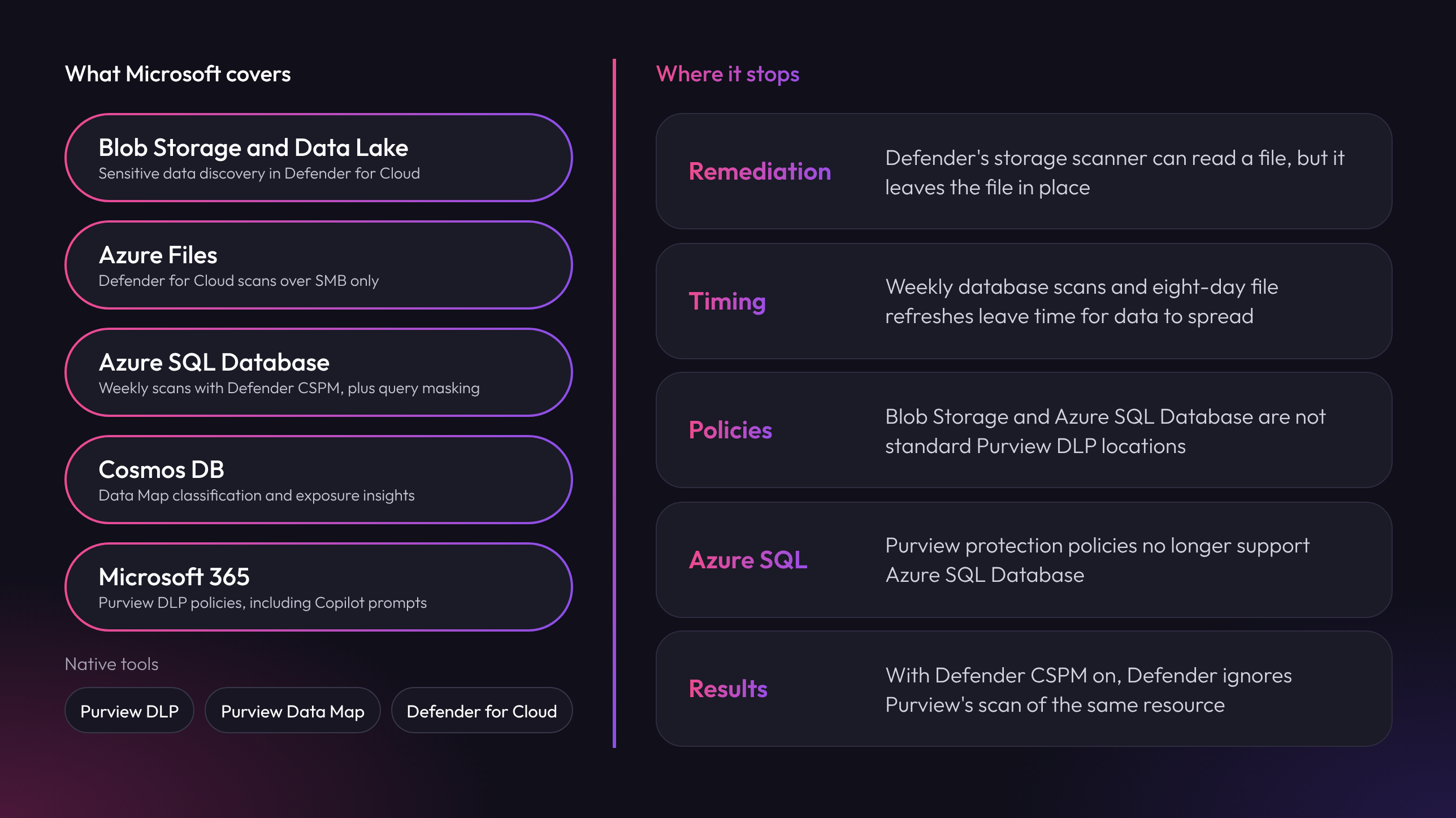
Microsoft's coverage depends on the service, so check it one data store at a time:

  • Blob Storage and Data Lake Storage Gen2. Defender for Cloud discovers sensitive data without an agent. First results arrive within 24 hours, and changed files refresh within eight days.
  • Azure Files. Defender for Cloud scans file shares over the SMB protocol only.
  • Azure SQL Database. Defender for Cloud scans weekly when Defender CSPM is on. Dynamic data masking hides values in query results, but the stored values do not change.
  • Cosmos DB. The Purview Data Map can classify it, and Defender for Cloud reports internet exposure. It is not on Defender's sensitive data discovery list.
  • Microsoft 365. Purview DLP is the main control here, with newer coverage for Microsoft 365 Copilot prompts and Microsoft Purview DLP policies in Edge for Business.

These are useful controls, with clear edges:

  • Finding is not fixing. Defender's storage scanner gets list and read permissions, so it reports on a file and leaves the file in place.
  • Scans run on a schedule. A weekly database scan or an eight-day file refresh leaves time for data to be copied elsewhere.
  • Purview DLP does not police Azure data stores. Blob Storage and Azure SQL Database are not standard DLP policy locations.
  • Older advice has expired. Microsoft said in August 2026 that Purview protection policies no longer support Azure SQL Database.
  • Two scanners can disagree. With Defender CSPM on, Defender shows its own results and ignores Purview's scan of the same resource. Custom Purview classifications are not shared with Defender.

Defender tells you a container holds card numbers. Someone still has to remove them.
✨ How Azure Remediation Works

__wf_reserved_inherit

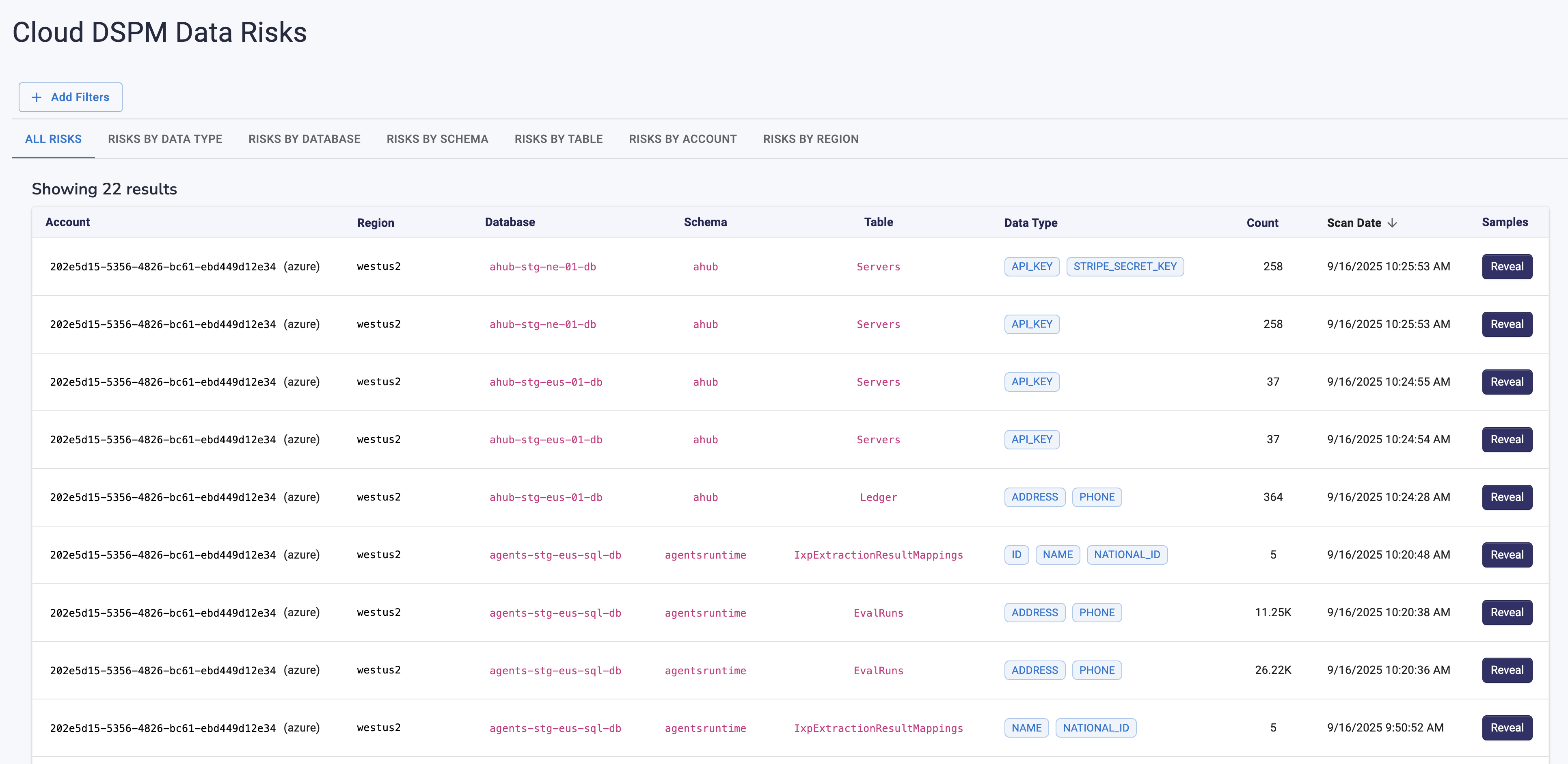
Strac connects to your Azure data stores and runs sensitive data discovery across them. It checks content against patterns and surrounding context, using the sensitive data elements in your policy plus any custom rules you add.

Each finding gets a label, so you can see which store holds which data type. Your policy then decides the DLP remediation to apply, and the security team gets an alert with the result.

A scanner tells you where the card numbers are; remediation means they are no longer there to steal.

🎥 Strac: Azure DLP from Discovery to Remediation

Strac Azure data discovery and classification adds action to what Microsoft reports. It covers stores including Blob Storage, Data Lake Storage, Azure SQL Database, Cosmos DB, and Azure Files as part of DSPM.

Strac handles each finding in one of five ways:

  • Label. Strac tags sensitive data so teams can find it and apply policy to it.
  • Mask. Data masking hides the sensitive value and keeps the rest usable.
  • Block. Strac restricts access to sensitive data based on roles and permissions.
  • Alert. Strac notifies the security team about risks and policy violations.
  • Delete. Strac removes sensitive data your retention policy no longer allows you to keep.

Azure is rarely the only place the data lives, so coverage has to follow it:

Findings also support your evidence for HIPAA, PCI DSS, SOC 2, ISO 27001, and GDPR.

Related reading:

Azure DLP Checklist

  • ☐ List every Azure data store, including test environments, backups, and data lake extracts.
  • ☐ Turn off anonymous access on blob containers that do not need it.
  • ☐ Turn on Defender for Cloud sensitive data discovery, and choose whether Defender or Purview is your record for each resource.
  • ☐ Remove any plan that relies on Purview protection policies for Azure SQL Database.
  • ☐ Add masking for sensitive columns, and remember that dynamic data masking leaves stored values unchanged.
  • ☐ Run data discovery on logs, exports, and free-text fields.
  • ☐ Put MCP DLP between AI agents and Azure data before you connect them.
  • ☐ Send alerts to one place and plan your DLP incident response.

✨ The Bottom Line

Microsoft gives you strong tools to see sensitive data in Azure, but seeing it is only half the job. Access and network controls fail eventually; the data layer is the backstop. Mask or remove sensitive data wherever it lands, and a compromised account never becomes a breach.

‍Book a demo to see Strac protect your Azure data.
__wf_reserved_inherit

🌶️ Spicy FAQs on Microsoft Azure Data Loss Prevention

Is Azure DLP the same as Microsoft Purview DLP?

No. Purview DLP is a specific Microsoft product focused on Microsoft 365, devices, and connected apps. "Azure DLP" is an informal label for protecting data in Azure, which also involves the Purview Data Map and Defender for Cloud.

Why isn't Defender for Cloud enough?

Defender for Cloud shows where sensitive data sits and how exposed it is, which is a strong starting point. It does not remove the sensitive value from the file. Strac adds that remediation step and extends coverage beyond Azure.

Can we protect Azure data without breaking applications?

Yes. Start with alerts and labels on copies, exports, and logs, where the risk is high and few apps depend on the data. Masking then hides the sensitive value and keeps the record usable, so you block only what remains.

Can DLP stop every Azure breach?

No. DLP will not stop a stolen admin credential or a misconfigured network rule. That is why the data layer matters: a value that has been masked or deleted cannot be stolen, even when an account is.

Does Azure DLP make you compliant with HIPAA or PCI DSS?

Not on its own. It supports the requirements for finding and protecting regulated data, but those frameworks also cover access, logging, and process. See HIPAA DLP, PCI DLP, and the cloud DLP pillar.

Customer story

“Don’t just alert on problems, fix them.”

Scott Roberts, Chief Information Security Officer, UiPath

  • UiPath
  • Crypto.com
  • Inmar Intelligence
  • thredUP
  • Paymentology
  • Enveda
  • Genesis Molecular AI
  • MeridianLink
More customer stories →
Discover & Protect Data on SaaS, AI, MCP, Endpoints & Cloud
Strac provides end-to-end data loss prevention for all SaaS and Cloud apps. Integrate in under 10 minutes and experience the benefits of live DLP scanning, live redaction, and a fortified SaaS environment.

Customers include

  • UiPath
  • Crypto.com
  • Inmar Intelligence
  • thredUP
  • Paymentology
  • Enveda
  • Genesis Molecular AI
  • MeridianLink
Trusted by enterprises
Data Security + Compliance Automation

Latest articles

Browse all

Get Your Datasheet

Thank you! Your submission has been received!
Oops! Something went wrong while submitting the form.
Close Icon