October 30, 2026

6
min read
Data Loss Prevention Guide for HubSpot
HubSpot DLP finds and redacts PII, PHI, and card data in HubSpot chats, tickets, and CRM records. See where native controls stop and how Strac closes the gap.
HubSpot DLP is a set of controls that detect sensitive data inside HubSpot and act on it automatically. It covers the places data actually lands: chat and email threads in the help desk inbox, ticket comments, call notes, form submissions, attachments, and contact properties.
A HubSpot DLP tool does three jobs. It runs sensitive data discovery on records already stored in HubSpot. It classifies each finding against a DLP policy. And it applies DLP remediation, such as redaction, blocking, or an alert, the moment new data arrives.
HubSpot is a CRM, and a CRM collects everything a customer ever tells you. That history is the point of the product; it is also the risk.
Picture a normal day in the support inbox. A customer pastes a full card number into chat to "speed things up." A rep copies a date of birth and a Social Security number into a note to verify identity. Someone uploads a photo of a driver's license to a ticket. None of it was supposed to be there, and all of it now sits in a system that dozens of people and apps can read.
HubSpot's own history shows what is at stake. In March 2022, an attacker took over a HubSpot employee account and pulled contact data from around 30 customer portals, most of them in the cryptocurrency sector. Strong access controls did not help those customers once the account was compromised.
Access controls decide who can open a record. DLP decides what is inside the record when they do.
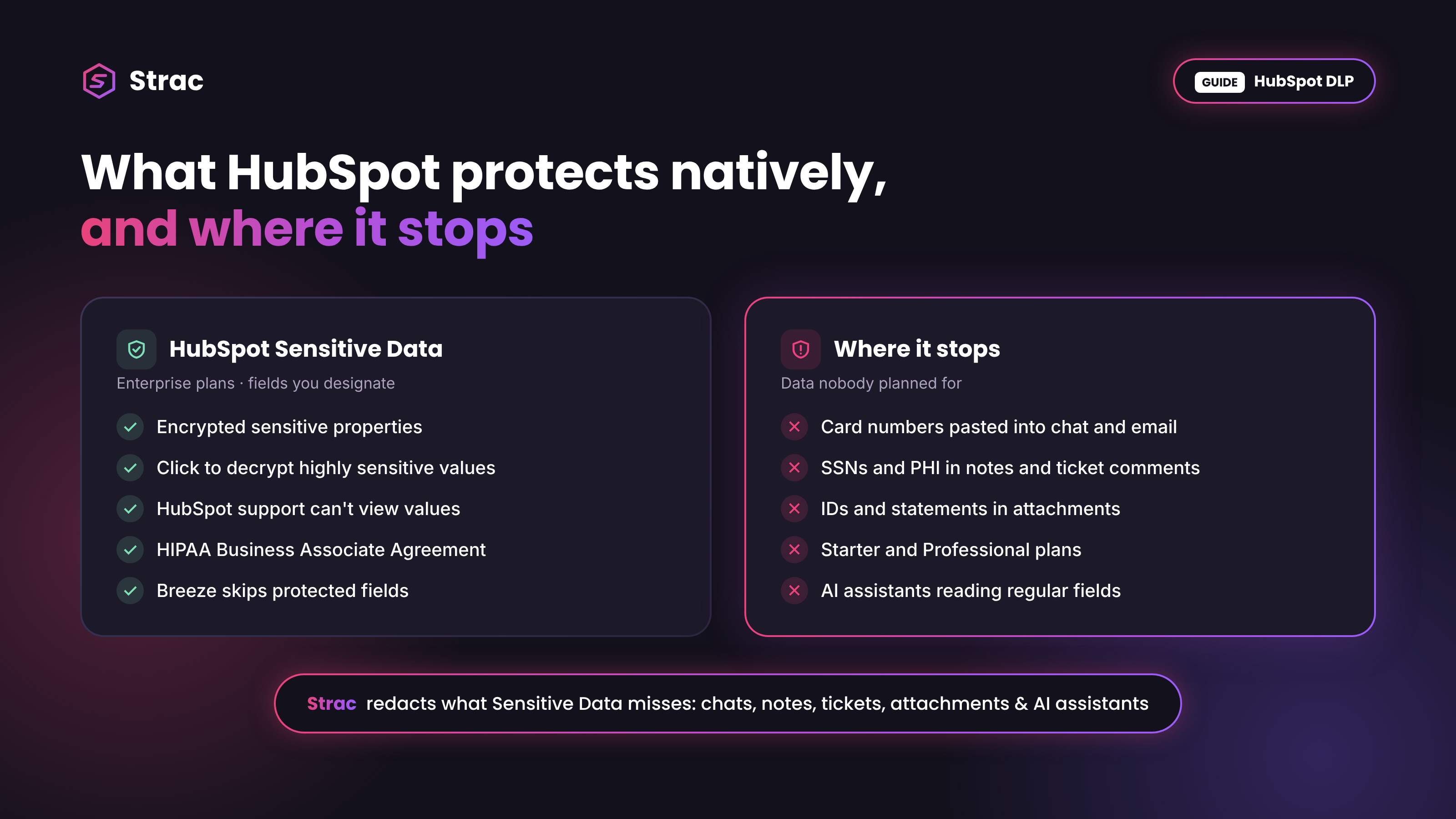
HubSpot ships a solid security baseline. Data is encrypted in transit and at rest. Admins set roles and permissions, enforce two-factor authentication, and connect single sign-on (SSO). HubSpot also holds a SOC 2 Type 2 report.
For regulated data, HubSpot offers a Sensitive Data feature on Enterprise plans. It adds dedicated "sensitive" and "highly sensitive" properties, and highly sensitive values must be decrypted with a click before anyone can view or edit them. HubSpot support staff cannot see those values. Healthcare teams select Health/Medical Data, confirm their HIPAA status, and accept HubSpot's Business Associate Agreement (BAA), which sits in the Sensitive Data Terms.
That is a real control, with clear edges:
Sensitive Data protects the fields you planned for; DLP protects the data you did not plan for. For the full compliance picture, read is HubSpot HIPAA compliant.
Most HubSpot exposure follows seven paths:
Strac connects to HubSpot through an approved app and receives an event each time a new message, note, or engagement is created. It scans the text and attachments against detectors for the sensitive data elements in your policy.
When it finds a match, Strac replaces the sensitive value in HubSpot with a redacted placeholder and a link to the Strac Secure Vault. The original stays in the vault, and only authorized admins who sign in through SSO can open it. The security team gets an alert in Slack or email with the record, the data type, and the action taken.
Strac redacts the card number the moment it lands in HubSpot, so the ticket stays useful and the data stays out of reach.
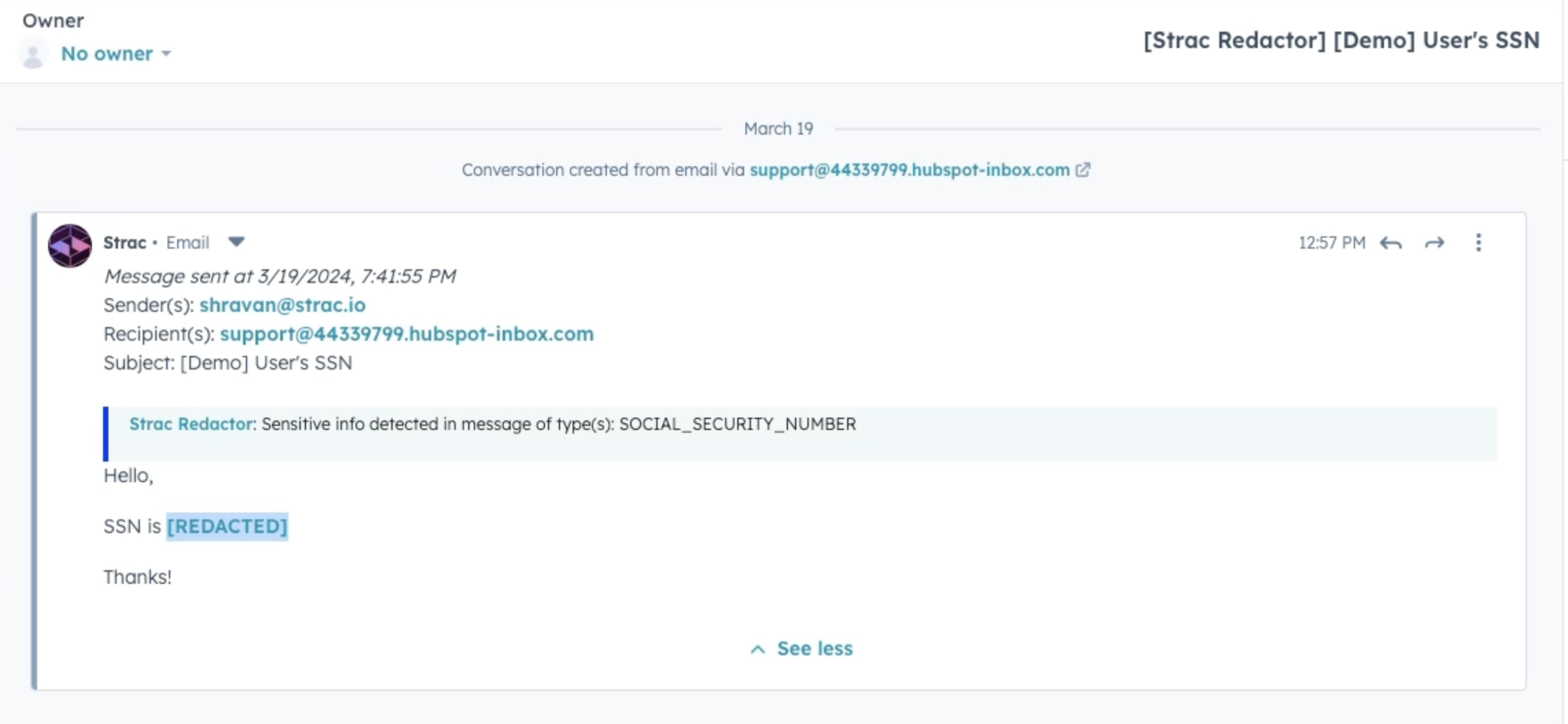
Strac HubSpot DLP scans HubSpot Conversations, tickets, and CRM records in real time. It detects Social Security numbers, dates of birth, driver's license and passport numbers, credit and debit card numbers, API keys, bank details, and HIPAA PHI data elements, including text inside images and PDFs.
Strac remediates each finding in four ways:
The same policy follows HubSpot data to AI assistants. MCP DLP sits between the assistant and the HubSpot MCP server and redacts PII, PHI, card data, secrets, and text inside images before any of it reaches the AI provider. The assistant still answers the question; it just never sees the raw data. For assistants used in the browser, AI DLP covers what employees paste in by hand.
HubSpot is rarely the only app holding customer data. The same platform covers Slack DLP, Gmail DLP, Salesforce DLP, Zendesk DLP, and endpoint DLP, with DSPM for data at rest. Findings map to HIPAA, PCI DSS, SOC 2, and GDPR.
Setup takes minutes. Install Strac from the HubSpot App Marketplace, choose the account to protect, and approve the permissions. The HubSpot DLP setup guide walks through each step.
👉 Related reading:
HubSpot locks down the fields you plan for, but customers and reps put sensitive data everywhere else, and AI assistants now read all of it. Account controls fail eventually; the data layer is the backstop. Redact sensitive data in every chat, note, and assistant request, and a compromised account never becomes a breach. Book a demo to see Strac protect your HubSpot data.
No. Sensitive Data encrypts and restricts the properties you designate on Enterprise plans. DLP scans everything else, including chats, emails, notes, ticket comments, and attachments, and redacts sensitive values wherever they appear.
No. Strac works alongside it. Sensitive Data protects the fields you planned for, and Strac catches the card numbers, IDs, and PHI that customers and reps put everywhere else, on any HubSpot plan.
No. Strac redacts only the sensitive value and leaves the rest of the conversation intact, so reps keep working the ticket. Authorized admins can still open the original in the Strac Secure Vault when a case truly needs it.
Not on its own. DLP does not stop a stolen admin password or a malicious script on your website. That is why the data layer matters: a value that has been redacted cannot be stolen, even when an account is.
HubSpot can support HIPAA on Enterprise plans once you turn on Sensitive Data and accept its BAA, but configuration is your job. Read is HubSpot HIPAA compliant and HIPAA DLP for the full picture.
“Don’t just alert on problems, fix them.”
Scott Roberts, Chief Information Security Officer, UiPath









Customers include