Data Loss Prevention in 2026 Key Questions Answered
Data loss prevention in 2026 requires more than email and endpoint controls. Learn the key DLP questions to ask about SaaS, cloud, GenAI, MCP, ROI, metrics, and policy effectiveness.
· Modern DLP has to cover more than email andendpoints. It should protect data across SaaS apps, cloud storage, supporttools, browsers, GenAI tools, and MCP-connected workflows.
· The most useful DLP metrics are not just alertcounts. Security teams should track sensitive data coverage, incidentreduction, remediation actions, false positives, time to investigate, andexposure by channel.
· Good DLP is not only detection. The real valuecomes from remediation: redacting, masking, blocking, quarantining, deleting,encrypting, or coaching users before data leaves the organization.
· False positives are reduced by usingcontent-aware detection, OCR, entity recognition, context, and datafingerprints—not just regex and static keyword rules.
· In2026, the best DLP programs combine data discovery + classification + policyenforcement + posture visibility across SaaS, cloud, endpoints, AI, andmodern agentic workflows.
Data loss prevention is no longer just about blocking someone from emailing a spreadsheet with credit card numbers. In 2026, sensitive data moves through Slack threads, support tickets, cloud drives, browser uploads, AI prompts, internal copilots, MCP-connected agents, and employee laptops. That shift has changed what buyers need from DLP—and the questions security teams should be asking.
This guide answers the most important data loss prevention questions in 2026: how to measure DLP success, what metrics matter, how to reduce false positives, what modern coverage should look like, and how to evaluate whether a DLP platform is actually built for today’s environments.
Data Loss Prevention in 2026: Your Top Questions Answered
Sensitive data is now spread across far more systems than most DLP programs were originally designed for. A customer’s SSN might appear in a Zendesk ticket, a Slack screenshot, a Google Drive PDF, a Salesforce case comment, a laptop download folder, a ChatGPT prompt, or a tool call made by an AI agent connected through MCP.
That is why DLP buying criteria have changed. Security teams are no longer asking only, “Can this tool detect PII in email?” They are asking:
Can it see sensitive data across SaaS, cloud, endpoint, browser, and AI?
Can it stop exposure in real time rather than just alert after the fact?
Can it work across unstructured files, screenshots, images, attachments, prompts, and database records?
Can it support compliance without forcing users into constant friction?
Can it help us understand where sensitive data already lives, not just catch future incidents?
Those are the right questions. Here are the answers.
How do you measure whether a DLP program is actually working?
The most common mistake is treating DLP effectiveness as an alert-count exercise. More alerts do not mean better protection. In many cases they mean noisy rules, poor tuning, or too much reliance on pattern matching.
A useful DLP measurement framework in 2026 looks at four things:
1) How much sensitive data is actually covered
You need to know whether your DLP controls are protecting the systems where sensitive data really lives. That includes not just email and cloud drives, but also support platforms, chat tools, CRM systems, code-adjacent workflows, AI tools, and employee devices.
Coverage questions to ask:
Which SaaS apps are scanned?
Are attachments, images, PDFs, spreadsheets, and ZIPs included?
Are browser uploads and copy/paste into AI tools covered?
Are endpoint-resident files included?
Can the platform inspect both structured and unstructured data?
2) How much risky activity is being prevented or remediated
Detection alone is not enough. A DLP program is more effective when it can take action at the moment of risk.
Examples of meaningful outcomes:
Sensitive text automatically redacted from a Zendesk ticket
PCI data masked before being posted into Slack
A browser upload to ChatGPT blocked because it contains PHI
A payroll spreadsheet quarantined after being uploaded to an unsanctioned app
A user coached in real time before pasting secrets or customer PII into an AI prompt
3) How much time the security team is saving
If every alert needs manual review, the program will not scale. Strong DLP reduces analyst workload by improving precision and automating remediation.
Useful indicators:
Lower false positive rate
Faster triage and investigation
Fewer manual cleanups of exposed records
Reduced back-and-forth with employees after incidents
4) Whether the organization’s exposure is shrinking over time
The goal is not just to catch one-off incidents. It is to reduce the amount of sensitive data floating around in risky places.
That means measuring:
Sensitive records found in unmanaged or overexposed systems
Repeated policy violations by workflow or department
Growth or reduction of risky data in support tools, chat apps, drives, and AI workflows
Trends in open exposures over time
What are the most important DLP success metrics to track?
A strong DLP program usually tracks a mix of coverage, detection quality, remediation, and business risk. The exact dashboard will vary by company, but these are the metrics that matter most.
1) Sensitive data coverage by environment
Track where DLP is actually deployed and what it can inspect:
SaaS coverage: Slack, Google Workspace, Microsoft 365, Salesforce, Zendesk, Jira, Notion, Confluence, etc.
MCP / agentic workflow coverage: data passed through tools, connectors, and agent actions
2) Confirmed policy incidents
This is the number of incidents that truly involved sensitive data exposure or attempted exposure—not raw alert volume.
Examples:
Customer PII posted into a support thread
Source code or API keys pasted into an external AI tool
Payroll records uploaded to an unsanctioned SaaS app
PHI shared in a Slack channel or AI prompt
3) False positive rate
If the DLP system flags harmless content too often, people stop trusting it and analysts stop looking closely. A modern DLP program should aim to lower false positives by using context, document understanding, OCR, fingerprints, and entity-aware detection.
4) Mean time to triage and remediate
How quickly can your team go from “alert fired” to “risk addressed”? A DLP platform that can automatically redact, block, quarantine, or coach users will reduce this significantly.
5) Remediation action rates
Track how often the platform actually does something useful:
Redacted
Masked
Blocked
Quarantined
Deleted
Encrypted
User coached / warned
Incident escalated
This is one of the clearest indicators that DLP is preventing exposure rather than just documenting it.
6) Volume of exposed sensitive data discovered at rest
DLP should not only monitor data in motion. It should also help you find sensitive data already sitting in risky places such as:
public or over-permissioned cloud folders
old support attachments
shared drives with broad access
endpoint folders containing regulated records
databases or data warehouses with sensitive columns lacking controls
7) Incident trends by channel
Track where leaks are happening:
support tickets
chat and collaboration tools
email
cloud drives
browser uploads
AI prompts and responses
endpoint file transfers
MCP tool usage and agent actions
This helps you tune policy where it matters instead of treating every channel the same.
How do you prove DLP ROI to the C-suite?
Executives usually do not care how many regexes you wrote. They care about avoided risk, reduced operational cost, and cleaner compliance outcomes.
A practical DLP ROI story usually comes from five buckets.
1) Fewer expensive exposure events
If DLP prevents a support agent from sending customer data externally, blocks a spreadsheet upload to an AI tool, or automatically redacts regulated information from a ticketing system, that is measurable risk reduction.
2) Lower compliance burden
For organizations subject to GDPR, HIPAA, PCI DSS, SOC 2, ISO 27001, GLBA, or internal data handling obligations, DLP helps reduce the cost of proving control over sensitive data movement and exposure.
3) Less manual remediation work
Without automated redaction and remediation, security and support teams spend time cleaning up tickets, deleting exposed files, chasing users, and handling avoidable incidents.
4) Faster audits and investigations
If your DLP system can show where sensitive data was found, what policy triggered, what remediation happened, and what systems were affected, audits become much less painful.
5) Better control over AI and shadow data flows
One of the fastest-growing sources of untracked exposure is employees pasting data into AI tools or AI agents pulling data across connected systems. DLP that covers those flows reduces a real and growing risk category that legacy tools often miss.
How often should DLP policies be reviewed?
At a minimum, policy review should happen quarterly, with lighter tuning happening continuously as new apps, AI workflows, business processes, and compliance obligations appear.
A DLP policy set written for “email + OneDrive” is not enough if the company now uses:
ChatGPT or Copilot for internal work
customer support tools with file attachments
Slack for engineering and customer operations
MCP servers or internal agents that can call tools across SaaS systems
browser-based workflows where users upload files directly to third-party apps
Good review triggers include:
adopting a new SaaS application
rolling out a new AI assistant or LLM integration
launching a new support workflow or customer portal
expanding into a regulated market
finding repeated false positives in one channel
discovering that employees are using a tool outside approved workflows
🎥How Strac helps answer modern DLP questions
Strac is built for the reality that sensitive data no longer lives in one place and does not move through one channel. Instead of focusing only on traditional email-style DLP, Strac is designed to help security teams discover, classify, and protect sensitive data across the systems where modern work actually happens. That includes SaaS apps, cloud environments, endpoints, browser workflows, generative AI tools, and emerging MCP-connected agent workflows. Its positioning around agentless deployment, broad integration coverage, inline remediation, and content-aware detection is central to how it approaches modern DLP .
Coverage across SaaS, cloud, endpoint, browser, AI, and MCP-related workflows
Strac’s core value is breadth without forcing teams into a patchwork of point products. It is positioned around unified protection across collaboration apps, support tools, cloud repositories, endpoints, and AI environments rather than only one narrow channel. The differentiator material highlights support across SaaS, cloud, generative AI, and endpoints, with an emphasis on modern workflows such as Slack, Zendesk, Salesforce, Google Workspace, Snowflake, and AI prompt flows .
In practice, that matters because the same customer record can show up in a Salesforce case, a Slack message, a Google Drive export, a support attachment, a laptop download, or a prompt sent to an AI assistant. A DLP program built for only one of those channels leaves major blind spots.
Agentless deployment with faster time to value
A recurring Strac theme is low-friction deployment. The positioning material consistently describes Strac as agentless or no-code for SaaS, cloud, GenAI, and related environments, with fast setup and lower operational overhead than tools that require heavier deployment models . That matters for teams that want coverage quickly across business systems without a long endpoint rollout or months of implementation work.
Inline remediation, not just alerting
One of the most important differences in modern DLP is whether the product simply detects risk or actually does something about it. Strac’s positioning emphasizes inline remediation such as redaction, masking, blocking, or deletion rather than alert-only workflows . That makes a big difference in environments like support and collaboration tools where the real goal is to stop exposure before the content keeps spreading internally or externally.
Content-aware detection beyond basic regex
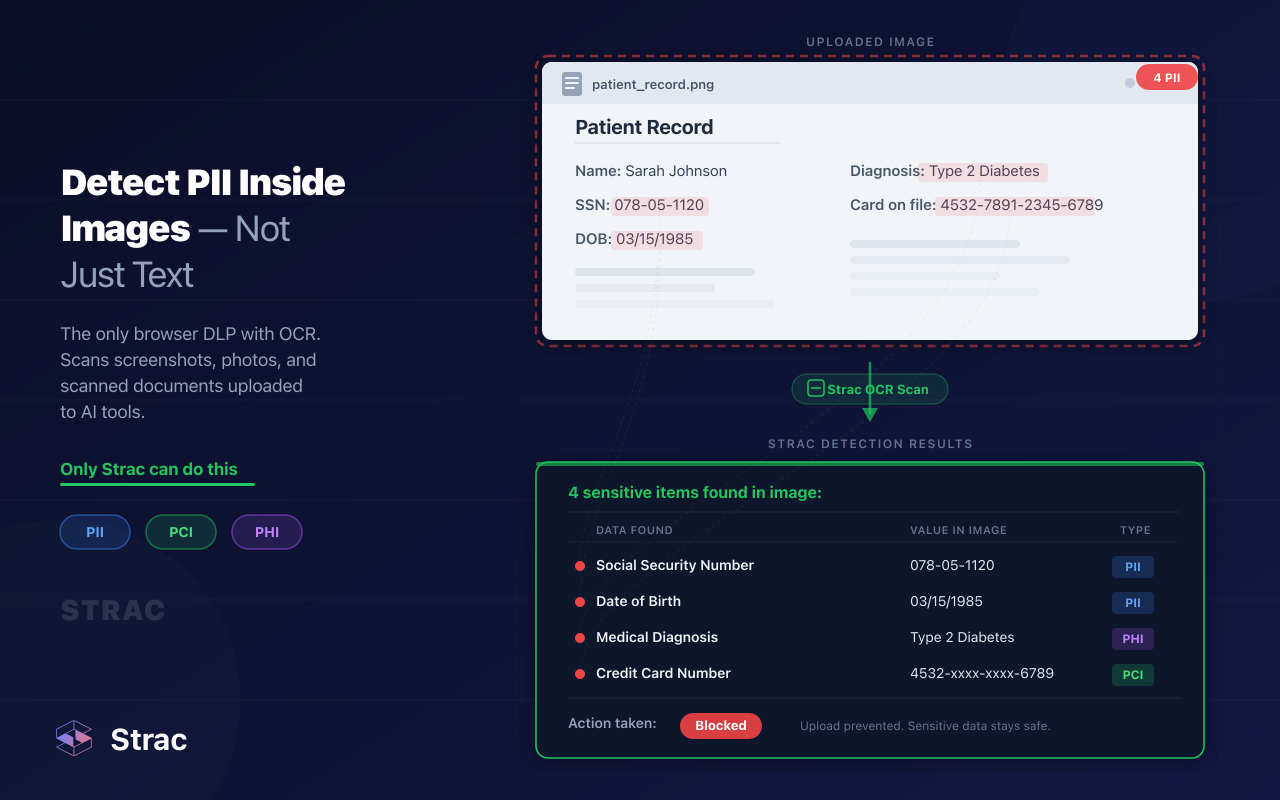
Another key Strac differentiator is its emphasis on ML, OCR, and content-aware detection for structured and unstructured data rather than relying only on brittle regex rules . In practical terms, that helps with the messy formats where modern data leaks happen: screenshots, PDFs, customer attachments, ticket threads, AI prompts, and free-form conversations. It also helps reduce the false-positive problem that often makes DLP programs hard to trust.
Unified DSPM + DLP thinking
The other important piece is that Strac is not framed only as a “block bad data in motion” tool. Its messaging also leans into DSPM-style discovery, classification, posture visibility, and remediation in one platform . That is important because many teams need both sides of the equation:
where sensitive data already lives
how it is moving
what is exposed
what needs to be remediated now
That combination is especially relevant for cloud drives, support platforms, data warehouses, and AI workflows where the problem is often not just one bad outbound event, but the fact that sensitive data is already spread across too many places.
Built for the environments where modern leaks actually happen
The internal Strac messaging also reinforces where the platform is strongest: protecting sensitive customer, employee, financial, health, and operational data inside real SaaS workflows such as Google Workspace, Salesforce, Slack, Intercom, Zendesk, and related systems, while supporting real-time redaction and broader API-driven coverage . That is a more practical fit for many organizations than DLP tools that focus primarily on traditional email gateways or static endpoint controls.
Bottom line
The right DLP questions in 2026 are different from the ones buyers asked a few years ago. The challenge is no longer just “Can we detect PII in email?” It is “Can we find and control sensitive data across SaaS apps, cloud stores, support tools, endpoints, browser uploads, AI prompts, and agent-driven workflows—without overwhelming users or the security team?”
That is why modern DLP has to be broader, more context-aware, and more action-oriented. It should help you discover where sensitive data already lives, understand how it moves, and remediate risk in real time—not just log another alert. If your current DLP strategy still stops at email, static regex rules, or a handful of sanctioned apps, it is probably protecting only a fraction of your real exposure surface.
Frequently Asked Questions
1) What is the biggest DLP blind spot in 2026?
For many companies, it is the combination of browser uploads, AI prompts, and SaaS collaboration tools. Sensitive data is often exposed through copy/paste into ChatGPT, file uploads into unsanctioned apps, support tickets, Slack messages, and cloud shares long before traditional DLP controls ever see it.
2) Is DLP still useful if we already use a CASB or secure email gateway?
Yes. CASB and email controls can help, but they rarely cover the full problem on their own. Modern DLP needs to inspect data in support tools, cloud repositories, endpoint workflows, AI interactions, browser activity, and other channels where sensitive information actually moves today.
3) What is the difference between DSPM and DLP?
DLP focuses on preventing sensitive data from being exposed or exfiltrated. DSPM focuses on discovering where sensitive data lives, understanding posture and access risk, and improving security hygiene around that data. In practice, the two work better together: one helps you find the problem, the other helps you stop it from spreading.
4) Can DLP help with ChatGPT, Claude, Gemini, and Copilot?
Yes—if the platform is designed for AI workflows. Modern DLP should be able to inspect prompts, responses, uploads, and AI-related browser or API activity so organizations can reduce the risk of employees sending customer data, source code, financial records, or PHI into AI systems without guardrails.
5) Does DLP matter for MCP and agentic workflows yet?
Yes. As internal agents and MCP-connected tools gain access to SaaS apps, local files, tickets, docs, and internal APIs, they create a new path for sensitive data to move across systems. DLP increasingly needs visibility into those workflows so security teams can apply the same policies they would apply to human-driven activity.
Discover & Protect Data on SaaS, AI, MCP, Endpoints & Cloud
Strac provides end-to-end data loss prevention for all SaaS and Cloud apps. Integrate in under 10 minutes and experience the benefits of live DLP scanning, live redaction, and a fortified SaaS environment.


.webp)










.png)
.avif)


.gif)
