November 20, 2026

8
min read
Data Loss Prevention PowerPoint Presentation
A data loss prevention presentation for employees in 2026: what to cover on Slack, email, AI tools and laptops, plus how Strac turns every warning into training.
A data loss prevention presentation is the session where a security or compliance team explains the company's DLP program to the people it protects. It answers three questions in plain language: what counts as sensitive here, where it slips out, and what the employee should do instead.
It is different from a board deck or a vendor pitch. The audience is sales, support, HR, finance and engineering, not the security team. They do not need architecture. They need to recognize their own Tuesday on the screen.
If you are presenting to leadership instead, the data loss prevention PowerPoint presentation guide covers the slide outline for budget and tool decisions, and data loss prevention SlideShare covers why most public DLP decks are out of date.
The old DLP training session was built for email, USB drives and the office network. Those paths still matter, but they are no longer where most employees handle customer data.
Today the data lives in Slack DLP channels, shared Google Drive DLP folders, Zendesk DLP tickets and Salesforce DLP records. It gets pasted into ChatGPT, Claude, Gemini and Copilot to write a reply faster. And it gets read by AI agents connected to company apps, with no person watching each request.
The second problem is timing. A yearly presentation asks people to remember a rule for months and apply it in a split second. Training explains the rule once; a warning at the point of action teaches it every time.
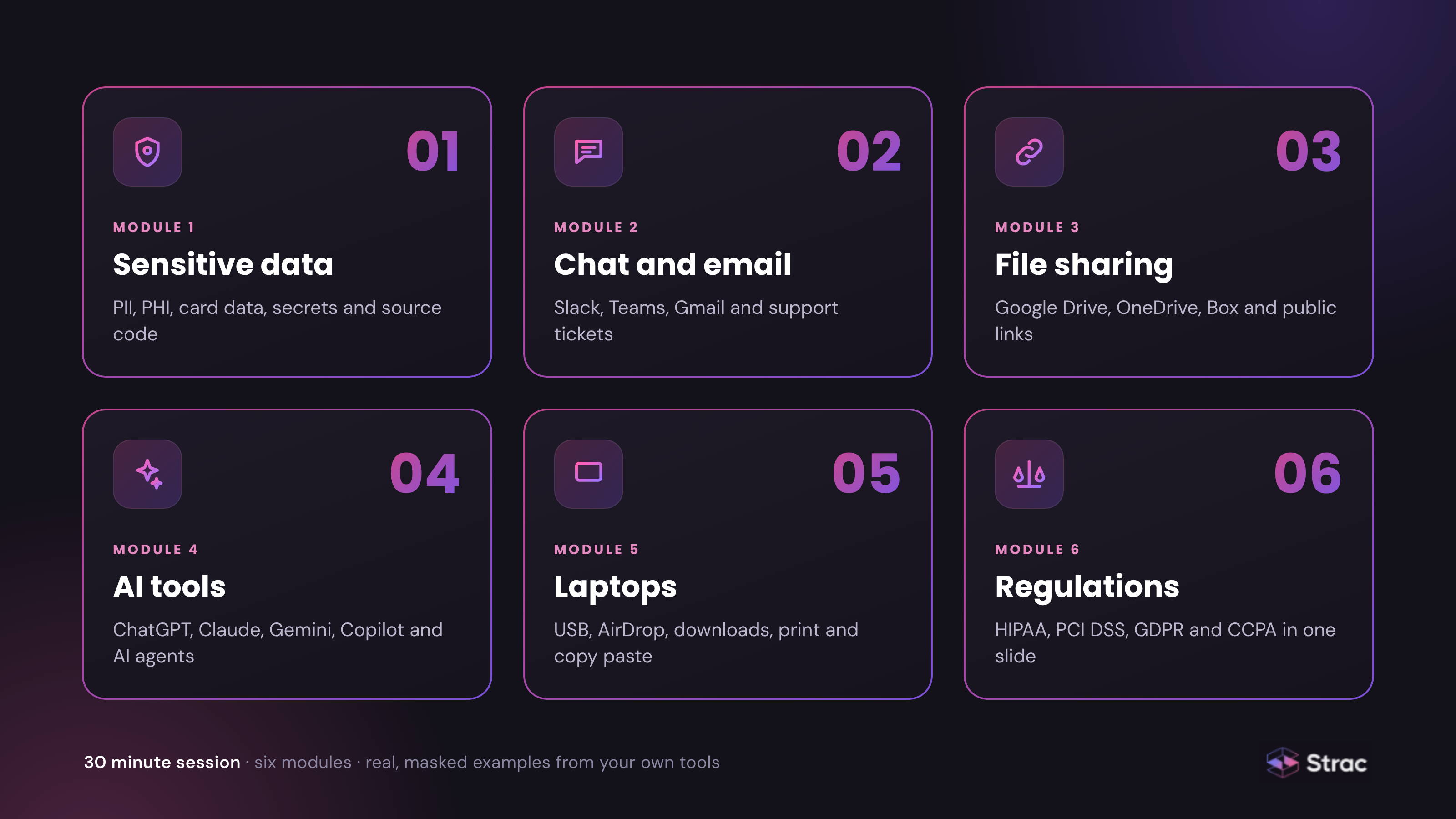
Keep the session to 30 minutes and six short modules. Each one should show a real screenshot from your own tools, with every real value masked.
Module 1: What counts as sensitive here. Name the data in your company's words: customer PII, patient records and HIPAA PHI data elements, card numbers, bank details, passwords and API keys, contracts and source code. Strac's catalog of sensitive data elements is a useful starting list.
Module 2: Chat and email. A customer sends a card number in a support chat. A teammate pastes a Social Security number into a Slack thread to "check something". Someone forwards a spreadsheet to a personal Gmail address to work from home. Show each one, then show what the employee should have done.
Module 3: File sharing. Most exposure in Google Workspace DLP, OneDrive DLP and Box DLP comes from links set to "anyone with the link" and folders shared with a vendor years ago. Teach people to share with named people and set an expiry.
Module 4: AI tools. This is the module that gets the most questions. Explain which AI tools are approved, why pasting a customer export into a free chatbot is a data transfer, and what the employee will see if they try. Bring your own numbers from how to detect shadow AI rather than industry estimates. The Shadow AI guide explains the problem in more depth.
Module 5: Laptops. Downloads, USB drives, AirDrop, printing and copy and paste all move data off company systems. Explain what Mac DLP, Windows DLP and Linux DLP watch, and what they do not. Say clearly that Strac keeps no keystroke logs and no screen recordings; trust is part of the training.
Module 6: Regulations, in one slide. Employees do not need the text of HIPAA, PCI DSS, GDPR or CCPA. They need one sentence each on what it protects and one example from their own team.
Most data loss starts with a person trying to get work done. A finance analyst exports payroll to finish a report at home. A developer pastes a stack trace with a live secret into an AI tool. A salesperson downloads the customer list on their last week.
Frame the session around the first two, because they are most of the cases, and mention the third without making the room feel accused. A presentation that treats every employee as a suspect gets ignored; one that treats them as the last line of defense gets questions.
For the security team running the program, reducing DLP false positives matters here too. If warnings fire on harmless messages, employees learn to click through them, and the training is undone in a week.

The most useful slide in the presentation is a short recording of the control working. Pick one scenario from each team.
For support, a customer pastes a card number into a Zendesk DLP ticket and Strac redacts it in place before an agent opens it. For engineering, a developer pastes an API key into ChatGPT and ChatGPT DLP masks it before the prompt is sent. For everyone, an employee tries to upload a board spreadsheet to a personal Dropbox and sees a message explaining why it was stopped.
A slide tells employees the rule once. The warning on their screen teaches it at the one moment it matters.
Strac is a DLP, data discovery and DSPM platform that protects data across SaaS apps, cloud storage, browsers, laptops, AI tools and AI agents. For a training program, it supplies the real examples before the session and the coaching after it.
Before the session: real findings. Strac's sensitive data discovery and classification scans existing data in Slack, Google Drive, OneDrive, SharePoint DLP, Box, Confluence DLP, Jira DLP and Microsoft Teams DLP. OCR reads text inside screenshots and PDFs. The findings show employees what is already sitting in their own channels and folders.
After the session: coaching at the point of action. Strac applies four actions, in this order:
Coverage for every module. The same policy runs in the browser through Chrome DLP and Edge DLP, on laptops through endpoint DLP, and in AI tools through Claude DLP, Gemini DLP and Copilot DLP. Data lineage tracks company files from cloud storage even after they are renamed or edited, so "Board-Meeting.xlsx" saved as "Notes.xlsx" is still recognized when someone tries to upload it.

AI agents, the newest module. When employees connect assistants to company apps, MCP DLP sits inline on each connection, logs every tool call, and redacts PII, PHI, card data and secrets before the model sees them. It covers more than 50 MCP connectors, including Slack, Google Drive, Salesforce, Jira, GitHub and Snowflake.
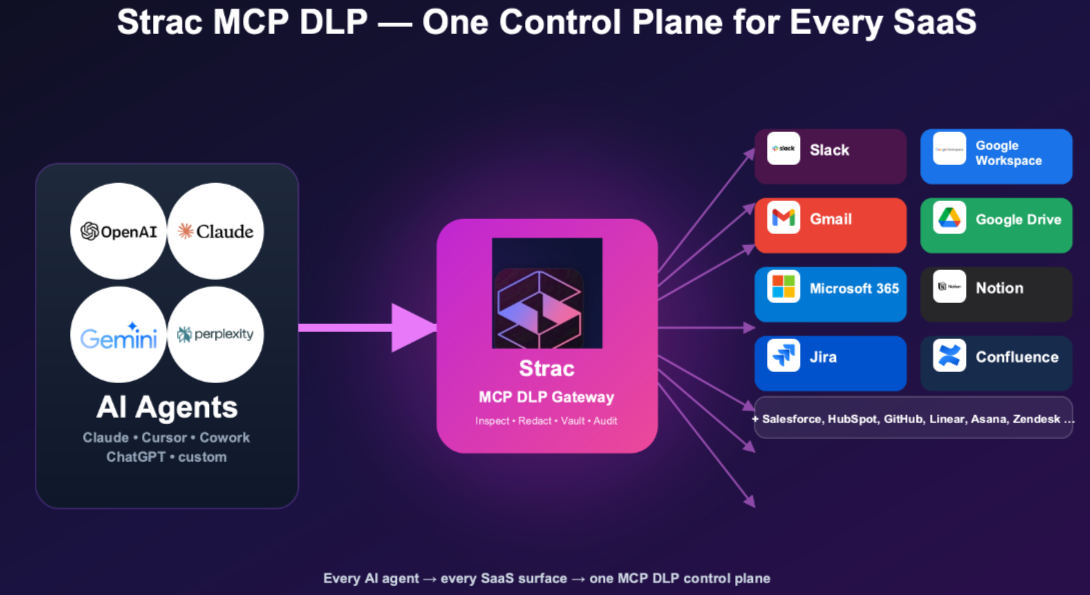
Every action is logged with the policy and the outcome. That log becomes the evidence that training worked, and the audit record for SOC 2 and ISO 27001.
👉 Related reading:
A data loss prevention presentation in 2026 has to cover the tools employees actually use: Slack, shared drives, support tickets, AI assistants and their own laptops. Keep it short, use real masked examples, and make sure the first warning they see after the session feels familiar. Training and account controls fail on a busy day; the data layer is the backstop, and redacting sensitive data on every action keeps a mistake from becoming a breach.
Book a demo to see the warnings your employees would see.
No. Security awareness training covers phishing, passwords and social engineering. A DLP presentation focuses on one thing: how employees handle sensitive data in Slack, email, file sharing, AI tools and laptops. Many teams run it as a module inside the wider awareness program.
Rarely. Most suite DLP tools send alerts to the security team, not guidance to the employee. If the person who made the mistake never sees a message, nothing changes. Strac warns the employee directly, in the app where the action happened.
Not if redaction is the default. The message, ticket or prompt goes through with the sensitive value removed, so people keep working. Blocking is kept for the few places data should never reach, such as personal cloud accounts.
No. People get busy, tired and rushed, and new AI tools appear every month. That is why the data layer matters: if sensitive values are redacted on every action, a mistake or a compromised account has nothing useful to leak.
It is the people layer of a wider program that also covers approved AI tools, agent access and data policy. See AI data governance and AI governance for the full picture.
“Don’t just alert on problems, fix them.”
Scott Roberts, Chief Information Security Officer, UiPath









Customers include