August 21, 2026

6
min read
Essential Data Loss Prevention Tips for Ubuntu Users
Discover the importance of Data Loss Prevention for Ubuntu and learn how to protect sensitive data with Strac's comprehensive DLP solutions tailored for Ubuntu users.
Data Loss Prevention for Ubuntu encompasses a set of practices, tools, and protocols designed to prevent the loss, leakage, or misuse of sensitive data on systems running the Ubuntu operating system. It involves monitoring, detecting, and responding to potential threats to ensure data integrity and confidentiality.
On Ubuntu, the exits are the same as any endpoint — USB, browser, local apps, clipboard — and the sensitive data flowing through them is just as regulated. Strac inspects each by content and enforces your policy in Block, Warn, or Audit.
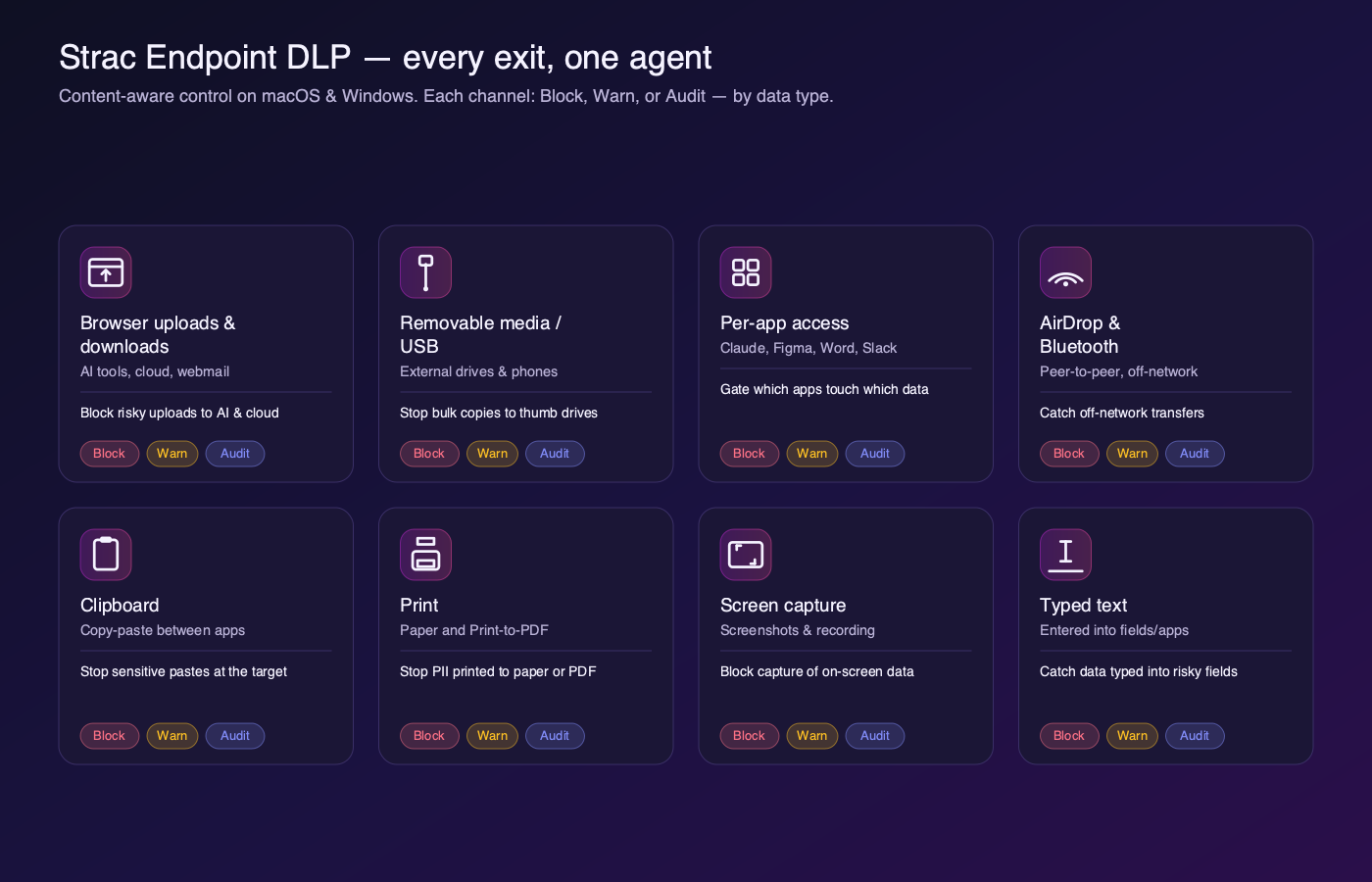
Block, Warn, or Audit — per data type, per channel. See the full eight-channel breakdown in the endpoint DLP agent guide.

A DLP solution for Ubuntu might involve scanning outgoing emails for sensitive information such as credit card numbers or health records. If such data is detected, the DLP system can automatically encrypt the email or block it from being sent until further authorization is obtained.
Another example is monitoring the file system for unauthorized access or transfer of sensitive files. For instance, if an employee tries to copy confidential files to an external USB drive, the DLP system can block the action and alert the security team.
Implementing Data Loss Prevention for Ubuntu requires a structured approach that covers system configuration, data discovery, policy creation, continuous monitoring, and automated remediation. Ubuntu environments often lack built-in enterprise-grade DLP controls; this makes it essential to combine native OS hardening with a specialized solution that can detect, classify, and control sensitive data movement. By following a step-by-step implementation framework, security teams can gain visibility, reduce insider risk, and maintain compliance across SaaS, cloud, and local Linux endpoints.
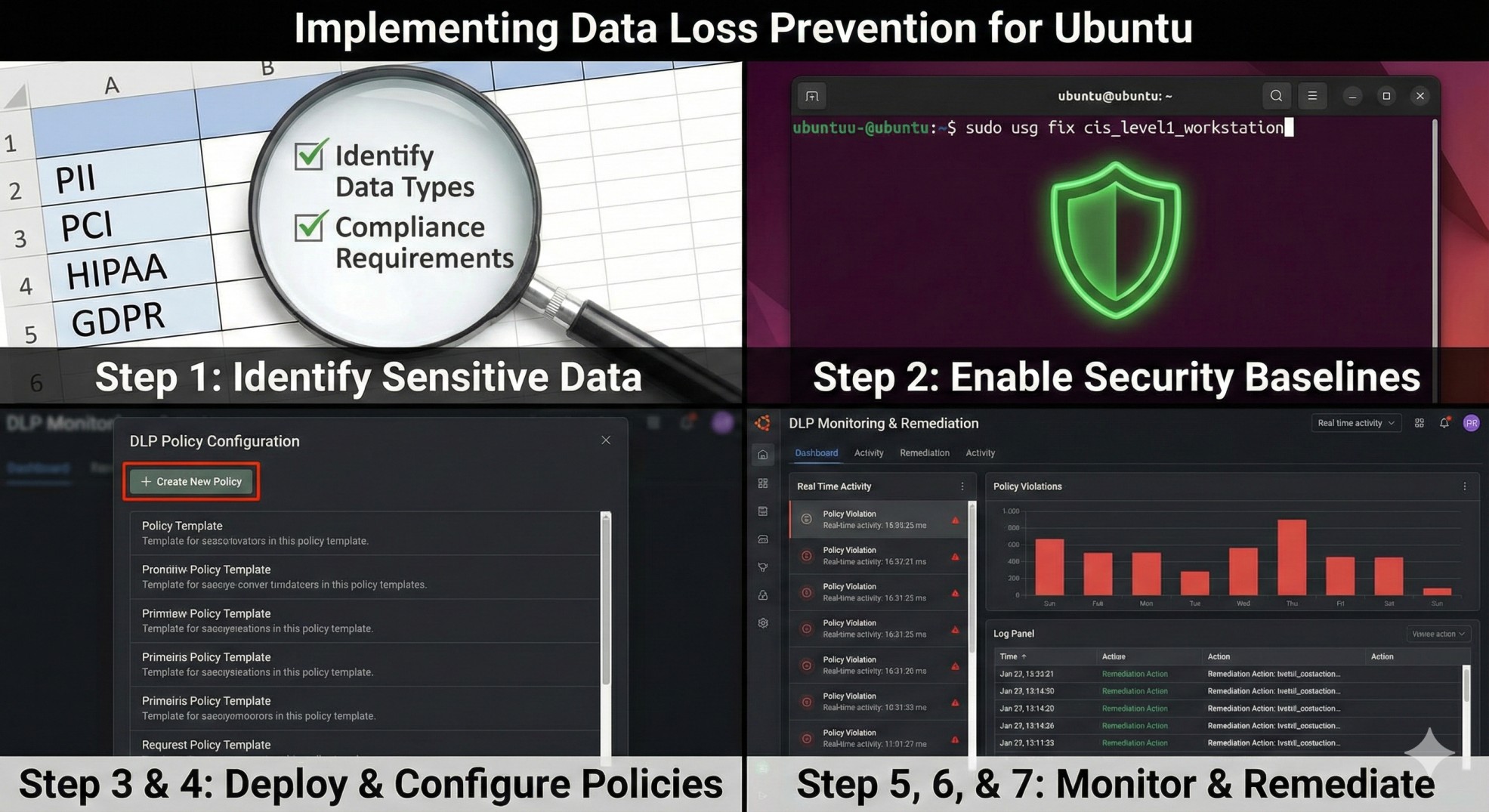
Before enabling any Ubuntu DLP controls, define exactly what data must be protected; PCI, PII, PHI, customer secrets, or internal credentials. Clarifying your regulatory obligations determines the right detection patterns, monitoring depth, and remediation rules. This step ensures the entire DLP program is aligned to business risk.
Ubuntu provides foundational controls that must be enabled before layering advanced DLP on top. Configure full-disk encryption through LUKS; enable AppArmor for process confinement; enforce strong authentication policies. These hardening measures create a secure base for DLP enforcement.
Ubuntu endpoints require a solution that can scan text, files, logs, command outputs, and application activity without creating system overhead. Traditional DLP agents may not support Ubuntu well; this is where platforms like Strac provide value through agentless classification, continuous monitoring, and real-time redaction across connected SaaS tools. Deployment should be simple, scalable, and seamless for developers and employees.
Once your DLP solution is installed, the next step is defining policies for what should be detected and how it should be handled. Configure classifiers for PII, PCI, PHI, secrets, API tokens, source code, or customer files; set thresholds for when alerts, redaction actions, or blocks are triggered. Accurate classification ensures minimal noise and maximum protection.
Ubuntu users frequently move files via SCP, SFTP, Git, curl, wget, and browser uploads, making outbound monitoring essential. Configure your DLP tool to watch for sensitive data being exfiltrated through terminals, Git commits, cloud sync folders, or email clients. Continuous visibility surfaces risky behavior before it leads to a breach.
Detection alone is not enough; Ubuntu DLP requires real-time enforcement. Define remediation rules that automatically redact sensitive content in logs or applications; block unauthorized file uploads; quarantine suspicious transfers. Strac strengthens this step by enabling instant policy-driven remediation across SaaS platforms connected to Ubuntu systems.
Effective Ubuntu DLP is iterative. Review logs, audit trails, and policy hits weekly; identify false positives; refine classification thresholds; improve remediation logic. Continuous optimization ensures the DLP program evolves with the organization’s data footprint and development workflows.
Implementing DLP for Ubuntu addresses several critical risks, ensuring that sensitive data remains secure.
Unauthorized data access is a significant concern for organizations. Without proper DLP measures, sensitive information can be accessed and exploited by malicious insiders or external attackers. DLP solutions help mitigate this risk by monitoring access patterns and enforcing strict access controls.
Employees often use removable media like USB drives to transfer data, which poses a risk of accidental or intentional data leakage. DLP solutions can block or restrict the use of such media, ensuring that sensitive data doesn't leave the corporate environment without authorization.
Organizations are required to comply with various data protection regulations such as GDPR, HIPAA, and PCI-DSS. Non-compliance can result in hefty fines and reputational damage. DLP solutions help ensure compliance by enforcing data protection policies and generating audit trails for regulatory reporting.
An ideal Data Loss Prevention (DLP) solution for Ubuntu should encompass the following features to ensure comprehensive data protection:
The solution should be capable of detecting all forms of sensitive data, including Personally Identifiable Information (PII), Protected Health Information (PHI), and payment card data. This involves the ability to scan various types of content such as documents, images, and email communications. Comprehensive detection ensures that no sensitive data goes unnoticed, whether it is stored in traditional text formats or embedded within images and multimedia files. This feature is crucial for preventing inadvertent data leaks and maintaining regulatory compliance.
Real-time monitoring is critical for promptly identifying and responding to potential threats. An effective DLP solution should provide immediate alerts for any suspicious activity, such as unauthorized access attempts or unusual data transfer patterns. These alerts enable security teams to take swift action to mitigate risks and prevent data loss. Real-time capabilities are essential for maintaining an active defense posture, allowing organizations to address security incidents as they occur rather than reacting after the fact.
Encryption and redaction are vital components of a DLP strategy. The solution should automatically encrypt sensitive data both at rest and in transit, ensuring that it remains secure even if intercepted. Additionally, robust redaction capabilities are necessary to mask or blur sensitive information within documents and images, preventing unauthorized individuals from viewing or extracting this data. This dual approach of encryption and redaction provides a layered defense mechanism, significantly reducing the risk of data exposure.
Every organization has unique data protection needs, and an ideal DLP solution should allow for customizable policies to cater to these specific requirements. This includes the ability to set up tailored rules for data access, transfer, and usage based on the organization’s risk profile. Customizable policies ensure that the DLP solution aligns with the organization's operational needs and compliance mandates, providing a flexible framework for effective data governance. This customization enables organizations to adapt their DLP strategies as threats evolve and business needs change.
Insider threats on Ubuntu systems often originate from trusted users who have legitimate access to sensitive data; this makes them significantly harder to detect than external attacks. Ubuntu endpoints commonly store logs, configuration files, API keys, SSH credentials, and customer data, which can be exposed through careless behavior or intentional misuse. Implementing Data Loss Prevention on Ubuntu provides continuous oversight of user activity, enforces policy-based controls, and prevents sensitive information from leaving the environment.
Ubuntu users frequently interact with terminals, Git repositories, cloud storage, and internal services, creating multiple points where data can be mishandled. DLP solutions monitor these actions; track when sensitive data appears in commands, files, or transmissions; and detect unusual or non-compliant behavior. This visibility allows security teams to immediately identify patterns that might indicate insider misuse.
Insider threats typically exploit outbound channels such as SCP, SFTP, curl, wget, browser uploads, email clients, or Git pushes. DLP for Ubuntu identifies sensitive information inside these transfers; blocks unauthorized uploads; and alerts security teams when risky exfiltration attempts occur. By enforcing policy at the moment of action, Ubuntu DLP stops data leakage before it becomes a breach.
Ubuntu environments often contain SSH keys, tokens, environment variables, and service credentials that insiders could export or abuse. DLP tools automatically detect these secrets when they appear in logs, config files, or terminal outputs; prevent them from being copied or transmitted; and ensure they are not exposed through Git commits or automation pipelines. This significantly reduces the likelihood of privilege abuse.
Not all insider threats are malicious; many stem from accidental sharing of sensitive information. Automatic redaction removes PCI, PII, PHI, and secrets from files, messages, and system outputs before they propagate. Strac strengthens this defense by performing inline redaction across connected SaaS tools used alongside Ubuntu, ensuring no sensitive content slips through internal channels.
A complete record of policy violations, attempted exfiltration, and sensitive data interactions is essential for understanding insider activity. Ubuntu DLP continuously logs events; correlates behavior across applications; and generates detailed reports that support investigations and compliance reviews. These audit trails create accountability and discourage risky behavior.
Strac is a SaaS/Cloud DLP and Endpoint DLP solution that excels in providing modern data protection features. Here's why Strac stands out:


Data Loss Prevention for Ubuntu is essential for safeguarding sensitive information and ensuring regulatory compliance. By addressing key risks such as unauthorized access, data leakage, and compliance violations, a robust DLP solution can protect your organization’s data assets. Strac offers a comprehensive, customizable, and highly effective DLP solution tailored to meet the unique needs of Ubuntu users. Invest in Strac to secure your data and stay ahead of evolving cybersecurity threats.
Data Loss Prevention is a security framework that detects, monitors, and prevents sensitive data from being exposed, misused, or exfiltrated. Ubuntu systems are widely used by developers, engineers, and technical teams; this means they frequently store credentials, API keys, logs, customer data, and configuration files that are extremely valuable. DLP is essential on Ubuntu because it provides visibility into data movement, enforces policies, and stops unauthorized transfers before they become breaches.
DLP matters for Ubuntu because it helps:
Together, these controls ensure that Ubuntu endpoints do not become silent risk points inside the organization.
Implementing DLP on Ubuntu requires a structured approach that secures the device, monitors sensitive data, and enforces automated controls. Ubuntu does not include native enterprise-grade DLP features; therefore, organizations must combine OS-level hardening with a modern DLP platform that can classify and remediate data in real time. A step-by-step framework ensures consistency and reduces insider and external risks.
To deploy DLP on Ubuntu, follow these steps:
A solution like Strac strengthens Ubuntu security by adding real-time redaction and SaaS-level protection on top of these endpoint controls.
Ubuntu environments face risks tied to developer workflows, command-line tools, and high-privilege access. These risks often go undetected because Linux systems are not always monitored with the same rigor as Windows or macOS. DLP reduces these risks by identifying sensitive data early and preventing it from moving to unsafe destinations.
DLP protects Ubuntu systems from:
By addressing these scenarios, DLP significantly reduces the chance of both intentional and accidental data loss.
Yes; modern DLP platforms for Ubuntu are designed to extend protection beyond the device into the cloud and SaaS ecosystem. Ubuntu teams frequently interact with tools such as Google Workspace, Slack, Salesforce, GitHub, AWS, and Notion; therefore, endpoint-only controls are not enough. A unified DLP approach ensures consistent classification, monitoring, and remediation across every system where Ubuntu users move data.
A platform like Strac enhances this capability by providing real-time redaction, SaaS scanning, and automated remediation across more than 40 cloud applications, giving security teams seamless visibility across both the endpoint and the cloud.
Insider threats are harder to detect because the user already has legitimate access; this makes monitoring contextual behavior essential. DLP solutions for Linux identify sensitive data exposure across command-line activity, file operations, application logs, and outbound transmissions. By correlating this behavior with policy rules, DLP can detect misuse, anomalies, and high-risk actions before data leaves the system.
To protect against insider threats, DLP:
These controls create a safety net that stops both accidental mistakes and intentional data theft across Ubuntu and other Linux distributions.
.avif)


.gif)


.webp)