September 8, 2026

8
min read
Advanced-Data Loss Prevention for Gmail and Drive
Protect sensitive data with advanced data loss prevention for Gmail and Drive. Learn about encryption, redaction, and real-time monitoring for enhanced security.
· Data loss prevention for Gmail and Drive is thepractice of detecting sensitive data in Google mail, files, and attachments,then redacting, blocking, or restricting it at the moment of egress.
· The risk changed in 2026. Data no longer leavesonly through a send button or a public link. It leaves through a browser pasteinto a chatbot, and through AI agents that read Drive over the Model ContextProtocol on behalf of a user who never opens the file.
· Native Google controls see policy violationsinside Google. They do not see the browser, the endpoint, or the agent, andtheir strongest answer is usually to block the action rather than to keep thefile useful without the secret in it.
· Strac reads the content of every mail, file,attachment, paste, and agent call across SaaSDLP, Browser DLP, endpoint DLP,and MCP DLP, then redacts thesensitive elements and leaves the rest intact.
· Thisis the Gmail and Drive slice of Google Workspace DLP.Start from that pillar for the full suite.
Data loss prevention for Gmail and Drive is the set of controls that inspect the content of Google mail and files, classify what is sensitive, and act before that content reaches somewhere it should not be. The three verbs matter in that order: inspect, classify, act. A tool that only inspects produces a report. A tool that only classifies produces a label. Neither one stops a leak.
Sensitive content in Google Workspace is rarely tidy. A Social Security number sits in the body of a reply. A credit card sits in a screenshot pasted into a Doc. An API key sits in a spreadsheet a contractor still has access to from a project that closed in March. Detection has to reach text, attachments, and pixels, which means optical character recognition on images, screenshots, and scanned PDFs rather than pattern matching on plain text alone.
Two examples show the shape of the problem. A clinic replies to a patient and quotes a full medical record number in the thread, which turns an ordinary email into a HIPAA compliance event. A finance analyst uploads a reconciliation export to Drive, sets it to anyone with the link so a vendor can read it, and 4,000 card numbers become a public URL. Neither person did anything malicious. Both moved data faster than any review process could follow.
Gmail and Drive are not one surface. They are four egress paths with four different failure modes, and a program that covers three of them is a program with a hole in it.
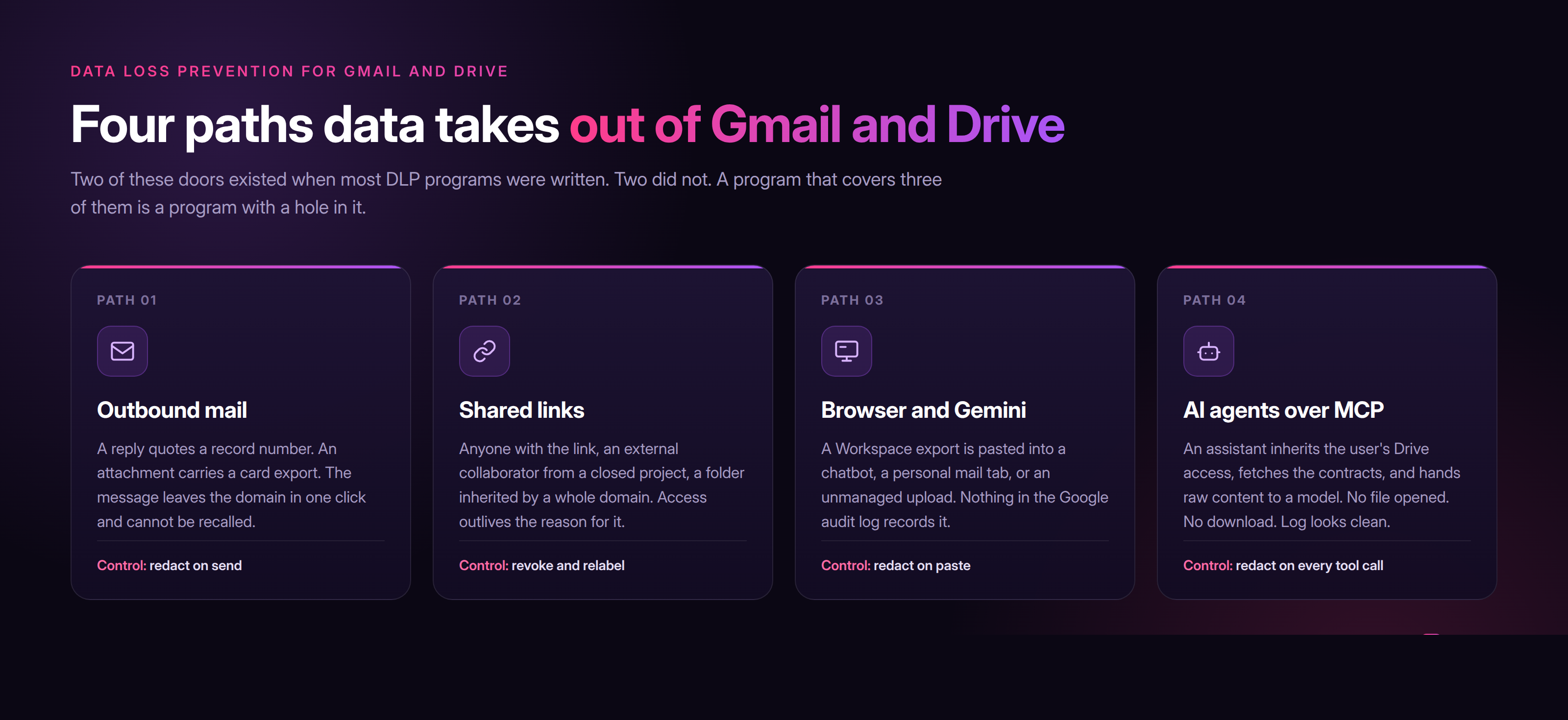
Four doors, one data layer. Strac inspects content on all four rather than guarding the two that predate generative AI.
The fourth path is the 2026 addition and the one most programs have not costed yet. When a user connects a Google Workspace MCP server to an assistant, the assistant gains the user's read access to Drive and Gmail. Ask it to summarize last quarter's contracts and it will fetch the files, including the ones with bank details in them, and pass the raw content to a model. The user never opened a document. No file was downloaded. Every native audit log records a legitimate API read by an authorized account.
That is the whole problem in one sentence. Identity said yes correctly, and sensitive data still left the building.
Google's own controls are a reasonable floor. They see rule violations inside Google properties, they apply labels, and on the higher tiers they can warn or block on share and on send. The trouble starts at the edge of Google.
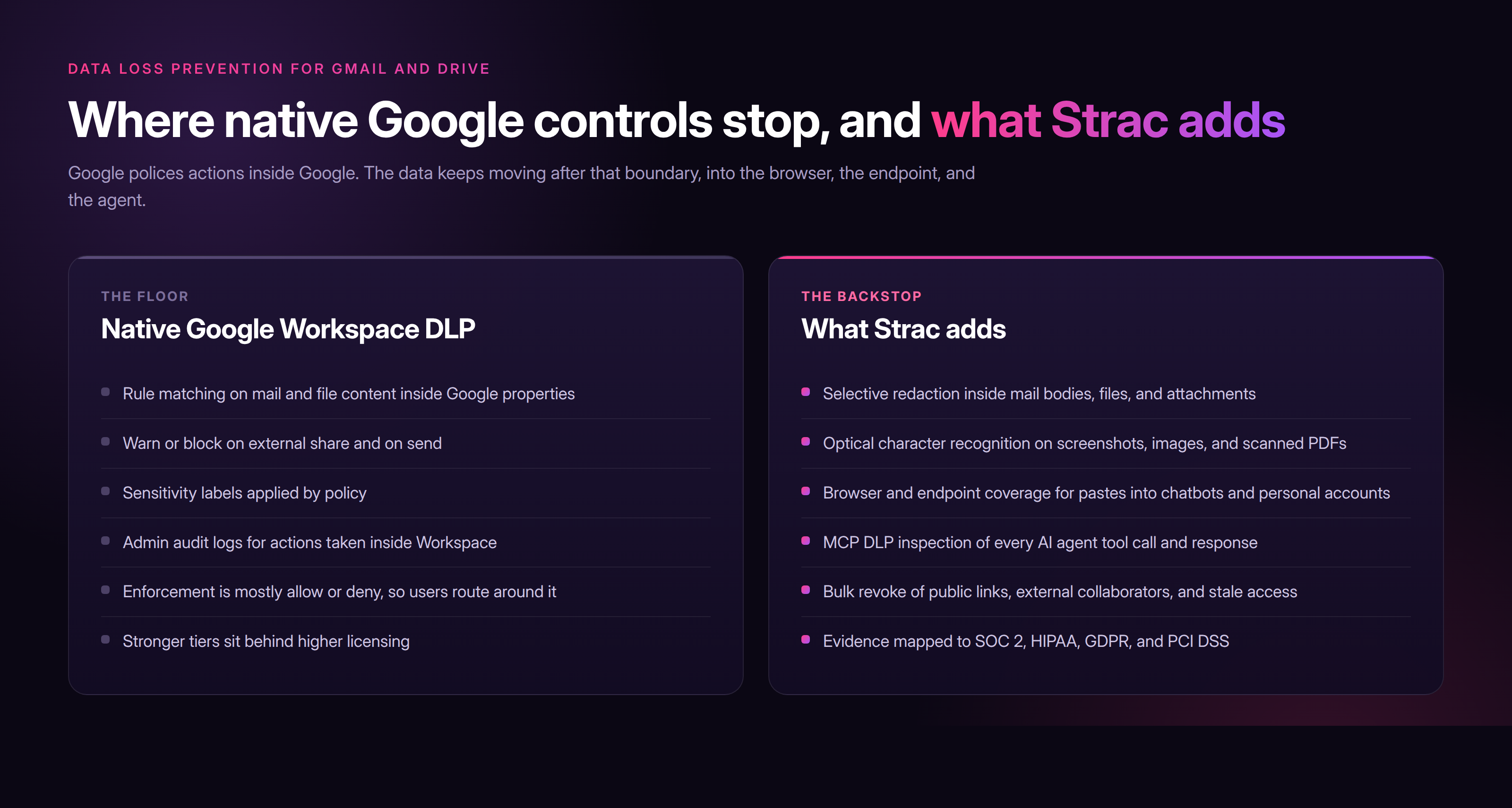
Native controls police actions inside Google. Strac follows the data past the boundary, into the browser, the endpoint, and the agent.
There is a second limit that has nothing to do with coverage. Native enforcement is mostly binary. The rule fires and the action fails, so the user forwards the file from a personal account or screenshots the record instead. Blocking teaches people to route around the control. Redaction does not, because the mail still sends and the file still opens, just without the card number in it.
A DLP program that blocks work is a program that gets disabled. One that removes the sensitive element and lets the work continue is one that survives its first quarter.
The mechanism is the same on all four paths, which is what makes it operable. Strac inspects content in flight, identifies the sensitive elements with machine learning detectors tuned for PII, PHI, PCI, credentials, and source code, and rewrites only those elements. The surrounding message, file, prompt, or agent response passes through unchanged.
Remediation runs in a fixed order of severity:
Redact or mask. Replace the sensitive element in place across Gmail, Drive, Docs, Sheets, Slides, Chat, Slack, tickets, SharePoint, and Box, so the artifact stays useful and the secret does not travel.
Block. Stop the send, the share, or the agent response outright when the data class allows no exception, such as full card data leaving to an external domain.
Warn and coach. Show the user what was detected and why at the moment they act, which is the only moment training actually lands.
Revoke access. Remove public links, cut external collaborators, and clear stale permissions on Drive files that have quietly gone open.
Strac redacts the sensitive element and leaves the work intact. The mail still sends, without the account number.
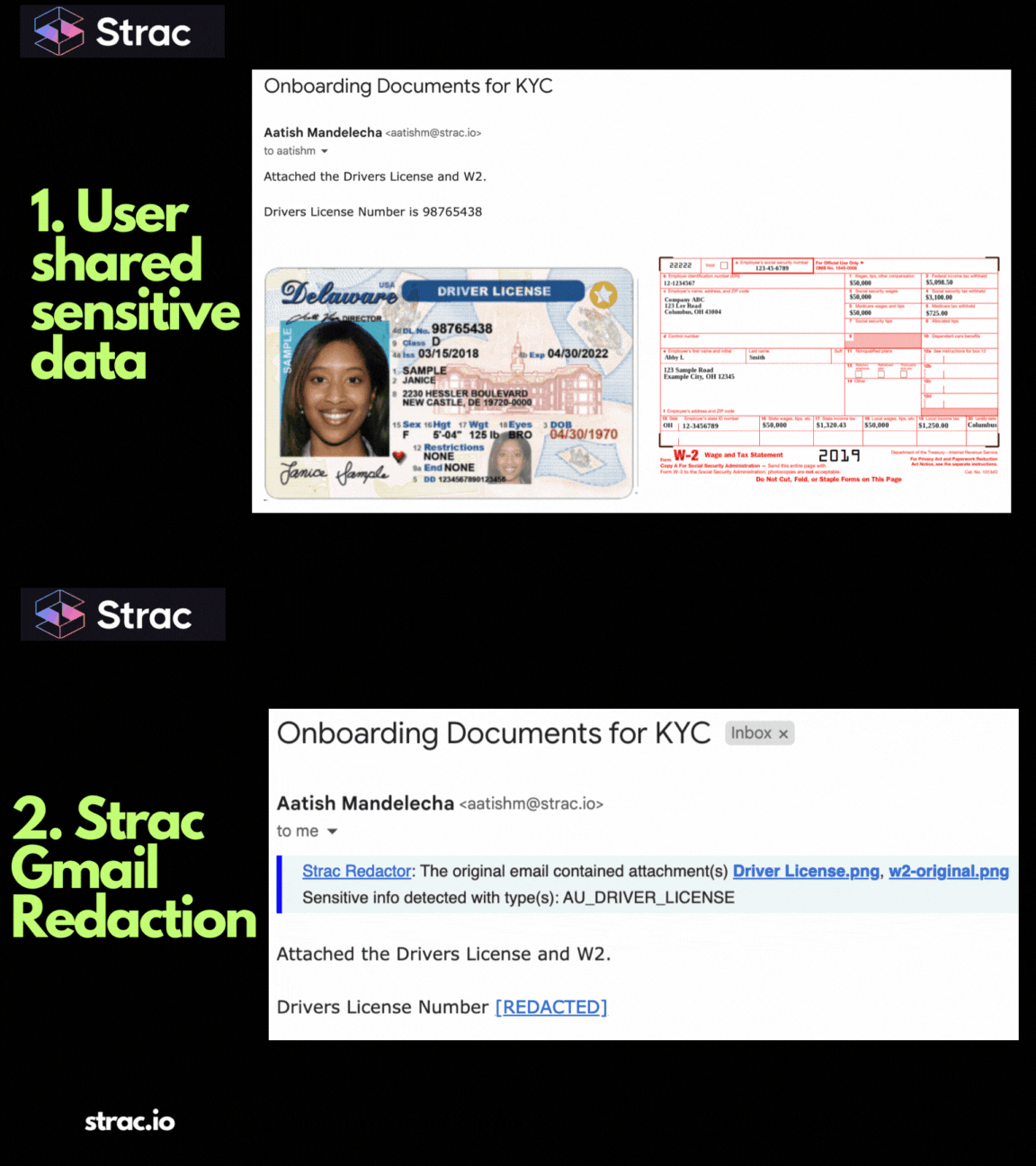
Gmail DLP connects over OAuth in under 10 minutes with no proxy and no MX record change. It scans inbound and outbound mail plus attachments, including PDF, DOCX, XLSX, CSV, ZIP, and images, and applies redaction, blocking, quarantine, encryption, alerting, or tagging by policy.
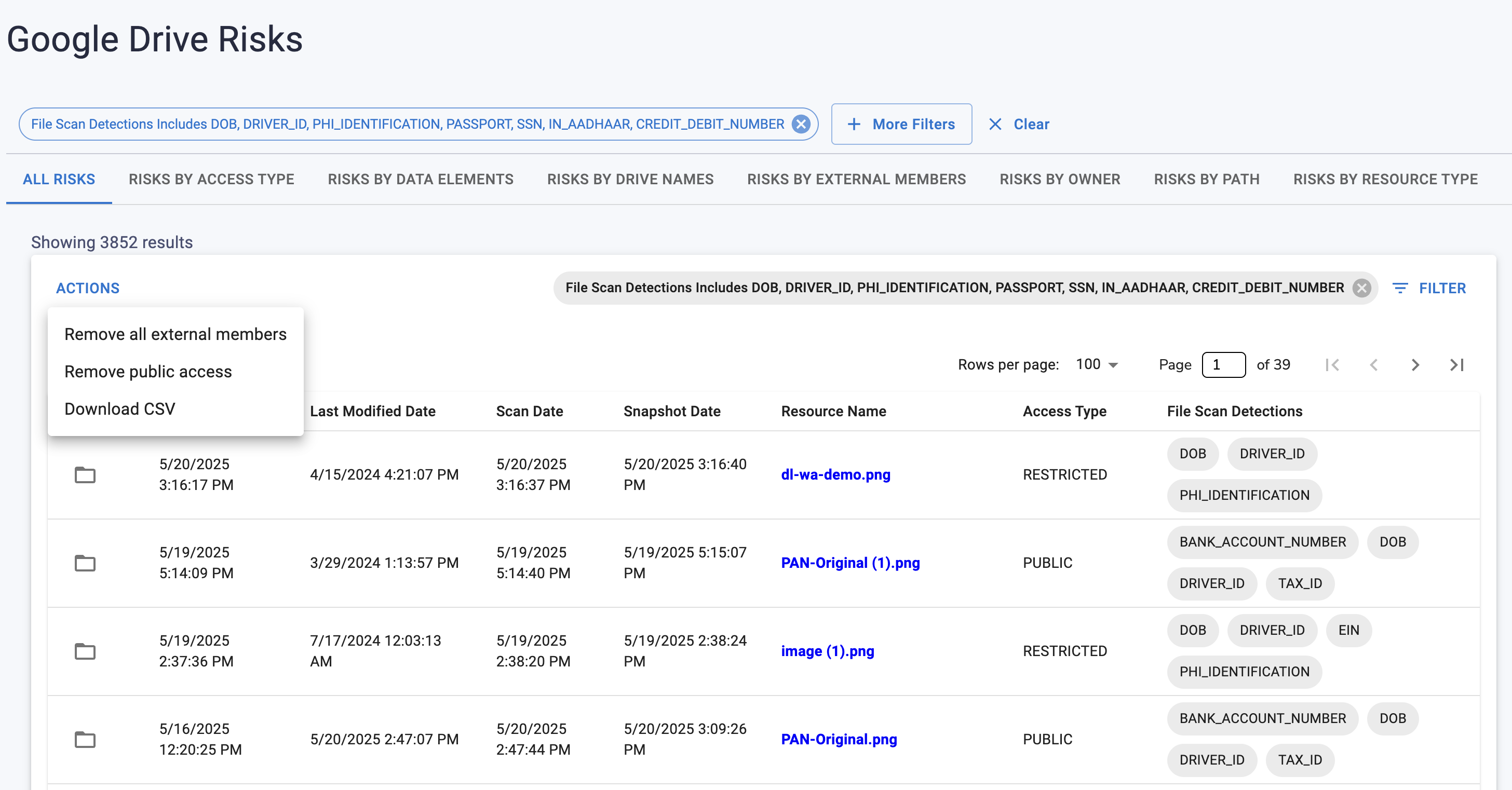
Google Drive DLP scans files at rest and on change. It finds the sensitive ones, shows which are shared externally and which carry public links, and remediates in bulk by revoking access, removing collaborators, applying labels, or masking the content in place. Continuous data discovery and classification keeps that inventory current, and DSPM turns it into a posture you can report on rather than a scan you ran once.
Browser DLP and endpoint DLP close the third path. Strac sees a Workspace export heading into a chatbot, a personal Gmail tab, or an unmanaged upload, and redacts it on the way. That is also how you get an honest inventory of shadow AI, because generative AI DLP records destinations and data classes rather than keystrokes.
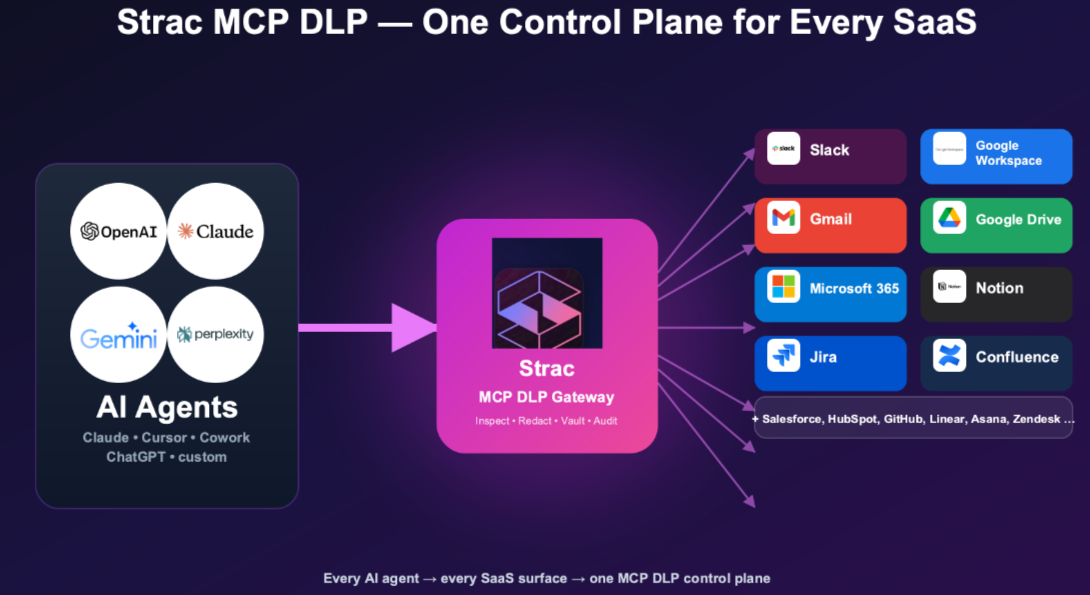
MCP DLP closes the fourth. Strac sits in the agent path, inspects every tool call and every response, and redacts sensitive values before they reach a model or a log. A hijacked or overly eager agent still gets its answer. It does not get the raw PII. This is the control that turns AI data governance from a policy document into something enforced.
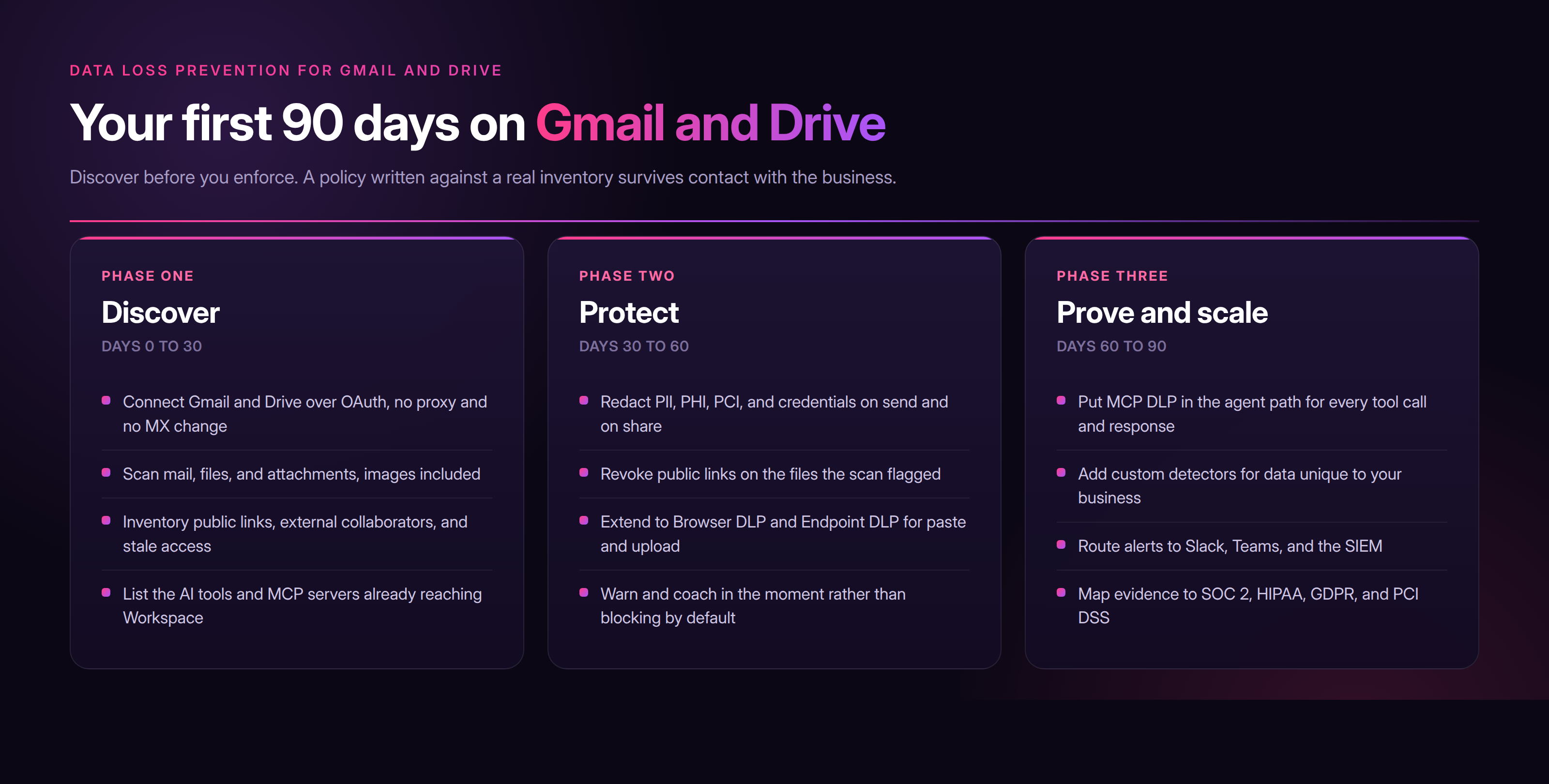
Gmail and Drive now leak through four doors, and only two of them existed when most DLP programs were written. Identity, sharing rules, and native policy all hold most of the time; they fail quietly at the edge, where the browser, the endpoint, and the agent live. The data layer is the backstop. Redact sensitive data on every send, every share, every paste, and every agent call, and a mistake stays a mistake instead of becoming a breach. Book a demo to see Strac redact sensitive data across Gmail, Drive, and the agents reading them.
It is the same discipline at a narrower scope. Google Workspace DLP covers the whole suite including Chat, Meet, and admin posture. Gmail and Drive are simply where the sensitive content and the egress volume concentrate.
Native rules see actions inside Google properties. They do not inspect a paste into a chatbot, a copy to an unmanaged device, or an agent call over MCP, and they cannot redact selectively inside an attachment. The gap is coverage and granularity, not intent.
Not when the default action is redaction rather than blocking. The mail sends, the file opens, the analysis runs, and only the sensitive element is masked. Blocking is reserved for the narrow set of data classes that allow no exception.
Not through identity, and that is the honest limit. If the user has access, the agent inherits it. MCP DLP works one layer down by redacting sensitive values in the response, so the agent completes the task without ever holding raw PII.
PII, PHI, PCI, financial records, credentials, API keys, and source code, in mail bodies, files, attachments, and images through optical character recognition. Custom detectors cover data unique to your business. See Google Workspace DLP for the full picture.
.avif)


.gif)


.webp)