

September 11, 2026

7
min read
Data Loss Prevention for Desktop as a Service
Data loss prevention for Desktop as a Service stops sensitive data from leaving virtual desktops. Strac redacts it across clipboard, uploads, GenAI, and SaaS.
· Data loss prevention for Desktop as a Service(DaaS DLP) is the practice of discovering, classifying, and controllingsensitive data as it moves in and out of hosted virtual desktops.
· The session is no longer the perimeter: frominside a virtual desktop, a user can paste a patient record into ChatGPT orhand an AI agent a Salesforce export; without touching a local disk.
· Session policies on the DaaS broker are on/offswitches; they cannot tell a customer list from a lunch order, so teams eitherblock productivity or permit leakage.
· Strac inspects the content itself; one endpointagent, a browser extension, AI DLPfor web and desktop AI apps, MCPDLP for agents, and SaaScoverage for the apps the data came from.
· DaaSDLP is the virtual-desktop slice of endpointDLP; start from that pillar.
desktops such as Windows 365, Azure Virtual Desktop, Amazon WorkSpaces, and Citrix. It finds regulated data like PII, PHI, PCI, credentials, and source code, then decides what happens when that data tries to leave the session.
DaaS moved the desktop into the cloud, which solved the lost laptop problem. It did not solve the data problem. Files, the browser, and AI tools now live in the session, and each one is a way out.
DaaS security protects the desktop. DaaS DLP protects the data the desktop can reach.
Traditional DLP was built for a laptop on a company network. It watched the disk, the USB port, and the email gateway. A virtual desktop has no disk the user owns, often no USB port, and a browser that goes straight to the internet.
DaaS is different in three ways. Sessions reset, so any control that depends on local files forgets what it knew. Most work happens in the browser, inside SaaS apps and web AI tools. And users now run desktop AI apps and AI agents that read Slack, Google Drive, and Salesforce for them.
The platform's own answer is session settings: turn off the clipboard, turn off drive mapping, turn off printing. Turning off the clipboard stops someone pasting a card number. It also stops them pasting a meeting link. This is the same reason why legacy DLP fails for AI: both look at the channel, not at what travels through it.
Every virtual desktop has the same seven ways out. A DaaS DLP program has to cover all of them, because data will take whichever one is left open.
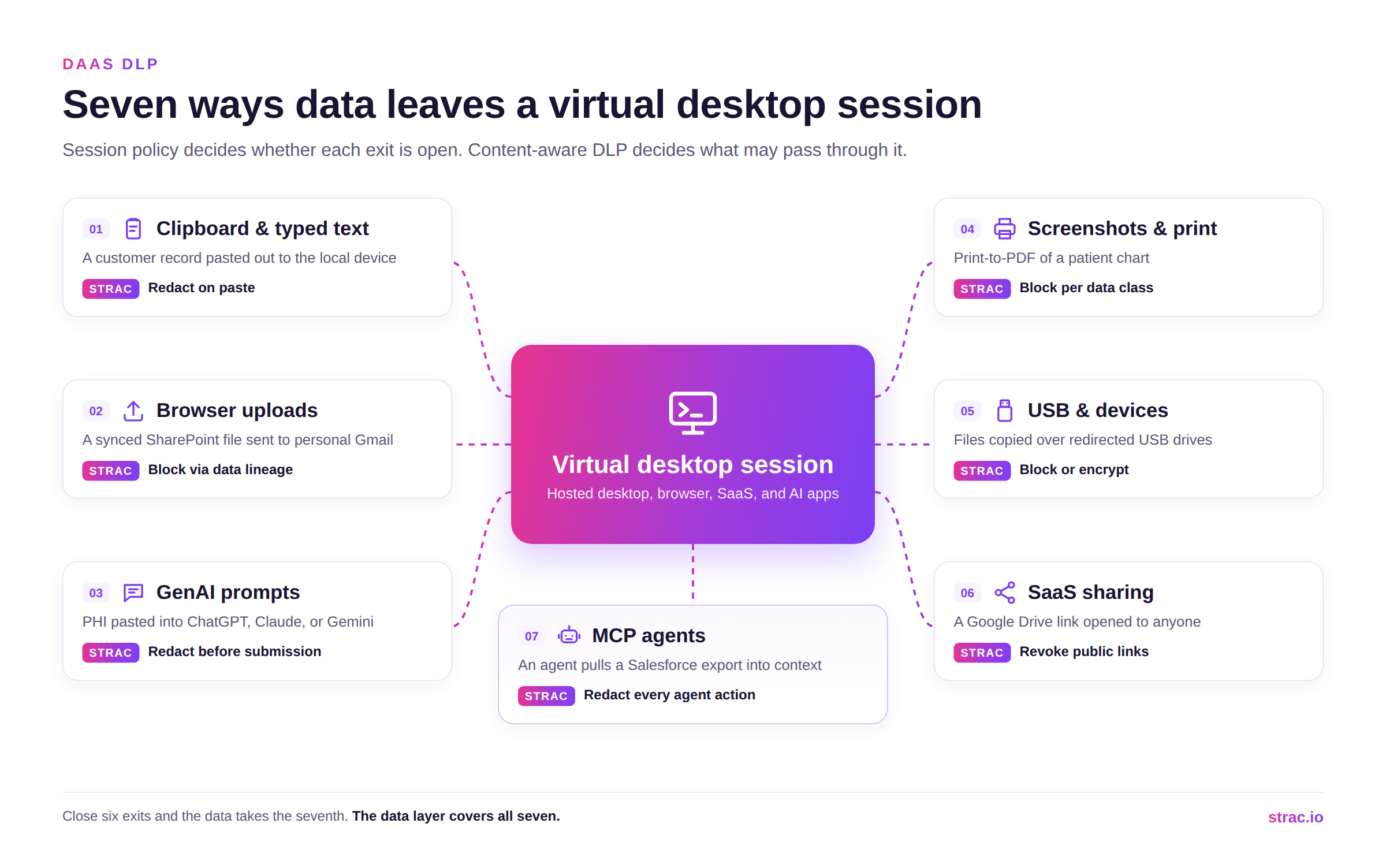
The clipboard moves text to the local device in one keystroke. Browser uploads carry files to personal Gmail or WeTransfer. GenAI prompts send data to ChatGPT, Claude, Gemini, or Copilot, on the web or in a desktop app. Screenshots and printing to PDF turn a protected screen into a file anyone can carry. USB still works wherever device sharing is switched on. SaaS sharing opens a Google Drive link to anyone. And MCP agents pull records straight into an AI model.
The last two never leave the session in the usual sense. They are still data loss. This is where Shadow AI shows up inside a virtual desktop: nothing is installed, a browser tab opens, and the prompt is gone.
Session settings and content inspection work together. The platform decides whether a channel is open. DLP decides what is allowed through it.
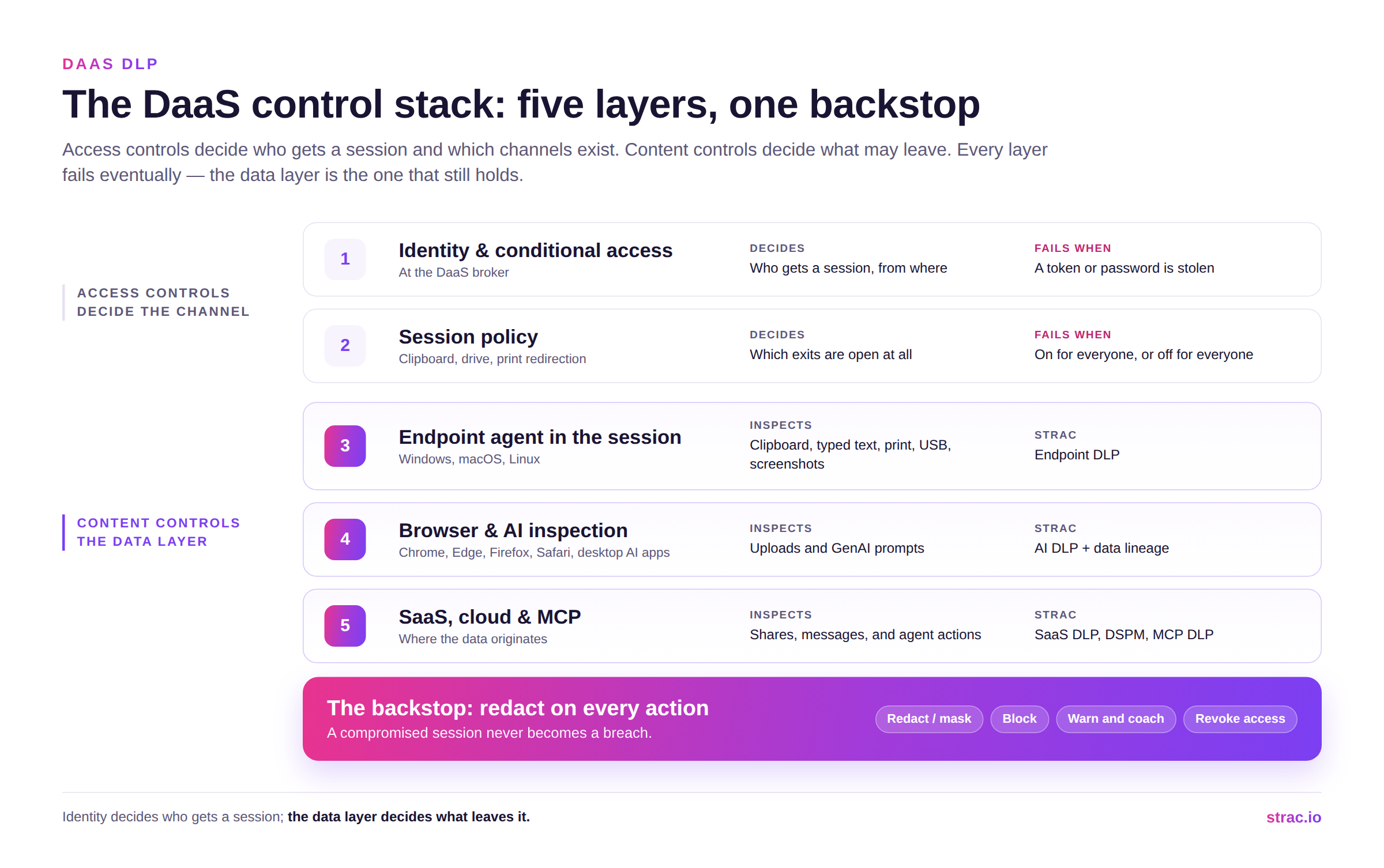
A well run DaaS setup has five layers: identity and access checks at sign in, session settings for the clipboard and printing, an endpoint agent inside the session, browser inspection for uploads and prompts, and SaaS, cloud, and MCP controls where the data lives. Each layer fails at some point, whether through a stolen password, a wrong setting, or an AI app nobody reviewed. The data layer is the one that still protects you when the others fail.
Strac's agent runs inside the session the way it runs on a laptop, on the same platform, with the same console and the same detection. Paste a customer record into a web AI tool, and Strac redacts the sensitive fields before the prompt is sent and lets the rest through. Upload a file synced from Box or SharePoint to a personal account, and data lineage recognizes the file, even if it was renamed or edited, and blocks the upload.
The user sees a short message explaining why, instead of a locked session. The security team sees the event, the type of data, and where it was going. Nobody sees keystrokes or screenshots, because Strac records neither.
Strac treats the virtual desktop as one more place to protect, with the same policies as everywhere else. Five capabilities cover all seven ways out.
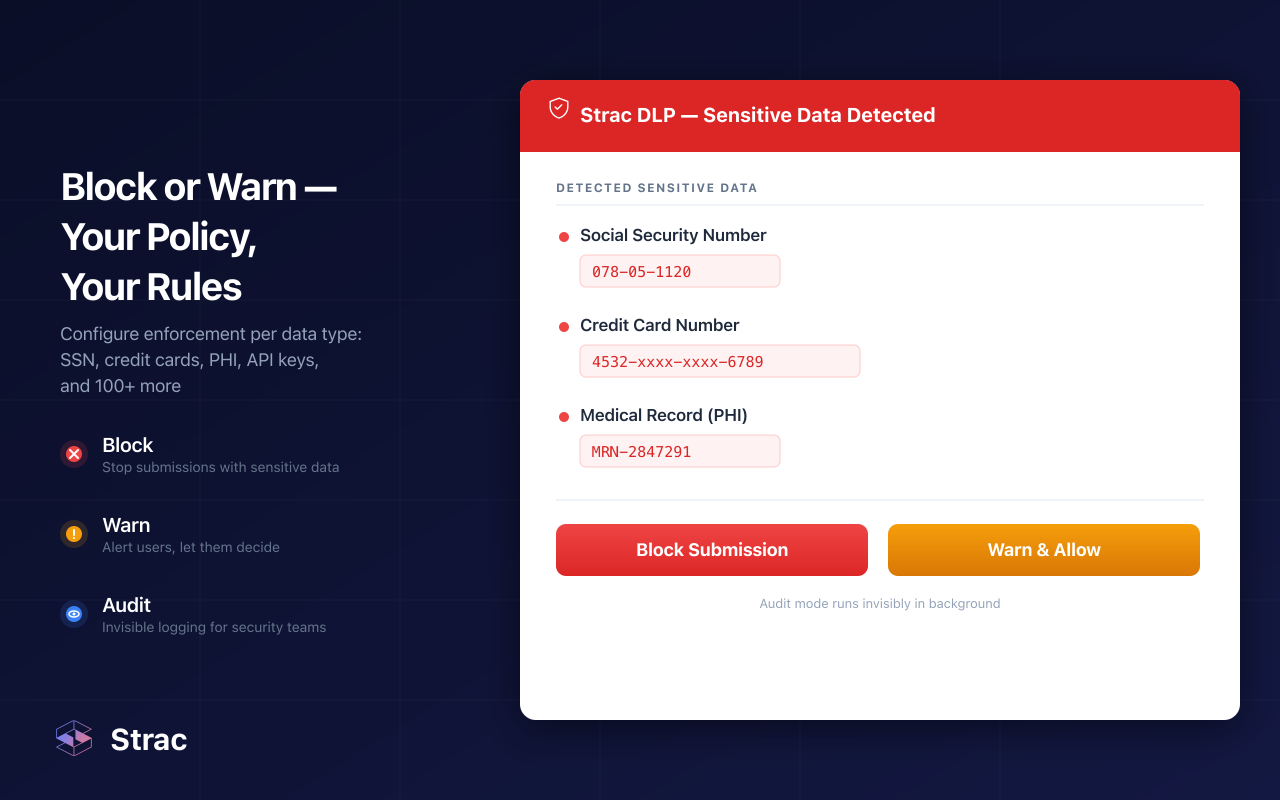
Endpoint DLP inside the session. One agent for Windows, macOS, and Linux controls the clipboard, typed text, uploads, screenshots, printing to PDF, USB, and access to specific apps. You set Block, Warn, or Audit for each type of data and each channel. It is Strac endpoint DLP, unchanged for a virtual desktop.
Browser and AI DLP. An extension for Chrome, Edge, Firefox, and Safari checks prompts and uploads to ChatGPT, Claude, Gemini, and Copilot, with no proxy and no TLS interception. AI DLP applies the same policy to desktop apps such as Claude desktop and Cursor.
MCP DLP for AI agents. MCP DLP redacts sensitive data on every agent action across Slack, Google Drive, Microsoft 365, GitHub, Salesforce, and more. An agent that has been tricked into leaking data returns masked fields instead of real records.
Data lineage. Files synced from Box, Google Drive, OneDrive, SharePoint, and Dropbox keep a lasting fingerprint. Even after they are renamed or edited, Strac stops them on the way to personal storage or AI tools.
SaaS DLP and DSPM. A session is only as safe as the apps it opens. Strac scans SaaS apps like Slack and Google Workspace, and DSPM removes public sharing on the files a desktop can reach.
All five use the same detection: standard and custom detectors for PII, PHI, PCI, credentials, and source code, with OCR for images and full inspection of PDF, DOCX, XLSX, and ZIP files.
Remediation follows the same order everywhere:
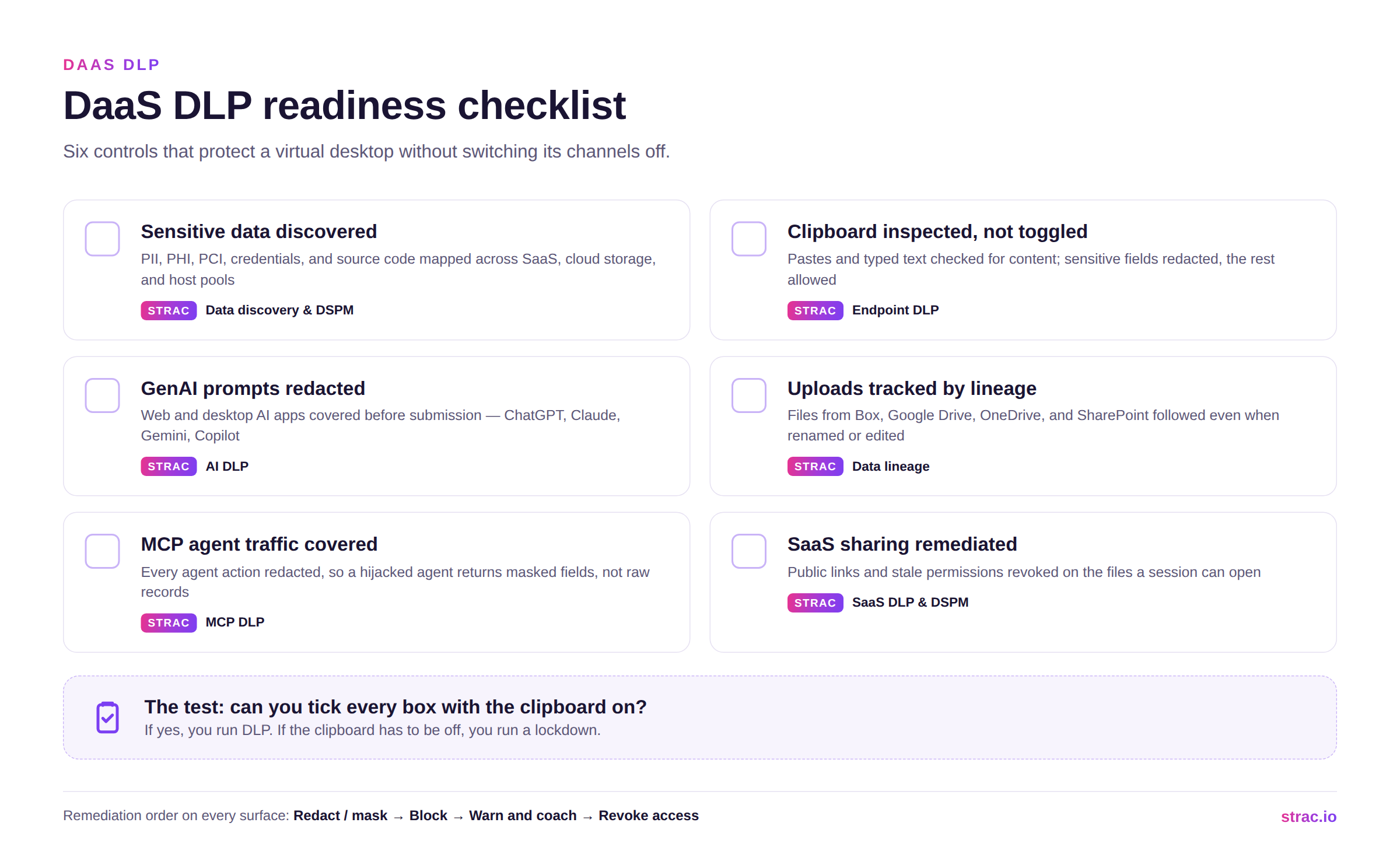
A virtual desktop moves the computer into the cloud. It does not move the risk. Session settings, identity, and network controls each fail at some point, and when they do, the data layer is what still protects you. Redact sensitive data on every paste, prompt, upload, and agent action, and a broken session never turns into a breach.
Book a demo to see Strac protect the data your virtual desktops touch.
Related reading:
Only in who hosts the desktop. With VDI, you run the virtual desktops on your own servers. With DaaS, a cloud provider runs them for you. The ways data leaves are the same, so one content policy covers both.
Because they control channels, not content. A clipboard or drive setting is on or off for everyone. Strac checks what moves through each channel and redacts only the sensitive fields, so the channel stays open for everything else.
Yes, by redacting instead of blocking. Strac removes the sensitive fields from a paste, prompt, or upload and lets the rest continue, with a short note to the user. People keep their clipboard and their AI tools, and the regulated data stays behind.
No. No software can, on a virtual desktop or a physical one. What DLP can do is put less raw data on screen. Strac masks sensitive fields in SaaS apps and agent results, so there is less worth photographing.
It is one part of endpoint DLP, not a separate program. The same detection and policies should cover laptops, virtual desktops, browsers, SaaS apps, and AI agents. See endpoint DLP and AI DLP for the full picture.
.avif)


.gif)


.webp)








