







In the age of cloud computing and SaaS dominance, one traditional yet essential technology continues to hold its ground—Windows File Share Servers. Despite their utility in facilitating centralized storage and collaborative workflows, these file servers are rife with challenges that can compromise data security, operational efficiency, and compliance.
As organizations strive to tighten their data protection strategies, one recurring question arises: How do we manage sensitive file access effectively on legacy systems like Windows File Share Servers? This blog explores the key issues and outlines how Strac provides an innovative solution.
✨ Key Problems with Windows File Share Servers
- Access Sprawl
Over time, file servers accumulate layers of access permissions, creating a labyrinth that’s nearly impossible to untangle. Employees come and go, projects end, and files often retain access permissions long after they’re needed. This results in:- Over-privileged Access: Users have access to files they no longer need.
- Orphaned Files: Files accessible to accounts that no longer exist.
- Public Exposure: Sensitive files may inadvertently become publicly accessible.
- Lack of Visibility
Many organizations struggle to answer basic questions like:- Who has access to a specific file?
- Which files are publicly accessible?
- Are there sensitive files accessible without proper controls?
- The lack of real-time insights into these issues makes organizations vulnerable to breaches and non-compliance with regulations like HIPAA and GDPR; especially without full data lineage visibility into how files move and inherit permissions over time.
- Sensitive File Identification
While traditional DLP solutions focus on detecting sensitive data, the challenge is compounded by the distributed nature of file servers. Sensitive data can reside in deeply nested folders or obscure file formats, eluding traditional detection methods. - Complexity in Managing Access
Revoking access or implementing least privilege principles is cumbersome. Manual processes often require IT teams to sift through endless logs and permissions, making them prone to human error.
How Strac Solves Windows File Share Servers Challenges

Strac’s comprehensive solution for file server management combines the power of Data Discovery, Access Control Analysis, and Automated Remediation to ensure your data stays protected and accessible only to the right people.
1. Deep Access Visibility

Strac provides a clear map of:
- Who has access to what files.
- Files that are publicly accessible or shared beyond their intended audience.
- Access anomalies, such as over-privileged accounts or orphaned files.
With real-time dashboards and granular reports, you gain unprecedented insights into your file server ecosystem.
2. Sensitive File Detection
Leveraging advanced AI and machine learning, Strac automatically scans files for sensitive data such as PII, PHI, PCI, and intellectual property. It identifies risks across all files—structured or unstructured.
3. Proactive Access Management
Strac simplifies access management with features like:
- Automated Remediation: Automatically revoke excessive permissions or restrict public access with a single click.
- Role-Based Access Recommendations: Suggests least-privileged access models based on user behavior.
- Policy Enforcement: Ensure compliance with predefined access policies.
4. Seamless Integration
Strac integrates with Windows File Share Servers, SMB/NFS protocols, and cloud-based file shares. This ensures you have a unified approach to managing both legacy and modern file systems.
✨Data Lineage for Windows File Share DLP
Finding sensitive files is step one. Understanding how they move is what actually reduces risk.
With Windows File Share environments, permissions change over time. Files get copied. Group inheritance expands access without anyone noticing. What starts as a restricted folder slowly becomes exposed.
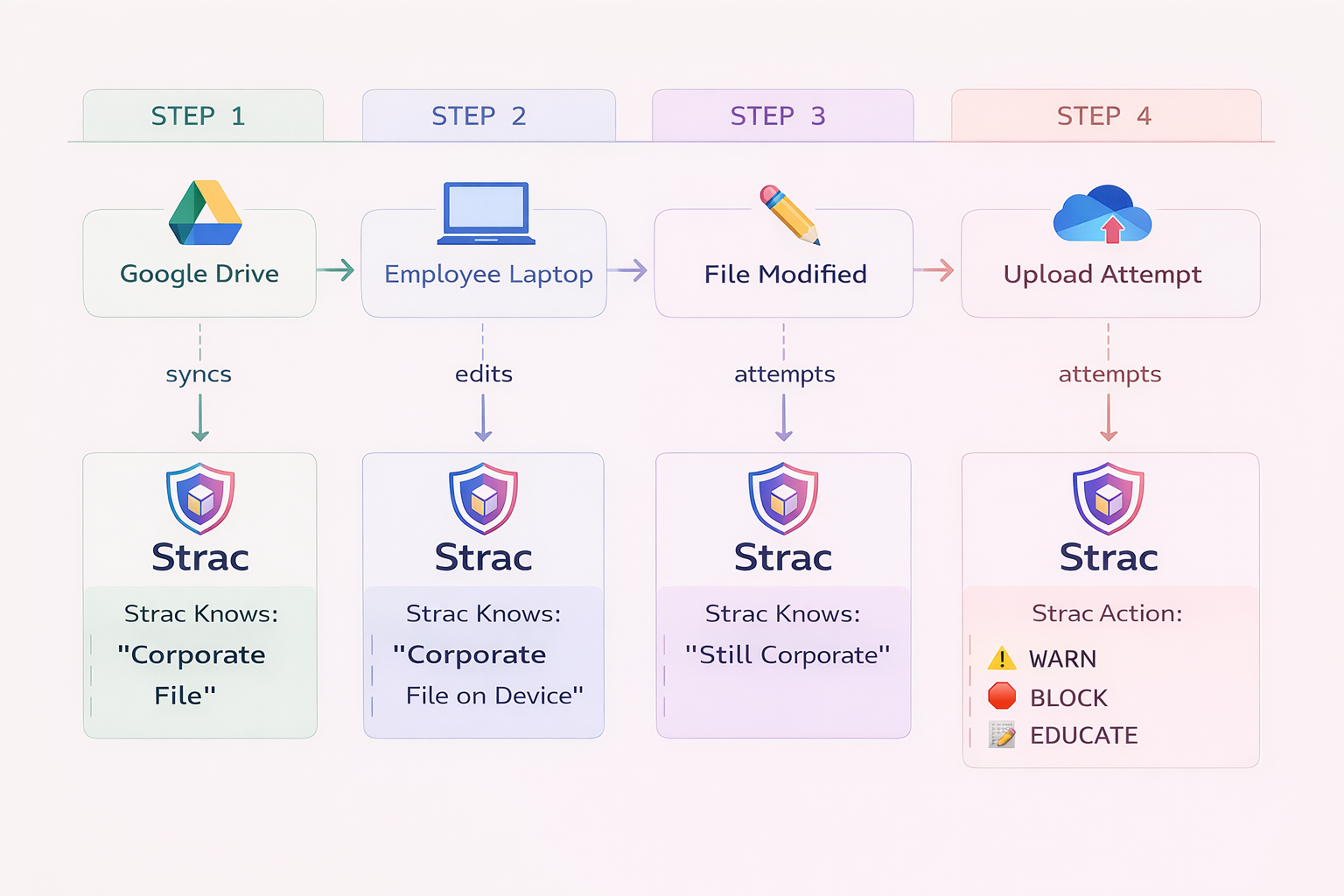
Strac adds data lineage to Windows File Share DLP so you can see:
- Where a sensitive file originated
- How it moved across folders or shares
- When permissions expanded
- Who interacted with it
This gives security teams context; not just alerts. And context is what makes remediation precise instead of disruptive.
👉 Read more about Strac Data Lineage
✨GenAI DLP for Windows File Share Environments
Here’s the modern risk most teams overlook: data from file shares doesn’t just stay on file shares.
It gets copied into ChatGPT. Dropped into Copilot. Uploaded into browser-based AI tools.
Traditional Windows File Share DLP stops at storage. Strac doesn’t.
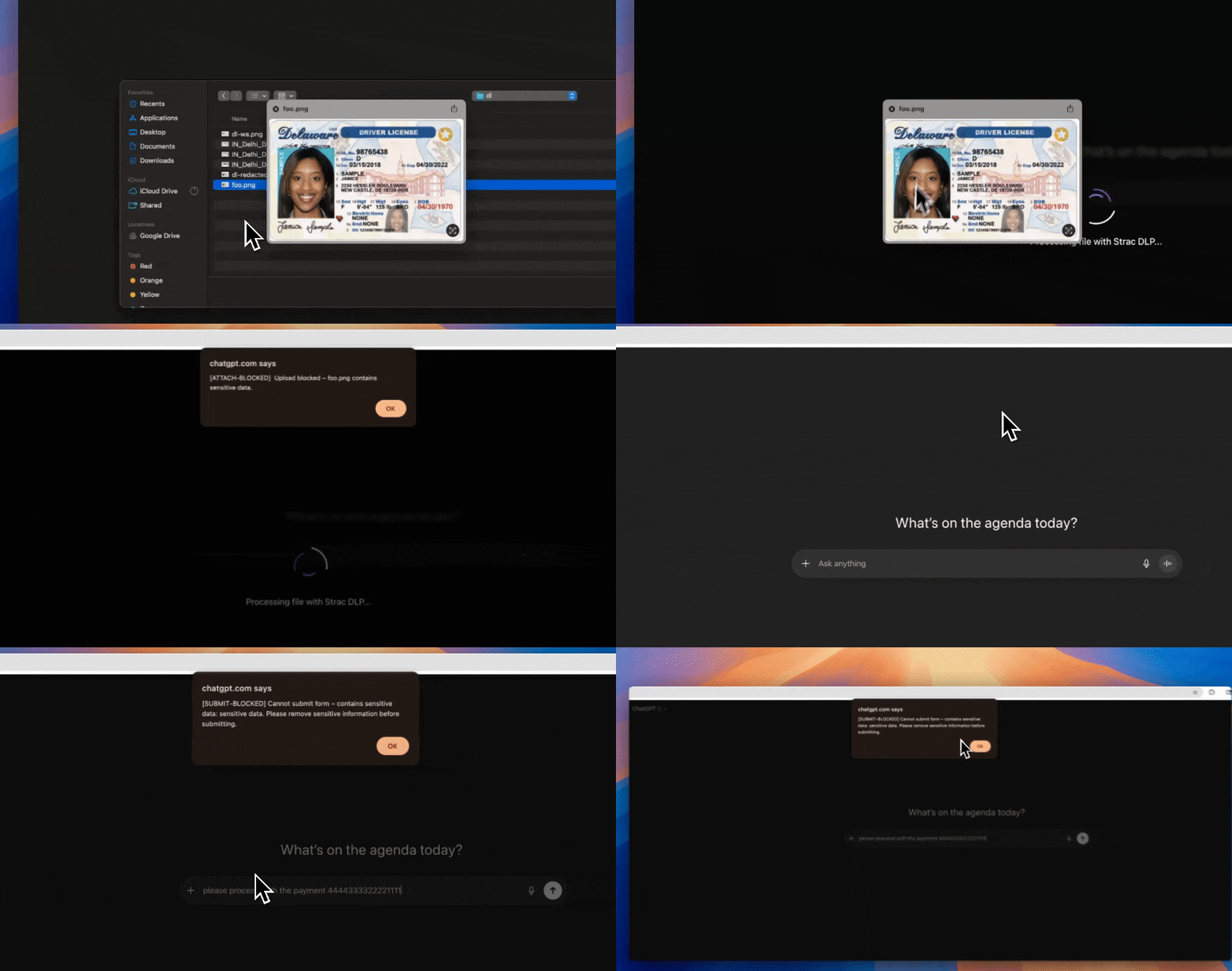
With GenAI DLP, Strac can detect, redact, or block sensitive data before it leaves your environment through AI prompts or uploads. That means PII, PHI, PCI, or IP stored in legacy file servers doesn’t leak through modern AI workflows.
File servers may be old infrastructure. The risks around them are not.
👉 Read more about Strac GenAI DLP
Conclusion
Windows File Share Servers continue to be an integral part of many organizations’ data management strategies. However, without proper tools to address access sprawl, sensitive file exposure, and identity management, they can become a liability.
Strac is here to bridge the gap between legacy systems and modern security needs. By delivering unparalleled visibility, robust data protection, and automated remediation, Strac ensures your file servers remain an asset, not a risk.
Ready to take control of your file servers? Contact us today to see how Strac can help.
🌶️ Spicy FAQs About Windows File Share DLP
1. What is Windows File Share DLP?
Windows File Share DLP is the ability to detect, monitor, and remediate sensitive data stored on SMB/NFS file servers. It helps security teams identify files containing PII, PHI, PCI, or intellectual property and control who can access them. Modern solutions go beyond detection; they automate redaction, permission cleanup, and policy enforcement.
2. How is Windows File Share DLP different from traditional DLP?
Traditional DLP often focuses on email or endpoint traffic. Windows File Share DLP focuses specifically on data at rest inside shared network folders. The key difference is visibility into inherited permissions, nested folders, and long-lived legacy storage systems that accumulate risk over time.
3. Why is data lineage important in Windows File Share environments?
Data lineage shows how sensitive files move, change, and inherit permissions over time. Without lineage, you only see a snapshot of risk. With lineage, you understand how exposure happened and can prevent it from expanding again.
4. Can Windows File Share data leak into generative AI tools?
Yes. Employees often copy content from file shares into tools like ChatGPT or Microsoft Copilot. If that data contains PII, PHI, or confidential information, it can create compliance and security risks. GenAI DLP helps detect and block that exposure before it leaves your environment.
5. How does Strac protect Windows File Share servers?
Strac combines data discovery, classification, access analysis, automated remediation, data lineage visibility, and GenAI DLP controls. It doesn’t just alert on risk; it helps fix it. That means less manual cleanup and faster compliance alignment.


.avif)


