Calendar Icon White
October 29, 2026
Clock Icon
8
 min read

Why should you move from Legacy DLP?

Legacy DLP alerts while data leaks through SaaS, browsers, and AI agents. See 7 reasons it breaks in 2026 and what modern DLP does instead.

Why should you move from Legacy DLP?
ChatGPT
Perplexity
Grok
Google AI
Claude
Summarize and analyze this article with:

TL;DR

  • Legacy DLP is data loss prevention built around network gateways, email, and heavy endpoint agents, with rules written in regex and fingerprints. It was designed for a time when data stayed inside the office.
  • Data no longer stays put. It sits in Slack, Google Drive, and Salesforce, gets pasted into ChatGPT, and is pulled out by AI agents over MCP DLP paths a legacy agent never sees.
  • Legacy tools mostly raise alerts. Someone still has to open each one, decide, and clean up by hand, while the data stays exposed.
  • Strac replaces that model with one platform: agentless SaaS DLP and DSPM, browser DLP, endpoint DLP, and AI DLP, with redaction built in.
  • This post is the migration companion to why legacy DLP fails for AI. For the full background, start from the data loss prevention guide.

What Is Legacy DLP?

Legacy DLP is the first generation of data loss prevention: tools that inspect traffic at the network edge, scan outbound email, and run a heavy agent on managed laptops. Policies are built from regular expressions, keyword lists, and exact-match fingerprints that a team has to create and maintain.

That design made sense when files lived on a file server and left the company through email or a USB stick. It assumes three things that are no longer true. Data lives inside the perimeter. Every path out passes a checkpoint you own. And a person will review each alert in time to matter.

Modern DLP starts from the opposite assumption. Data is spread across dozens of SaaS apps, cloud stores, browsers, and AI tools, so protection has to connect to each of those places directly and fix problems where they happen. For a side by side look at what changed, read data loss prevention advantages and disadvantages.
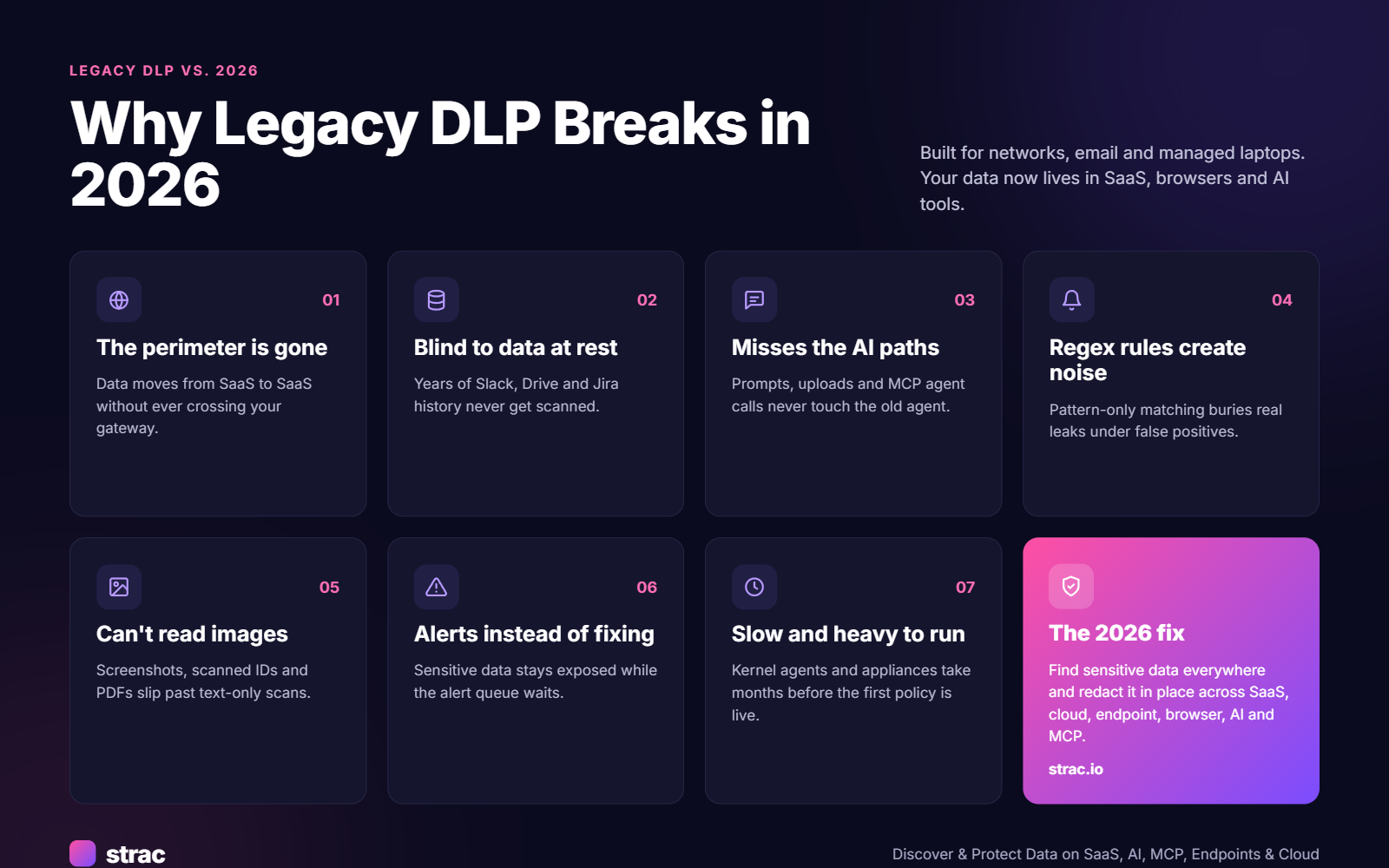
✨ Why Legacy DLP Breaks in 2026

1. It guards a perimeter that no longer exists

A support agent pastes a customer's card number into a Zendesk ticket. An engineer shares a database export in Slack. A file moves from Google Drive to Box without touching a laptop. None of that crosses the network gateway, so a network-first DLP never sees it.

2. It cannot see data at rest in SaaS

Legacy tools inspect data in motion. They do not scan the three years of Slack messages, the shared Drive folders, or the Jira tickets that already hold Social Security numbers and API keys. That old exposure is where most audits and breaches start. Finding it is the job of sensitive data discovery and classification.

3. It misses the AI paths entirely

Employees paste contracts into Claude, upload spreadsheets to Gemini, and ask Copilot to summarize customer data. AI agents now read Drive, Slack, and databases through MCP connectors, server to server. A legacy endpoint agent watches files on disk, not prompts typed in a browser or tool calls made by an agent. See AI data governance and shadow AI for the full picture.

4. Regex rules create noise

A nine-digit number is not always a Social Security number. Pattern-only rules flag order IDs, phone numbers, and timestamps, and the alert queue fills faster than anyone can clear it. Teams respond by loosening the rules, and real leaks slip through. Fewer, better detections beat more alerts. The Strac catalog of sensitive data elements shows what context-aware detectors cover.

5. It cannot read images and attachments well

A photo of a driver's license, a scanned bank statement, or a screenshot of a customer record is still sensitive data. Text-only scanning misses all of it. In support tools and chat, images are often the riskiest content.

6. It alerts instead of fixing

Most legacy deployments end at "notify the security team." The card number stays in the Slack channel until someone gets to it, which can take days. Detection tells you a leak happened. Remediation is what stops it.

7. It is slow and heavy to run

Kernel-level agents, fingerprinting pipelines, on-prem servers, and consultant-led rollouts mean months before the first policy is live. Every new app needs a new project. That is why lean security teams, and the MSPs that serve them, struggle to keep legacy DLP running at all.

The Hidden Cost of Staying on Legacy DLP

The license fee is the smallest part of the bill. The larger costs are harder to see.

  • Staff time. Every alert needs a human to triage it, and every new SaaS app needs a policy project. That is analyst time spent on noise instead of real risk.
  • Infrastructure. On-prem servers, gateway appliances, and agent upgrades all need hardware, patching, and people.
  • Coverage gaps. The data in SaaS and AI tools that legacy DLP cannot see is not protected at all. You carry that risk whether or not it shows up on a dashboard.
  • Audit work. When auditors ask for evidence under HIPAA, PCI DSS, or SOC 2, teams assemble it by hand from alert logs that never show what was fixed.
  • Lost productivity. Blunt blocks stop legitimate work. People file tickets, find workarounds, or move to tools nobody approved.

A cheap tool that only alerts is expensive; a tool that fixes the problem in place pays for itself in staff hours. For a structured way to weigh this, see the DLP risk assessment guide.

🎥 What Modern DLP Looks Like in 2026

A replacement for legacy DLP should do these things on day one, not after a year of tuning.

  • Connect by API, not by appliance. SaaS and cloud apps connect in minutes through their own APIs, with no proxy, no network change, and no per-user setup.
  • Scan history and live activity. It finds the sensitive data already sitting in Slack, Drive, SharePoint, and AWS S3, then watches new activity in real time. That combination is DSPM plus DLP.
  • Detect with context and OCR. Card numbers are checked with Luhn validation, secrets are matched against known key formats, and OCR reads PDFs, images, screenshots, Word files, spreadsheets, and ZIP archives.
  • Fix the problem in place. Redact the value, mask it, revoke the share, or block the action, automatically. See DLP remediation for how each action works.
  • Cover browsers and AI. Inspect prompts and uploads before they reach an AI tool, and redact sensitive data inside AI agent tool calls.
  • Use a light endpoint agent. Content-aware control on Mac and Windows without a kernel-heavy footprint or months of fingerprint tuning.
  • Produce audit evidence by default. Every finding and every action is logged and mapped to the frameworks you report on.

If you are scoring vendors against these points, the best DLP tools roundup and what is a DLP provider cover the evaluation in more depth.

🎥 Remediation in Practice: What "Fix It in Place" Means

Here is the same leak handled two ways. An employee posts a customer's card number in a shared Slack channel.

With legacy DLP, if the tool sees it at all, an alert lands in a queue. An analyst opens it hours later, messages the employee, and asks them to delete the post. The card number is readable by the whole channel the entire time.

With Strac, the Slack DLP integration detects the number when it is posted and replaces it with a redacted marker. The original can be stored in the Strac document vault, where only authorized people can open it. The employee gets a short note explaining why, and the event is logged for PCI DSS evidence. The conversation keeps going; the card number does not stay.

The same pattern runs in Gmail, Office 365, Microsoft Teams, Zendesk, Intercom, HubSpot, and Salesforce.
✨ Strac: One Platform Where Legacy DLP Needed Five

Strac covers the surfaces legacy DLP was never built for and the ones it was, with one set of detectors and one policy engine.

  • SaaS and cloud, agentless. SaaS DLP connects by API to Slack, Google Workspace, Microsoft 365, OneDrive, SharePoint, Box, Notion, Jira, Zoom, and cloud storage such as AWS S3. Most connect in under 10 minutes. The full list is on the integrations page.
  • Discovery and posture. DSPM scans historical data across every connected app and ranks risk in one view, so you clean up old exposure instead of only preventing new leaks. The PII scanner does the same for PII, PCI, and PHI.
  • Endpoint without the drag. One light agent for Mac, Windows, and Linux controls every exit on the device: downloads, USB and removable media, printing, screenshots, AirDrop, clipboard, browser uploads, and text typed into an AI prompt. Each channel runs in Block, Warn, or Audit mode. Read how an endpoint DLP agent works.
  • Data lineage. Data lineage DLP follows a sensitive file after it is downloaded, copied, or renamed, so you know where it went, not only where it started.
  • Browser and AI. Browser DLP for Chrome and Edge inspects prompts and file uploads before they reach ChatGPT, Claude, Gemini, or Copilot, and redacts, warns, or blocks. See all GenAI DLP coverage.
  • Shadow AI. Strac shows every AI app and agent people actually use, approved or not, and the sensitive data going into each, with no keystroke logging and no screen recording. Start with how to detect shadow AI.
  • AI agents and MCP. MCP DLP redacts sensitive data inside each agent tool call, so an agent reading Drive or a database gets safe data only. Browse the MCP connector directory.
  • Email. Email DLP redacts inbound and outbound mail and scans mailbox history in Gmail and Outlook.
  • Remediation in a fixed order. When Strac finds sensitive data, it follows your policy:
    • Redact / mask. Removes or partially hides the value in Slack, email, tickets, docs, Google Drive, SharePoint, and Box. See data masking.
    • Block. Stops a file share, a USB copy, an outbound email, or an AI prompt when redaction is not enough.
    • Warn and coach. Tells the person what was found and why, at the moment they act.
    • Revoke access. Removes public links and outside sharing from files that hold sensitive data.
  • Compliance evidence. Built-in templates cover HIPAA, PCI DSS, SOC 2, ISO 27001, CCPA, GDPR, and NIST, and every action is logged as audit evidence. Strac supports healthcare and fintech teams with regulated data.
  • APIs for your own apps. Developers can call Strac's detection and redaction APIs to clean data before it is stored, logged, or sent to an AI model.

A 90-Day Plan to Move Off Legacy DLP

You do not need to rip out the old system on day one. Run both in parallel, move coverage over in stages, and retire the legacy agents last.

  • Days 0 to 30: Discover. Connect your highest-risk SaaS apps by API, usually Slack, Google Workspace or Microsoft 365, and your support tool. Run a historical scan to see what is already exposed. Turn on browser DLP in audit mode to see which AI tools are in use. Keep the legacy system running.
  • Days 30 to 60: Protect. Switch the clearest policies from alert to redact: card numbers in chat, SSNs in tickets, secrets in code channels. Revoke public links on files with regulated data. Roll out the endpoint DLP agent to a pilot group in Warn mode. Move the most-used legacy rules over, rewritten with context-aware detectors instead of raw regex.
  • Days 60 to 90: Prove and retire. Expand endpoint enforcement to all devices. Add MCP DLP for any AI agents connected to company data. Pull the audit report for SOC 2 or HIPAA. Once coverage matches or exceeds the old system, decommission the legacy agents and appliances.

Most teams reach enforcement in the first week of this plan. If you are replacing a specific product, see the Symantec DLP alternatives, Forcepoint alternatives, and Digital Guardian alternatives guides.

Your Legacy DLP Exit Checklist

  • ☐ List every place sensitive data lives today, including SaaS, cloud, browsers, and AI tools
  • ☐ Run a historical scan with DSPM to measure existing exposure
  • ☐ Connect Slack, email, file storage, and support tools by API
  • ☐ Replace regex-only rules with context-aware detectors and OCR
  • ☐ Turn alert-only policies into redact, mask, or revoke actions
  • ☐ Inspect AI prompts and uploads in the browser
  • ☐ Add MCP DLP for AI agents with access to company data
  • ☐ Deploy a light endpoint agent with per-channel Block, Warn, or Audit
  • ☐ Confirm audit logs cover HIPAA, PCI DSS, and SOC 2
  • ☐ Decommission legacy agents and appliances once coverage is confirmed

Related reading:

The Bottom Line

Legacy DLP was built to guard a perimeter, and the perimeter is gone. In 2026 sensitive data moves through SaaS apps, browsers, endpoints, AI tools, and AI agents, and a system that only raises alerts leaves it exposed while someone works the queue. Networks, identities, and filters will fail eventually, so the data layer is the backstop: find sensitive data everywhere it lives, redact it on every action, and a mistake never becomes a breach.

‍Book a demo to see how Strac replaces legacy DLP across SaaS, cloud, endpoint, browser, MCP and AI.

🌶️ Spicy FAQs on Moving From Legacy DLP

What is the difference between legacy DLP and modern DLP?

Legacy DLP inspects network traffic, email, and managed endpoints using regex and fingerprints, and mostly raises alerts. Modern DLP connects to SaaS, cloud, browsers, and AI tools by API, scans data at rest, and fixes problems in place with redaction, masking, and access revocation.

Can we keep our legacy DLP and add a CASB or a SaaS add-on?

You can, but you end up running two or three consoles with different detectors and no shared view. Strac often runs alongside a legacy tool during migration, then replaces it once SaaS, endpoint, browser, and AI coverage is confirmed, so you end with one policy engine instead of several.

Will moving off legacy DLP slow employees down?

No. Legacy DLP slows people down because it blocks whole actions. Strac redacts only the sensitive value and lets the message, file, or prompt go through, so work continues. Blocking is kept for the cases that need it, and people see a short explanation instead of a silent failure.

Can any DLP catch every leak?

Not every one. People find new tools, and attackers find new paths. That is why the data layer matters: if sensitive values are redacted wherever they land, a missed alert or a stolen login exposes far less. Coverage across SaaS, endpoint, browser, and AI closes most of the gaps legacy tools leave.

Do we have to replace legacy DLP all at once?

No. Most teams connect SaaS apps first, run both systems in parallel for 30 to 60 days, and retire legacy agents last. Strac deployments typically reach enforcement within a week. See the data loss prevention guide and AI data governance for the full picture.

Customer story

“Don’t just alert on problems, fix them.”

Scott Roberts, Chief Information Security Officer, UiPath

  • UiPath
  • Crypto.com
  • Inmar Intelligence
  • thredUP
  • Paymentology
  • Qventus
  • Genesis Molecular AI
  • MeridianLink
More customer stories →
Discover & Protect Data on SaaS, AI, MCP, Endpoints & Cloud
Strac provides end-to-end data loss prevention for all SaaS and Cloud apps. Integrate in under 10 minutes and experience the benefits of live DLP scanning, live redaction, and a fortified SaaS environment.

Customers include

  • UiPath
  • Crypto.com
  • Inmar Intelligence
  • thredUP
  • Paymentology
  • Qventus
  • Genesis Molecular AI
  • MeridianLink
Trusted by enterprises
Data Security + Compliance Automation

Latest articles

Browse all

Get Your Datasheet

Thank you! Your submission has been received!
Oops! Something went wrong while submitting the form.
Close Icon