The Most Ignored PCI DSS Requirements in 2026: Data Retention and PAN Masking
The most ignored PCI DSS requirements in 2026: data retention (3.2.1) and PAN masking (3.4.1). How to meet them across SaaS, endpoints, Gen AI and MCP agents.
PCI DSS v4.0.1 is the only active version, and all future-dated requirements have been mandatory since March 31, 2025.
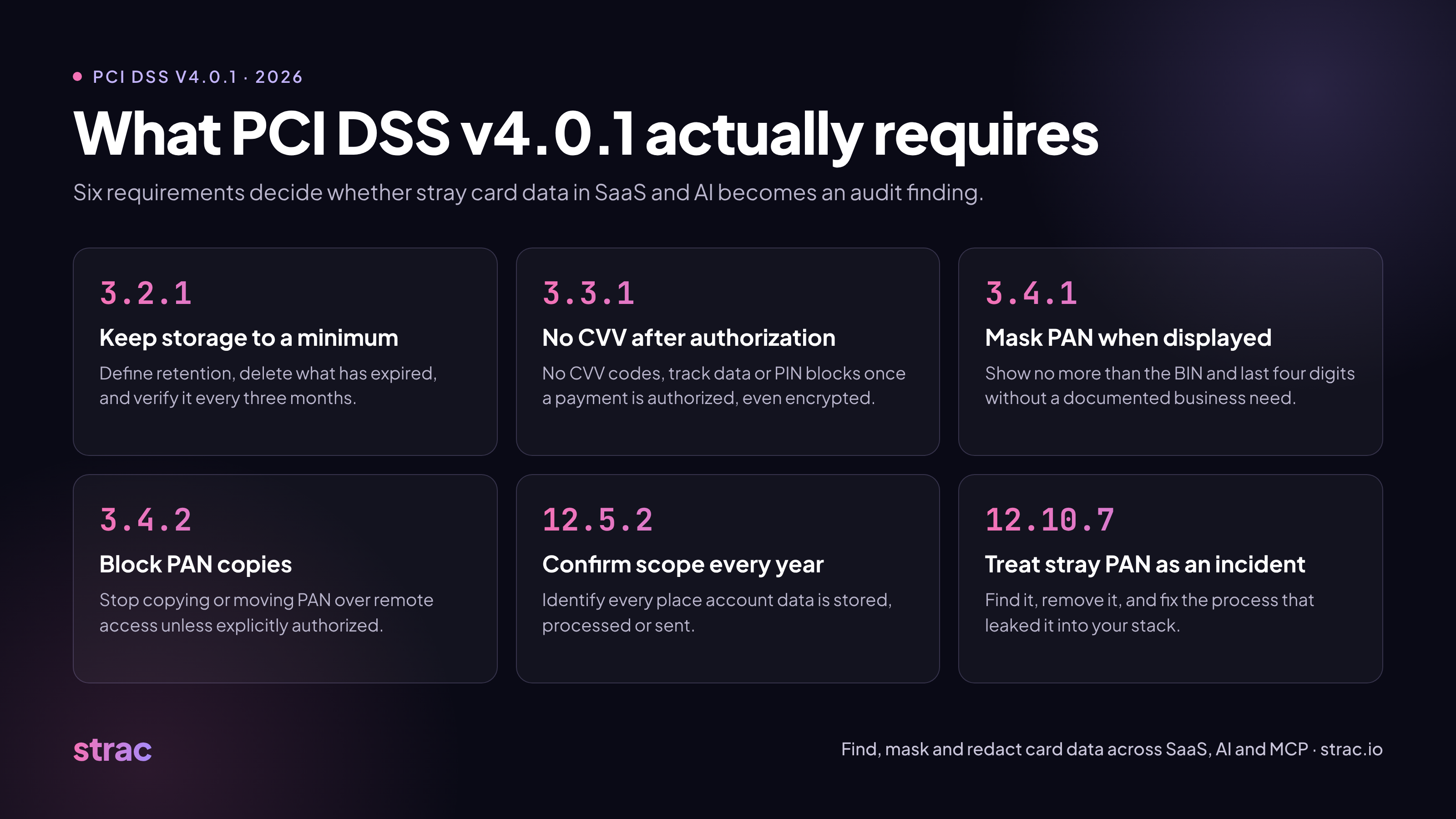
The old "3.1 and 3.3" are now 3.2.1 (keep data to a minimum) and 3.4.1 (mask PAN when shown), plus a new 3.4.2 (block PAN copies over remote access).
12.10.7 now treats card data found in an unexpected place as a security incident, and 12.5.2 makes you confirm every place card data lives each year.
Most findings come from card numbers in Zendesk tickets, Slack threads, shared files, AI prompts and MCP agent tool calls, not the payment system.
Strac finds, masks and redacts card data across SaaS, endpoints, browsers, Gen AI and MCP, and Strac Comply turns those controls into audit evidence.
Most teams that fail a PCI DSS assessment in 2026 do not fail on firewalls or encryption. They fail because card numbers are sitting where nobody looked: a Zendesk ticket from 2022, a Slack thread, a spreadsheet in a shared drive, or the context of an AI agent. Two requirements catch this, and they are still the ones teams skip: keeping stored account data to a minimum, and masking the Primary Account Number (PAN) when it is shown.
If you learned PCI DSS on version 3.2.1, you knew these as Requirement 3.1 and Requirement 3.3. That numbering is gone. Under PCI DSS v4.0.1, the only active version of the standard, retention now lives in Requirement 3.2.1 and display masking lives in Requirement 3.4.1, with a new Requirement 3.4.2 on copying PAN over remote access. Since March 31, 2025, every one of the v4.0 future-dated requirements is mandatory in assessments.
Five requirements decide whether stray card data becomes a finding. Read them together, because an assessor will.
3.2.1, keep storage to a minimum. Retention and disposal policies must define how long account data is kept, and data past that period must be securely deleted or made unrecoverable. The policy must also cover sensitive authentication data stored before authorization, and you must confirm at least every three months that nothing is held past its limit.
3.3.1, no sensitive authentication data after authorization. Full track data, CVV codes and PIN blocks cannot be kept once a payment is authorized, even if encrypted. A CVV pasted into a support chat counts.
3.4.1, mask PAN when displayed. Only people with a documented business need may see more than the BIN and the last four digits. This applies to screens, reports, exports and any app your staff use, not just your payment system.
3.4.2, stop PAN from being copied over remote access. When staff work through remote-access tools, technical controls must prevent copying or moving PAN unless someone has explicit, documented authorization.
12.10.7, treat stray PAN as an incident. If PAN turns up somewhere it is not expected, your incident response procedures must kick in: decide what to do with it, find out how it got there, and fix the process that leaked it.
Two more requirements tie these together. 12.5.2 asks you to confirm your PCI scope at least once a year, which means identifying every location where account data is stored, processed or sent. 3.5.1 requires PAN to be unreadable anywhere it is stored, which is where tokenization and encryption come in.
The common thread is that you cannot meet any of them without knowing where card data actually lives. For a deeper look at the masking rules alone, see our guide to PCI DSS PAN masking.
Why these requirements still get ignored
Teams skip retention and masking because they think the payment system is the only place card data lives. It almost never is.
Customers paste card numbers wherever they can type. Support tickets in Zendesk, live chats in Intercom, and emails in Gmail or Office 365 collect PAN and CVV codes every day, often as screenshots and PDFs.
Employees move it around. A card number from a ticket ends up in a Slack thread, a Jira issue, a Google Drive spreadsheet or a Salesforce note. Each copy is now in scope.
Nobody owns old data. Retention policies are written for databases. Nobody deletes the four-year-old SharePoint file or the Notion page with test data from a real card.
AI tools opened new paths. Staff paste customer records into ChatGPT or Claude to draft replies. AI agents connected through MCP can read the same Slack channels and ticket queues and pull card data into a model context window.
Scope was set once and never checked. Under 12.5.2 the scope must be confirmed every year. Most teams confirm the systems they already listed instead of searching for new ones.
The result is the same each time: the controls look fine on paper, and the assessor finds PAN in a tool nobody listed.
How to meet Requirement 3.2.1: keep less card data
The fastest way to pass 3.2.1 is to stop holding card data in places that have no reason to hold it. That takes four steps.
1. Find every copy. Run sensitive data discovery and classification across your SaaS apps, cloud storage and endpoints, including historical data. Strac scans tools such as SharePoint, OneDrive, Box, Notion, AWS S3 and Postgres, and uses OCR to find card numbers inside images, PDFs, Word files, spreadsheets and ZIP archives. That matters because customers often send a photo of a card, not the digits. The Strac DSPM view then shows where card data sits and who can reach it.
2. Decide what to keep. Most copies outside your payment flow have no business reason to exist. Where a system does need to refer to a card later, replace the PAN with a token from a vault so the real number never lands in the app. See data minimization for how to set those rules.
3. Clean up automatically. Set remediation policies that redact or delete PAN and CVV codes as soon as they appear in a ticket, message or file, and apply the same rule to old data. A CVV should never survive authorization, so it should be removed the moment it is found.
4. Prove it every quarter. 3.2.1 asks you to verify every three months that nothing has outlived its retention period. A scheduled scan with a saved report is that evidence, and it replaces the manual sweep most teams forget to do.
🎥 How to meet Requirements 3.4.1 and 3.4.2: mask PAN and stop copies
Masking has to happen everywhere a person can see a card number, not only inside the payment system. In practice that means three layers.
Mask inside the apps your team uses. Strac masks or redacts PAN inline in support and collaboration tools, so an agent in Zendesk or Intercom sees only the last four digits, and the full number never sits in the ticket history. The same policy runs in Slack, Jira, Salesforce, HubSpot, Zoho Desk and Kustomer. For files, Strac redacts card numbers in SharePoint documents and PDFs while keeping the file usable. Our data masking page covers the formats.
Tie full PAN access to roles. 3.4.1 allows full PAN only for staff with a documented need. Pair masking with role-based access so finance or fraud staff can see what their job requires, and everyone else sees the masked value. Keep the list of who has access, and why, as part of your assessment evidence.
Block copies at the endpoint and browser. 3.4.2 is about people pulling PAN out through remote-access sessions. Endpoint DLP on Mac, Windows and Linux, plus browser DLP in Chrome and Edge, detects card numbers in clipboard pastes, uploads and file moves and blocks them for anyone not authorized. Every blocked attempt is logged with the user and the data type, which is the record an assessor will ask for.
The new gap: AI tools and MCP agents
PCI DSS does not name AI tools, but it does not need to. A card number in a ChatGPT prompt or an agent's context window has been stored, processed or sent somewhere outside your defined scope. That touches 3.2.1, 3.4.1 and 12.5.2 at once.
There are two ways card data reaches AI today.
People paste it. An agent copies a ticket into ChatGPT to draft a reply, or a finance analyst drops a spreadsheet into Claude. Strac's Gen AI DLP detects PAN and CVV codes in prompts and uploads to ChatGPT, Claude, Gemini and Copilot and redacts them before the text is sent. For more on how this happens, see how employees leak data through AI tools.
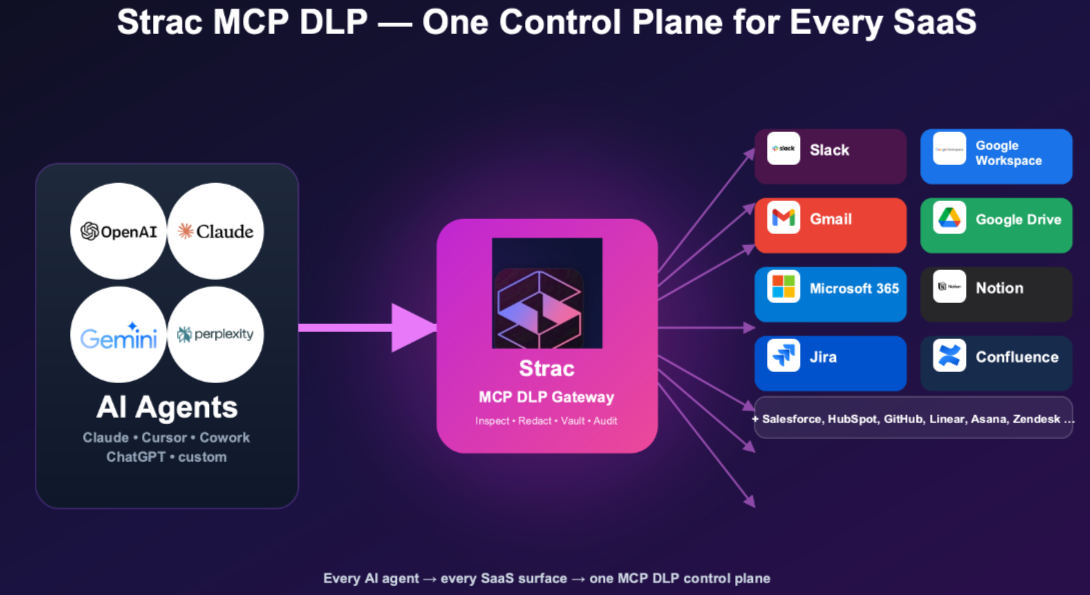
Agents pull it. With the Model Context Protocol, an AI agent can search Slack, read Zendesk tickets or query a database with no person in the loop. Strac MCP DLP inspects each tool response and redacts or blocks card data before it reaches the model, and logs which agent read what, for which user. It covers the systems where card data tends to sit, including the Zendesk MCP server, Stripe MCP server, Salesforce MCP server, Slack MCP server and Google Sheets MCP server. It works with Claude, ChatGPT, Gemini, Copilot, Cursor and other MCP clients.
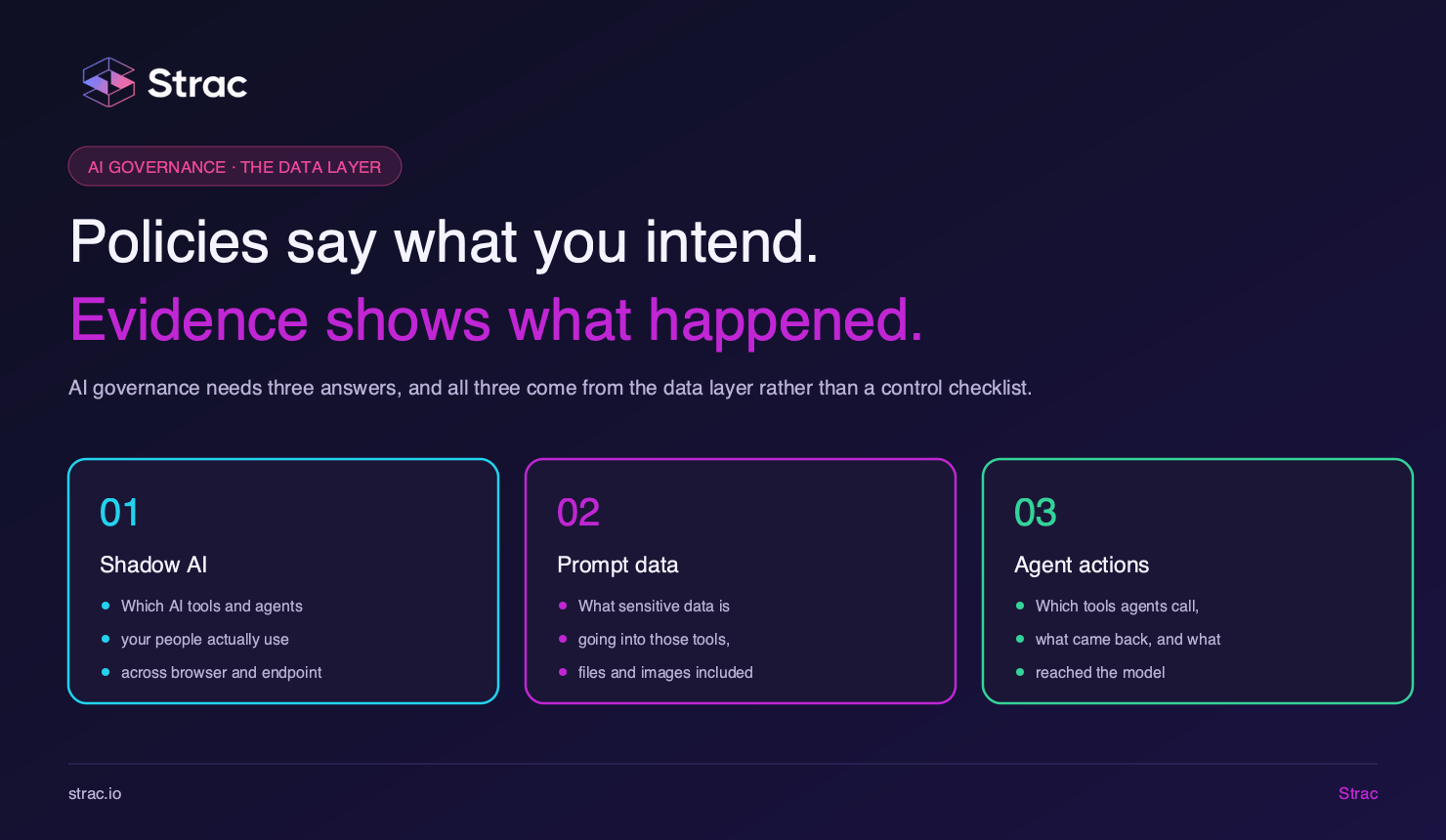
You also need to know which AI tools are connected in the first place. Shadow AI and shadow MCP discovery finds the apps and servers nobody approved, so they can be brought into scope or shut off. For the wider picture, read our guide to MCP security.
Turning controls into evidence
Assessors now expect proof that controls ran all year, not a screenshot from audit week. The data security work above produces most of that proof if you keep it.
For 12.5.2 scoping: discovery scans give you a dated list of every system where card data was found, which is your annual scope confirmation.
For 3.2.1 retention: quarterly scan reports show that data past its retention period was found and removed.
For 3.4.1 and 3.4.2: masking and blocking logs show who tried to see or move PAN, and what happened.
For 12.10.7 incident response: every alert on PAN found in an unexpected place is a record that the response process started, plus what was done about it.
Strac Comply brings this together with the rest of your PCI DSS program. It runs 100+ automated tests every day against tools such as AWS, Google Workspace, GitHub and Okta, and maps each result to the PCI DSS requirements it proves, for example MFA checks to 8.4.2 and logging checks to 10.2.1. When a test fails, it names who or what to fix and the steps for your setup. Your auditor reviews evidence in a portal without needing a Strac account.
You can also run your compliance from your AI agent. The Strac Comply MCP server works with Claude Code, Codex, Gemini CLI and Cursor, so you can ask what is failing, rerun a check or upload evidence without opening a dashboard. Plans start at $4,995 a year and cover SOC 2, ISO 27001, PCI DSS, HIPAA and NIST CSF 2.0, with a 14-day free trial.
Bottomline
Retention and masking are still the PCI DSS requirements teams skip, and the cost of skipping them grew when card data started flowing into SaaS tools and AI agents. Under v4.0.1, check yourself against this list:
Know every place card data lives, and confirm it every year (12.5.2).
Delete what you do not need, and check every quarter (3.2.1).
Never keep a CVV after authorization, wherever it turns up (3.3.1).
Mask PAN in every app staff use, not just the payment system (3.4.1).
Block copying of PAN over remote access and endpoints (3.4.2).
Treat stray PAN as an incident, including in AI prompts and agent tool calls (12.10.7).
PCI DSS v4.0.1 is the current and only active version. It was published in June 2024, and v4.0 was retired on December 31, 2024. All future-dated requirements became mandatory on March 31, 2025, so every 2026 assessment covers the full standard.
What replaced PCI DSS Requirement 3.3?
Requirement 3.4.1 replaced the old 3.3 on masking PAN when displayed. In v4.0.1, Requirement 3.3 now covers sensitive authentication data, and the old 3.1 on data retention now sits in 3.2.1. If a blog, policy or vendor still cites "3.1 and 3.3" for retention and masking, it is using retired v3.2.1 numbering.
What is PCI DSS Requirement 3.4.1?
Requirement 3.4.1 says PAN must be masked whenever it is displayed, so only people with a legitimate business need can see more than the BIN and last four digits. It applies to screens, reports, exports and every app staff use, including Zendesk, Salesforce and Slack. See our full guide to PCI DSS PAN masking.
What is PCI DSS Requirement 3.4.2?
Requirement 3.4.2 says that when staff use remote-access technologies, technical controls must stop them from copying or moving PAN unless they have explicit, documented authorization. In practice this means clipboard, upload and file-transfer controls on endpoints and in the browser.
What is PCI DSS Requirement 12.10.7?
Requirement 12.10.7 says your incident response procedures must start whenever stored PAN is found somewhere it is not expected. You have to decide what to do with the data, find out how it got there, and fix the process that let it in. A card number found in a support ticket or AI prompt counts.
How long can you store credit card data under PCI DSS?
PCI DSS does not set a fixed number of days. Requirement 3.2.1 says you define retention based on legal, regulatory and business needs, delete data once that period ends, and check at least every three months that nothing has been kept too long. Data with no business reason to exist should not be kept at all. See data minimization.
Can you store CVV codes after authorization?
No. Requirement 3.3.1 forbids keeping CVV codes, full track data or PIN blocks after a payment is authorized, even if they are encrypted. That includes a CVV a customer types into a chat or email, which is why it should be redacted the moment it appears.
How many digits of a credit card number can be displayed under PCI DSS?
At most the BIN and the last four digits, and only for people with a business need to see that many. Everyone else should see less, such as only the last four. Full PAN display must be limited to documented roles.
What is the difference between PAN masking, truncation and tokenization?
Masking hides digits when PAN is shown on screen. Truncation permanently removes digits from the stored number. Tokenization swaps the PAN for a stand-in value and keeps the real number in a secure vault. Masking covers 3.4.1, while truncation and tokenization help meet 3.5.1. Read tokenization vs encryption for when to use each.
Does PCI DSS apply to Slack, Zendesk and other SaaS tools?
Yes, if card data is stored, processed or sent through them. A PAN pasted into a Zendesk ticket, Intercom chat, Gmail thread or Google Drive file brings that tool into scope. Using a hosted checkout like Stripe does not change this, because customers send card numbers through support channels anyway.
Is it a PCI DSS violation to paste a credit card number into ChatGPT?
It puts card data outside your defined scope with no retention control you own, which is exactly what 3.2.1, 12.5.2 and 12.10.7 exist to prevent. Treat it as an incident and stop it at the source. ChatGPT DLP and Gen AI DLP redact card numbers before the prompt is sent.
Do AI agents and MCP servers fall under PCI DSS scope?
Yes, if they can read card data. An agent that searches Slack or reads Zendesk tickets through the Model Context Protocol is processing that data, so it needs the same least access, masking and audit trail as a person. MCP DLP inspects each tool response and redacts card data before it reaches the model.
Does a photo of a credit card count as cardholder data?
Yes. A card number in an image, scanned PDF or screenshot is still stored PAN. Text-only scanners miss it, so your discovery tool needs OCR to find it.
How do you find credit card numbers across SaaS apps?
Use a discovery tool that connects to each app by API, scans current and historical data, validates matches so random digit strings are not flagged, and reads inside images and attachments. Strac's sensitive data discovery and DSPM do this across SaaS, cloud and endpoints. The results double as your 12.5.2 scope evidence.
What should a PCI DSS DLP tool cover in 2026?
It should find PAN in SaaS apps, cloud storage, endpoints, browsers, AI prompts and MCP tool calls, then mask, redact or block it automatically and keep a log of every action. If it only covers email and file shares, it misses where most stray card data now lives. See how Strac PCI DSS DLP covers each of these and our roundup of PCI DSS compliance software.
Customer story
“Don’t just alert on problems, fix them.”
Scott Roberts, Chief Information Security Officer, UiPath
Discover & Protect Data on SaaS, AI, MCP, Endpoints & Cloud
Strac provides end-to-end data loss prevention for all SaaS and Cloud apps. Integrate in under 10 minutes and experience the benefits of live DLP scanning, live redaction, and a fortified SaaS environment.