Calendar Icon White
November 17, 2026
Clock Icon
4
 min read

Solve Insider Risks When Employees Leave

Insider risks when employees leave include copied data and access that outlasts the job. See where offboarding stops and how Strac closes the gap.

Solve Insider Risks When Employees Leave
ChatGPT
Perplexity
Grok
Google AI
Claude
Summarize and analyze this article with:

TL;DR

  • Data can start leaving well before an employee's last day, and sometimes before they give notice.
  • Files now leave through personal cloud accounts, USB drives, AI tools and SaaS sharing links.
  • Disabling a login does not remove every path. Shared files, connected apps and AI agents can outlast the employee.
  • A good offboarding plan covers four stages: before notice, the notice period, the last day and the weeks after.
  • Strac helps by finding sensitive data, stopping risky transfers and removing access across laptops, browsers, SaaS apps and AI tools.

‍

What Are Insider Risks When Employees Leave?

Insider risks when employees leave are the data and access problems created by a trusted person's exit. They include a customer list copied to a personal drive, a Google Drive folder still shared with a personal email, and an app that keeps working after the account is gone.

Most departing employees are not criminals. Many believe a sales deck or code sample is their own work and take it to the next job. Intent changes the response; it does not change the exposure.

These moves are a form of data exfiltration, and they look like normal work until someone checks what was inside the file.

Why Offboarding Checklists Miss the Risk

A standard checklist is built for the last day. It disables single sign-on, ends sessions, and collects the laptop. That work matters, but the riskiest moves can happen earlier and the remaining access can outlast it.

Three gaps stay open:

  • Timing. An employee may decide to leave weeks before telling anyone. Controls that begin at notice miss everything before it.
  • Visibility. A login record shows that someone opened a file. It does not show that the file held 500 Social Security numbers.
  • Leftover access. Public links, external sharing, app tokens, and AI agents can keep working after the account is disabled.

Disabling the account closes the door; it does not recover what already left.
✨ How Data Leaves During an Employee Exit

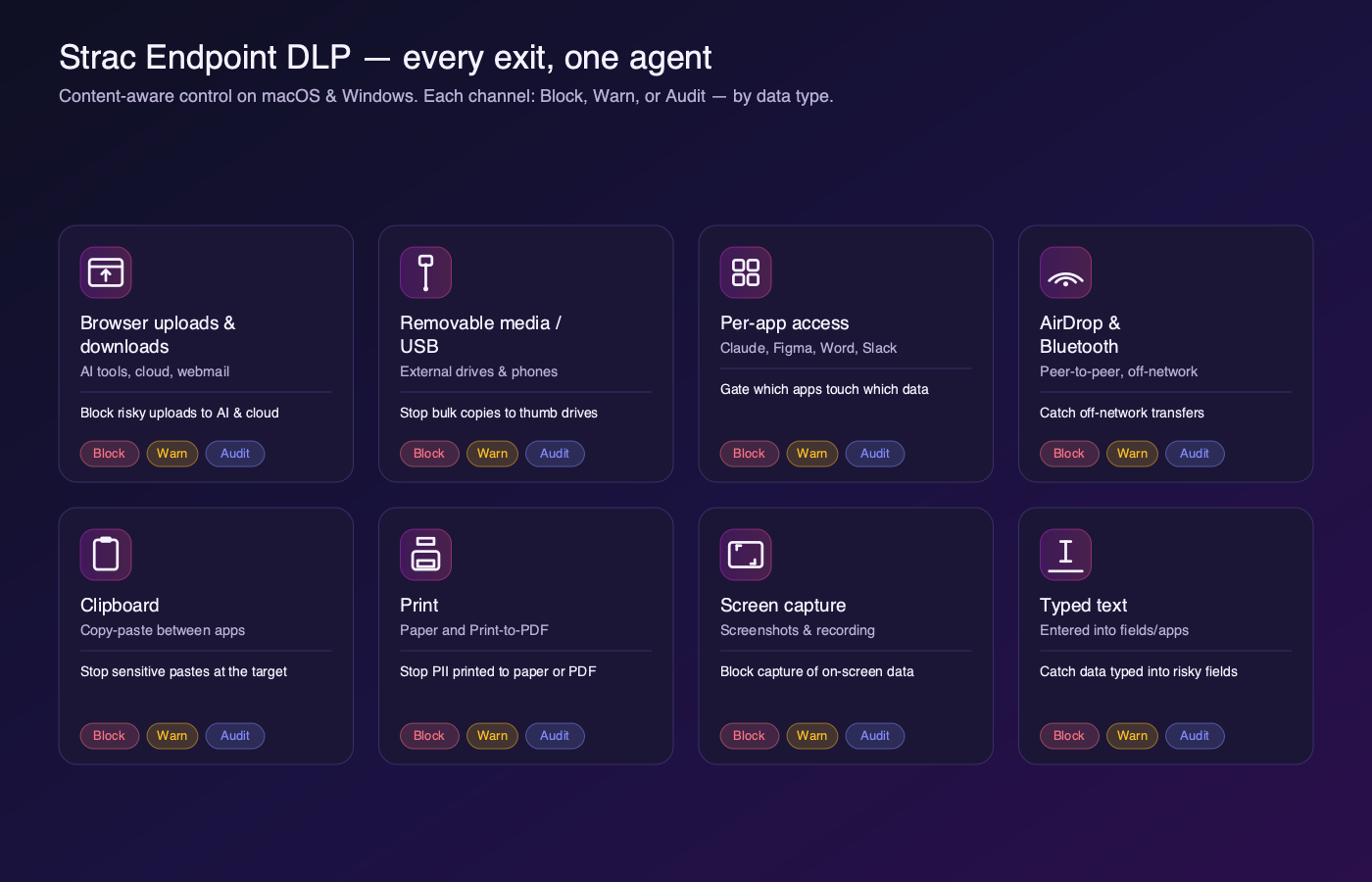
Grid of eight endpoint exit channels with Block, Warn, and Audit coverage
Strac Endpoint DLP, every exit channel, each content-aware, each Block/Warn/Audit.

Departing employees have five common paths:

  • The laptop. A person copies files to a USB drive, syncs a folder to personal cloud storage, AirDrops a file to a phone, or prints a client list. Only endpoint DLP can see these moves on the device.
  • The browser. A person uploads files to a personal account or webmail. Browser DLP checks the content before it leaves.
  • AI tools. A person pastes customer records or code into ChatGPT, Claude, or Copilot, sometimes through a personal account. Shadow AI makes this path hard to see.
  • SaaS apps. A person shares a Google Drive folder externally, forwards messages from Gmail, or exports records from Salesforce. The file never has to touch the laptop.
  • AI agents. A person connects an agent to email or files using their own access. Through the Model Context Protocol (MCP), that agent can keep reaching company data unless its owner and credentials are reviewed. Teams need to discover AI agents and monitor AI agents before anyone leaves.

How Strac Stops a Risky Copy

The Strac endpoint agent inspects the content moving through each exit path. When an employee copies a file to USB, Strac checks what is inside and applies the policy for that data type.

Audit records the action. Warn explains the risk and asks the person to confirm or cancel. Block stops the copy in real time. Each attempt is logged with the person, data type, channel, and destination.

[GIF: Strac blocking a file containing sensitive data from leaving through an endpoint exit channel]

A USB port can stay open when the policy reads the file; the person keeps working and the sensitive data stays put.

🎥 Strac: Insider Risk Protection Across Every Exit Path

Strac combines DSPM, DLP, and remediation in one platform, so a data type defined once applies across laptops, browsers, SaaS apps, cloud storage, and AI tools.

Before an exit, sensitive data discovery shows where customer data, source code, and financial records live, including data sitting in systems for years. During an exit, data lineage shows where a file came from, who opened it, and each attempt to move it. Detection tells you data is moving. Remediation is what stops the leak.

DLP remediation covers four actions:

  • Redact / mask. Strac removes sensitive values from Slack messages, email, tickets, and docs, with originals held in the Strac Secure Vault.
  • Block. Strac stops sensitive transfers through USB, print, browser uploads, and AI tools.
  • Warn and coach. Strac shows the person what was found and lets them cancel or proceed with a logged reason.
  • Revoke access. Strac can revoke public links and remove external members in Google Drive, SharePoint, and Box.

The same platform covers people and agents. AI DLP protects what employees paste into AI tools, and MCP DLP redacts sensitive data before an agent sees it. AI agent security adds an inventory that can flag agents with no owner and old credentials.

Offboarding also needs proof. Strac Comply helps collect evidence for SOC 2, HIPAA, PCI DSS, ISO 27001, and GDPR.

👉 Related reading:

Employee Offboarding Security Checklist

Before anyone gives notice

  • ☐ Map sensitive data and remove old public links and external access.
  • ☐ Run endpoint and browser controls in audit mode, then warn on or block the riskiest data.
  • ☐ List AI tools and agents in use, and give each one an owner.

During the notice period

  • ☐ Have HR alert security as soon as notice is given or a layoff is planned.
  • ☐ Apply stricter rules for that person where policy allows.
  • ☐ Review activity from before the notice date.
  • ☐ Move ownership of shared files, projects, and agents to a named colleague.

On the last day

  • ☐ Disable single sign-on and end active sessions.
  • ☐ Check apps outside single sign-on.
  • ☐ Revoke app tokens, API keys, and shared credentials the person could use.

In the weeks after

  • ☐ Search for files still shared with the person's personal accounts.
  • ☐ Confirm connected apps and agents are removed or reassigned.
  • ☐ Save the evidence for your audit file.

✨ The Bottom Line

Employee exits are routine, but the data and access they leave exposed are not. Logins, checklists, and exit interviews all fall short eventually; the data layer is the backstop. Redact and control sensitive data on every path, and a departure never has to become a breach.

‍Book a demo to see Strac protect your data when employees leave.
__wf_reserved_inherit

🌶️ Spicy FAQs for Insider Risks When Employees Leave

Is insider risk the same as an insider threat?

No. Insider risk covers any way trusted access can expose data, including honest mistakes. An insider threat usually means a person or account actively causing harm, so most departing employees create risk without being threats.

Does Strac replace our HR or identity offboarding tools?

No. HR systems and identity providers still manage the exit and disable accounts. Strac adds the data view: what sensitive data moved, what is still shared, and which agents still hold access.

Do we have to block everything for departing employees?

No. Redaction and vaulting keep work moving while sensitive values stay protected, and content-aware rules let normal files pass. Handover work continues, while a file full of Social Security numbers stops at the USB drive.

Can any tool stop every employee from taking data?

No. No tool can stop someone from photographing a screen with a personal phone. That is why the data layer matters: find and redact sensitive data across your systems, and there is less for anyone to take.

When should insider risk monitoring start?

It should start before anyone resigns, because a person may collect files before giving notice. Run controls for everyone, and agree on the rules with HR and legal. See insider risk management for the full program.

Customer story

“Don’t just alert on problems, fix them.”

Scott Roberts, Chief Information Security Officer, UiPath

  • UiPath
  • Crypto.com
  • Inmar Intelligence
  • thredUP
  • Paymentology
  • Enveda
  • Genesis Molecular AI
  • MeridianLink
More customer stories →
Discover & Protect Data on SaaS, AI, MCP, Endpoints & Cloud
Strac provides end-to-end data loss prevention for all SaaS and Cloud apps. Integrate in under 10 minutes and experience the benefits of live DLP scanning, live redaction, and a fortified SaaS environment.

Customers include
  • UiPath
  • Crypto.com
  • Inmar Intelligence
  • thredUP
  • Paymentology
  • Enveda
  • Genesis Molecular AI
  • MeridianLink
Trusted by enterprises
Data Security + Compliance Automation

Latest articles

Browse all

Get Your Datasheet

Thank you! Your submission has been received!
Oops! Something went wrong while submitting the form.
Close Icon