October 29, 2026

4
min read
How to Hide Emails, Phone Numbers and PII in SaaS Apps
Learn how to hide customer emails, phone numbers and PII in Zendesk, Intercom and Salesforce with redaction, masking or pseudonymization.
Most support agents can solve a ticket without ever seeing a customer's full email address or phone number. Yet in Zendesk, Intercom, Salesforce and most other customer-facing apps, that data sits in plain view on every ticket, chat and contact record. This guide shows how to hide it, which method fits which situation, and how Strac does it across the apps your team already uses.
The short answer is data minimization: people should only see the data they need to do the job in front of them. For support teams, that need is usually smaller than the access they have.
Privacy laws expect it. GDPR, the CCPA as amended by the CPRA, HIPAA and PCI DSS all push companies to limit who can view personal data. Showing every customer's contact details to every agent is hard to defend in an audit.
It cuts insider risk. Support teams are often large, include contractors or outsourced vendors, and turn over quickly. The fewer people who can see a customer's email or phone number, the fewer ways it can be copied, sold or misused.
It prevents honest mistakes. Agents paste data into the wrong ticket, forward it to the wrong person or drop it into a Slack thread. If they never see it, they can't share it by accident.
Agents rarely need it. Most tickets are about an order, a bug or a refund. When an agent does need to confirm who they are talking to, a masked value like XXX-XXX-9876 is usually enough.
Customers notice. People share more freely with a support team when they know their details aren't on display to everyone who opens the ticket.
It shows due diligence. If you are ever asked how you protect customer data, written rules that limit access, backed by tooling that enforces them, carry far more weight than a policy document alone.
There will always be roles that need full access, such as fraud review or account recovery. The goal is to make full access the exception, granted on purpose, instead of the default.
Most support platforms offer some way to remove sensitive text, but it rarely covers everything customers actually send you.
That is why most teams handle this with one policy applied across all their apps, instead of relying on each vendor's settings.
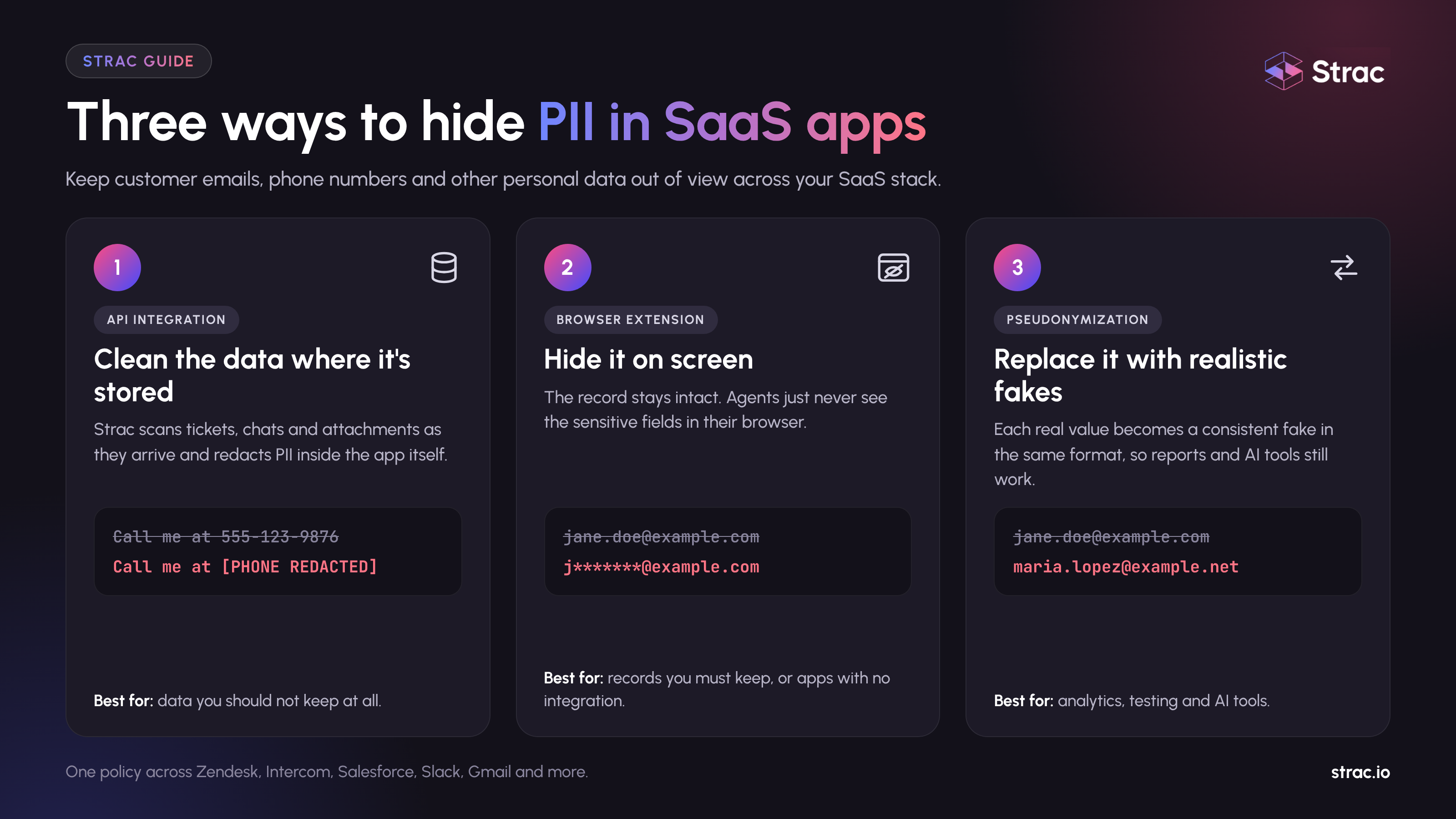
Strac gives you three ways to keep customer data out of view. Many teams use more than one.
Strac connects to apps like Zendesk, Intercom and Salesforce through their APIs. It scans new tickets, comments and attachments as they arrive, then redacts or masks the sensitive parts in the app itself. Images and PDFs are read with OCR, so a photo of a driver's license is caught the same way as a typed email address. You can see the full list of what it detects in the catalog of sensitive data elements.
Use this when the data shouldn't be kept at all, or when you need it gone for compliance.
Sometimes you need to keep the data in the system but stop agents from seeing it. The Strac Chrome extension (also available for Edge) reads the page as it loads and hides emails, phone numbers and other fields before the agent sees them. Nothing changes in the backend, and it works on any web app, including ones with no API, such as WhatsApp Web or an internal admin panel. We cover the setup in How to Hide Emails, Phone Numbers and PII on Zendesk, WhatsApp Web, and CRM Tools with a Chrome Extension.
Use this when the record must stay intact for billing, fraud review or legal reasons, or when an app has no integration.
Pseudonymization swaps each real value for a fake one in the same format, and the same real value always gets the same fake one. Agents and reports still work, because a ticket from the same customer still lines up with their other tickets. Read more in our data pseudonymization guide and on keeping references consistent.
Use this when the data needs to stay useful, for example for analytics, testing or AI tools.
Whichever method you pick, the work behind it follows the same five steps.
Because one set of rules runs across every connected app, a phone number is handled the same way in Zendesk, Slack, Gmail and Salesforce. You manage it all from one dashboard instead of configuring each tool on its own.
In the example below, the customer's real email has been replaced with a placeholder before the agent ever opens the ticket.
For a step-by-step look at Zendesk's own tool and where it stops, read How to Redact Zendesk Tickets.
In the example below, customer emails in the Intercom inbox have been swapped for fake addresses.
If you connect Intercom to AI tools through MCP, the same rules can apply to those tool calls. See MCP DLP.
You can set a different display for each type of data. Here is how the same customer details look under each option.
The value is removed or blacked out completely. Nothing about the original is left on screen.
jane.doe@example.com becomes [EMAIL REDACTED]555-123-9876 becomes [PHONE REDACTED]Best for data nobody on the team should see, like card numbers or Social Security numbers. See PCI DSS PAN masking for how this applies to payment cards.
Part of the value is hidden and part stays visible, so an agent can still confirm a detail with the customer.
jane.doe@example.com becomes j*******@example.com555-123-9876 becomes ***-***-9876Best for verification. An agent can ask "Is your number the one ending in 9876?" without seeing the rest.
The value is replaced with a realistic fake in the same format. The same real value always maps to the same fake one, and authorized users can look up the original when needed.
jane.doe@example.com becomes maria.lopez@example.net555-123-9876 becomes 555-847-2031Best when the data still has to work, for example in reports, test environments or AI tools. Our post on pseudonymization vs. anonymization vs. masking explains the trade-offs in more depth.
The same policies work across the rest of your stack, so you set the rules once.
See the full list of integrations for everything Strac connects to today.

Hiding PII from agents only goes halfway if the same data flows straight into AI. Many support teams now use AI to draft replies, summarize tickets or answer customers directly, and those tools read the full ticket history. Agents also paste ticket text into tools like ChatGPT to get help with a reply.
Apply the same rules there. Strac can hide sensitive data before it's sent to ChatGPT and other AI apps, and before an AI assistant pulls it through an MCP connection. If you need AI to work with real-looking data, pseudonymize it first so the model never sees the real values. More on this in Generative AI DLP.
Strac finds and hides sensitive data across your SaaS apps, browsers, endpoints and AI tools from one place.
Book a demo to see it working on your own Zendesk, Intercom or Salesforce account.
Yes. Use masking for the fields they verify against, so they can see the last few digits of a phone number or the domain of an email address.
Yes. You choose which users or groups can view the originals, and every view is logged.
No. The browser extension only changes what is displayed. Use the API integration if you need the data removed from storage.
Yes. Strac uses OCR to find text inside images and PDFs and redacts it there too.
Most integrations connect in a few minutes with no code. You can start with one app and add the rest later.
“Don’t just alert on problems, fix them.”
Scott Roberts, Chief Information Security Officer, UiPath









Customers include