File Scrubbing: The Art of Digital Redaction for Secure Document Handling
File scrubbing removes PII, PHI, card data, secrets, and hidden metadata from files. Learn how to scrub files by hand, by API, and automatically across apps.
File scrubbing removes sensitive data from a file's visible content, its images, and its hidden metadata. Covering text with a black box is not scrubbing, because the text is still in the file.
Scrubbing by hand works for one contract. It does not work for the thousands of files that move every day through tickets, inboxes, shared drives, laptops, and AI tools.
File scrubbing is the permanent removal of sensitive content from a file before it is shared, stored long term, or processed by another system. The scrubbed value is deleted and replaced with a mark, a label like [REDACTED], or a masked value like XXXX-4242. Anyone who opens the scrubbed copy sees the replacement, and there is nothing underneath it.
People use a few names for the same job. Data redaction usually means removing values from documents. Data masking usually means swapping real values for realistic fake ones so the data stays usable. Data sanitization often means wiping a whole drive. File scrubbing sits in the middle: you keep the file and its useful content, and you take out the parts that should never have been there.
What gets scrubbed depends on your policy, but it usually includes:
PII. Names, Social Security numbers, passport and driver's license numbers, dates of birth, home addresses.
PHI. Diagnoses, medical record numbers, insurance IDs, lab results.
Payment data. Card numbers, bank accounts, and routing numbers covered by PCI DSS.
Secrets. API keys, tokens, and passwords that end up in config files and screenshots. See secret scanning.
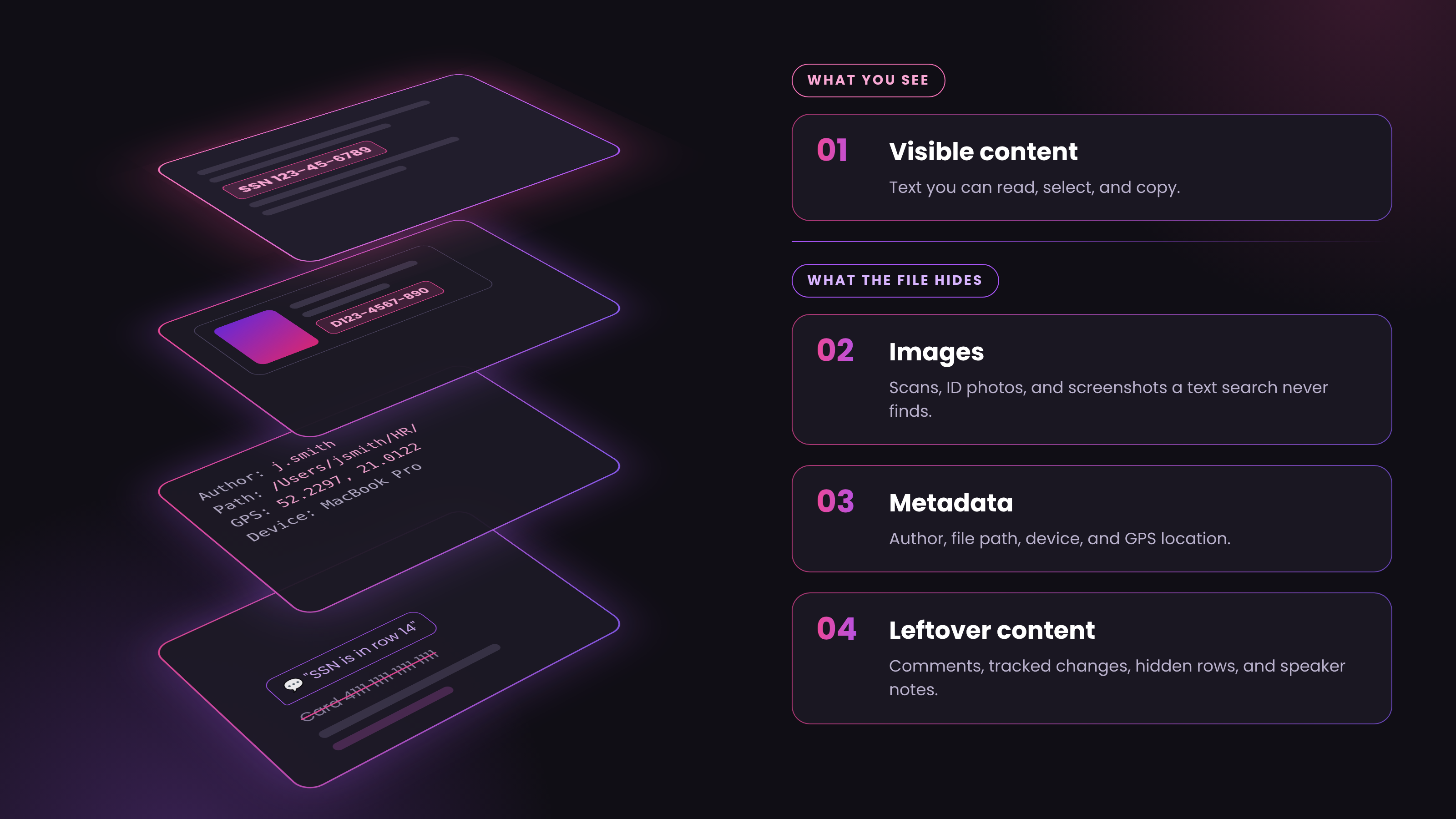
Most leaks from "clean" files come from the parts nobody looked at. A single file can hold sensitive data in four layers:
The visible content. The text you can read, select, and copy.
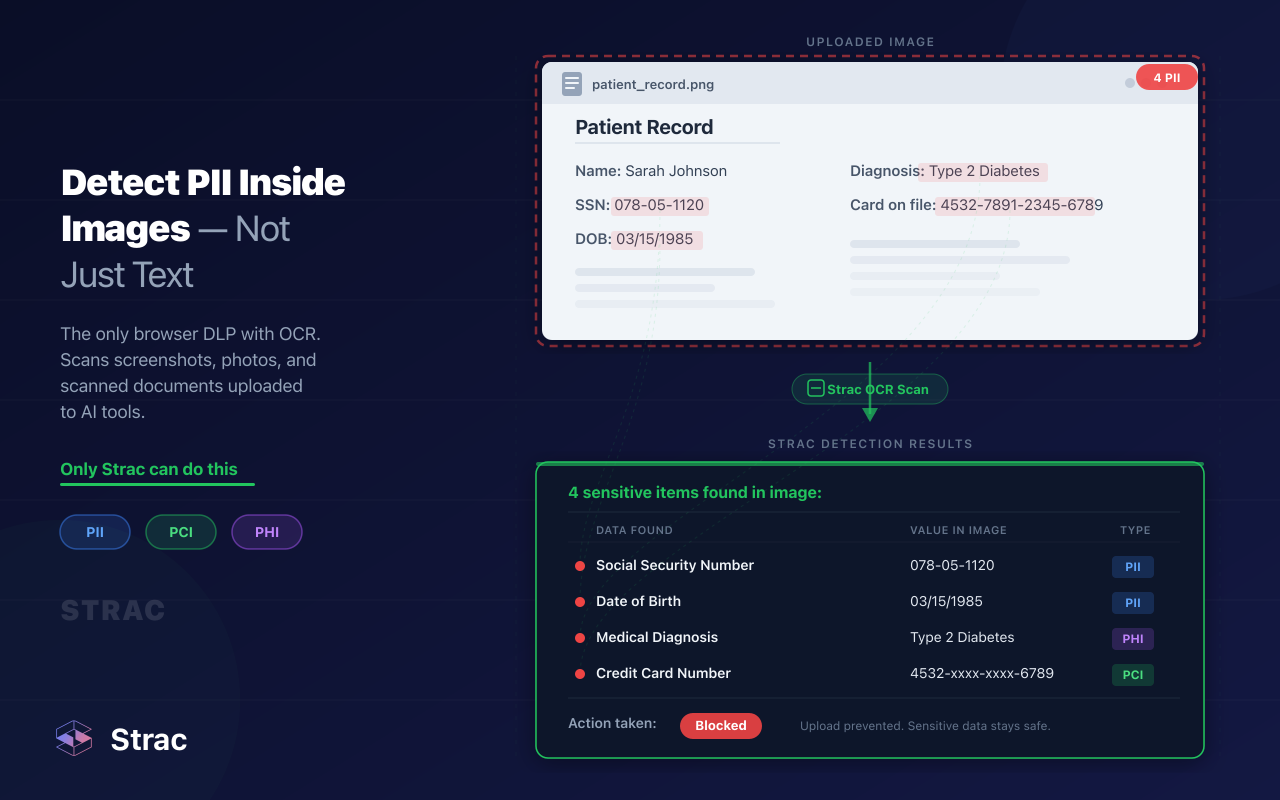
Images. Scanned pages, photos of IDs, signatures, and screenshots pasted into a slide or a ticket. A text search will never find a card number inside a photo.
Document metadata. The author, company name, device, software version, and the folder path on the laptop that created the file. Photos often carry GPS coordinates in their EXIF data.
Leftover content. Comments, tracked changes, hidden rows and sheets in spreadsheets, speaker notes in slide decks, earlier versions saved inside the same file, and form fields that still hold answers.
A spreadsheet with the SSN column hidden still holds every SSN. A Word file with tracked changes turned off still holds the deleted paragraph. Scrubbing has to clear all four layers, or it hasn't scrubbed anything.
Why File Scrubbing Matters More in 2026
Three things changed how much data sits inside files and who reads it.
Files multiply. One customer upload to a support ticket becomes a download on an agent's laptop, a forward in email, a share in Slack, and a copy in a cloud folder. Every copy needs scrubbing, not just the first one.
AI reads everything. Employees upload files to ChatGPT, Claude, and Gemini to summarize them. AI agents connected over MCP open files on their own, from Google Drive, SharePoint, and ticketing tools. Whatever the model reads goes to the provider. This is the core of shadow AI risk and the reason AI data governance now includes files, not just prompts.
Regulators expect less data, not just locked data.GDPR, HIPAA, and PCI DSS all push data minimization: if a file doesn't need a value to do its job, the value shouldn't be in it. A scrubbed file is out of scope. An encrypted one is still in scope.
How to Scrub a File by Hand
For a single file that needs a person to judge every line, such as a legal disclosure or a records request, manual scrubbing still makes sense. Follow these steps:
Keep the original safe. Store the source file somewhere access controlled and work on a copy.
Run OCR on scans and images. If the file is a scan, make the text searchable first. Otherwise your search will come back empty and the data will stay in the image.
Search for patterns, not just words. Look for names, account numbers, email addresses, phone numbers, and ID formats. Don't rely on reading alone.
Use a real redaction tool. In PDF editors, use the redaction feature, not shapes or black highlights. Then apply the redactions. Marked is not removed.
Unhide everything. Show hidden rows, columns, and sheets in spreadsheets. Open speaker notes in slides. Review comments and tracked changes, then accept or delete them.
Strip metadata. Use the "inspect document" or "remove properties" option in Office, the "remove hidden information" option in your PDF editor, or an EXIF remover for photos.
Save as a new file and test it. Search for a word you removed and try to copy text from a scrubbed area. Both should come up empty. For a step by step guide on PDFs, read how to redact a PDF.
This works for a handful of files a week. It breaks for an inbox, a ticket queue, or a shared drive with ten years of exports, because nobody opens every file.
How to Scrub Files With the Strac Redaction API
The Strac Redaction API scrubs files in code, so you can build scrubbing into an upload form, a document pipeline, or your own app. It takes three calls: upload the file, redact it, and download the scrubbed copy.
curl -X GET 'https://api.test.tokenidvault.com/redacted-documents/<document_id>' \ -H 'X-API-Key: <api_key>' > scrubbed-bank-statement.pdf
What the API handles in 2026:
Many file types. PDF, DOCX, XLSX, JPEG, PNG, and .msg email files, with OCR for scans, photos, and screenshots.
The data you choose. Pick from Strac's built-in detectors for SSNs, passports, driver's licenses, bank accounts, card numbers, names, addresses, and API keys, or add your own with regex. The full list lives in the Strac catalog of sensitive data elements.
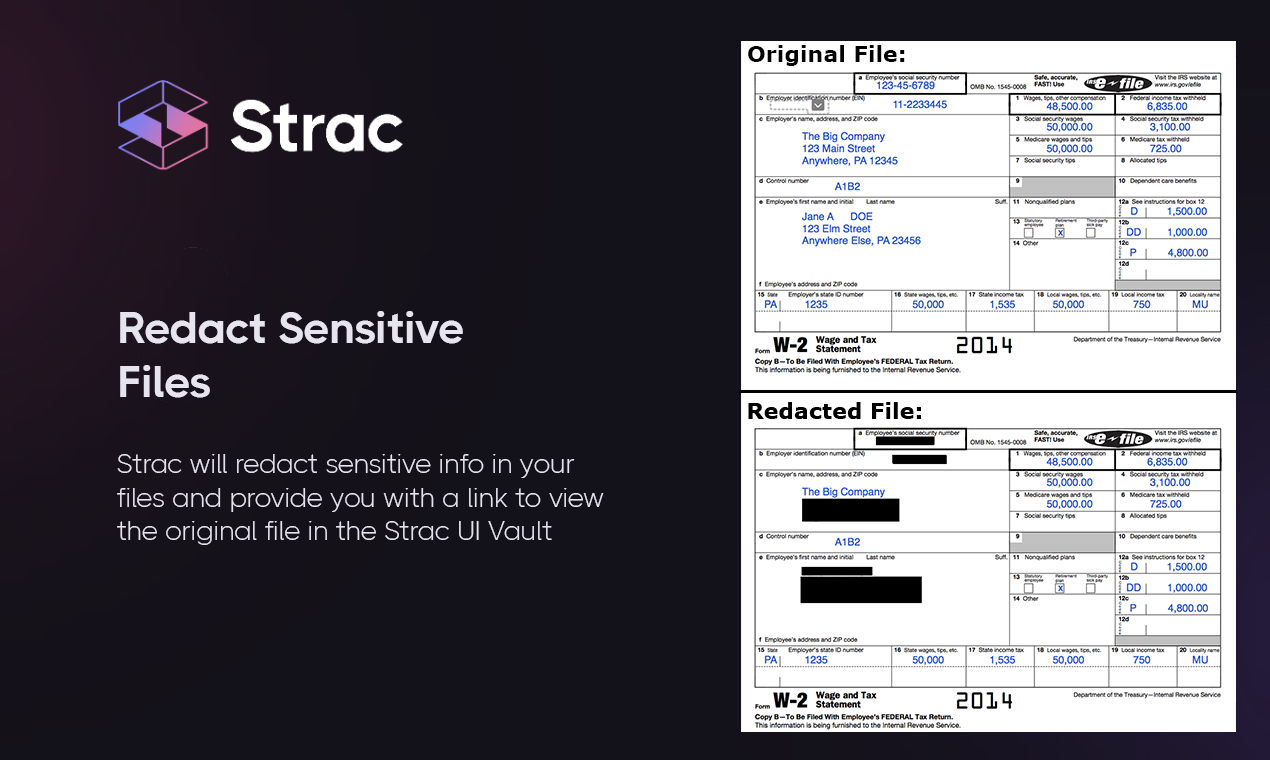
The scrub style. Replace a value with [REDACTED], mask it, remove it entirely, or swap it for a link to the original in the Strac document vault so an authorized person can still get it back.
Results without the values. The API reports which data types it found and where, not the values themselves, so the response doesn't leak what you just removed.
AI agents now open files without asking a person first: a W-2 in a shared folder, an invoice attached to a ticket, a spreadsheet pulled through an MCP connector. The file goes into the prompt, and the prompt goes to the model provider.
Strac ships an open source MCP server for this. Add it to Claude Code, Claude Desktop, Cursor, or VS Code, and the agent gets two file tools. detect_file scans a file and reports what sensitive data it holds without changing it. redact_file writes a scrubbed copy next to the original, never edits the source, and refuses to overwrite it.
That tool scrubs when the agent asks. Strac MCP integrations scrub whether the agent asks or not. When an agent pulls a Drive file, a Salesforce record, or a Zendesk attachment through MCP, Strac removes the sensitive data before the agent receives it. Asking an agent to scrub is a request. Scrubbing at the connector is a control. Read more in MCP DLP and AI DLP.
✨ Automatic File Scrubbing Where Files Actually Land
The API is for files you control. Most sensitive files arrive in apps you didn't build. Strac connects to those apps through their APIs, scrubs files as they arrive, and scans the ones already sitting there.
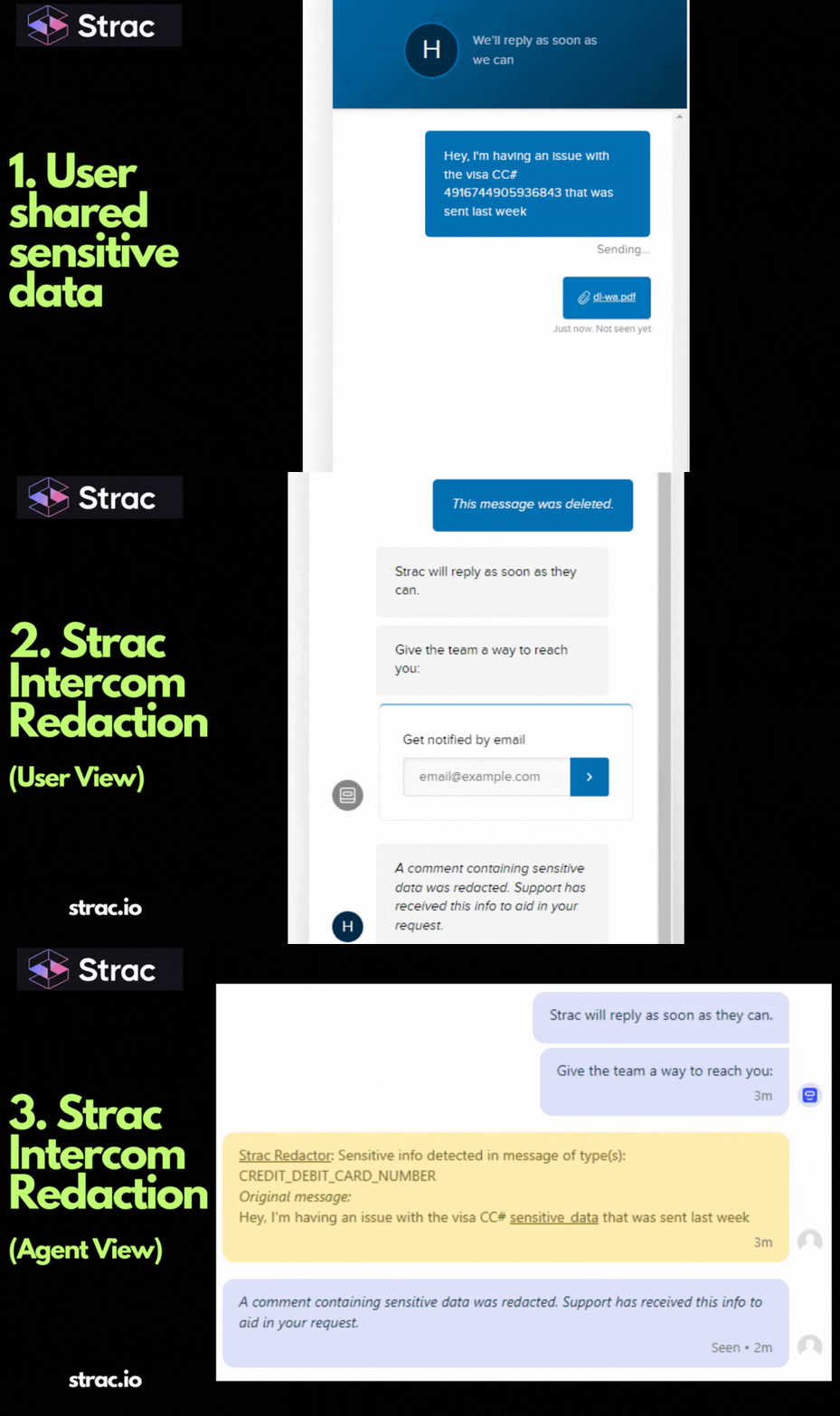
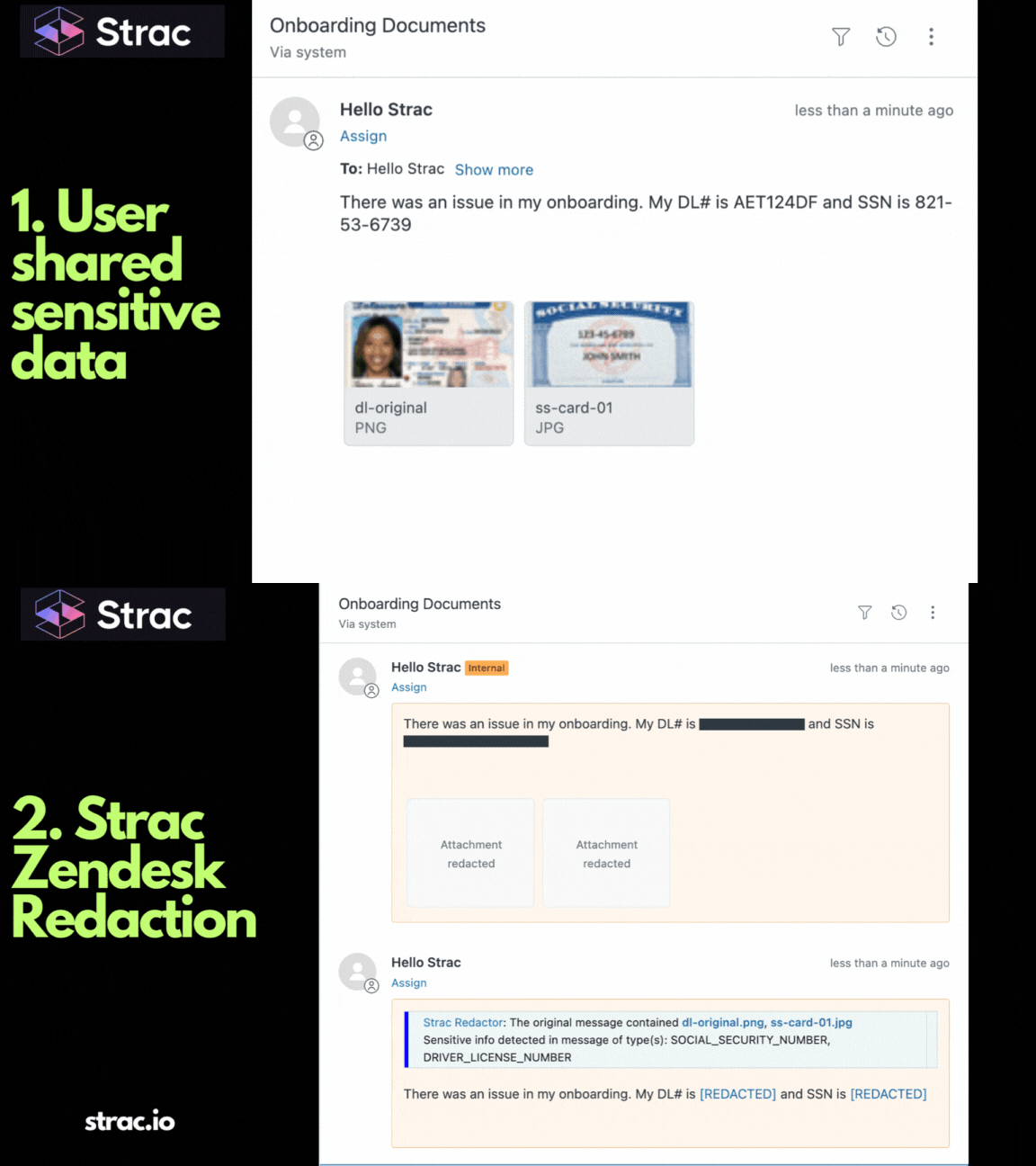
Support tools. Customers attach statements, IDs, and medical forms to Zendesk, Intercom, Freshdesk, and Salesforce. Strac can scrub part of an image or the whole file, and can wait until a ticket is solved so agents finish the work first. See customer support DLP.
Browsers and AI tools.Browser DLP checks a file before it's uploaded to ChatGPT, Claude, or Gemini. The question reaches the model. The account number doesn't.
Laptops. One endpoint DLP agent for Mac, Windows, and Linux controls copying sensitive files to USB drives and personal cloud storage.
✨ Strac: One Engine to Scrub Every File
Strac runs the same detectors on the API, the MCP server, and every connected app, so a file is judged by one policy wherever it shows up.
Detect accurately. Strac ships 191 built-in data elements across 10 categories, covering IDs from around 60 countries, financial accounts, health data, and secrets like AWS keys. Custom elements use your own regex. Context checks keep false positives down.
Act in order. When Strac finds sensitive data in a file, it follows your DLP policy:
Redact / mask. Scrubs the value from the file in Slack, email, tickets, docs, Google Drive, SharePoint, and Box.
Block. Stops the file from reaching an AI tool, a personal upload site, a USB drive, or an agent's context.
Warn and coach. Tells the person what was found and where the file should go instead.
Revoke access. Removes public links and outside sharing from files that hold sensitive data.
Prove it. Every finding and fix is logged with time, location, data type, and action, ready for HIPAA, PCI DSS, SOC 2, and ISO 27001 evidence.
See DLP remediation for how each action works. SaaS integrations connect in under 10 minutes with no agent and no code.
A file holds more than the words on the page. Real file scrubbing removes sensitive data from the content, the images, and the metadata, and in 2026 it has to happen in tickets, inboxes, drives, laptops, and AI tools, not just in an editor. Every other control fails eventually, so the data layer is the backstop: scrub the file the moment it lands, and a leaked copy holds nothing worth stealing.
Book a demo to see Strac scrub files across your stack.
🌶️ Spicy FAQs on File Scrubbing
Is file scrubbing the same as redaction?
Close, but not identical. Redaction usually means removing visible values from a document. File scrubbing covers that plus the parts you can't see, such as metadata, comments, hidden rows, and text inside images. A file can be redacted on the page and still leak through its metadata.
Does deleting a file scrub it?
No. Deleting a file removes one copy. The same file may still sit in email threads, Slack channels, backups, and laptops. Scrubbing removes the sensitive data from the copies that need to stay, and DSPM finds the copies you forgot about.
Will automatic scrubbing slow my team down?
No. Strac removes only the sensitive values and leaves the rest of the file readable. Agents still see the statement period, the transaction list, and the form answers they need, and support teams can delay scrubbing until a ticket is solved.
Can automatic scrubbing catch everything?
Not everything. Handwriting, very low quality scans, and data types you never defined can slip past any tool. That is why legal disclosures still get a human review, and why scrubbing at every entry point matters: what does get caught never spreads.
How do I scrub a file before uploading it to ChatGPT or Claude?
Strac checks file uploads in the browser and scrubs or blocks sensitive data before the file reaches the AI tool, and does the same for agents through MCP. See AI DLP and shadow AI for the full picture.
Customer story
“Don’t just alert on problems, fix them.”
Scott Roberts, Chief Information Security Officer, UiPath
Discover & Protect Data on SaaS, AI, MCP, Endpoints & Cloud
Strac provides end-to-end data loss prevention for all SaaS and Cloud apps. Integrate in under 10 minutes and experience the benefits of live DLP scanning, live redaction, and a fortified SaaS environment.