Endpoint security management is the program that keeps every laptop, desktop and server secure, compliant and under central control.
Antivirus, EDR and patching stop attackers. They do not stop an employee from moving customer data off the device. That gap is filled by endpoint data loss prevention.
Strac runs one lightweight agent on Windows, macOS and Linux, covering USB, print, screenshots, clipboard, browser uploads, cloud sync, desktop AI apps and more.
Every channel can be set to Audit, Warn, Block or Disabled, and Strac can redact, quarantine or encrypt sensitive files instead of only sending an alert.
Endpoint security management used to mean antivirus, patches and a firewall. Those still matter, but most data now leaves a company through ordinary actions on a laptop: a file copied to USB, a spreadsheet pasted into ChatGPT, a folder synced to a personal Dropbox. This guide explains what endpoint security management covers today, where data protection fits in, and how Strac Endpoint DLP protects sensitive data on Windows, macOS and Linux from one policy.
✨ What is endpoint security management?
Endpoint security management is the set of policies, tools and processes a company uses to secure and control every device that touches its data. That includes laptops, desktops, servers, phones and anything else that connects to company systems.
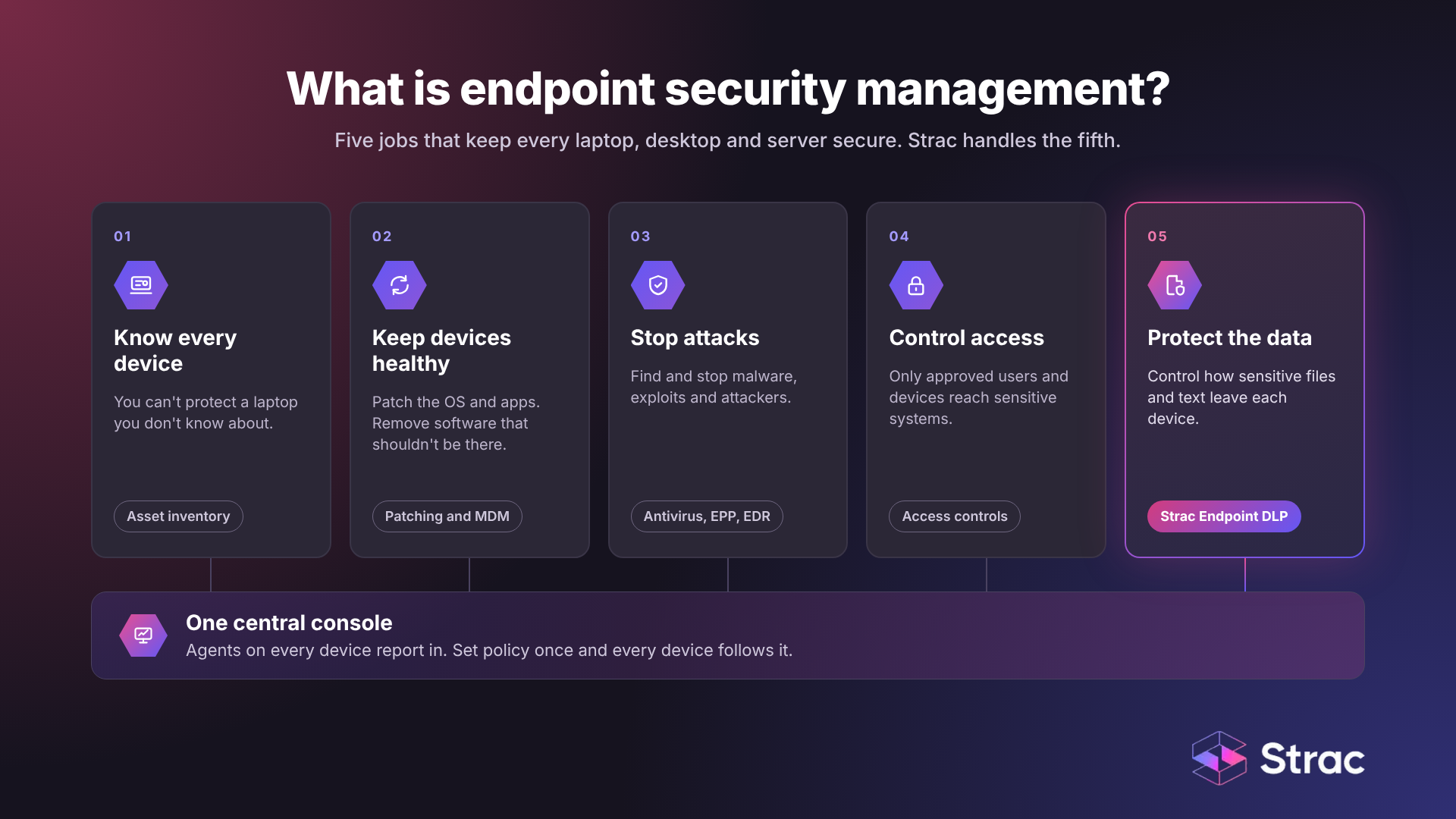
In practice it covers five jobs:
Knowing what devices exist. You cannot protect a laptop you do not know about.
Keeping devices healthy. Patching the operating system and apps, and removing software that should not be there.
Stopping attacks. Antivirus, endpoint protection platforms (EPP) and endpoint detection and response (EDR).
Controlling access. Making sure only approved users and devices reach sensitive systems.
Protecting the data itself. Controlling how sensitive files and text can leave the device, which is the job of endpoint DLP.
Most of these tasks run through software agents on each device that report to a central console. Security teams set policy once in that console, and every device follows it.
The field grew out of simple antivirus in the late 1980s. Remote work, laptops and Wi-Fi in the 2000s pushed protection past the office firewall. Then SaaS apps and shadow IT moved data onto services IT never approved. Today the newest exit is shadow AI: employees pasting company data into AI tools on their own.
Why endpoint security management matters in 2026
Breaches are getting more expensive, and the endpoint is where many of them start. According to the IBM Cost of a Data Breach Report 2026, the global average cost of a breach reached $4.99 million, up 12% from the year before and the highest in the report's history. In the United States the average was $11.5 million. The average time to identify and contain a breach also rose to 247 days, the first increase in five years.
Three changes put more pressure on the endpoint:
Work happens everywhere. Laptops spend most of their time off the corporate network, so controls that live at the network edge miss them.
Data moves through the browser. Webmail, file sharing sites, SaaS apps and AI chat tools all sit one upload away.
AI tools read local files. Desktop AI apps and command line assistants can open files on the device, which creates a new path for data to leave.
Regulators have also raised expectations. Frameworks such as HIPAA, PCI DSS, SOC 2, ISO 27001 and CCPA expect you to show control over sensitive data on every device, not just in your data center. See our guide to endpoint security compliance for more.
✨Endpoint security vs endpoint DLP: where Strac fits
Endpoint security and endpoint DLP solve different problems, and a complete program needs both.
Endpoint security tools (antivirus, EPP, EDR) look for malware, exploits and attackers. They ask: is something malicious running on this device?
Endpoint DLP looks at the data. It asks: is sensitive data about to leave this device, and should it? A trusted employee uploading a customer list to a personal Google Drive is not malware, so EDR will not flag it. Endpoint DLP will.
Device management tools (MDM and UEM) handle setup, patching and configuration. They are also how you roll out the DLP agent.
Strac is the data protection layer in this stack. It does not replace your EDR, your patching tool or your MDM. It works alongside them, reading the content of files and text to decide what can leave each device. To compare the two approaches in more depth, read what a DLP agent is and agent vs agentless DLP.
How endpoint security management works
A working program follows the same loop on every device:
Deploy agents. A lightweight agent goes on each laptop, desktop and server, usually pushed through MDM tools such as Intune, SCCM, Jamf or Kandji.
Report to one console. Agents send device health, events and findings to a central console, so the security team sees the whole fleet in one place.
Set policy once. Admins define the rules: which apps are allowed, which devices may connect, and which data types (PII, PHI, card numbers, secrets, source code) need protection.
Find sensitive data. The DLP agent reads the content of files, not just their names, and uses OCR to read scanned documents, images and screenshots. Learn more about data discovery and classification.
Enforce in real time. When a protected action happens, the agent applies the policy on the spot, even when the device is offline.
Respond and fix. Threats get isolated by EDR. Data risks get blocked, redacted, quarantined or encrypted by DLP. See the different DLP remediation options.
Log everything. Every event is recorded as evidence for audits and investigations. Many teams also feed these logs into a SIEM (security information and event management) tool.
Review and adjust. Teams review the logs, tune policies and repeat.
✨ Every exit channel endpoint DLP should control
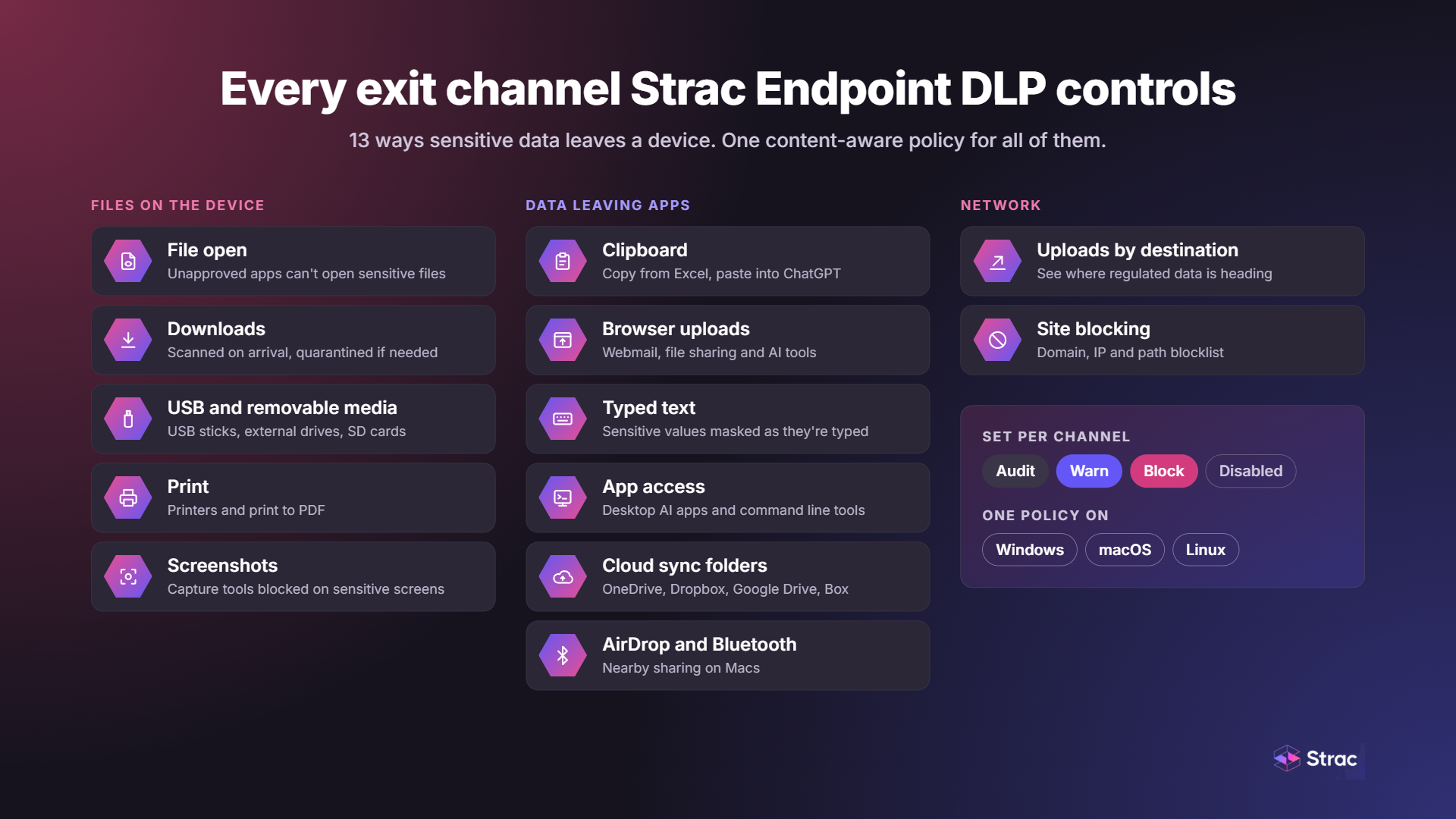
Data leaves a device through many small paths, not one big door. A modern endpoint DLP agent should cover each of them and act on the content, so it stops the file with a Social Security number while letting harmless files through. Strac governs these channels (exact coverage varies by operating system):
File open. Stops an unapproved app from opening a sensitive file, such as a payroll spreadsheet opening in an unmanaged desktop app.
Downloads. Scans files the moment they finish downloading and can quarantine them.
USB and removable media. Stops sensitive files from being written to USB sticks, external drives and SD cards. Read more on removable media encryption.
Print. Stops sensitive files from printing, including print to PDF.
Screenshots. Blocks screen capture tools while sensitive content is on screen.
Clipboard. Catches sensitive text copied from one app and pasted into another, such as Excel into ChatGPT.
Browser uploads. Stops sensitive files from being dragged or picked into upload forms on webmail, file sharing sites or AI tools. See browser DLP for Chrome and Edge.
Typed text. Masks sensitive values, like an SSN typed into a chat box, as they are entered.
App access. Blocks or warns when a desktop or command line app, including AI apps, tries to read a sensitive file.
Cloud sync folders. Stops sensitive files from being copied into sync folders for OneDrive, Dropbox, Google Drive and Box before they leave the device.
AirDrop and Bluetooth. Controls nearby sharing on Macs.
Uploads by destination. Shows where regulated data is heading so you can tighten policy.
Site blocking. Keeps data off risky or unapproved websites with a domain, IP and path blocklist.
For a channel-by-channel walkthrough on Windows, read our Windows DLP guide.
One policy across Windows, macOS, Linux and the browser
Most companies run a mixed fleet. A Windows-only tool leaves the Mac laptops and Linux servers exposed, and managing three separate tools means three sets of rules that drift apart. Strac runs the same agent and the same policy on every operating system, with one console and one audit trail.
Windows. The agent installs on Windows 10, Windows 11 and Windows Server and uses a file system minifilter driver to watch file, device, clipboard and upload activity. Roll it out with Microsoft Intune or SCCM. Details: Windows DLP.
macOS. The agent is built on Apple's own Endpoint Security framework as a system extension, so it sees file and device events without hacks. Roll it out with Jamf or Kandji. Details: Mac DLP, plus our guides to data loss prevention for macOS and endpoint security for macOS.
Linux. The agent monitors file and process activity and deploys through standard packages or config management tools. Details: Linux DLP.
Browsers. A browser extension adds protection where most modern data leaves: uploads and pastes into web apps and AI chat tools. It inspects content on the device, so there is no proxy and no TLS interception to set up.
The same policy also extends past the endpoint. Strac covers data at rest in SaaS and cloud apps through SaaS DLP and DSPM, so a data type you define once applies on laptops, in Slack, in Google Drive and in your cloud storage.
Enforcement modes and remediation
Blocking everything on day one breaks workflows, and a DLP tool that breaks workflows gets switched off. Strac lets you set each channel, for each data type, to one of four modes:
Audit records the action quietly so you learn where sensitive data really moves.
Warn shows the user a message in the moment and lets them continue with a reason, which is flagged for review.
Block stops the action outright.
Disabled turns the channel off while files are still scanned on the device.
The rollout that works: run every channel in Audit for about two weeks, move the riskiest channels to Warn, then switch to Block one channel at a time. Our playbook on how to prevent AI data leaks walks through it.
When Strac finds sensitive data, it can do more than send an alert:
Redact the sensitive values in place, so the file stays usable and the data stays protected. See data masking.
Quarantine the file so it cannot be used until an admin reviews it.
Block the action and save the finding so an admin can review the exact file it fired on.
Detection is content-aware, not just pattern matching. Strac checks context and validates matches (for example, a Luhn check on card numbers), reads text inside images with OCR, and opens ZIP files, Office documents and nested files. That keeps false positives low enough to actually enforce. More on how this works in DLP data classification.
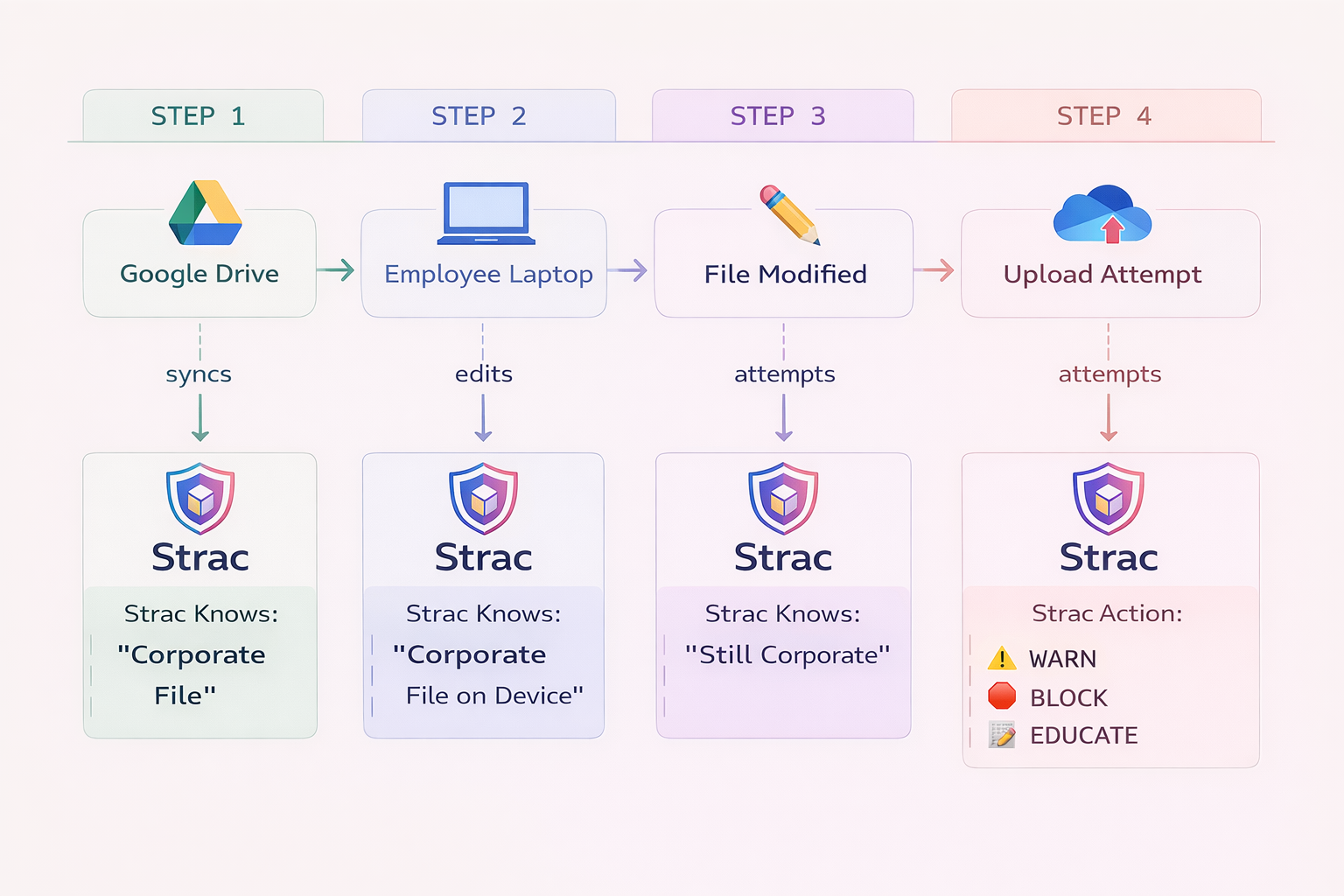
Data lineage adds the history behind each event. Strac traces a sensitive file from where it came from, through every place it moved, to the moment someone tried to send it out. That record is what an investigation needs. Learn more about data lineage.
Protecting data in AI tools on the endpoint
The fastest-growing way data leaves a laptop is not a USB stick. It is an employee pasting a customer record into a chatbot, uploading a spreadsheet to an AI tool, or running a desktop AI app that reads local files. Older endpoint tools were built for USB and print, so they cannot see any of this.
Strac covers all three paths on the device:
Pastes and uploads in the browser. The clipboard and browser upload channels catch sensitive text and files headed to ChatGPT, Claude, Gemini and Copilot, and can redact the sensitive part so the employee can keep working. This works on personal accounts too, not just company ones.
Desktop AI apps and command line tools. The app access channel controls whether ChatGPT desktop, Claude desktop and AI coding assistants can open sensitive files.
AI agents and MCP. As teams connect AI agents to company systems through the Model Context Protocol, MCP DLP keeps sensitive data out of those connections.
Policies define what is allowed on each endpoint. Good ones are specific, easy to change and the same on every device.
Define data types once. Decide what counts as sensitive (customer PII, PHI, card numbers, API keys, source code, or your own custom types) and use those definitions everywhere. A PII scanner helps you find where that data already lives.
Allow known good, block known bad. An allowlist of approved apps and sites is safer than a blocklist, but needs a clear view of what people actually use.
Start in Audit, then tighten. Two weeks of Audit data shows you where regulated data really moves before you block anything.
Lead with the AI path. Clipboard, browser upload and app access are where most leaks happen today. Move those to Warn first.
Fix, do not just alert. Redaction and quarantine stop the leak. An alert only records it.
Cover the whole fleet. One agent and one policy for Windows, Mac and Linux, so nothing slips through the gaps.
Keep the agent light. Agents that slow laptops get uninstalled. Measure CPU, memory and boot impact during a trial.
Keep devices patched. Use your device management tool to keep operating systems and apps up to date. DLP protects the data, but patching closes the holes attackers use.
Train people. Warn messages double as training. Employees learn the rule at the moment it matters.
Common endpoint security management challenges
More complex threats. Attacks are faster and more targeted, and zero-day flaws leave no time to patch first.
Rising costs. Every new tool adds license fees, rollout work and upkeep. Some native options, such as Microsoft Purview endpoint DLP, sit behind top-tier E5 licensing.
Sensitive data loss. Most leaks come from trusted people doing everyday tasks, which threat-focused tools are not built to see.
Remote work and BYOD. Devices live off the network, and personal devices mix company and private data.
App sprawl. Employees install apps and AI tools IT never approved, each one a new place for data to go.
Patching delays. Every day a patch waits is a day an attacker can use the flaw.
Mixed operating systems. Tools that are strong on Windows are often weak on Mac and missing on Linux.
Alert fatigue. Rules based only on patterns flag every 16-digit number, and people learn to ignore the alerts.
Visibility without friction. Teams need to see everything without slowing people down or overstepping on privacy.
Checklist for choosing endpoint security management software
Use these questions when you compare vendors. The first group covers the wider security stack. The second covers data protection, where most tools fall short. For a side-by-side look, see our list of the best DLP tools and how endpoint DLP solutions compare.
For the security stack
Does it give you a full list of every device that connects to your systems?
Does it include EDR that catches threats in real time?
Can it patch operating systems and third-party apps automatically?
Does it plug into your identity and access tools, your SIEM and your MDM?
Can it grow to more devices without slowing down?
For data protection
Does it cover every exit channel, including screenshots, clipboard, cloud sync and desktop AI apps, not just USB and print?
Does it read the content of files, including images with OCR, or only file names and types?
Can you set Audit, Warn and Block for each channel, or is it block only?
Can it redact, quarantine and encrypt, or only alert?
Does the same agent and policy run on Windows, macOS and Linux?
Does it protect pastes and uploads into AI tools, including personal accounts?
Does policy still apply when the device is offline?
Does it show data lineage, so you know where a file came from?
Endpoint security management is no longer just about keeping malware off laptops. With breaches averaging $4.99 million and most data leaving through everyday actions like uploads, pastes and syncs, the endpoint is now where data protection succeeds or fails.
Keep your EDR, your patching and your MDM. Then add the layer they miss: an endpoint DLP agent that reads the content of what is moving, covers every exit channel including AI tools, and runs the same policy on Windows, macOS and Linux. Start in Audit, move to Warn, then Block, and fix leaks with redaction and quarantine instead of just logging them.
What is the difference between endpoint security and endpoint management?
Endpoint management keeps devices set up, patched and configured. Endpoint security protects them from threats and controls what data can leave. Endpoint security management ties the two together under one set of policies.
Is antivirus enough to protect endpoints?
No. Antivirus and EDR stop malware and attackers. They do not stop a trusted employee from uploading a customer list to a personal drive or pasting it into ChatGPT. That takes endpoint DLP.
Does Strac replace my EDR or MDM?
No. Strac is the data protection layer. It runs alongside your EDR and deploys through your MDM.
Does Strac work on Mac, Windows and Linux?
Yes. The same agent and the same policy run on Windows, macOS and Linux, including Windows Server.
Can Strac stop employees pasting data into ChatGPT?
Yes. The clipboard and browser upload channels inspect content headed to AI tools and can block it or redact the sensitive part in real time. The app access channel also controls desktop AI apps and command line tools. See ChatGPT DLP.
Does endpoint DLP work when the laptop is offline?
Strac's does. Policy is enforced on the device, so it holds whether the laptop is on the office network, at home or on a plane.
Will the agent slow down laptops?
It should not. Strac's agent is lightweight and inspects the files that matter rather than scanning everything nonstop. Always measure CPU, memory and boot impact during a trial.
How long does rollout take?
The agent installs through your existing MDM and registers with the console in minutes per device. Most fleets are covered in days, not weeks. Read more in what is a DLP endpoint agent.
Discover & Protect Data on SaaS, AI, MCP, Endpoints & Cloud
Strac provides end-to-end data loss prevention for all SaaS and Cloud apps. Integrate in under 10 minutes and experience the benefits of live DLP scanning, live redaction, and a fortified SaaS environment.



.avif)


.gif)


.webp)