What is Email Security? Top 10 Email Security Best Practices for 2026
Email security best practices for 2026, from DMARC and MFA to email DLP and DSPM. See how Strac redacts sensitive data in Gmail and Outlook before it leaks.
Email security protects messages, attachments, and accounts from phishing, account takeover, and data leaks, in both directions and at rest in the mailbox. It is the front line of email data security.
The risk has grown because the inbox is now a data store. Customers email IDs and bank statements, staff forward exports, and AI assistants and connected apps can read every message.
Gateways and filters stop bad mail from coming in. They do little about the Social Security number sitting in a 2019 thread or the spreadsheet a well-meaning employee sends to the wrong address.
Email security is the practice of protecting email accounts, messages, and attachments from unauthorized access, tampering, and loss. It covers three jobs: keeping attackers out, stopping sensitive data from leaving, and controlling the sensitive data that is already sitting in mailboxes.
Most email security programs were built for the first job. Spam filters, secure email gateways, and domain authentication all decide whether a message should be delivered. Those controls still matter. They just answer a narrow question: is this email safe to receive? They do not answer what is inside it, who can read it later, or where it goes next. That second set of questions is what email DLP and data discovery and classification answer.
Why the Inbox Breaks Traditional Email Security
An inbox is not a pipe. It is a searchable archive of every invoice, contract, patient form, and password reset your company has ever handled.
That changes the threat model in three ways. It is permanent: a message delivered in 2019 is still readable today by anyone who gets into the account. It is two-way: customers send you regulated data you never asked for, and your staff send data out to the wrong people. And it is shared: OAuth apps, CRM sync tools like Salesforce and HubSpot, and AI assistants now read mailboxes on a user's behalf.
Email also does not stay in email. An attachment gets saved to Google Drive, SharePoint, OneDrive, or Box, pasted into Slack or Microsoft Teams, or forwarded into a Zendesk ticket. A gateway inspects mail at the door. A breach happens in the room. That is why email security in 2026 needs data controls next to the threat controls.
Email Threats to Plan For in 2026
Phishing and spear phishing. Messages that impersonate a vendor, an executive, or a login page to steal credentials. AI writing tools have removed the typos that used to give them away.
Business email compromise (BEC). An attacker uses a real or lookalike account to request a wire transfer, change bank details, or ask for W-2s.
Account takeover. A stolen password or session token gives the attacker the whole mailbox, including every attachment ever received.
Malware and ransomware. Payloads delivered through attachments, links, and QR codes.
Spoofing and brand impersonation. Forged sender addresses that pass as your domain when authentication is weak.
Misdirected and oversharing email. The wrong autocomplete, a reply-all, or a full customer export attached when one row was needed.
Inbound sensitive data. Customers and patients emailing card numbers, IDs, and PHI into shared inboxes.
Transactional email leaks. Apps that send receipts and alerts through services like SendGrid can put PII into outbound mail with no human in the loop. See SendGrid DLP.
Third-party and AI access. Connected apps, AI assistants, and agents with mailbox permissions that read and move data with no human review. This is where email meets shadow AI.
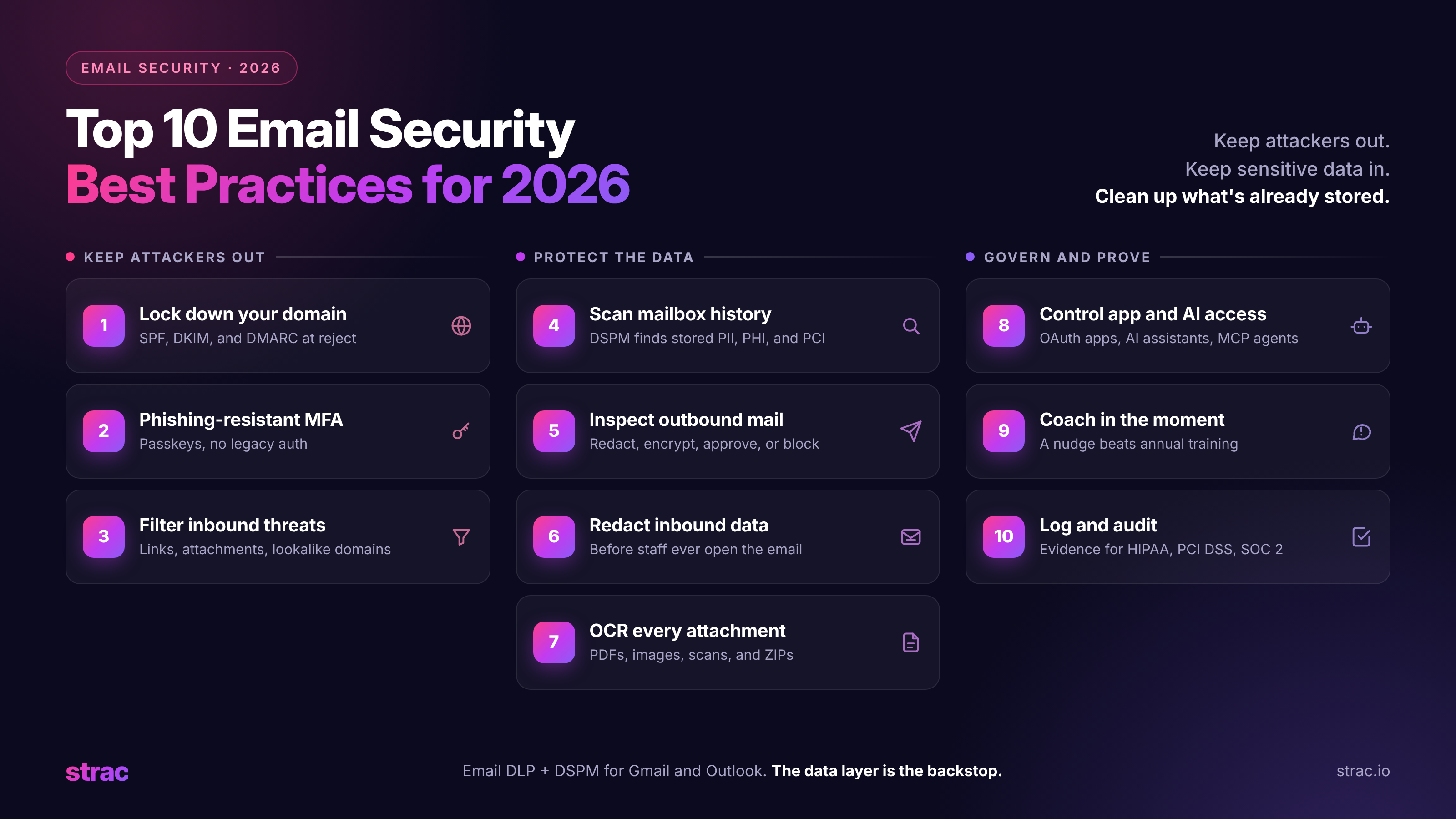
✨ Top 10 Email Security Best Practices for 2026
1. Lock down your domain with SPF, DKIM, and DMARC
Publish SPF and DKIM for every service that sends as your domain, including transactional senders, then move DMARC from monitoring to a reject policy. This stops attackers from sending mail that looks like it came from you, and it is now a requirement for bulk senders at the major mailbox providers.
2. Use phishing-resistant MFA for every mailbox
Passwords and SMS codes are not enough. Use passkeys or hardware security keys, block legacy authentication protocols, and apply conditional access by device and location. Account takeover is the attack that turns one mistake into access to years of data. For tenant-level hardening, see how to improve Google Workspace security.
3. Filter inbound mail for threats
Run a secure email gateway or an API-based filter that checks links, attachments, sender reputation, and lookalike domains. Add a banner to external mail so staff can see when a message did not come from inside the company.
4. Find the sensitive data already in your mailboxes
Before you write a policy, find out what you are protecting. A historical scan across every mailbox shows where card numbers, Social Security numbers, health records, and API keys are stored, and who can reach them. This is the job of DSPM, and email is usually where it finds the most. New to the term? Start with what is DSPM, or run the PII scanner across mail and files.
5. Inspect outbound email and attachments
Outbound email DLP checks the body and every attachment before a message leaves. When it finds regulated data headed to an outside address, it can redact the value, encrypt the message, hold it for approval, or block it. Most outbound leaks are mistakes, so the control should fix the email rather than punish the sender. For Microsoft tenants, pair it with the steps to encrypt email in Outlook and Office 365.
6. Redact sensitive data that customers send you
You are responsible for data that lands in your inbox, even when you never asked for it. Inbound email redaction removes card numbers, IDs, and PHI from incoming mail before staff open it, and can store the original in the Strac document vault that only authorized people can open. This is what PCI compliance for email and a HIPAA compliant email setup both require in practice. It is also the simplest form of data minimization.
7. Read every attachment, including images and scans
A photo of a driver's license or a scanned bank statement is still sensitive data. Use detection with OCR that reads PDFs, images, screenshots, Word files, spreadsheets, CSVs, and ZIP archives. Text-only scanning misses the files that carry the most risk. The Strac catalog of sensitive data elements lists what the detectors cover.
8. Control which apps and AI tools can read mail
Review OAuth grants to mailboxes on a schedule and remove the ones nobody uses. Treat AI assistants and agents with mailbox access like any other integration: if an agent can read an inbox over a connector, sensitive values should be removed before the agent receives them. See MCP DLP for agents, AI DLP for prompts and uploads, and how to detect shadow AI for the tools nobody approved.
9. Coach people in the moment
Annual training fades in a week. A short notice at the point of the mistake ("this email contains a card number and is going to an outside address") teaches more than a slide deck, and it keeps people working instead of filing tickets.
10. Log everything and audit on a schedule
Keep a record of every detection and action: what was found, in which mailbox, and what happened to it. Those logs are your evidence for HIPAA, PCI DSS, SOC 2, ISO 27001, and CCPA audits, and they show whether your policies are catching real data or just creating noise.
🎥 How Strac Redacts Sensitive Data in Gmail and Outlook
Strac connects to Google Workspace and Microsoft 365 through their APIs. A Workspace or Microsoft admin grants access, and Strac starts scanning inbound and outbound mail for the users you select. There are no MX record changes, no proxy, and no per-user setup, and the connection takes under 10 minutes. The setup is covered in the Gmail DLP guide and the Office 365 DLP guide.
When a message arrives with sensitive data, Strac replaces the value in the body or attachment with a redacted marker or a link to the Strac document vault. Only employees with the right permissions can open the link, and admins set when it expires. The email stays useful. The card number does not sit in the inbox.
🎥 Strac: Email DLP and DSPM in One Platform
Strac treats email as one of many places sensitive data lives, and applies the same detectors and policies to every one of them.
Inbound and outbound policies. Outbound actions include redact, encrypt, alert, block, quarantine, log, forward, tag, and route to an approval step. Inbound actions include alert, redact, delete, and encrypt.
Historical scanning. Connect a mailbox and Strac scans its archive to show existing exposure, then inspects new mail in real time. Results feed DSPM, which ranks risk across email, Google Drive, SharePoint, Slack, and AWS S3 in one view.
Attachment and image detection. OCR reads PDFs, images, screenshots, DOCX, XLSX, CSV, and ZIP files.
Detectors you control. Built-in detectors cover SSNs, card numbers, driver's licenses, bank accounts, medical record numbers, and API keys. Add your own for customer IDs or internal project names. The full list is in the Strac catalog of sensitive data elements.
Partial masking for card data. Show the last four digits and hide the rest, so support can still confirm a card without storing the full number. See data masking and PCI DSS PAN masking.
Remediation in a fixed order. When Strac finds sensitive data, it follows your policy:
Block. Stops an outbound email, a file share, or an upload to an AI tool when redaction is not enough.
Warn and coach. Tells the sender what was found and why, at the moment they send.
Revoke access. Removes outside sharing and public links from files that hold sensitive data.
Compliance evidence. Audit logs record every finding and action for HIPAA, PCI DSS, and SOC 2. Strac signs a BAA for healthcare customers using Gmail with PHI, and supports fintech teams handling card and bank data.
The same platform covers the places email data travels next: browser DLP and ChatGPT DLP for uploads to AI tools, endpoint DLP and Mac DLP for downloads and USB copies, and MCP DLP for AI agents reading mail through connectors. See DLP remediation for how each action works.
The Bottom Line
Email security used to mean keeping bad mail out. In 2026 it also means controlling the sensitive data that comes in, goes out, and sits in mailboxes for years, where attackers, apps, and AI agents can all reach it. Filters and MFA will fail eventually, so the data layer is the backstop: redact sensitive data in every inbox with email DLP, and a compromised account does not become a breach.
Book a demo to see Strac secure Gmail and Outlook.
Your Email Security Checklist for 2026
☐ SPF, DKIM, and DMARC at a reject policy for every sending domain
☐ Phishing-resistant MFA on every mailbox, legacy authentication blocked
☐ Inbound filtering for links, attachments, and lookalike domains
☐ Historical scan of all mailboxes for regulated data with DSPM
No. A secure email gateway decides whether a message is safe to deliver, mostly by checking for phishing and malware. Email DLP looks at the data inside messages and attachments, in both directions and in stored mail, and redacts or blocks it.
Doesn't Google Workspace or Microsoft 365 already include DLP?
Partly. Native DLP is tied to higher license tiers, focuses on outbound rules, and does not redact inbound mail or scan old messages well. Strac works on every paid Workspace plan and alongside Microsoft Purview DLP, redacts inbound and outbound, and scans history.
Will email DLP slow down my team?
No. Strac redacts only the sensitive value and lets the rest of the email through, so work continues. Blocking is reserved for the cases that need it, and senders get a short explanation instead of a silent failure.
Can email security stop every phishing attack?
Not every one. Well-written phishing still gets through filters and fools careful people. That is why the data layer matters: if the mailbox holds no readable card numbers or IDs, a stolen login exposes far less.
What is DSPM and how does it relate to email?
DSPM (data security posture management) finds where sensitive data is stored and who can reach it. For email, that means scanning existing mailboxes for regulated data and ranking the risk. Read what is DSPM and see AI data governance for the full picture.
Customer story
“Don’t just alert on problems, fix them.”
Scott Roberts, Chief Information Security Officer, UiPath
Discover & Protect Data on SaaS, AI, MCP, Endpoints & Cloud
Strac provides end-to-end data loss prevention for all SaaS and Cloud apps. Integrate in under 10 minutes and experience the benefits of live DLP scanning, live redaction, and a fortified SaaS environment.