






Salesforce has quietly become the largest system of record for customer data in most companies.
Accounts, Contacts, Leads, Opportunities, Tickets, Billing data, Support attachments, case comments, uploaded files… everything ends up inside Salesforce.
The problem?
You have zero deep visibility into what sensitive data is sitting across objects, fields, attachments, emails, notes, chatter, and custom objects.
And with organizations rolling out GenAI copilots (Salesforce Einstein Copilot, OpenAI, Claude, Gemini), the risk surface just exploded:
If sensitive fields in Salesforce are not discovered, classified, and governed, they will flow into AI prompts, workflows, ETL pipelines, LLMs, and 3rd-party apps.
That’s exactly where Salesforce DSPM (Data Discovery) becomes critical.
Below is the definitive guide you wish existed — written Strac-style: clear, tactical, and built for security teams and Salesforce admins.
TL;DR
- Salesforce DSPM (Data Discovery) gives full visibility into PII, PCI, PHI, secrets, IDs, and sensitive text across all Salesforce objects (standard & custom).
- Most risk hides in custom objects, support attachments, notes, chatter threads, and rich-text fields, not core CRM objects.
- Salesforce is a major source for Shadow AI data leakage — DSPM is required before enabling copilots/LLMs.
- DSPM maps who has access, including roles, profiles, permission sets, external communities, and connected apps.
- Remediation includes redaction, deleting data, field-level policies, reconfiguring access, and blocking risky AI usage.
- Strac provides automated scanning, access mapping, risk scoring, and bulk remediation across Salesforce.
What is Salesforce DSPM (Data Discovery)?
Salesforce DSPM (Data Discovery) is the practice of scanning, identifying, and classifying sensitive data across every Salesforce object, field, attachment, and workflow.
Companies use Salesforce DSPM to answer:
- Where is sensitive data stored inside Salesforce?
- Which objects contain PII, PHI, PCI, secrets, contracts, IDs, or customer documents?
- Who has access to that data?
- Which records are exposed to external communities or integrations?
- Which sensitive data may leak into AI models or copilots?
Salesforce is one of the hardest SaaS apps to secure because it is:
- Fully customizable (custom objects, custom fields, custom apps)
- Filled with rich-text fields
- Used heavily in support workflows where customers upload documents
- Connected to hundreds of integrations (ETL, marketing, AI apps, BI tools)
This creates a massive blind spot without DSPM.
Why Salesforce Needs DSPM (Data Discovery)
Hidden Sensitive Data Everywhere
Salesforce contains:
- PII (Names, emails, addresses, phone numbers)
- PCI (Credit cards in case comments or notes)
- PHI (Health details in customer communications)
- IDs (Driver's license, Passport, SSN)
- Secrets (API keys, tokens, credentials in debug logs or integrations)
- Financial data (Invoices, contracts, tax IDs)
- Uploaded files/screenshots containing sensitive information
Unlike Google Drive or Slack, Salesforce has 10+ locations where sensitive data appears:
- Standard objects
- Custom objects
- Case comments
- Email-to-case
- Chatter messages
- Notes
- Attachments
- ContentVersion files
- Files related to Accounts/Leads
- Documents uploaded via communities
- Workflow-generated text blobs
- ETL-transformed data
✨ Salesforce DSPM (Data Discovery) vs Salesforce DLP — Why You Need Both
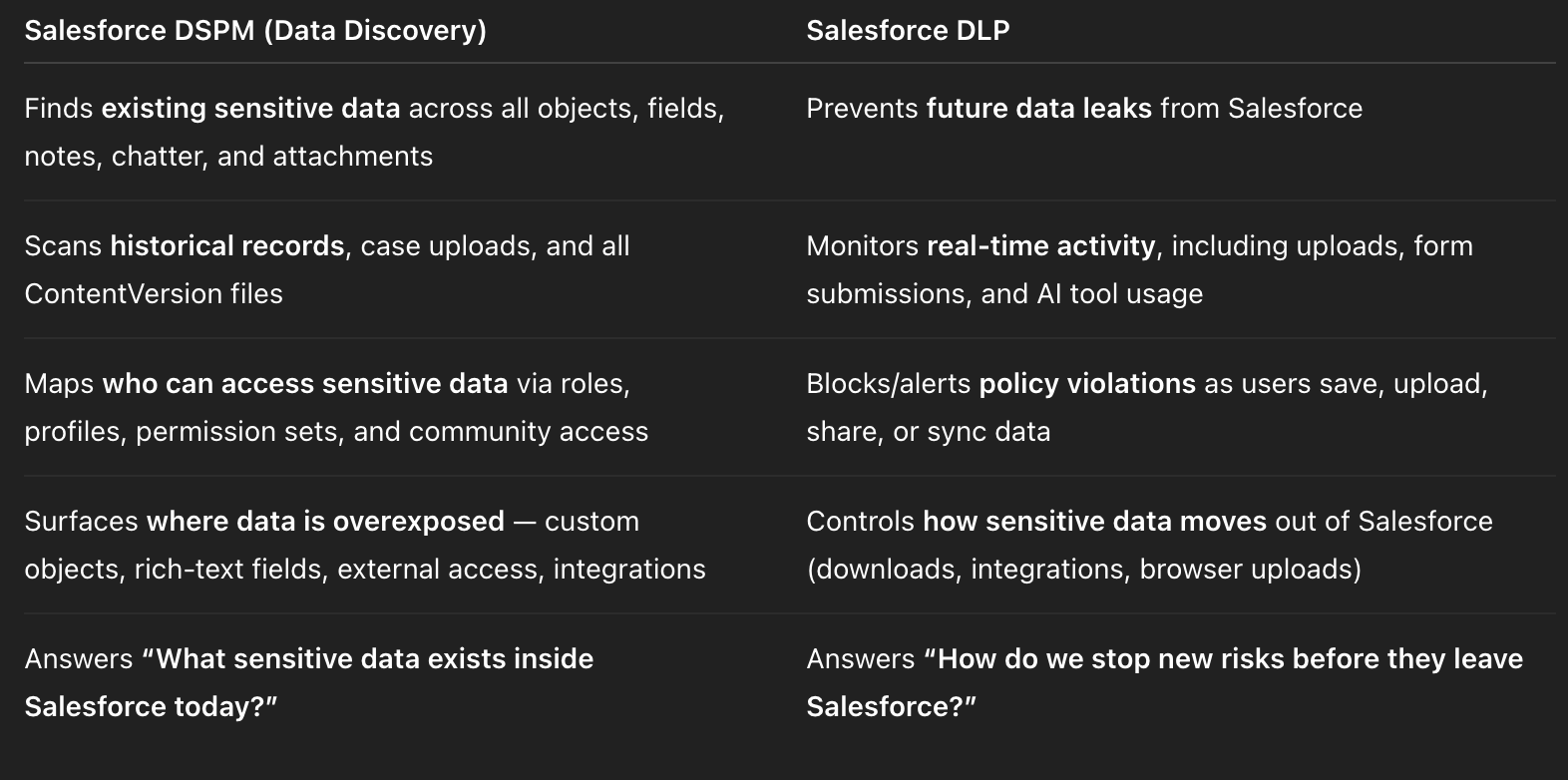
Think of it like this:
- ✅ DSPM = MRI (full-body scan of everything already inside Salesforce)
- ✅ DLP = Real-time guardrail (stops risky actions the moment they happen)
Once Salesforce DSPM uncovers sensitive PII/PHI/PCI inside fields, objects, and attachments — and shows how exposed it is — companies need Salesforce DLP to prevent:
- uploading new sensitive files
- pasting or typing sensitive data into fields
- sharing data externally
- exfiltrating data to AI copilots
- syncing sensitive fields to third-party apps
Together, they deliver closed-loop Salesforce data protection.
👉 Learn more with our Salesforce DLP solution
https://www.strac.io/integrations/salesforce-dlp
✨ Salesforce DSPM (Data Discovery) aka Historical Scan

Strac scans:
- All standard objects (Lead, Contact, Account, Opportunity, Case…)
- All custom objects
- All custom fields
- All rich-text fields
- All attachments across ContentVersion
- Case comments + Email-to-Case
- Notes + Chatter
- Apex logs + integration payloads
- Community/external-accessible objects
Each field is automatically classified:
✔ Name
✔ Email
✔ Phone
✔ SSN
✔ Credit Card
✔ API Keys / Secrets
✔ Health Data
✔ Financial Identifiers
✔ Addresses
✔ Tax IDs
✔ Contracts
✔ Confidential business data
Salesforce DSPM (Data Discovery) for Access & Exposure
DSPM must answer:
- Who can access sensitive data?
- Which users have excessive permissions?
- Which profiles/permission sets expose sensitive fields?
- Are community/portal users able to see sensitive fields?
- Are public links (Files/ContentVersion) visible externally?
- Are 3rd-party integrations pulling sensitive data?
Strac automatically builds:
- Role hierarchy maps
- User access graphs
- Object-field permission visibility maps
- App-level exposure analysis
- Risk scores per object/field
This is essential before enabling AI copilots.
✨Salesforce DSPM (Data Discovery) and GenAI / AI Copilot Risk
Embed the required YouTube video for GenAI DLP:
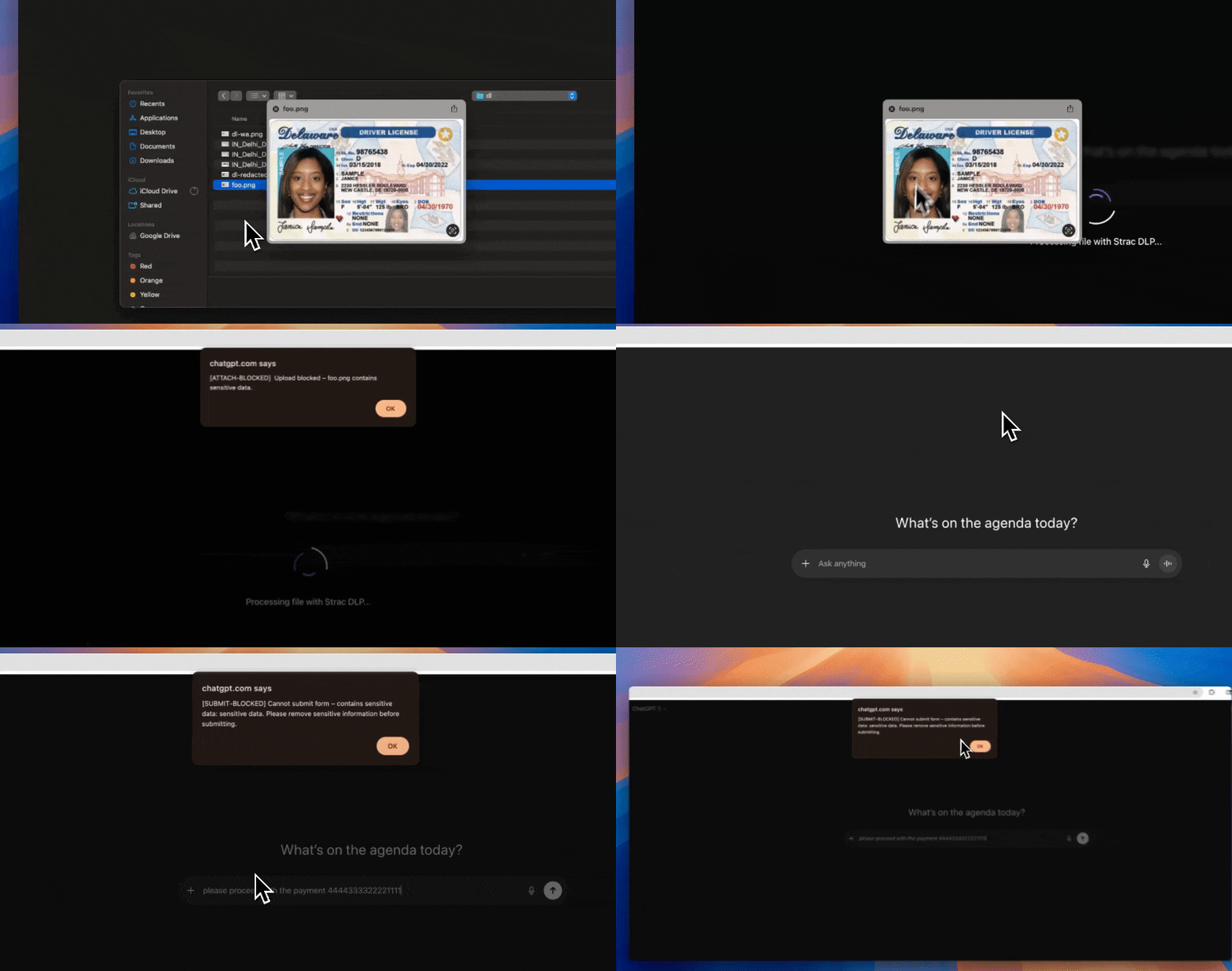
AI copilots introduce the most dangerous Salesforce exposure vector:
- Sensitive data can flow directly into LLM prompts
- Agents can accidentally reveal sensitive Salesforce fields
- ETL/BI tools can send rich text to AI systems
- Uploaded files with PII/PHI may be processed by LLMs
- Plugins/widgets may send Salesforce data to third-party AI tools
Salesforce DSPM is required before:
- Enabling Einstein Copilot
- Using third-party copilots
- Using AI assistants plugged into Salesforce
- Feeding Salesforce to OpenAI, Anthropic, Gemini, or internal LLMs
Strac blocks/redacts sensitive fields before they flow into GenAI.
🎥 Salesforce DSPM (Data Discovery) Remediation Options
Strac enables powerful remediation:
1. Redact
Remove sensitive values from fields, notes, chatter, and attachments.
2. Delete
Delete sensitive attachments or field values in bulk.
3. Mask
Apply partial masking for IDs, financial data, or PII.
4. Restrict Access
Fix over-permissioned profiles, roles, permission sets.
5. Remove External Access
Disable community visibility for sensitive objects.
6. Block GenAI Exfiltration
Prevent sensitive Salesforce data from being sent to LLMs.
How Strac Implements Salesforce DSPM (Data Discovery)
Strac provides:
- Automated full scan of all Salesforce objects
- Object + field classification
- Attachment scanning (ContentVersion)
- OCR for screenshots and documents
- ML for contextual detection
- Metadata extraction
- Access & permission mapping
- Risk scoring and insights
- Bulk remediation workflows
- Real-time alerting
- API-based deployment
- Optional self-hosted deployment inside customer AWS
- Full integration with Strac’s DSPM + DLP platform
Internal links to include:
- https://www.strac.io/integrations
- https://www.strac.io/integrations/slack
- https://www.strac.io/integrations/google-drive
🌶️ Salesforce DSPM (Data Discovery) — Spicy FAQs
Salesforce DSPM (Data Discovery): Do I really need it if I already use Salesforce Shield?
Shield ≠ DSPM.
Shield does auditing, encryption, and monitoring — it won’t tell you what sensitive data actually exists across objects and attachments.
Strac fills the discovery + classification + remediation gap.
Salesforce DSPM (Data Discovery): Does Strac scan custom objects and custom fields?
Yes — 100%.
Over 70% of Salesforce-sensitive data hides in custom objects, not standard CRM objects.
Salesforce DSPM (Data Discovery): Can Strac detect PHI/PCI inside attachments and case uploads?
Yes.
Strac uses OCR + ML to scan PDFs, images, screenshots, CSVs, logs, and documents uploaded via cases or communities.
Salesforce DSPM (Data Discovery): How does Strac help with GenAI risk?
Strac can:
- Block sensitive Salesforce fields from flowing into AI prompts
- Redact attachments before AI ingestion
- Monitor browser uploads into GenAI tools
- Provide real-time alerts for risky usage
Salesforce DSPM (Data Discovery): Can Strac be deployed inside my AWS/VPC?
Yes.
Strac offers full self-hosted Salesforce DSPM for enterprises that require data to stay inside their environment.
Meta Title
Salesforce DSPM (Data Discovery) Guide: Sensitive Data Discovery, Risks & Remediation
Meta Description
Learn how Salesforce DSPM (Data Discovery) identifies, classifies, and remediates sensitive data across objects, fields, attachments, and AI workflows. Includes access mapping, AI risk, remediation, and Strac’s automated DSPM solution.
If you'd like, I can now:
✅ Generate the matching Salesforce DLP page
✅ Produce the Webflow CMS version
✅ Create an SEO cluster with 10 related articles
Just tell me!
