






Jira has become the central nervous system for engineering, product, and support teams. It is where work happens. But because it is designed for collaboration and speed, it has also become a massive "unstructured data graveyard."
API keys, customer database dumps, PII in screenshots, health data (PHI) in support tickets, and hardcoded secrets in descriptions—all sitting in tickets from 2018, accessible to anyone with a login.
And here's the uncomfortable truth:
You can't protect what you can't see.
That is exactly where Jira DSPM (Data Discovery) comes in. This guide covers tactical, real-world steps to scan, secure, and remediate sensitive data in Jira.
TL;DR
- Jira DSPM (Data Discovery) gives full visibility into sensitive data across all existing Jira tickets, comments, and attachments—not just new ones.
- Most risk comes from historical data: old API keys, forgotten customer logs, and screenshots containing PII.
- DSPM identifies what data exists, where it lives (Project/Ticket/Comment), and who has access.
- Remediation includes redaction (masking), labeling, and removing sensitive attachments.
- DSPM is critical before enabling AI tools like Atlassian Intelligence, Copilot, or Glean, which can index and resurface this data.
- Strac provides automated scanning, risk scoring, and bulk remediation (redaction) for Jira Cloud.
What Is Jira DSPM (Data Discovery)?
Jira DSPM (Data Discovery) is the process of:
- Discovering all sensitive data stored in Jira (Issues, Comments, Descriptions, Attachments).
- Classifying it (Secrets, API Keys, PII, PHI, PCI, IP).
- Mapping access (Who can see this project? Is it open to the whole company? Is it public?).
- Assessing risk (e.g., "High Severity: AWS Secret Key in a public project").
- Remediating exposure (Redacting the key, deleting the attachment).
In short:
DSPM = Visibility + Understanding + Action
✨ Jira DSPM (Data Discovery) vs Jira DLP — Why You Need Both
Think of it as:
✅ DSPM = X-ray (Scans the past and current state)
✅ DLP = Treatment (Prevents future infection)
- Jira DSPM scans your existing 500,000 tickets to find the credit card numbers support agents pasted three years ago.
- Jira DLP blocks or redacts a new credit card number the moment an agent tries to paste it today.
👉 Learn more with our Jira DLP solution
You need both. DSPM cleans up the mess you already have; DLP ensures it stays clean.
✨ Why Companies Need Jira DSPM (Data Discovery)
Jira is the default place for:
- Engineering: Stack traces, error logs, environment variables.
- Support: Customer screenshots, database dumps, HAR files.
- Product: Roadmaps, feature specs, customer feedback.
- HR/Legal: Employee requests, contract reviews.
These workflows create high-risk "data sprawl":
✅ 1. Secrets & API Keys (The #1 Risk)
Developers often paste "quick fixes" or stack traces into Jira tickets. These frequently contain AWS keys, Stripe tokens, or database credentials. If an attacker gains access to Jira, they don't just see tickets—they get the keys to your production environment.
✅ 2. Unstructured Data Sprawl
Sensitive data isn't just in fields; it's in comments and attachments. A support ticket titled "Login Issue" might contain a screenshot of a user's dashboard revealing their full PII or PHI. Standard filters miss this; DSPM with OCR (Optical Character Recognition) catches it.
✅ 3. External Users & Permissions
Jira permissions are complex. Contractors, vendors, and partners often have access to specific projects. Without DSPM, you don't know if a "Private" ticket containing secrets was moved to a project that external vendors can see.
✅ 4. Compliance Gaps
SOC2, HIPAA, PCI, and GDPR all require you to know where your data is. You cannot claim compliance if you have 5,000 unredacted SSNs sitting in closed Jira tickets.
✅ 5. AI Risk
If your Jira contains sensitive data, AI tools (Atlassian Intelligence, Copilot, etc.) will ingest it. (More on this below).
✨ Historical Scanning in Jira DSPM (Data Discovery)
Most companies only monitor new tickets. The real danger lives in the archives.

Historical scanning answers:
- What secrets were pasted in tickets from 2021?
- Are there HAR files with session tokens attached to closed bugs?
- Did we ever scrub that customer PII from the "Resolved" queue?
Historical scanning must cover:
✅ Summary & Description fields
✅ Comments (the most common leak source)
✅ Attachments (Logs, CSVs, Images)
✅ Archived Projects
✅ Sub-tasks
Without historical scanning, you are blind to 90% of your risk surface.
<a name="access-visibility"></a>
✨ Access Visibility in Jira DSPM (Data Discovery)
Finding the data is step one. Step two is context.
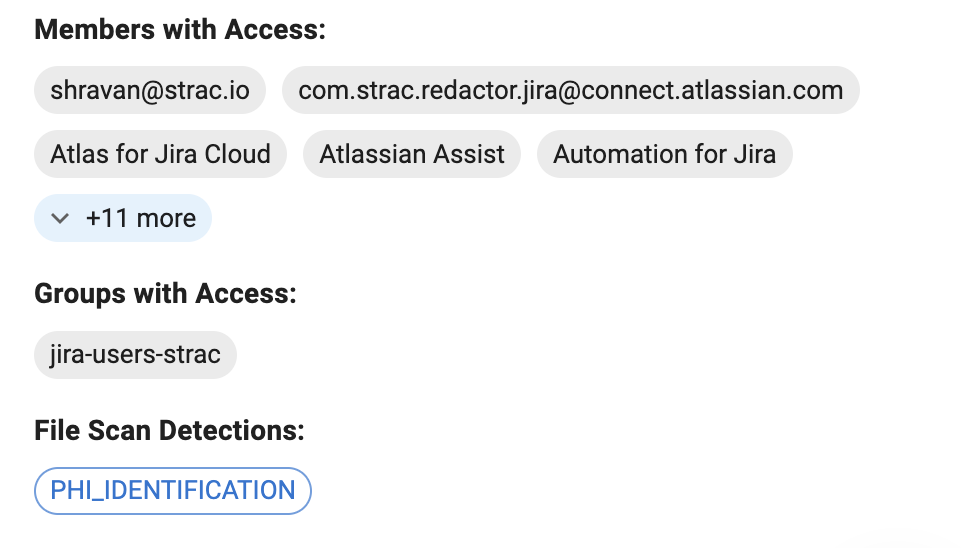
Jira DSPM identifies:
- Tickets visible to "Any logged-in user" (effectively public to the org).
- Tickets accessible by external email domains (gmail.com, vendors).
- Tickets owned by departed employees.
This differentiates between:
"This ticket contains an API key." (Bad)
vs
"This ticket contains an API key and is visible to 5 external contractors." (Emergency)
📽️ Remediation in Strac Jira DSPM (Data Discovery)
Visibility without action is noise. Strac provides automated remediation tools specifically designed for Jira's structure.
✅ Redaction (Masking)
This is the gold standard for Jira. Strac can replace sensitive text (like a credit card number or API key) with **** or [REDACTED] directly inside the ticket description or comment, while keeping the rest of the text readable.
✅ Attachment Scanning & Removal
Strac identifies sensitive files (e.g., passwords.xlsx or error_log.txt containing keys) and can quarantine or delete them.
✅ Labeling
Automatically tag tickets as CONFIDENTIAL, PII-DETECTED, or INTERNAL-ONLY to alert staff.
✅ Bulk Remediation
Fixing 10,000 historical violations manually is impossible. Strac allows admins to bulk-redact specific data types across entire projects in minutes.
How Jira DSPM (Data Discovery) Protects Against AI & GenAI Risk
AI tools are productivity multipliers, but they are also data surfacing engines.
When you connect tools like Atlassian Intelligence or Microsoft Copilot to Jira, they index your tickets to answer user questions.
🚩 The Risk: Privilege Escalation
Imagine a junior developer asks an AI agent: "How do I connect to the production database?"
If a Senior Engineer pasted the production database password into a Jira ticket three years ago, the AI will find it and serve it to the junior developer.
The AI doesn't know the password is "secret"—it just knows it answers the question.
✅ Why Jira DSPM (Data Discovery) Is Step Zero for AI
Before turning on AI features in Jira:
- Scan your entire history for secrets and PII.
- Redact (overwrite) that data.
- Ensure AI only learns from clean, safe data.
Clean Data = Safe AI.
How Strac Solves Jira DSPM (Data Discovery)
Strac provides the most comprehensive DSPM & DLP solution for Jira Cloud.
- Historical Scanning: Scans all past issues, comments, and attachments.
- OCR Capabilities: Detects sensitive data in screenshots and PDFs attached to tickets.
- Accurate Detection: Detects API Keys, PII, PHI, PCI, and secrets with high accuracy (low false positives).
- Real-Time Redaction: Mask sensitive data instantly.
- Access Visibility: See who has access to sensitive tickets.
- Compliance Mapping: Reports for SOC2, HIPAA, GDPR, and PCI.
Strac supports: Jira, Confluence, Slack, Google Drive, Zendesk, Salesforce, and more.
🔗 Explore all integrations: https://www.strac.io/integrations
🌶️ Spicy FAQs on Jira DSPM (Data Discovery)
Can Strac remove sensitive data from Jira attachments?
Yes. Strac detects sensitive data inside files (PDFs, Excel, JSON logs, Images) and can quarantine or delete the attachment to remove the risk.
Does this work for Jira Service Management (JSM)?
Yes. JSM is often the highest risk area because customers email in PII. Strac scans and redacts JSM tickets to keep your support agents safe from handling toxic data.
What is the difference between Jira DSPM and Jira DLP?
- DSPM finds the sensitive data already sitting in your Jira history (Clean up the past).
- DLP stops new sensitive data from being entered in real-time (Protect the future).
- Strac does both in one platform.
Does Jira DSPM help with SOC2?
Absolutely. Auditors will ask for evidence that you track and protect sensitive customer data. A DSPM report showing "0 Unresolved Critical Risks" is powerful evidence for your audit.
