
.jpg)






Confluence has become the "corporate brain" of modern organizations—product specs from 2019, HR onboarding docs with employee details, engineering runbooks containing pasted API keys, and financial planning spreadsheets attached to restricted pages... all sitting somewhere in your instance with unknown access.
And here’s the uncomfortable truth:
You can’t protect what you can’t see.
That’s exactly where Atlassian Confluence DSPM (Data Discovery) comes in.
This is the guide you wish existed years ago—tactical, real-world, and written specifically for the sprawling, unstructured environment of Confluence.
TL;DR
- Atlassian Confluence DSPM (Data Discovery) gives full visibility into sensitive data across all Confluence content—not just active pages, but blogs, comments, archived spaces, and attachments (PDFs, Excel, images).
- Most risk comes from "Shadow Content"—forgotten drafts, pages in "Personal" spaces, and old attachments containing PII or credentials.
- DSPM identifies what data exists, where it lives (which Space/Page), who (Groups/Users) has access, and how exposed it is (e.g., publicly viewable).
- Remediation includes labeling sensitive pages, restricting page permissions, redacting secrets directly within the content, and removing toxic attachments.
- DSPM is critical before enabling AI features like Atlassian Intelligence.
- Strac provides automated scanning, risk scoring, permission mapping, OCR for attachments, and bulk remediation for Confluence.
✨What Is Atlassian Confluence DSPM (Data Discovery)?
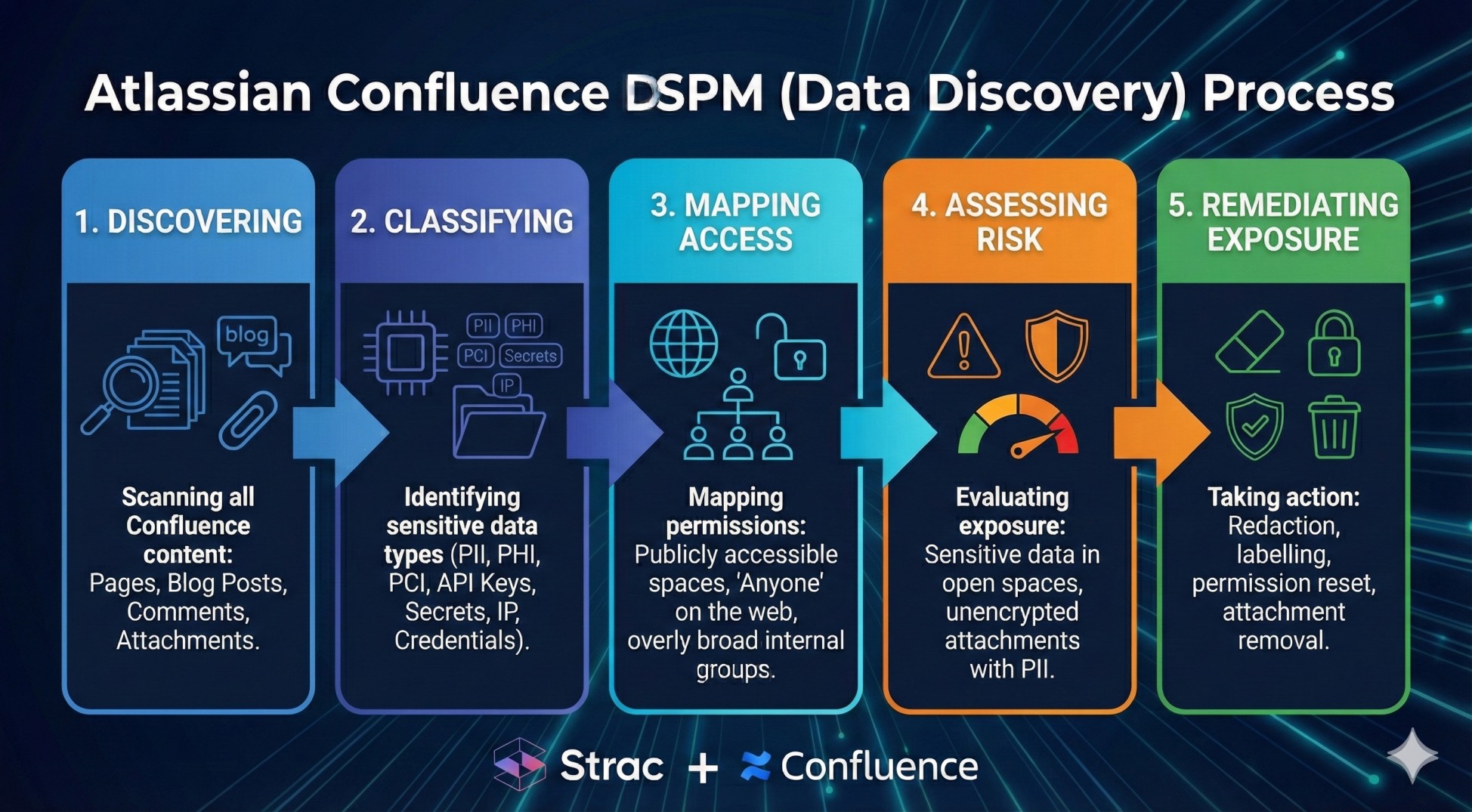
Atlassian Confluence DSPM (Data Discovery) is the process of:
- Discovering all sensitive data stored in Confluence (Pages, Blog Posts, Comments, Attachments).
- Classifying it (PII, PHI, PCI, API Keys, Secrets, IP, Credentials).
- Mapping access (Publicly accessible spaces, "Anyone" on the web, overly broad internal groups).
- Assessing risk (Sensitive data in open spaces, unencrypted attachments with PII).
- Remediating exposure (Redaction, labelling, permission reset, attachment removal).
In short: DSPM = Visibility + Understanding + Action
Atlassian Confluence DSPM (Data Discovery) vs. Confluence DLP — Why You Need Both
Think of it as:
✅ DSPM = X-ray (Scans existing petabytes of historical pages and attachments at rest)
✅ DLP = Treatment (Blocks new sensitive data from being pasted or uploaded in real-time)
Once DSPM uncovers where sensitive data lives (e.g., a list of customer emails in a 3-year-old marketing page), companies need DLP to prevent new sensitive data from being created moving forward.
👉 Learn more with our Atlassian Confluence DLP solution
This pairing creates true closed-loop protection for unstructured data.
Why Companies Need Atlassian Confluence DSPM (Data Discovery)
Confluence is the default knowledge base for modern teams. It stores:
- Product/Eng: PRDs, architecture diagrams, runbooks with pasted secrets.
- HR/Finance: Employee handbooks, salary bands, spreadsheets with PII.
- Customer Support: Incident retrospectives often containing customer data.
And these problems make Confluence high-risk:
✅ 1. The "Anonymous Access" Crisis
A single misconfigured Space permission can turn internal documentation into public internet content. If "Anonymous Access" is enabled for a space, Google will index it. This is a leading cause of accidental data leakage.
✅ 2. Shadow Content & Forgotten Drafts
Employees create pages in their "Personal Space" to take notes on sensitive projects and forget them. Drafts that were never published still contain searchable data. This content sits dormant but dangerous.
✅ 3. Secrets in Runbooks (The "Copy-Paste" Problem)
Developers often paste credentials, API keys, or database connection strings directly into code blocks on Confluence pages for easy sharing during incidents. Without DSPM, these are plaintext and accessible to anyone in the space.
✅ 4. Over-Permissioned Groups
Data might be in a "restricted" space, but if the default confluence-users group has view access, your entire company can see it. Permissions degrade over time as users are added to broad groups.
✅ 5. Compliance Gaps in Unstructured Data
SOC2, HIPAA, PCI, and GDPR require you to know exactly which pages or attachments contain PII. You cannot rely on page titles; you must scan the actual content.
✅ 6. AI Risk (Atlassian Intelligence)
If your Confluence instance is fed into Atlassian Intelligence for summarizing or searching, any sensitive data inside becomes part of the AI's answers.
Historical Scanning in Atlassian Confluence DSPM
Most companies only monitor newly created pages. The real danger lives in the thousands of pages created years ago by employees who have since left.
Historical scanning answers:
- Which pages contain customer PII from the 2021 migration?
- Do we have AWS access keys pasted into old engineering runbooks?
- Are there Excel attachments with salary data in archived Finance spaces?
- Is that "team-internal" page actually viewable by the whole company?
Historical scanning must cover:
✅ Pages & Blog Posts (including full version history)
✅ Comments (often where sensitive details are discussed casually)
✅ Attachments (PDFs, Excel, Word, Images via OCR)
✅ Archived Spaces
Without historical scanning, you’re blind to 90% of your knowledge base risk.
Access Visibility: Who Can See Your Data?
Finding the data is only half the story. You must know: Who has the permissions to see it?
Atlassian Confluence DSPM identifies:
- Publicly Accessible Spaces: (Readable by "Anonymous" or anyone on the internet).
- Broad Internal Access: Pages containing secrets that are viewable by the default "everyone" group.
- External Collaborators: Sensitive pages accessible by guest users or external domains.
- Page-Level Restrictions: Identifying pages that should be restricted but aren't.
This is the difference between: "This page contains database credentials "and" This page contains database credentials and is visible to all 5,000 employees."
Only the second is an immediate emergency.
✨Remediation in Strac Atlassian Confluence DSPM
Visibility without action is useless. Strac allows you to fix Confluence risks instantly.
✅ Tagging & Labeling
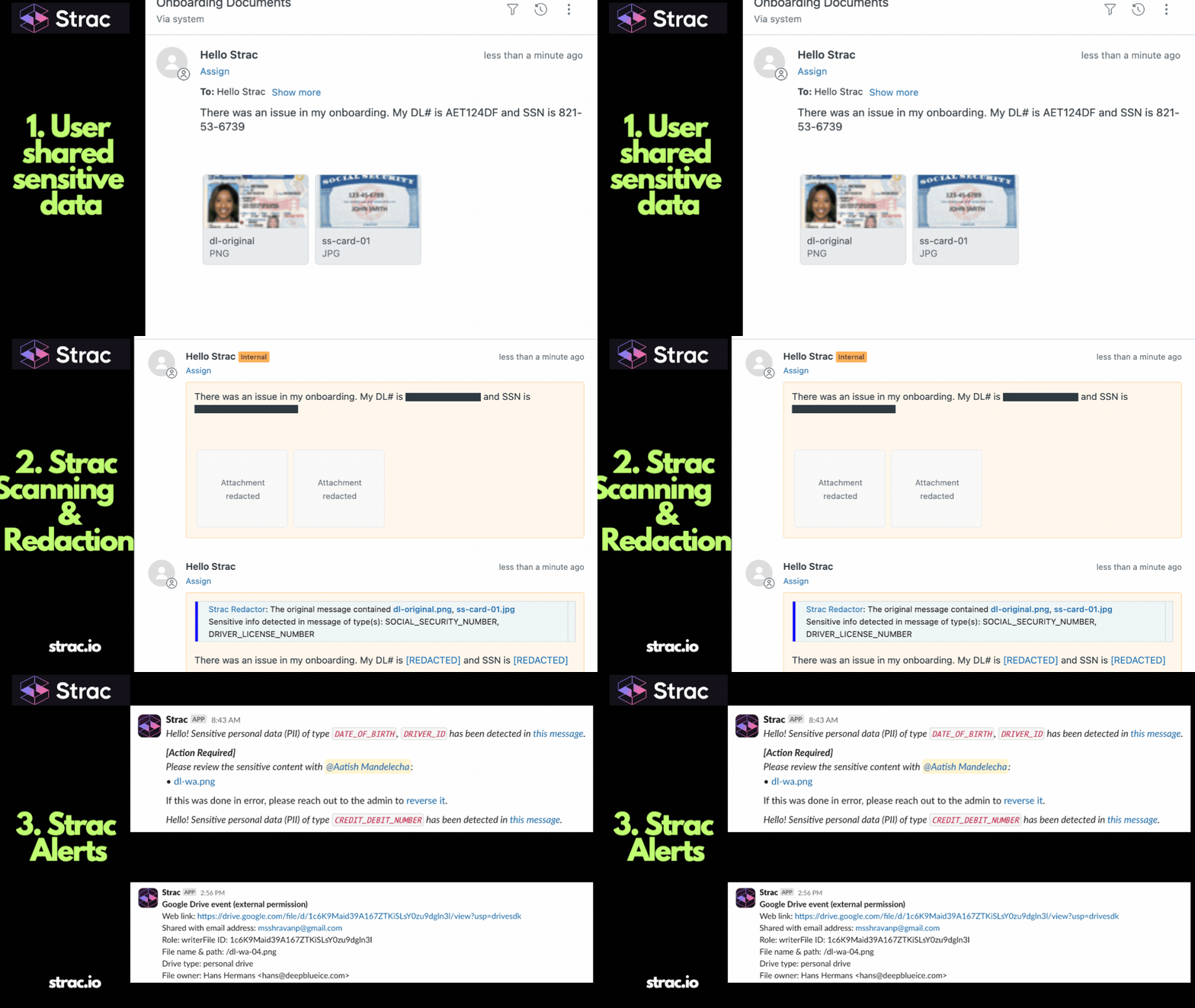
Automatically add Confluence labels (e.g., confidential, pii-sensitive) to pages. This signals to users the nature of the content and can trigger automated workflows.
✅ Restricting Page Access
One-click remediation to change page restrictions, narrowing access from a whole Space to specific users or groups.
✅ Redaction
Strac can physically redact sensitive text values (like masking an API key or SSN) directly inside the Confluence page content, replacing it with a placeholder.
✅ Takedown & Deletion
Flag toxic attachments or pages for deletion by administrators.
✅ Least-Privilege Enforcement
Identify spaces with overly broad default permissions and suggest tightening them.
✅ Bulk Remediation
Fix hundreds of pages containing the same leaked credential in one action.
How Atlassian Confluence DSPM Protects Against AI Risk
AI features like Atlassian Intelligence are powerful, but they act as data amplifiers.
When you connect Atlassian Intelligence to your Confluence knowledge base, you risk:
✅ AI RISK #1: RAG (Retrieval-Augmented Generation) Leaks
If a user asks Atlassian Intelligence, "What are the production database keys?", and that information exists on a page they have access to, the AI will summarize and deliver the keys directly to them.
✅ AI RISK #2: Loss of Context
AI summarizes information, potentially removing the context that made the data sensitive (e.g., stripping away "DO NOT SHARE" warnings surrounding a piece of PII).
✅ Atlassian Confluence DSPM is Step Zero for AI
Before unleashing Atlassian Intelligence:
- Scan your entire Confluence instance.
- Identify pages and attachments with sensitive data.
- Remediate (redact secrets, restrict permissions on sensitive HR docs).
- Create a clean, safe knowledge base for the AI to index.
🎥How Strac Solves Atlassian Confluence DSPM (Data Discovery)
Strac provides a unified Data Security Platform for Atlassian Confluence:
- Coverage: Pages, Blogs, Comments, Attachments, Archived Spaces, Personal Spaces.
- Detection: PII, PHI, PCI, API Keys, Secrets, IP, Custom Regex detectors.
- OCR: Scans images (screenshots of credentials) and scanned PDFs stored as attachments.
- Real-Time & Historical: Scans existing content and monitors new pages/edits.
- Compliance: Maps findings to SOC2, HIPAA, PCI-DSS, GDPR frameworks.
- Remediation: Redact content, Label pages, Restrict permissions, Alert admins.
🔗 Explore Strac's Atlassian Integrations
🌶️ Spicy FAQs on Atlassian Confluence DSPM
Doesn't Confluence's built-in search do this?
No. Confluence search is designed for finding relevant topics, not sensitive data patterns. You can't easily search for "all social security numbers" or "all AWS keys" using native search, especially within attachments or across historical versions.
How does it handle attachments like PDFs or images?
Strac uses Optical Character Recognition (OCR) and text extraction to scan the contents of attachments (PDFs, Excel, Word, PNG/JPEG screenshots) to find buried secrets or PII.
Can Strac redact data inside a page without deleting the page?
Yes. Strac can surgically modify the page content to replace the sensitive value (e.g., sk_live_...) with a redacted placeholder like [REDACTED_SECRET], leaving the rest of the documentation intact.
Does this help with HIPAA/SOC2 compliance for unstructured data?
Absolutely. Auditors know that unstructured data platforms like Confluence are a massive compliance blind spot. Strac provides the inventory and remediation evidence to prove you are managing PII/PHI within your knowledge base.
Trusted by enterprises
